
Should You Buy the MacBook Neo?
Priced at $599, the MacBook Neo is Apple's cheapest laptop, but it is not without compromise. Instead of an M-series Mac chip, it uses the A18 Pro that Apple first introduced in the iPhone 16 Pro, plus it is limited to 8GB RAM. It performs as well as an iPhone, but it isn't on par with the more expensive MacBook Air or MacBook Pro. Still, if you simply need a Mac for tasks like browsing the web, streaming video, creating documents, and photo editing, the MacBook Neo can do all of that with ease. It also supports Apple Intelligence and can be used for AI tasks.

Apple made the MacBook Neo for those who need a more affordable machine and who otherwise would have opted for a Windows PC or a Chromebook, including students. For education customers, the MacBook Neo starts at just $499.
The aluminum MacBook Neo comes in four fun colors, and it has a 13-inch display with a standard keyboard and trackpad. There are built-in speakers and microphones, along with a FaceTime camera, and up to 512GB of storage. Apple just introduced the MacBook Neo, which means now is a good time to buy. If you want better performance, a slimmer design, more RAM, faster Wi-Fi, and longer battery life, you might want to consider the MacBook Air, which is priced starting at $1,099.
Apple also sells the MacBook Pro, which is its most capable laptop. The MacBook Pro models feature higher-quality mini-LED displays, the fastest performance in a laptop, more RAM, more maximum storage, longer battery life, and several other premium features.
The New MacBook Neo
Contents
The MacBook Neo is Apple's newest Mac, and the most affordable notebook that Apple has released to date at $599. Designed from the ground up, the Neo is unique because it features an A-series chip instead of a typical M-series chip. It has lower-end features than the MacBook Pro or the MacBook Air to keep costs low.
Apple designed the MacBook Neo for teachers, students, and anyone who just needs a laptop for day-to-day tasks like document editing, web browsing, and watching videos. Apple says that the device is available at a breakthrough price which makes it more accessible to millions of people around the world.
You might mistake the MacBook Neo for a 13-inch MacBook Air because it is similar in size, shape, and overall look. The Neo has a 13-inch Liquid Retina Display and an aluminum body with soft, rounded corners. It is less than a centimeter smaller than the MacBook Air in length and width, but it is thicker than the MacBook Air. It weighs 2.7 pounds, which is exactly what the 13-inch MacBook Air weighs.
Apple sells the MacBook Neo in four colors, including Silver, Blush, Citrus, and Indigo. It has dual speakers at the sides of the body with spatial audio support, two microphones with Voice Isolation and Wide Spectrum, a 3.5mm headphone jack, a color-matched Magic Keyboard with no backlight, and a physical trackpad instead of a Force Touch trackpad, but it still supports Multi-Touch gestures. The base model does not have Touch ID, but if you upgrade the storage, you also get a Touch ID power button.
There are thicker bezels all around the display, with a 1080p FaceTime camera at the top. There is no notch, unlike Apple's other MacBooks. The MacBook Neo has a resolution of 2408 x 1506 at 219 pixels per inch with 500 nits brightness and an included anti-reflective coating. There is no support for True Tone, a 120 Hz ProMotion refresh rate, or P3 Wide color, so the display is lower quality than the MacBook Air and MacBook Pro displays.
The MacBook Neo is the first consumer Mac that has an A-series chip, and it is equipped with the A18 Pro chip that Apple first debuted in the iPhone 16 Pro. The A18 Pro that Apple used for the MacBook Neo has a 6-core CPU, a 5-core GPU, and a 16-core Neural Engine. It features 60GB/s memory bandwidth, which is less than half of the bandwidth of the MacBook Air.
Like Apple's other Macs, it has a Media Engine with hardware-accelerated H.264, HEVC, ProRes, and ProRes RAW support, along with video encoding and decoding engines. There is just 8GB RAM in the MacBook Neo, with no option to get more. 8GB is sufficient for Apple Intelligence, so the MacBook Neo does support Apple's AI features.

The $599 model comes with 256GB of storage, but there is a 512GB upgrade option for an additional $100. There are no other upgrades available for the MacBook Neo. There are two USB-C ports, including one that's USB 2 that supports transfer speeds of up to 480Mb/s, and one that's USB 3 that supports speeds of up to 10Gb/s. The USB 3 port supports DisplayPort 1.4 for connecting a single external display at 4K 60Hz. The MacBook Neo does not support multiple displays, nor does it fully support higher-resolution displays like Apple's Studio Display. There are also no Thunderbolt ports.
There is a 36.5-watt-hour lithium battery in the MacBook Neo, and it lasts for up to 11 hours of browsing the web or up to 16 hours of streaming video. The MacBook Neo charges over USB-C with a 20W or higher power adapter, and it does not include a MagSafe charging port. It does not have a fast charge feature. Apple ships the MacBook Neo with a 20W USB-C power adapter in the U.S. and some other countries, but a power adapter is not included in the EU or the UK.
The MacBook Neo supports Wi-Fi 6E so it can connect to 6Hz Wi-Fi networks, and it has Bluetooth 6.
Note: See an error in this roundup or want to offer feedback? Send us an email here.
How to Buy
The MacBook Neo is available from the Apple online store and other retailers. It is priced starting at $599 for 256GB of storage, with 512GB available for $699.
Reviews
Reviews of the MacBook Neo are largely positive, and reviewers found that the machine was more than adequate for everyday productivity tasks despite only having 8GB RAM inside.
The Verge said the MacBook Neo "zips through the light workloads it's designed for," outperforming the M1 MacBook Air and most Windows laptops.
The SSD in the MacBook Neo is slower than the SSDs in the MacBook Air and MacBook Pro, and it can feel a little slower at times if you're used to one of Apple's more powerful laptops. For those new to a Mac or coming from an older machine, the 8GB RAM and slower storage won't be an issue.
The A18 Pro chip in the MacBook Neo has a single-core CPU performance score on par with the M4 chip, and CNET said that it felt "bursty." It was able to run ChatGPT, worked fine with Google Docs and Sheets, and could be used to edit video in iMovie. It was much faster than Chromebooks, and it won out in battery life tests too. Tom's Guide found that the Macbook Neo lasted for 13 hours and 30 minutes in battery tests, which was longer than the Microsoft Surface Go, too.
Reviewers missed the Touch ID button on the keyboard in the 256GB model, and MagSafe charging, which isn't available. There's also no fast charging option. Apple used a new speaker design, but there were no complaints about sound.
Bloomberg praised the MacBook Neo's well-balanced dual speakers, high-quality aluminum build, and display quality, which beats out most Windows laptops in the price range.
Overall, reviewers found the MacBook Neo to be an excellent compromise. It has the lightweight and compact design Apple's notebooks are known for, a premium look with fun color options, and a competitive $599 price tag. It is missing some features that are in other Apple laptops, but it is perfect for those looking for a laptop for day-to-day tasks like web browsing, document creation, and streaming video. It's $100 off for students and teachers, which makes it an even better deal for its target audience.
More reviews are available in our review roundup.
Design
The 13-inch MacBook Neo is an all-new Mac in Apple's lineup, but it looks similar in size and shape to the MacBook Air. It has a flat, MacBook Air-style clamshell body with an all-aluminum enclosure, along with four rubber feet at the bottom of the machine. There are soft, rounded corners and four color options, including Silver, Blush (a light pink), Citrus (yellow), and Indigo (dark blue).

Apple added an embossed Apple logo on the exterior of each machine that matches the color of the aluminum. There are thick iPad-style bezels around the display, with a front camera located in the top bezel.
The MacBook Neo is 11.71 inches long, 8.12 inches wide, and 0.50 inches thick. It weighs 2.7 pounds. Comparatively, the 13.6-inch MacBook Air is 11.97 inches long, 8.46 inches wide, and 0.44 inches thick, and it also weighs 2.7 pounds. The MacBook Neo is just a little smaller than the MacBook Air, but it is thicker.

There are two USB-C ports on the left side of the MacBook Neo, and a 3.5mm headphone jack on the right side. There are speaker grilles on each side of the device because the Neo has a new outward-facing speaker system rather than speakers at the top near the keyboard.
There is no fan inside the MacBook Neo, so it operates silently.
Keyboard and Trackpad
The MacBook Neo is equipped with a Magic Keyboard that is similar to the keyboards included on the MacBook Air and MacBook Pro. It features 12 full-height function keys and 78 ANSI keys or 79 ISO keys.

To reduce costs, Apple did not include backlighting for the keyboard, but the keyboard is color-matched to the aluminum of the casing. The Blush MacBook Neo has a lighter pink keyboard, for example, with Apple using blue, yellow, and white, respectively, for the Indigo, Citrus, and Silver models.
Like all of Apple's modern Mac notebooks, the Neo keyboard uses a durable scissor switch mechanism that holds up well to dust and debris while still delivering satisfying key travel.
The MacBook Neo is equipped with a simplified Multi-Touch trackpad that has a physical click mechanism rather than the haptic Force Touch mechanism used for the MacBook Air trackpad. The trackpad functions in the same general way and can be clicked anywhere, plus it supports gestures.
Because it does not have Force Touch, the Neo trackpad does not have pressure-sensing capabilities, pressure-sensitive drawing support, or Force clicks with variable pressure.
Touch ID
The base $599 version of the MacBook Neo does not have a Touch ID button on the keyboard, but if you upgrade to the $699 version with 512GB of storage, it adds Touch ID.

Touch ID is powered by a Secure Enclave that keeps your fingerprint data and personal information safe. It can be used instead of a password, unlocking the Mac when a finger is placed on the sensor. It also replaces a password for password-protected apps and can be used to make Apple Pay purchases in Safari.
Ports
The MacBook Neo has two USB-C ports that are used for charging and connecting peripherals like a display or an external storage drive. The USB-C port closest to the back of the device features USB 3 and supports speeds of up to 10Gb/s, while the other USB-C port closer to the trackpad is limited to USB 2 and supports speeds of up to 480Mb/s.
An external display has to be connected to the USB 3 port, and the Neo provides a warning if a display is plugged into the wrong port.
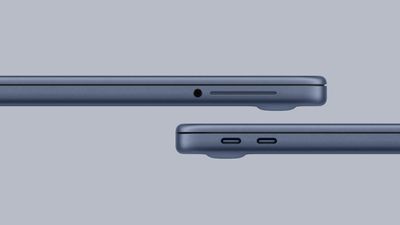
The USB 3 port supports DisplayPort 1.4, and a single 4K 60Hz external monitor can be connected to the Neo. The MacBook Neo does work with Apple's $1,599 Studio Display, but it is limited to 4K 60Hz instead of the full 5K resolution.
There is a headphone jack included on the MacBook Neo, but it does not support high-impedance headphones.
Display
The MacBook Neo features a 13-inch LED display (measured diagonally) with a resolution of 2408 by 1506. It features 219 pixels per inch, so it is Retina quality, like the MacBook Air display.

It offers 500 nits of brightness and support for a billion colors, but it is limited to sRGB and does not support P3 wide color. Both sRGB and P3 are color gamuts, but P3 offers a wider color range for more vivid, true-to-life colors and deeper blacks. sRGB is entirely fine for web browsing, streaming video, and similar tasks, while P3 is better for video editing, professional photo editing, graphic design, and other creative work.
There is an anti-reflective display coating on the MacBook Neo to cut down on glare, but no other bells and whistles. It does not support True Tone, which is a feature that tweaks the color of the display to match the lighting in the room for a better viewing experience.
The MacBook Neo matches the MacBook Air in brightness, and while it only supports sRGB color, Apple says it is brighter and better quality than many PC notebook displays that are in a similar price range.
A18 Pro Chip
Apple used the A18 Pro chip from the 2024 iPhone 16 Pro in the MacBook Neo, and it is the first time that an A-series chip has been included in a Mac.
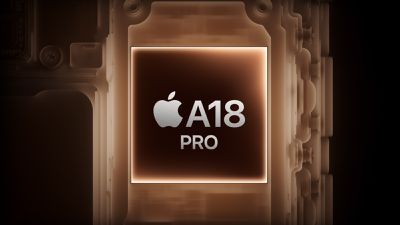
The A18 Pro in the Neo has a 6-core CPU with two performance cores and four efficiency cores, along with a 5-core GPU. It has one fewer GPU core than the A18 Pro chip that Apple used in the iPhone 16 Pro, so Apple appears to be taking advantage of binned chips to keep costs low.
With an A18 Pro chip, the MacBook Neo is not going to perform as well as Macs with a much more powerful M-series chip, but it is more than adequate to compete with Windows PCs and Chromebooks in the $599 price range.
Apple says the A18 Pro is up to 50 percent faster at everyday tasks like web browsing than the bestselling Windows PC with the latest Intel Core Ultra 5 chip, and up to 3× faster when running on-device AI workloads.
Neural Engine
A 16-core Neural Engine included in the A18 Pro supports on-device Apple Intelligence features and AI tasks like using the Clean Up tool in the Photos app.
Media Engine
All of Apple's chips include a Media Engine, and the A18 Pro is no exception. It supports hardware-accelerated H.264, HEVC, ProRes, and ProRes RAW, and it has video and ProRes encoding and decoding engines. It also supports AV1 decode.
Memory
The MacBook Neo is limited to 8GB unified memory, with no option to upgrade.
Storage
The MacBook Neo starts with 256GB of storage, but for an extra $100, a 512GB SSD is an option. Upgrading to the 512GB SSD also adds Touch ID to the keyboard.
The MacBook Neo has an SSD that's slower than the SSDs in the MacBook Air and the MacBook Pro, and in tests, it saw read speeds of 1,735MB/s and write speeds of 1,684MB/s.
Battery Life
There is a 36.5-watt-hour lithium-ion battery in the MacBook Neo. It lasts for up to 11 hours when browsing the web, and up to 16 hours when streaming video.

The MacBook Neo charges with a 20W or higher USB-C power adapter, but there is no fast charging capability. In the U.S. and select other countries, Apple includes a 20W USB-C Apple Power Adapter. In Europe and the UK, the power adapter is not included.
While the MacBook Neo comes with a 20W power adapter, it is able to charge at up to 30W and will charge faster with a higher watt power adapter.
The MacBook Neo charges over USB-C as it does not have a MagSafe port. Both USB-C ports can be used for charging purposes.
The MacBook Neo's battery has a maximum cycle count of 1,000, which means that it is meant to hold up to 80 percent of its original capacity at the maximum cycle count. After the 1,000 count is hit, the battery is considered "consumed" and Apple recommends replacement.
Other Features
Connectivity
The MacBook Neo supports Wi-Fi 6E, so it is able to connect to 6GHz Wi-Fi networks on supported routers. It also includes support for Bluetooth 6.
Speakers and Microphone
There are dual side-firing speakers in the MacBook Neo, along with dual microphones. Apple says that the speakers support spatial audio and Dolby Atmos for a 3D audio experience.
The microphones support directional beamforming to reduce background noise and isolate the user's voice. There are Voice Isolation and Wide Spectrum microphone modes to improve voice clarity.
FaceTime Camera
While Apple has upgraded other Macs to a 12-megapixel high-resolution front-facing camera, the Neo is equipped with an older 1080p camera that's not quite as high quality.
Apple says that an advanced image signal processor with computational video ensures high-quality video.
Repairs
The MacBook Neo has a more repairable design than other MacBook models, and the keyboard can be replaced without having to swap out the entire top case. Since individual components can be replaced, repairs should be more affordable.