

Ask MacRumors
iOS 27 - Everything New
Contents
iOS 27 is the newest version of iOS, the software that runs on the iPhone. Apple showed off iOS 27 at WWDC, and it's now in beta. It was released on September 14 ahead of Apple's new iPhones.
iOS 27 includes Siri AI, an overhauled version of Siri that's much smarter and more capable than before. iOS 27 adds new Apple Intelligence features in apps, updated parental controls, and performance improvements that speed up your iPhone.
Siri AI uses generative AI models and it performs more like ChatGPT or Claude than the prior version of Siri. Siri can hold full back-and-forth conversations, and it has access to your personal data so it knows more about you and can complete complex tasks. It can search across Mail, Messages, Notes, Reminders, Calendar, and other apps to find things for you. Siri has broad world knowledge and can search the web to answer questions for you on any topic, plus it is able to see what's on your screen so you can ask for more information about what you're looking at. Siri can also take action in apps, doing things like drafting emails, adding events to Calendar, and adding photos to an album.
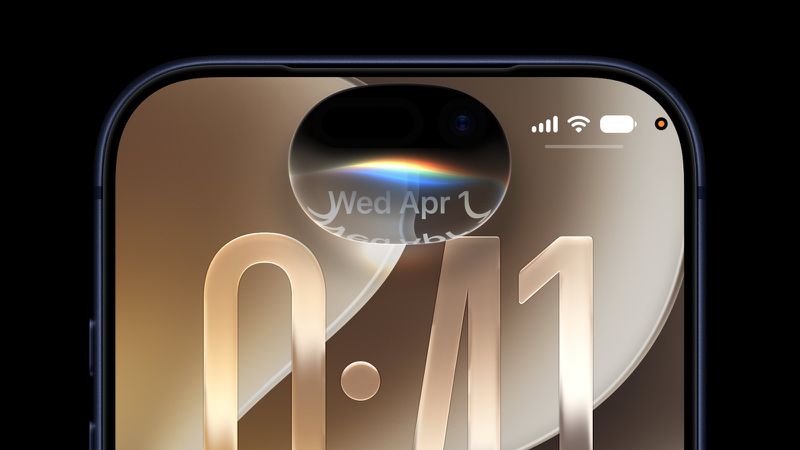
There is a standalone Siri app where you can talk to Siri, revisit existing conversations, and see a history of your chats. The Siri app is available on compatible iPads, Macs, iPhones, and more, and conversations sync across devices. Siri lives in the Dynamic Island, and swiping down at the center of the display brings up a new Search or Ask interface that replaces the Spotlight Search interface. Apple rebuilt the search index, so content is indexed faster and it brings up more relevant results, especially in the Mail app.
You can type to Siri from Search or Ask, say Hey Siri, or activate Siri with the side button, and you'll see a new Siri animation. Concise Siri responses show up in the Dynamic Island area, and you can swipe down for more information or to ask a follow-up question. You can upload files and photos by tapping on the "+" button. On the iPhone 17 Pro and iPhone Air, you can set a custom voice for Siri, with customizable pace and expressivity. Apple's newest iPhones also support improved dictation capabilities with special on-device AI models.
Apple moved Visual Intelligence to the Camera app, and there's a Siri mode with Siri integration. You can take photos of anything around you and get information on what you're looking at from Siri. Visual Intelligence has new capabilities, and it can tell you the nutritional info from a meal, import multiple events to your calendar at one time, split up a receipt for you, import contacts from a business card photo, or import a membership card into the Wallet app.
Siri is integrated into apps with systemwide context menus so you can select text or images and then ask Siri about your selection. With the Write with Siri feature, Siri can generate text from scratch, correct your grammar, or give feedback on your writing. Siri can even write in your own style when composing email and text messages. Siri capabilities are available on AirPods and CarPlay.
The Photos app has AI photo editing tools. Clean Up is better at removing objects from images and filling in missing areas, and there are Reframe and Extend options. Extend lets you change the crop of an image, using AI to generate new fill, while Reframe combines AI and spatial images so you can change the perspective or composition of a photo. iCloud Shared Albums support full-resolution sharing, and friends with Android and Windows devices can contribute images to iCloud albums. There's also a new 30-day expiration option and an option to sync content immediately to iCloud for quicker uploads.
Any set of photos or videos can be played as a slideshow, and you can save a video frame as a photo. Apple added a Captured by Me collection in the Photos app. With the new Selection View, you can review and modify metadata like location for multiple images, and there is support for keywords and star ratings.
Safari can automatically organize tabs, bookmarks, and Reading List by topic, create custom extensions for you based on natural language prompts, and monitor webpages for changes with Notify Me, letting you know when an update is detected. The Passwords app uses AI to change weak and compromised passwords for you, upgrading them to strong passwords. When saving files or folders, Apple Intelligence suggests names based on content.
Image Playground was overhauled, and it generates images in any style, including photorealistic. You can create images of people, modify images using descriptions for small changes, and make tweaks with touch gestures. Apple also updated Genmoji to be faster and better quality. Image Playground supports creating wallpaper for the Lock Screen, Contact Posters, images for social media, and more with different aspect ratio options. Image generation and similar resource-intensive AI features have daily usage caps with more access tied to paid iCloud+ plans, but Apple's AI features are otherwise free.
The Shortcuts app can create shortcuts for you based on natural language requests. Just tell it what you want a shortcut to do, and the app generates it automatically with AI. Calendar and Reminders support natural language for adding and modifying events and tasks. The Maps app uses aerial imagery and vision intelligence models for Flyover with sharper, more lifelike detail. The Journal app supports generative writing prompts for writing inspiration.
In the Home app, HomeKit Secure Video supports 4K streaming, and it uses AI to summarize activities from video footage. Multiple notifications are aggregated, and it can stitch together footage from multiple cameras for a complete picture of what's happening. It also supports searching for specific moments.
For the AirPods, Apple added a redesigned Settings interface and custom EQ for personalizing AirPods sound by adjusting lows, mids, and highs. GymKit now works on iPhone, so it can be paired with treadmills, indoor bikes, and more for data syncing. The Health app supports perimenopause and menopause as part of Cycle Tracking.
Mail makes intelligent suggestions for taking action on content with apps, and in Messages, there are AI suggestions for actions you might want to take like inserting a photo or sharing a location. Sending large photos and videos no longer slows text conversations, and there is a send indicator for outgoing messages. Tapback notifications are now consolidated, so you get fewer notifications.
The Phone app has Call Context, a feature that brings up relevant on-device information you might need when calling a business for help, like a flight number. In FaceTime, there's an option to use Dual Capture, streaming the front and rear cameras at the same time. The Music app has new artist pages and AutoMix more smoother transitions. The Clock app supports setting alarm volume independent of system volume.
There's now a Liquid Glass slider for customizing translucency level, and Apple updated Liquid Glass to improve readability. Liquid Glass icons have more detail and sharpness, and more depth and separation are available for navigation bars, menus, and buttons. The Home Screen supports extra large widgets for apps like Calendar, Photos, and Music.
Apple focused on performance improvements across iOS 27, and everything feels faster, even on older iPhones. Apps launch quicker, AirDrop transfers are faster, the keyboard loads quicker, swapping Home Screen pages is speedier, and App Library is faster. New captures in Photos load up to 70 percent faster, and the iPhone is better at transitioning between Wi-Fi and Cellular connectivity as needed for fewer dropped calls and unsent messages.
Apple is updating parental controls and introducing child safety features in iOS 27. Screen Time has been redesigned, and parents can see the apps and websites children are visiting and make adjustments in real-time. Time Allowances let parents set the amount of time children can use app categories like Entertainment, Games, and Social Media, with customizable schedules based on time and day.
Ask to Buy and Ask to Browse require kids to get parental permission for every app download and new website visited in Safari, plus parents can manage contacts and require permission before kids contact someone new. Communication Safety now blurs gore and violence in addition to nudity in Messages and FaceTime.
iOS 27 is compatible with all iPhones that run iOS 26, including the iPhone 11 and later. Apple Intelligence and Siri features require an iPhone 15 Pro or later, and on-device processing for improved dictation and a customizable Siri voice requires an iPhone 17 Pro or iPhone Air.
Siri AI is available in English and will expand to other languages in the future. Siri AI is not initially be available in the European Union because of issues with the Digital Markets Act. Siri AI and the new Apple Intelligence features are not available in China.
Note: See an error in this roundup or want to offer feedback? Send us an email here.
Design
With iOS 27, Apple is updating the look of the Liquid Glass design introduced in iOS 26. Liquid Glass is now customizable, and there is a slider in the Settings app that lets you choose the level of translucency you want. You can pick a clear option to let more of the background show through, or an opaque, tinted option to minimize the Liquid Glass effect.
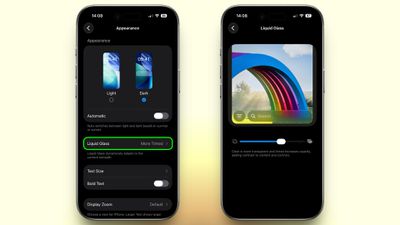
Apple also made overall Liquid Glass design changes. Complex content behind menu bars, navigation bars, and other interface elements is better diffused. Darkened edges and brighter specular highlights give more depth and separation to the interface, so controls more clearly stand out from what's below.
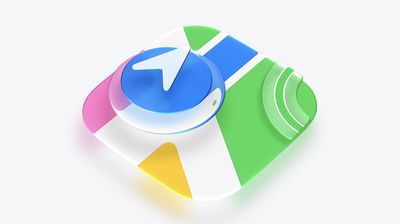
App icons have been updated with additional layers of Liquid Glass for more detail and sharpness.
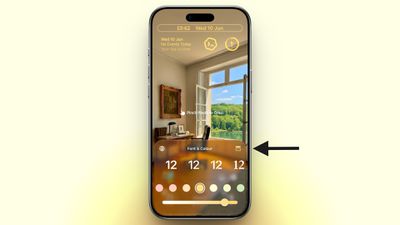
On the Lock Screen, Apple Intelligence can automatically expand a photo to fill the entire display. If an image is cropped too tightly or doesn't match the iPhone's aspect ratio, iOS 27 is able to generate more image context using an Extend feature. Image Playground can also now be used to generate custom wallpapers.
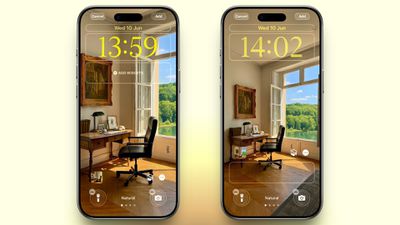
There is a new compact clock mode that's available, and it moves the time alongside the date and widgets at the top of the display to leave more of the wallpaper visible.
Siri AI
Siri AI is the single biggest change in iOS 27. Apple has entirely overhauled Siri, introducing a dedicated Siri app and making updates that put Siri on par with chatbots like Claude and ChatGPT.
Apple says Siri has understanding and reasoning that wasn't available before, with four main improvements that change how Siri works.

All of the different Siri functions come together to allow Siri to do far more than it could before. You can have full back-and-forth conversations with Siri, and include multiple tasks in a single request.
Personal Context Understanding
Apple overhauled its search index, and Siri has access to emails, text messages, files, photos, notes, and more. Siri can find content from across your apps, but it also understands that content. You can ask Siri to surface photos, bring up information from emails or texts, or find files, and the Apple Intelligence semantic index behind the scenes finds what you need.
- What was that movie my brother told me to watch last week?
- Can you get me the directions to that place I was supposed to meet Eric tomorrow?
- What video games did John recommend to me last year?
- Find images with pancakes from 2024
- What was the name of that restaurant I ate at in February?
- What's the confirmation number for my upcoming flight?
- What do I need to do tomorrow?
- Show me my photos from the music festival last weekend
- What's the door code Sarah texted me?
- Find the lease my landlord emailed me last month
- Who did I have lunch with two Tuesdays ago?
Broad World Knowledge
Siri can search the web for up-to-date information to answer questions about anything, similar to other chatbots. Siri can analyze documents and get information from the web for additional context, help come up with recipes, do party prep, help with homework, give gardening tips, assist with DIY projects, and much more.
- When is the Suki Waterhouse show in SF?
- How can I get tickets?
- I'm planning a birthday party, can you find me some good cake recipes?
- What's the difference between pine warblers and goldfinches?
- What's the Hurricanes score?
- What are the hours for the closest Ace Hardware?
- What's a good substitute for buttermilk?
- What's a 15% tip on $84?
- Help me plan a 5-day trip to Lisbon
Onscreen Awareness
Siri knows what's on your screen and can answer questions about it. Siri can tell what you're looking at, read text, and analyze images.
Siri can tell you where a photo was taken if there's something recognizable in it, and you can ask questions about any app you're in without having to provide specifics.
- Where was this photo taken?
- Summarize this
- Can you give me directions here?
- What are the best native plant options for a shady spot near my house?
- Does this document look correct?
- What is this?
- Translate this menu
- Explain what this chart is showing
App Actions
App Actions allow Siri to use tools in apps to complete requests. Siri can use some apps on your behalf, including apps from Apple and third-party apps that have implemented App Actions support.
- Write a quick response to this email
- Send all the photos from today to Eric
- Add a 3pm Tuesday meeting with the neighbor to my calendar
- Add these photos to the cat album
- Get me directions to the post office, but add a stop at the coffee shop first
- Move my 2pm meeting to Thursday
Siri Design
On the iPhone, a new Search or Ask Siri interface replaces the former Spotlight search option, and it's available from the Dynamic Island. A swipe down from the middle of the iPhone's display brings up Search or Ask, where you can type or speak a question or request to Siri.
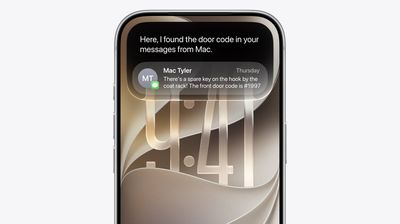
An animation is displayed as Siri is thinking, and then the Siri bubble expands into a short response. If you swipe down on a response, it brings up a text bar where you can provide clarification or ask another question. A "+" button lets you add images or documents to the conversation.
Some responses use rich information cards pulled from apps. If you ask Siri about the weather, you'll see the current weather forecast. If you ask about upcoming calendar events, you'll see them listed in the Calendar app format.
You can also access Siri by pressing the side button or by using the "Siri" and "Hey Siri" wake phrases.
Siri works in any app. You can select text or images, then ask Siri about the selection. If you see an image in Safari you want to know more about, you can long press it to select and then ask Siri whatever you want about it.
Siri App
There is a dedicated Siri app where you can start new conversations or revisit past conversations you've had with Siri.
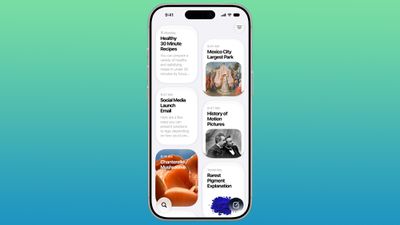
The app has a card-style interface with details on your most recent conversations across all of your devices. You can also use the search button to find conversations, and there's a pin option for conversations that you revisit frequently.
Write with Siri
In iOS 27, you can write with Siri anywhere you type with a systemwide Write with Siri feature. Siri can draft documents from scratch, and in Mail and Messages, it can use the same writing style that you normally use.
Siri can give you feedback on your writing if you select your text and ask Siri how it sounds, and as you type in apps, there's automatic proofreading for misspellings and grammar. Siri can also edit, and you just need to describe the change that you want to make to something you've written, such as changing the tone to be more professional.
- Make this email sound more formal
- Turn these bullet points into a paragraph
- Shorten this to three sentences
- Draft a thank you note for a gift
- Rewrite this to be friendlier
- What do you think of this presentation?
- How can I improve this email?
Apple's AI Models
The Apple Foundation models used for Siri and other Apple Intelligence features in iOS 27 are the result of Apple's collaboration with Google. Apple used the technologies behind the Gemini AI models to develop the next generation of Apple Foundation models.
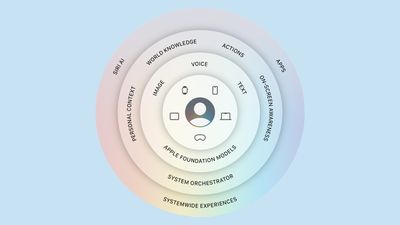
Apple's AI models are integrated into iOS and coordinated with a system orchestrator that can use the Spotlight index and the app toolbox.
The Spotlight index surfaces data from any app that integrates with it, such as Mail, Calendar, and Messages. The app toolbox identifies which app tools might be useful to answer a request.
Siri Voice
Apple has a more powerful on-device model for the iPhone 17 Pro and iPhone Air, allowing for a customizable Siri voice. Apple says its on-device model can understand and generate speech, plus understand text and images. You can tweak expressivity and pace when customizing Siri's voice.
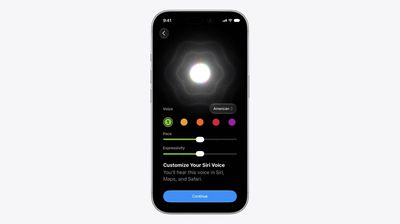
The on-device model also improves accuracy for system-wide dictation thanks to better natural language understanding. Dictation is better at capturing what you're saying, and it makes fewer mistakes with spelling, punctuation, and capitalization.
Privacy
Apple's Siri features run on-device and on cloud servers using Private Cloud Compute. Data is not accessible to Apple or third parties.
Private Cloud Compute servers have historically all been Apple servers in Apple data centers, but Apple is expanding Private Cloud Compute to run Apple Intelligence workloads on Google Cloud using NVIDIA hardware.
Availability and Requirements
Siri AI is available in iOS 27, iPadOS 27, macOS Golden Gate, visionOS 27, and watchOS 27, so you can start a Siri request on one device and revisit it on another device.
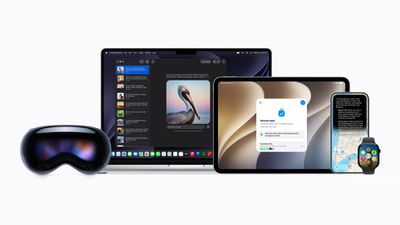
Siri conversations sync across devices, and the Siri app is available on most of Apple's software platforms. Siri AI features are also available when using CarPlay and AirPods.
Siri AI requires a device that supports Apple Intelligence, including the iPhone 15 Pro and later. Siri AI works in English (Australia, Canada, Ireland, India, New Zealand, South Africa, UK, U.S.), and will expand to more languages in the future.
Visual Intelligence
Apple moved Visual Intelligence to the Camera app in iOS 27, and it's accessible through a new Siri Mode that lives with the Photo, Video, and other camera mode options. You can swipe over to Siri Mode and take a picture so Siri can see what you see.
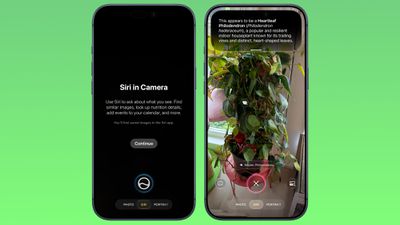
Siri gives you details about whatever you're looking at when you swipe down, and you can ask follow-up questions.
Siri Mode replaces Camera Control as the primary method for accessing Visual Intelligence, but you can still get to it by holding down the Camera Control button.
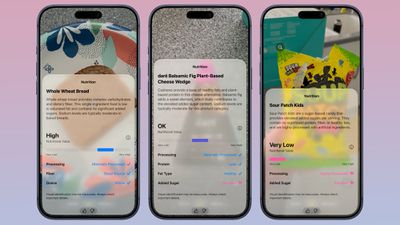
Siri Mode suggests relevant actions based on what you're taking a photo of. If you take a photo of a plant, Siri offers to identify it. If you take a photo of a plate of food, Siri can give you the nutritional information.
Visual Intelligence in iOS 27 requires an iPhone 15 Pro or later. For Mac, you need an Apple silicon chip, and on the iPad, you need an Apple silicon chip or the A17 Pro iPad mini.
Siri Integration
Visual Intelligence is integrated with Siri AI, and Siri can answer questions about what you're looking at. Complex questions were previously handed off to ChatGPT, but that's no longer necessary.
The smarter, more capable version of Siri can do much of what ChatGPT can do, pulling information from the web to answer questions.
All of your Visual Intelligence Siri requests are saved in the Siri app so you can revisit them later. The Siri app can be set to retain conversations for a month, a year, or forever.
New iOS 27 Visual Intelligence Features
- Nutritional Insights - You can take a picture of a meal or a food item to check its nutritional value. Siri doesn't tell you specific calories in an item, but it can tell you if what you're eating has nutritional value and what's good or bad about it.
- Bill Splitting (U.S. only) - If you take a photo of a restaurant bill, you can split out what you ate and then send money via Apple Cash. Or calculate what everyone owes and request money.
- Import Multiple Events - You can import multiple events into the Calendar or Reminders app at one time from a schedule or list.
- Import Contacts - You can import contacts from a photo of a business card.
- Wallet Passes - You can turn a photo of a barcode from a membership or pass into a Wallet pass.
Visual Intelligence is much more powerful than before because of Siri's ability to search the web for answers. It can read laundry labels and give you clear instructions, look up items and find reviews on the web, identify odd devices or cables and tell you what they're for, scale recipes, read ingredient lists for you to check for allergens, transcribe messy written notes or lists into text, decipher confusing parking signs, offer plant care advice, solve math problems on a worksheet, and whatever else you can think to ask AI to do.
Other Visual Intelligence Capabilities
Visual Intelligence has a long list of things it can be used for, and these options have been available in earlier versions of iOS.
- Identify plants, animals, insects, landmarks, art, sculptures, books, and more.
- Add items to your calendar from a piece of paper like an event poster or flyer.
- Use Google Image Search to find similar images.
- Search Etsy, Amazon, Anthropologie, and other apps for an item that you capture with the camera.
- Provide details about a business in front of you, like hours of operation.
- Translate, summarize, and read text aloud.
Photos
There are AI photo editing tools in the Photos app, accessible by tapping on the icon featuring three sliders, and then selecting the Apple Intelligence icon labeled "Tools."
Clean Up
Clean Up uses new AI models, and it's better at removing objects. The original version of Clean Up was best for small items with little complexity in the surrounding area, but now it is able to do more work reconstructing backgrounds with generative AI.
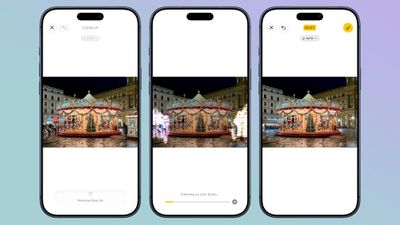
There are now three options for object removal. Fast works more quickly and can still be used for simple edits, while High Quality works better for more detailed scenes. Auto lets the Photos app decide which option is best.
Extend
Extend lets you change the crop of an image, expanding the borders around content to zoom out a bit or change the photo's composition. It uses generative AI to fill in missing areas, and you can adjust the borders with pinch gestures.
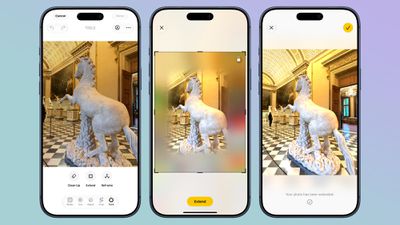
Apple also uses the Extend feature for expanding iPhone Lock Screen wallpapers that don't quite fit the display.
Reframe
Reframe can change the perspective of the photo, making adjustments to the angle of a person or object. It draws on the spatial information the iPhone gathers when a photo is taken, and combines it with AI to change the angle of the camera in post-processing. The spatial data is used for adjusting the subject of the image, and then AI fills in any pixels that are missing.
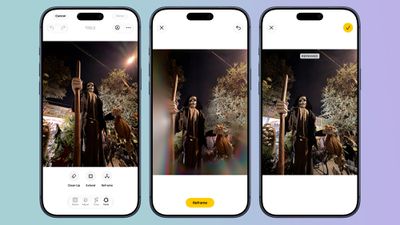
Reframe uses touch and drag gestures to adjust perspective, and two fingers for panning, zooming, or rotating an image to get the right angle.
Other New Photos Features
- Videos to Photos - You can now save a frame of a video as an individual photo.
- Metadata - Apple now lets you add keywords and star ratings to photos and videos in the Photos app. You can rate images with one to five stars and then filter images by rating.
- iCloud Albums - Android and Windows users can now contribute to iCloud Albums. It's easier to invite people to share with a dedicated "Create Shared Album" option in any album menu. Full-resolution photos and videos can also be added to iCloud Shared Albums, with support for all common photo and video formats.
- Shared Albums - Shared Albums can be filtered by photos or videos, there's an activity log, and it's easier to save images from Shared Albums. You can also react to images in Shared Albums with any emoji.
- Expirations - You can set Shared Albums to expire after 30 days, which is useful for sharing photos without having a permanent album.
- Slideshows - You can create a slideshow from any album or collection of images in the Photos app instead of being limited to what's in the Memories section.
- Utilities - There are two new Utilities folders in the Photos app. Captured by Me includes all of the images that you've taken from the Camera app on your current or past iPhone, while Identity Documents aggregates pictures of passports, licenses, and similar documents.
- Uploading - In the Photos section of the Settings app, there's a "Sync Immediately" option that lets you prioritize immediate iCloud uploads for the day.
- Photo Shuffle - You can select a specific pet to use with the Photo Shuffle wallpaper. You can include images of yourself in Photo Shuffle.
- Collections - The Collections tab is faster to render.
- Selection picker - A "Show Selected" option in the Library shows you all of the photos you have checked so you can modify metadata.
Safari
Automatic Tab Organization
Safari uses Apple Intelligence to organize your open tabs into relevant topics, grouping like concepts together to make it easier to browse your open tabs.
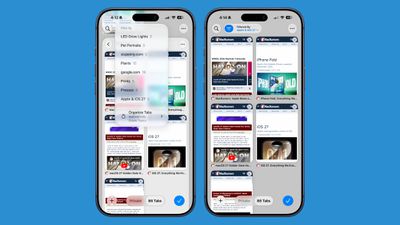
If you're searching for a new couch while also planning a weekend trip, websites that you open for each topic are grouped together. Automatic sorting can be enabled by tapping on the icon with three lines in the upper right of the display while in tab view and turning on the Automatically Create Topics setting.
This same Safari menu also lets you see all of the groups and filter by topic so you can open just the tabs related to a specific topic while avoiding the other tabs.
There is a new "Resume Browsing" section of the Start Page that lets you continue browsing topics you recently closed or topics you have open on other devices.
You can also group pages you've saved to Bookmarks and Reading List by topic.
Custom Extensions
You can use AI to create Safari Extensions in iOS 27 with Apple's new Create an Extension option.
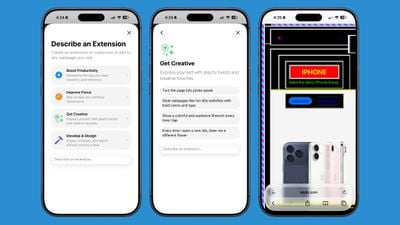
In the Safari settings accessible from the left of the URL bar, tapping into Create an Extension brings you to an interface where you can type in whatever you want an extension to do. Apple also includes suggestions in categories that include Boost Productivity, Improve Focus, Get Creative, and Develop and Design. Some of Apple's extension suggestions:
- Create a citation for the current webpage and copy it to my clipboard
- Create a 3-minute focus timer for the page
- Set the minimum font size to 14pt
- Turn the page into pirate speak
- Style websites like 90s websites with bold colors and type
- Every time I open a new tab, draw me a different flower
- Highlight and show the dimensions of webpage elements when I tap on them
- Enter the design mode for a website so that I can edit the contents
Notify Me
Safari can monitor a website for changes and alert you when new information is detected. Apple says it's useful for monitoring when concert tickets go on sale or watching for a product to be restocked.

To use it, navigate to a website, then tap on the settings icon to the left of the URL bar, and choose the Notify Me option. You can type in what you want Safari to watch for and set a frequency and a time.
At most, Safari checks websites once per hour at a set time, with daily, weekly, and monthly checks also available.
Performance Improvements
Apple says Safari's power efficiency has improved, so it drains less battery. Web apps and start page content load faster, JavaScript handling is faster, and animations and graphics are smoother.
Shortcuts
The Shortcuts app is a lot easier to use in iOS 27, thanks to Apple Intelligence. Shortcuts can be created using natural language, and they're more accessible to the average person.
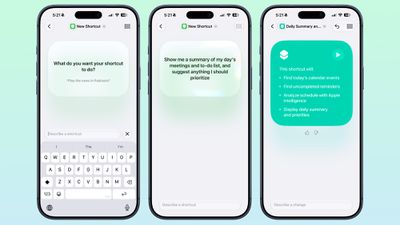
When you tap on the New Shortcut button in the iOS 27 Shortcuts app, it opens to the Describe a Shortcut interface. There's a text box that asks you what you want your shortcut to do, and you can describe what you need in natural language. You can start with a single step, or add in multiple parameters. Apple Intelligence selects the correct actions, creates the automations, and folds it all into a completed shortcut. A few examples of what you can do:
- Each evening, set tomorrow's alarm based on my first Calendar event, turn on Sleep Focus, and dim the bedroom lights.
- Every morning, show me my first meeting, today's weather, and my Reminders due today.
- Turn on the porch lights at night when you get a notification that food delivery is arriving.
- Text my partner an ETA when I leave work, then start playing my podcast.
- Show me a summary of my day's meetings and to-do list, and suggest anything I should prioritize.
- When I open YouTube, turn off orientation lock. Turn it back on when I close the app.
- Give me a three-line summary of today's tech news.
Shortcuts and automations can run based on time of day, location, an app action, a system feature like a screenshot, an incoming notification, and more. Shortcuts can do all kinds of things, from accessing system features to opening and running apps.
After dictating a shortcut, the app outlines each of the actions the shortcut performs. If it's what you want, you can tap on the play button to test it. It's then added automatically to your personal shortcuts.
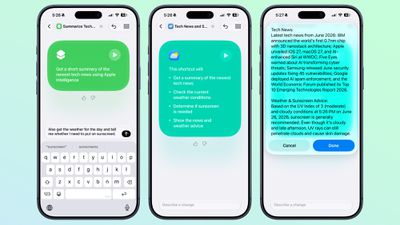
If it's not quite what you want or you want to add more features, you can use the "Describe a change" interface. You can type in what you want to tweak, and go through multiple rounds of refinement until you get exactly what you want. Shortcuts can be used from Siri, the app, Control Center, the Action Button, and more.
Once created, you can tap into a manual editing interface if you want to add more complicated actions or tweak without using Apple Intelligence. AI Shortcuts is not always perfect, so sometimes manual edits are required to get the end result you want.
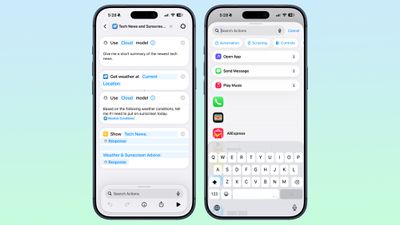
You can also open any shortcut and use the Apple Intelligence mode to make edits.
The Apple Intelligence Shortcut app features require a device that supports Apple Intelligence, which includes the iPhone 15 Pro and later, iPads with an M-series chip or the iPad mini with A17 Pro, or a Mac with an Apple silicon chip.
Supported languages include English, Danish, Dutch, French, German, Italian, Norwegian, Portuguese, Spanish, Swedish, Turkish, Vietnamese, Chinese (simplified and traditional), Japanese, and Korean.
Other Apps
Messages
Messages uses Apple Intelligence to surface one-tap suggestions based on what's being discussed in a conversation. If someone you're talking to asks you to send a photo, Messages recognizes the request and suggests adding the relevant photos.
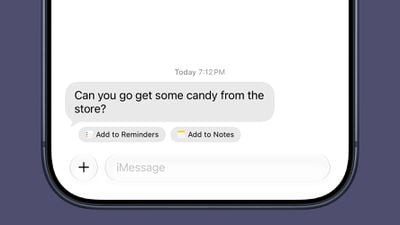
If someone invites you to an event, Messages offers to add it to your Calendar. If someone asks you to pick something up at the store, Messages suggests adding it to your Reminders list or to the Notes app. Messages also suggests Genmoji you might want to generate based on the conversation.
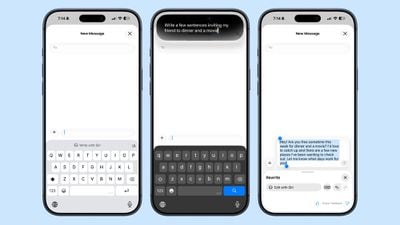
The systemwide Write with Siri feature is available in the Messages app. Siri AI can compose entire messages for you, proofread your messages, or give you feedback. There is a dedicated Write with Siri button above the keyboard where you can get to the new Siri tools. Smart Reply suggestions also use your writing style so they sound more natural.
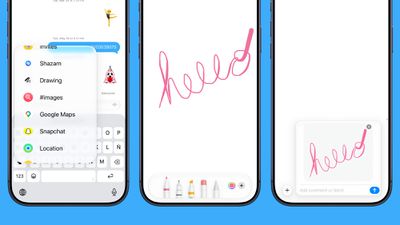
You can use a new Drawing interface in the Messages app to send little sketches and notes. It's available when tapping on the "+" button next to the text bar in a conversation. The drawing interface is the same as the Markup tool available in apps like Photos and Notes. There's a marker, a pen, a highlighter, and an eraser, plus options to use the tools in any color.
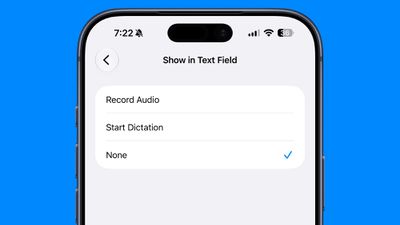
The iOS 27 Messages app includes an option to remove the audio button from the text bar. In the Messages section of the Settings app, you can navigate to Show in Text Field to set the right-side button to Record Audio, Start Dictation, or None. Setting the option to none prevents you from accidentally recording a voice message with an errant tap.
Messages now consolidates notifications for Tapback responses, which is useful when you're in a group thread and tons of people are sending emojis, and when a message fails to send, your iPhone automatically retries sending it. In iOS 26, you get an alert if a message fails, but you have to manually tap to try to send it again.
The Messages app also supports continuous sending of photos, videos, and texts. If you're sending someone a photo and your connection is poor or you go offline, it automatically resumes sending when the connection is restored.
Cross-device syncing is improved in iOS 27, so conversations sync more reliably across the iPhone, iPad, Mac, Apple Watch, and Vision Pro. Fewer messages fail to sync and display properly when you switch between devices. Messages, read states, reactions, and attachments sync faster.
In RCS message conversations with Android users, you can now long press on a message to send an inline reply. iOS 27 also shows reaction emoji directly on images and videos, a feature that was not functioning in iOS 26.
Genmoji
Apple revamped Genmoji creation in iOS 27. There's an updated interface for describing an emoji that you want, with options to start from an existing emoji, choose an image from Photos, or select a person.
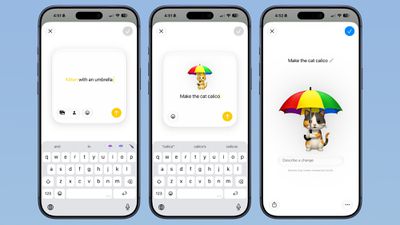
After uploading an image or using a text phrase to create a Genmoji, there's a new "Describe a change" interface for making updates to what you've already created. You can iterate on designs and change individual elements of a Genmoji, tweaking colors and objects. Each change uses the old base instead of regenerating a new Genmoji.
With a series of requests, it is possible to make a complicated, multi-element Genmoji. Along with describing changes, you can add in additional emoji, and the interface makes suggestions on what to do next.
Genmoji output is more consistent, and Genmoji look more like real emoji with a 3D, cartoonish style by default. There is now an option to change style, so if you don't want the cartoonish look, you can ask for something else like a drawing or a sketch.
iOS 27 has an overhauled search system that extends to the Mail app. Instead of surfacing results based on keywords and recency, Mail app search ranks results by relevance and intent. Search results that come up in Mail are more relevant than before, so you find exactly what you're looking for.
If you search for "Sprouts" because you want to find a recent order, it'll show your order before it shows marketing emails you might have from the same retailer.
The Mail app also has a built-in "Ask Siri" feature. Long press on an email and you can ask Siri to summarize, find an item in the email, track a package, get a flight number, save a photo, and more. Once you get a response, you can swipe down to enter the Siri interface for asking follow-up questions. Conversations are logged in the Siri app.
Siri can complete tasks in the Mail app too, like deleting all emails from a specified sender or adding information from an email to your Reminders list.
Smart Replies that your iPhone suggests to you are now tuned to your writing style, which means the one-tap suggestions sound like things you might actually type. The contextual suggestions that you see at the top of the Mail app are now available to third-party apps, plus Apple has revamped the design.
An email that includes a flight time or a restaurant reservation has a one-tap button for adding it to the Calendar app. An email with directions may let you see the route in Maps, and emails with tracking information can be tracked with the Wallet app.
Music
The Apple Music app has new artist pages with improved art and motion to make them come alive. Apple also improved AutoMix, and it includes transitions that "feel more immersive and engaging."
Weather
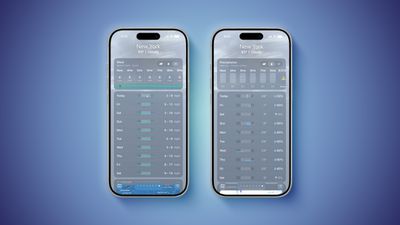
- Highlights - The top of the Weather app now has a Highlights section that shows you need-to-know weather information for the day.
- Conditions - There are new views for the Conditions section of the main Weather app interface. In addition to viewing temperature and current condition on an hourly basis, you can toggle over to a precipitation or wind view. Precipitation shows you an hour-by-hour chance of rain forecast, while wind displays a breakdown of wind speed.
- 10-Day View - The 10-day view also changes when you swap between the different condition options so you can see precipitation and wind overviews for the next 10 days without having to tap into a more detailed view.
Health
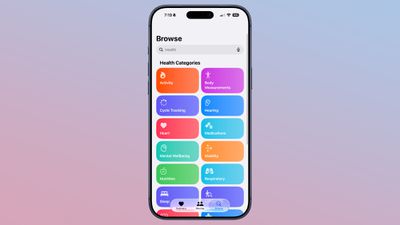
- Design - Apple redesigned the Browse section of the Health app, and it now uses a card-style interface instead of a list. It is more colorful and easier to see the different categories.
- Cycle Tracking - Cycle Tracking is expanding with perimenopause/menopause support. The Health app now sends notifications when logged cycle patterns are suggestive of perimenopause. Apple also added new Fitness+ workouts for perimenopause and menopause.
- Faster data updates - Data syncs to the Health app quicker than before thanks to performance improvements Apple implemented.
- Route and Distance accuracy - Route maps that populate the Fitness app after workouts are more accurate in iOS 27. During treadmill workouts, distance is also reflected more accurately than before.
- GymKit - GymKit has expanded to the iPhone, which can pair with treadmills, indoor bikes, and other exercise equipment for data syncing. GymKit was previously an Apple Watch feature, but now iPhone users won't need a watch to use it.
Passwords
The Passwords app can use Safari to automatically change flagged weak and compromised passwords, turning them into strong passwords.
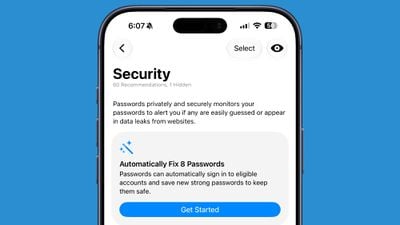
The feature uses Apple Intelligence to automatically navigate to eligible websites, sign in, and update your password with a tap.
Image Playground
The Image Playground app can now be used to make images in any style, including photorealistic. If you have a photo of a friend and want to add a hat or an accessory that looks real, you can do so with Image Playground. You can select specific areas in an image to modify and make AI edits using natural language, plus there's an option to combine images.
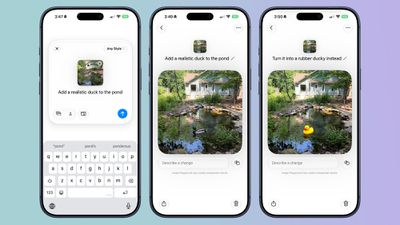
Image Playground can be used for free, but there will be daily caps, with extra usage available through iCloud+ plans.
Calendar
Apple Intelligence in Calendar lets you add events by describing them in natural language. It identifies people, dates, and places while you are typing, and you can tap to add that info.
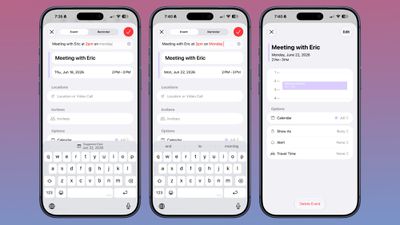
Calendar adds an event on the date that's selected, and by default, that's the current date. To use natural language to select another date, you can type in "meeting at 2pm with Eric on July 14," but you need to tap on the July 14 suggestion at the top of the keyboard.
The Calendar app automatically sets the event to the time that you type in with natural language, so you don't need to tap for that. Siri has full access to your calendar and can add events to it with natural language requests. What you can't do with the natural language entry, you can do with Siri.
Siri is much more capable than before, and it does a better job correctly adding events to the calendar on the day and time you intend, and with parameters, like repeating events.
Just describe the event you want to create and Siri can get it done. Siri can add events to your calendar from other apps, like Mail and Messages.
The event editing interface is a little simpler to use, and it's quicker to get to time adjustments. If you adjust the frequency of an event, Calendar can intelligently apply changes to all events. Siri can also be used for editing calendar events.
The Calendar app also tracks holidays, and can alert you the day before a holiday to ask if you want to change the time of the wake-up alarm that you have set.
Reminders
In Reminders, you can now describe a reminder in natural language and it autofills the metadata that you mention. It can add date, time, and location automatically.
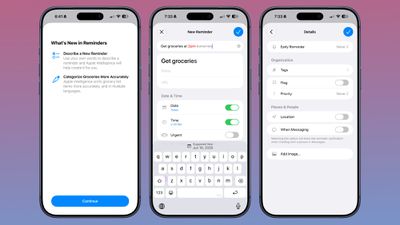
You can write in a reminder like "get the groceries at 6pm tonight" or "send the photos to John tomorrow at 4pm" and it adds the correct times to your reminder.
With natural language support, Apple removed the menu bar at the bottom of the interface for adding a new reminder. Adding extra features like an image or metadata such as a flag can now be done through the "Details" interface.
There are new Reminders actions in the Shortcuts app, including Create Group, Create List, Create Section, Delete Groups, Delete Lists, and Delete Sections. There's also a new "Get What's On Screen" option that can be used with Reminders.
Wallet
Apple upgraded airline boarding passes in the Wallet app with iOS 26, and in iOS 27, upgrades are coming to additional types of passes. Memberships, gift cards, loyalty cards, and rewards cards can use a bolder "Poster Generic" card style with full background images, primary logo, header fields, footer field, primary fields, and an optional barcode.
Each pass is able to include up to two actions that can be tapped from the bottom of the pass, such as getting directions to a venue or checking a rewards point balance.
Apple added a "Create a Pass" feature in the Wallet app for adding tickets, memberships, and more using Visual Intelligence. If you have a ticket for an event and there's not a digital version available for the Wallet app already, you can create one using the physical pass.
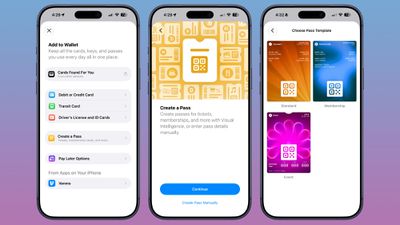
You can scan a pass and add it with Visual Intelligence if there's a barcode or QR code, or a pass can be added manually. Pass templates include Standard, Membership, and Event. Each type includes relevant information like name, location, or admission type, along with a scannable code drawn from an included barcode or QR code that you take a photo of. There are 12 background colors to choose from with different texture options, or seven custom backgrounds for categories like theater, music, sports, and movies.
Fields can be added or removed as needed when creating a custom pass, with options like label, date, membership, contact, coupon code, VIN, insurance, and more, so most physical cards are able to be stored digitally.
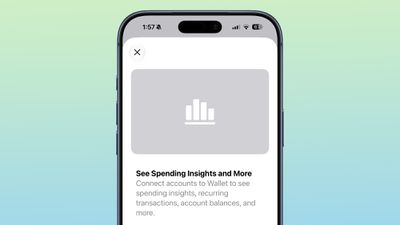
iOS 27 also includes an "Insights" feature where you can add financial accounts to the Wallet app to monitor spending. Insights is an expansion of the Connected Accounts feature in earlier versions of iOS, and it includes spending, recurring transactions, account balances, and more.
Home App
The Home app generates written summaries for motion alerts and what's detected, using AI to determine what's been recorded. It can recognize people, animals, vehicles, packages, and general motion, giving a summary of what's happening even if you're not looking at the video footage.
It is intelligent enough to give detail, so you'll see alerts like "a person walked through the room," "two people were in the room," "a dog sat on the floor," or "a cat played in the room."
Along with analyzing footage, the Home app can now group footage from separate cameras capturing the same event. If a person walks by one camera and continues on to another, the Home app knows those two events are related. During video playback, you can see relevant footage from multiple cameras with a summary of something that happened across the entire home.
- Highlights - If there are noteworthy recordings available, they are shown in a separate section above the general recordings in the camera view.
- Search - The Home app supports natural language search for camera footage, so if you're looking for something like when a package was delivered, you can search for it.
- Notification Summaries - Notifications update in real-time and related alerts are combined instead of being shown as separate notifications. The net result is fewer Home app notifications.
- Video Previews - Long pressing on an incoming video notification plays a preview clip of the footage.
- Reduce Notifications - There is an Apple Intelligence section in the Home app where you can turn on video summaries and cut down on notifications.
- 4K Recording - HomeKit Secure Video cameras are no longer limited to 1080p recording. If supported, cameras can stream and record at up to 4K.
- Energy Monitoring - Accessories able to track energy usage like smart plugs now display that information in the Home app in the Energy tab.
- Remote Apple TV Updates - It's now possible to update the Apple TV remotely using the Home app, similar to how HomePod updates are installed.
- Reliability - Apple says capturing and storing HomeKit Secure Video footage is more reliable than it was before and it is less likely to miss activity. Connectivity for Thread home accessories has also been improved with Apple adopting Thread 1.4, and HomeKit accessories now pair faster.
The Apple Intelligence Home features require a 2TB iCloud+ plan or higher.
Maps
Apple is upgrading Flyover in iOS 27, making it more detailed than before. It combines aerial imagery with vision intelligence models to add more texture and sharper visuals for trees, architecture, and more.

Apple says cities around the world are rendered in sharper, more lifelike detail with improvements to everything from the "shapes of individual trees to the way light reflects off the glass of skyscrapers."
Flyover is an Apple Maps feature that offers detailed 3D landmarks, roads, parks, buildings, and more in more than 350 cities. The current version of Flyover uses aerial imagery captured by planes, but the new iOS 27 version improves the quality using AI.
- New Maps Icon - Apple updated several of its Liquid Glass app icons in iOS 27 to add more glass-like layers. Icons have more depth, and the Maps app icon makes the difference especially clear.
- Local Lists - Local Lists uses intelligent insights from what's trending around you for suggestions on places you should visit. Maps surfaces locally relevant collections of places to make it easier to find popular and interesting locations to visit. Local Lists is privacy-focused and does not use information tied to individual users. It is a U.S.-only feature.
- Trending Restaurants - In the Search interface, there's a Trending Restaurants section that shows you the top restaurants in the area you're in.
- Natural Language Search Expansion - Natural language search in Maps now lets you ask for directions that avoid toll roads or highways.
- Visited Places - The Visited Places feature is more accurate in iOS 27 and less likely to miss locations. Visited Places keeps track of locations you've been to, organizing stops by category and location. It's accessible by tapping on your profile picture, choosing Places, and selecting Visited Places. Visited Places is also expanding to more locations in iOS 27.
Phone
The Phone app has one major update, and that's Call Context. When you call a company, the Phone app can surface relevant information from the Mail app.
If you call an airline, it might show your confirmation code for an upcoming flight, or your reservation code if you're calling a hotel. It doesn't listen to what you're saying, but instead looks at the number you're calling and links it to details in the Mail app.
Call Context is an Apple Intelligence feature that runs entirely on-device, and it requires an iPhone 15 Pro or newer. It also works when you make a phone call from your iPad or Mac.
FaceTime
FaceTime has a Dual Capture option in iOS 27. On the iPhone 17 models and the iPhone Air, you can use the front and back cameras at the same time while on a FaceTime call. The person you're calling is able to see your face and what's shown through the back camera.
You can turn on Dual Capture on a supported iPhone by tapping on the camera flip button. If you only want to show the back camera feed, you can tap to turn off the front camera view.
While streaming video with Dual Capture is limited to the iPhone 17, iPhone 17 Pro, iPhone 17 Pro Max, iPhone Air, and newer, anyone running iOS 27 can see a dual video stream on a FaceTime call because there are no hardware requirements for the receiving device.
There are a few other features worth knowing about:
- Connection Quality - When you have a bad connection, FaceTime calls now have better quality than before.
- Wi-Fi/Cellular - In iOS 27, iPhones are better at transitioning from a Wi-Fi to a cellular connection and vice versa, so you'll lose connection less often when moving between networks.
- Live Captions - Live Captions are now available in Traditional Chinese.
- Communication Safety - Communication Safety blurs gore and violence in FaceTime and Messages instead of just nudity.
Miscellaneous Features
- Independent Alarm Volume - Alarm volume can be set independently of system volume for keeping system sounds lower while alarms are louder.
- Journal - The Journal app suggests writing prompts using Apple Intelligence.
- Widgets - The Home Screen now supports an extra-large widget size for some apps. The extra large widget takes up an entire app page.
AirPods
Apple added a custom EQ feature for the AirPods in iOS 27, which is available when the AirPods are connected to an iPhone, iPad, or Mac.
There are options for adjusting lows, mids, and highs. Custom EQ is available for AirPods with an H2 chip, which includes the AirPods Pro 2, AirPods Pro 3, AirPods 4, and AirPods Max 2.
There's a more compact settings interface available when the AirPods are connected to an iPhone. It's still located under Settings > AirPods, but all of the AirPods features are better organized and easier to get to. Transparency, Noise Cancellation, and Adaptive modes are still accessible at the top of the screen for quick switching, but Apple also added a volume slider for adjusting sound in the same interface.
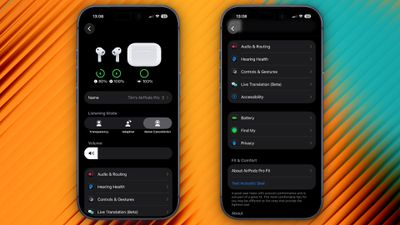
Instead of expanded menus for Hearing Health, Call Controls, and gestures, the options are organized into separate menus. Apple has logically aggregated controls into categories that include Audio & Routing, Hearing Health, Controls & Gestures, Live Translation, Accessibility, Battery, Find My, and Privacy.
Other New AirPods Features
- Siri AI - Siri AI works on the AirPods through a connected iPhone. When you're wearing AirPods, you can ask Siri AI questions and make requests. Siri AI isn't a standalone feature on the AirPods, and it requires an iPhone that supports it.
- Precision Finding - The AirPods Pro 3 charging case features Ultra Wideband (UWB), and it works with Precision Finding on the iPhone. With the update to iOS 27 and watchOS 27, you can also use an Apple Watch for AirPods Pro 3 Precision Finding.
CarPlay
With iOS 27, Apple is introducing several CarPlay features that improve your in-car experience, both when you're driving and when you're idle in the car.
CarPlay apps can incorporate video browsing capabilities, so you can browse for and watch videos on your in-car display while parked. The video playback feature does not work when a car is in motion for safety reasons, but if you're watching something and shift into drive, playback switches to audio only.

iPhone apps that support AirPlay can also stream content to the car's display. Video apps require car manufacturers to enable support on the vehicle, and no automakers have announced plans to add support as of now.
Apple's smarter, more capable version of Siri can be used in the car for hands-free conversations. Siri AI for CarPlay works like Siri AI on other devices, so you can ask it to complete tasks or find information for you while you drive. Conversations in CarPlay sync to the Siri app on iPhone so you can pick them up later.
- Audio - There is a persistent mini-player for the Now Playing CarPlay template. The player shows artwork and playback controls in the top right corner of audio and media apps. The Now Playing interface in CarPlay also has a progress bar, so you can jump to a specific spot in a song, podcast, or audiobook.
- Wallpaper - CarPlay includes the new iOS 27 wallpapers, formatted for the CarPlay interface. The wallpapers have wave-style designs in a range of colors, with 14 total wallpaper options available. CarPlay in iOS 27 also supports larger, more interactive content thumbnails and it incorporates the updated Liquid Glass icons for apps like Maps and Weather.
- Route Data - Navigation apps like Apple Maps and Google Maps can share route data with a vehicle for incorporating information like EV charging stops. The car is able to check a map route against the range of the vehicle, and suggest a charging stop.
- Reliability - Apple says that wireless CarPlay is more reliable in iOS 27, plus it supports improved GPS location accuracy and navigation heading detection.
- Voice Control - All app categories are also now able to offer a voice control option, and Apple has designed a voice control template that can be integrated into apps for voice conversations.
- Natural Language Improvements - In Apple Maps, Apple extended natural language search to navigation, and that also works with CarPlay. You can ask Siri for directions that avoid toll roads, highways, and more.
Performance Improvements
With iOS 27, Apple focused on making improvements to iOS performance, speeding up everything from system animations to AirDrop transfers. iPhone performance is smoother and faster on all iPhones able to run iOS 27, which includes the iPhone 11 and newer.
App Launching
Apps launch up to 30 percent faster in iOS 27, and that includes Apple's own apps and third-party apps. When you're opening apps dozens of times a day, less loading time adds up and makes the system feel faster.
Apple says it tested the app launching speed improvements using an iPhone 11 Pro Max running iOS 26.4.2 and iOS 27.
CPU Scheduler Improvements
iOS includes a CPU scheduler that manages computational resources across workloads as you use your iPhone. Apple says it optimized the CPU scheduler in iOS 27 to more efficiently handle performance-intensive tasks.
Apple extended CPU scheduler optimization all the way back to the iPhone 11, which is part of the reason even old iPhones feel faster with the update installed. Apple is often accused of making old iPhones slower with new iOS updates, but there are noticeable speed improvements in iOS 27 so we likely won't hear that complaint this year.
Better Wi-Fi to Cellular Transitions
iPhones are better at determining when to transition from Wi-Fi to a cellular connection, and from a cellular connection to Wi-Fi. When you're connected to your home Wi-Fi and walk out the door, you'll see less connectivity loss as your device changes networks.
Apple says the iPhone is better about choosing the best available Wi-Fi or cellular connection to help you stay connected.
Rebuilt Search Index
Apple rebuilt its search foundation in iOS 27, giving Spotlight, Photos, Mail, and other apps a more complete index of content that stays updated throughout the day.
In the Mail app, there's a new ranking system that surfaces more relevant emails for search queries instead of listing results by date. You'll see up to five ranked Top Results now.
Photo Load Time
When you take a photo and then open up the Photos app, your just-captured image appears more quickly so you can edit it or share it. Apple says photos and videos load up to 70 percent faster in the Photos library, which it tested with a Photos app that had a 50,000-asset library.
Waiting on a photo to unblur when you quickly swap over to the Photos app is a small annoyance, but cutting down on load time makes taking a photo feel much faster.
Recent camera captures are also added more quickly in the Messages app photo picker.
Automatic Message Resending
When a message, photo, or video fails to send in iMessage, your iPhone automatically retries sending it instead of throwing up a red exclamation point and forcing you to manually try again.
Sending photos and videos when you have a poor connection also does not pause a Messages conversation while the content sends. Each photo or video has its own progress bar, and your texts still go through while you wait for images and video to upload.
Faster Camera Launch in Low Power Mode
When you have Low Power Mode turned on, the Camera app can launch slowly. That's been fixed in iOS 27, and it loads faster than before.
The Camera also draws less power in Low Power Mode.
Faster Keyboard Loading
The emoji and sticker keyboards load more quickly, so there's no longer an irritating pause when you want to use an emoji. The keyboard is something you use frequently, so this is a time-saving improvement.
Mail Badges
If you're tired of unread Mail badges popping up when you have read all your emails, iOS 27 addresses the issue. The Mail app badge is now less likely to show an inaccurate number of unread emails.
Bluetooth
Apple says it improved Bluetooth power management in iOS 27, an update relevant to AirPods, Apple Watch, CarPlay, speakers, and other Bluetooth devices.
Bluetooth accessories should draw less power for some minor improvements to battery life.
More Useful Improvements
- AirDrop transfers are up to 80 percent faster, and AirDrop is faster to find nearby recipients
- Text recognition in images and documents is quicker
- Safari has better power efficiency and web apps are faster
- Unlocking an iPhone, scrolling through Home Screen pages and App Library, and scrolling in Control Center are all smoother
- The Lock Screen no longer goes to sleep when you're scrolling through notifications
- Wireless CarPlay is more reliable
iCloud Updates
- Link Previews - iCloud collaboration links now show richer previews so you can more clearly see what you've been sent.
- Access Requests - Users can send access requests for items shared via iCloud.
- Speed - Apple says users can get faster access to shared content on iCloud.com.
- Links - Creating links to iCloud content is easier with a more accessible share link.
Parental Controls
There are new child safety features in macOS Golden Gate, iOS 27, and iPadOS 27. Parents can select the apps a child can access, choosing a few essential apps, a curated set, or the apps that are appropriate for the individual child.
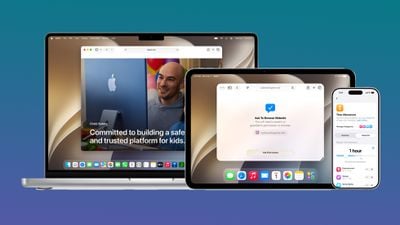
Apps can be added over time, and kids can get parental approval to download apps with Ask to Buy. A new Ask to Browse option lets parents approve each new website a child visits.
There are tools for managing who children can communicate with using Messages, FaceTime, and Phone, and parents can enable a setting that requires children to get permission before connecting with a new contact.
Communication Safety is being updated to blur gore and violence in Messages and FaceTime calls by default for users under 18. As with nudity, it automatically blurs content when gore or violence is detected in images and videos.
With Time Allowances, parents can manage the time that children spend in apps in the Entertainment, Games, and Social Media categories. Parents can set a limit based on the child's age, with suggestions from the latest expert guidance. Daily Schedules let parents limit which apps children can access and when based on time of day and day of the week.
Screen Time now gives parents an at-a-glance view of their kids' device usage and most used apps, with options to make adjustments to access in the moment. Parents are able to quickly limit access during meals, outdoor play, and other times that "deserve full attention," according to Apple.
Apple has a dedicated Child Safety website where parents can learn more about the tools available in iOS 27, iPadOS 27, and macOS Golden Gate.
Compatibility
iOS 27 runs on all devices that support iOS 26, including the iPhone 11 models and the iPhone SE 2. Apple Intelligence features require an iPhone 15 Pro or newer.
- iPhone 17e
- iPhone 17
- iPhone Air
- iPhone 17 Pro
- iPhone 17 Pro Max
- iPhone 16e
- iPhone 16
- iPhone 16 Plus
- iPhone 16 Pro
- iPhone 16 Pro Max
- iPhone 15
- iPhone 15 Plus
- iPhone 15 Pro
- iPhone 15 Pro Max
- iPhone 14
- iPhone 14 Plus
- iPhone 14 Pro
- iPhone 14 Pro Max
- iPhone 13
- iPhone 13 mini
- iPhone 13 Pro
- iPhone 13 Pro Max
- iPhone 12
- iPhone 12 mini
- iPhone 12 Pro
- iPhone 12 Pro Max
- iPhone 11
- iPhone 11 Pro
- iPhone 11 Pro Max
- iPhone SE (2nd generation and later)
Launch Date
New versions of iOS, macOS, and Apple's other software platforms were previewed at WWDC in June. Developers and public beta testers had early access to the iOS 27 beta to try out the new features ahead of release, and iOS 27 was released to the public on Monday, September 14, ahead of the release of the iPhone 18 Pro and iPhone 18 Pro Max later in the week.
