Satechi Thunderbolt 5 CubeDock Review - MacRumors
Skip to Content

Satechi CubeDock Review: A Thunderbolt 5 Dock That Doubles as an SSD Enclosure

by

Accessory maker Satechi released its first Thunderbolt 5 dock earlier this year, debuting the $400 Thunderbolt 5 CubeDock. Satechi's dock combines Thunderbolt 5 connectivity with the traditional ports you expect from a dock, plus extra SSD storage thanks to an added SSD enclosure.
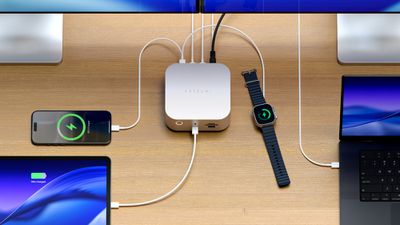
satechi cubedock 2
Satechi likes to make things shaped like the Mac mini, and the CubeDock gives ‌Mac mini‌ vibes. It's five inches by five inches, and two inches thick, identical to the ‌Mac mini‌. It's silver, so it matches Apple hardware that comes in that shade, and it would pair well with a ‌Mac mini‌.

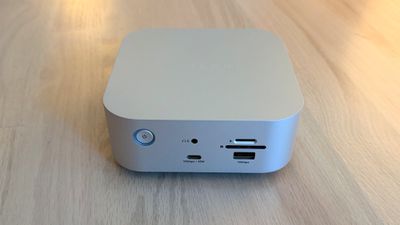
The front of the dock has a 30W/10Gbps USB-C port, a 7.5W/10Gbps USB-A port, a 3.5mm audio jack, and SD and microSD card slots. I like the positioning of the card readers because they're easy to get to. I don't use wired headphones, but if I did, I'd also appreciate having that front audio jack. 30W charging for the front USB-C port is useful too, because 30W is enough to fast charge an iPhone and charge an iPad or MacBook Air.
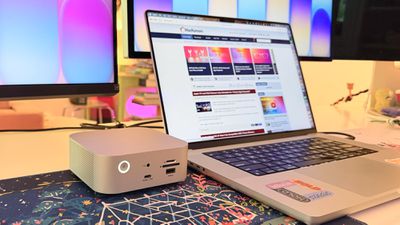
cubedock with mac
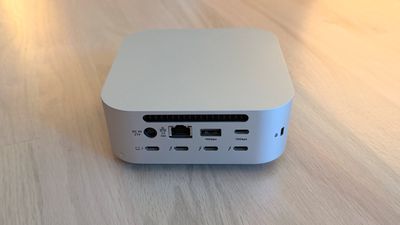
The back has a 2.5Gb Ethernet port, an 80/120Gbps Thunderbolt 5 host port to connect to a Mac, three additional 80Gbps Thunderbolt 5 ports (with 15W each for accessories), a 10Gbps 4.5W USB-A port, a 10Gbps 7.5W USB-C port, and a DC port for connecting the power supply. The CubeDock provides 140W for a MacBook,can charge the 16-inch MacBook Pro at the fastest speed.
cubedock front
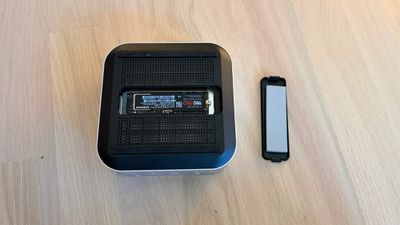
At the bottom of the CubeDock, there's a panel that can be popped out to add in up to an 8TB NVMe SSD. It supports 2230, 2242, 2260, and 2280 sizes with transfer speeds of up to 6000MB/s, depending on the SSD used. The CubeDock has an SSD enclosure, but it does not come with SSD storage. You need to buy an internal SSD separately if you want to use the enclosure, and SSDs aren't cheap right now.
cubedock ssd
I installed a 2TB SSD in the slot at the bottom of the CubeDock. There's a plastic cover that comes off, and the SSD plugs in underneath. It's held in place with a screw, but the installation process was a little annoying because the screw needs to be positioned before the SSD is inserted. Satechi includes a thermal pad, which I added before closing it back up. My Mac recognized the SSD in the enclosure just as it would any other SSD I plugged in.
cubedock back scaled
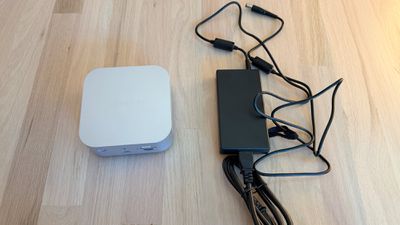
There is a fan in the CubeDock that circulates air, along with vent holes at the sides. It has an LED power button on the front, and it charges with an included 180W power supply. The power supply is not built into the dock and is instead an external brick. Satechi also includes a Thunderbolt 5 cable to connect the dock to a Mac.

I don't generally mind the sound of fans, but the CubeDock's fans have a subtle electronic whine that bothers me. I know some people can't hear that high-pitched electronic noise, but I can, and in a quiet room, it's the audio equivalent of having a pebble stuck in my shoe. I can't hear the sound when the TV is on, when music is playing, or when my AC is running. Anker's Thunderbolt 5 Dock has fans and had a similar noise, but fanless models like the CalDigit TS5 Plus are silent.

With the fans, the CubeDock doesn't get blazingly hot, but it is warm to the touch. The temperature is closer to a hand warmer on a cold day than scorching coffee. I didn't notice a temperature difference testing with the SSD installed and without it.
satechi cubedock power supply
The CubeDock supports up to three 8K displays at 60Hz, but Satechi says 8K is limited to Windows machines. The M5 Pro and M5 Max chips do support 8K displays, but I don't have one to test with.

What I do have on hand is a 5K Studio Display and a 32-inch 4K 120Hz OLED display, both of which the CubeDock can handle with no problem. I plugged in two iPhones to charge, put in an SD card, and connected two SSDs, and transferred large files. I had no issues with the CubeDock under this stress test, and everything also worked during day-to-day testing.

The benefit of a dock like the CubeDock is being able to plug in multiple displays, peripherals, and accessories while only having one cable connected to a Mac. I can tuck the CubeDock under a display, route the cables out the back, and keep my desk neater with less cable clutter. I felt like the CubeDock had a good number of ports for everyday use, and I wasn't missing anything. It has fewer USB-C and USB-A ports than some other docks that it competes with, but I have few enough USB-A devices that even two USB-A ports felt like one too many.

The Apple silicon chip you have determines the number of displays that the CubeDock can drive over a single Thunderbolt port. M5 Pro and M5 Max Macs can drive three displays at 6K/60Hz with Satechi's dock. M4 Max, M4 Pro and earlier Pro/Max chips support up to two external displays with the CubeDock (up to 6K/60Hz).
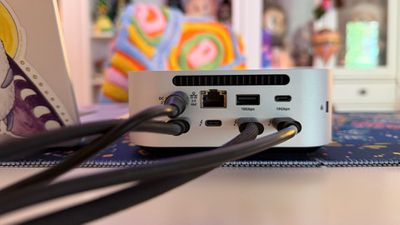
cubedock rear cables
Pro/Max Macs can generally support more than two external displays, but you need to use more than one Thunderbolt port. I have two displays connected to an M1 Max with the CubeDock, and a third display plugged into a different Thunderbolt port.

Base M1 and M2 Macs support a single external display over Thunderbolt, but base M4 and M5 Macs can drive two. The M3 is complicated because an M3 ‌MacBook Air‌ can support two displays, but only in clamshell mode. It's best to check Satechi's website for compatibility info to make sure you can connect what you want to connect.

Bottom Line

Satechi's dock lets you connect multiple displays, peripherals, and accessories to your Mac with one cable, offering easy plug-and-play functionality. The addition of an SSD enclosure helps differentiate the CubeDock from competing products. It puts the ports most people need right up front, and hides the rest away for desk organization.

The CubeDock is one of the better looking options on the market because of how well it matches Apple's aesthetic, and it doesn't run as hot as docks without a fan included. Unfortunately, the fan noise can be distracting for people who are sensitive to certain sounds.

With two generations of Thunderbolt 5 Macs now available, there's more reason to choose a Thunderbolt 5 over a Thunderbolt 4 dock. Compared to Thunderbolt 4, Thunderbolt 5 offers double the bandwidth (80Gbps instead of 40Gbps) and up to 120Gbps for display-heavy setups.

If you have a newer Mac that supports Thunderbolt 5 and need extra ports, a Thunderbolt 5 dock makes the most sense. If you have an older Mac and are trying to decide between Thunderbolt 4 and Thunderbolt 5, Thunderbolt 5 is the better choice if you're going to upgrade anytime in the next couple of years.

How to Buy

The Satechi Thunderbolt 5 CubeDock with SSD Enclosure can be purchased from the Satechi website or from Amazon.com for $399.99.

Note: Satechi provided MacRumors with a CubeDock for the purpose of this review. No other compensation was received. MacRumors is an affiliate partner with Satechi and may earn commissions on purchases made through links in this article.

Tag: Satechi

Top Rated Comments

18 weeks ago

I recommend this to MacBook Neo users, they need more ports !
Neo doesn't have Thunderbolt, why would you ever recommend them a TB dock?
Score: 9 Votes (Like | Disagree)
enricoclaudio Avatar
18 weeks ago

The unit appears to be the same size as the MacStudio. Is it stackable with a MacStudio? Satechi's website shows them side-by-side, but not stacked. Enough with more SD, Mini-SD, and USB-A ports. Users of MacStudios are likely to use CFExpress A and B cards, not SD cards. Or even older Compact Flash and XQD cards are still in use. Even if the ports are USB-C instead of Thunderbolt 5, folks with old USB-A devices can use a dongle to connect to the new connector. I currently stack my MacStudio on two Raycue docks. Each of the Raycue MacStudio docks holds two SSD cards and can be set up as RAIDs. It has CFExpress A and B slots. But those darn USB-A ports instead of USB-C or Thunderbolt 5 ports.
It's NOT the same size as the Mac Studio. It is the same size as the Mac mini M4. I have one on my desk next to my Mac Studio M1 Max and it performs great. I got in anticipation to the Mac Studio M5 Max which I'm planning to get as soon it is released. I put in my Satechi CubeDock a 2TB WD SN850P that I got on sale at Best Buy and fit perfectly because the CubeDock is designed to take M.2 SSD with heatsink.


Attachment Image
Score: 8 Votes (Like | Disagree)
Timpetus Avatar
18 weeks ago
I have such a love/hate relationship with Thunderbolt. It's great that it's so fast and versatile, but it really sucks that TB accessories/peripherals are so pricey, especially docks. It feels like the high cost has slowed adoption significantly vs. much cheaper USB peripherals.
Score: 8 Votes (Like | Disagree)
East India Company Avatar
18 weeks ago

I recommend this to MacBook Neo users, they need more ports !
a $400 dock for a $500 laptop? ok..
Score: 5 Votes (Like | Disagree)
18 weeks ago
180w just isn't enough for a TB5 dock like this, especially if you use a 140w 16" MacBook Pro. That only leaves ~40w of headroom and the dock needs some of it for itself. I've had disconnection issues on docks with these low wattage power supplies while in a heavy workload. I'd recommend looking elsewhere, especially at this price. There are some out there with 240w which is much better, some even higher.
Score: 2 Votes (Like | Disagree)
richpjr Avatar
15 weeks ago

Thunderbolt 4 is plenty fast enough for me.
I'm still very happy with my solution:

One of these:
https://satechi.com/products/thunderbolt-4-dock?srsltid=AfmBOorg4xNHrDTer_GXRlQQHSbndnV7VQq6WLhtwHkxtTCuU5J20haU

And a couple of these, with 4TB NVMe chips:
https://www.acasis.com/products/acasis-usb4-0-mobile-m-2-nvme-enclosure-40gbps-compatible-with-typec-thunderbolt-3-interface-solid-state-nvme-ssd-universal-tools?variant=43694516601061

Total cost (no chips); ~$300usd.
Working well for a couple of years now. NVMe enclosures are fanless, so silent. Thunderbolt 4 dock is powered, so very solid and reliable.

I am trying to cut down on the clutter on my desk so am going for the all in one and might as well go TB5 for future proofing.
Score: 1 Votes (Like | Disagree)

Popular Stories

iOS 26 Battery Glass Feature

Three Years of 80% Charge Limits on iPhone: The Results

Tuesday October 6, 2026 12:59 pm PDT by
Since 2023, Apple's newer iPhones have had an 80 percent charge limit for those who want to extend battery lifespan. Charging to 80 percent instead of 100 percent is supposed to put less stress on the battery, improving longevity. For the last three years, I've used that setting on my iPhone. I started with the iPhone 15 Pro Max, then did the iPhone 16 Pro Max, and most recently, the iPhone...


MagSafe 3 Cable Midnight Feature

Apple Releases MagSafe 3 Charging Cable Firmware Update

Monday October 5, 2026 5:59 am PDT by
For the first time since February 2023, Apple has released a firmware update for the MagSafe 3 charging cable for the MacBook Pro and MacBook Air. Specifically, Apple last week released firmware version 3.2.0 for the USB-C to MagSafe 3 Cable. The previous firmware version for the cable was 3.1.12. It is unclear what is included in the latest firmware, as Apple does not publish release...
Prime Big Deal Days 25 Red and Green

Amazon Launches Prime Day Discounts on AirPods, iPad, MacBook Air, and More

Sunday October 4, 2026 9:15 am PDT by
Earlier this week, we began tracking early Prime Day deals on Apple-related accessories, and now Amazon has introduced major early deals on Apple products as well. This includes AirPods, iPads, MacBooks, and more, all available at some of the lowest prices of the year so far. Note: MacRumors is an affiliate partner with Amazon. When you click a link and make a purchase, we may receive a small...
Latest Stories
Apple Watch Series 12, Ultra 4 Owners Report Skin Irritation
45 minutes ago
Boston's MBTA Testing New Charlie Card With Apple Wallet Support
2 hours ago
Get AirPods Pro 3 for $179, Apple Watch for $199, and More Before Prime Day Ends Today
3 hours ago
Manchester's Bee Card Now Fully Supported in Apple Wallet
4 hours ago
You Can Get Up to $149 Off Every New Mac Mini During Prime Day
4 hours ago
Best Buy Takes $260 Off All iPhone Air Models During Techtober Sale
5 hours ago
The Best Anker Prime Day Deals: Score Big on MagSafe Chargers and More
5 hours ago
12 New Things to Expect From Apple in October
5 hours ago
Prime Day Offers Best TV Prices of the Year From Samsung, Sony, and More
6 hours ago
First Look at LG's Smart Home Products Made With Apple
6 hours ago
Apple Watch Ultra 3 and Ultra 4 See Record Discounts During Prime Day
7 hours ago
Apple Drops Intel Macs From Magic Mouse/Trackpad Compatibility Lists
7 hours ago
Apple Reportedly Waiting on Samsung for Ultimate Bezel-Free iPhone Display
7 hours ago
Apple's Own Home Security Camera Still Coming Next Year
9 hours ago
Unfolded iPhone Duo Lets You Preview Documents in a Two-Page Layout
10 hours ago
Formula 1 Coverage on Apple TV to Get Dolby Atmos Later This Month
11 hours ago
LG Making Doorbell, Lock, and Cameras for Apple's Home Hub
22 hours ago
Apple to Report Q4 2026 Earnings on November 2
22 hours ago
Three Years of 80% Charge Limits on iPhone: The Results
1 day ago
macOS 27.2 Further Hints at MacBook With Touch-Enabled OLED Display
1 day ago
The 15 Best Apple Deals Under $200 for Prime Day
1 day ago
AirPods Pro 3 and AirPods Max 2 Get Big Price Drops for Prime Day
1 day ago
Apple Releases Second Public Betas of iOS 27.2 and macOS Golden Gate 27.2
1 day ago
'Crossy Road Rush' Launching Exclusively on Apple Arcade in November
1 day ago
Apple Watch Series 9 vs. Series 12 Buyer's Guide: Is It Worth Upgrading?
1 day ago
Prime Day Savings: TVs, Headphones, Chargers, and Other Tech Accessories
1 day ago
Apple TV 4K Rumored to Support Four HomePods for Surround Sound
1 day ago
iPhone 18 Pro and Duo Were Once Planned With 16GB RAM, Leaker Says
1 day ago
Apple's Entire Mac Lineup Gets Massive Discounts for Prime Day
1 day ago
Prime Day iPad Deals Include Low Prices on iPad Air, iPad Mini, and More
1 day ago