

Acer recently came out with a new 6K 31.5-inch display, the ProDesigner PE320QXT. It's a touchscreen display that's able to work with a Mac using touch drivers, and it's aimed at professional creators. It's fun to use, but there are some compromises, and this is not the display to get unless you really want touch integration.
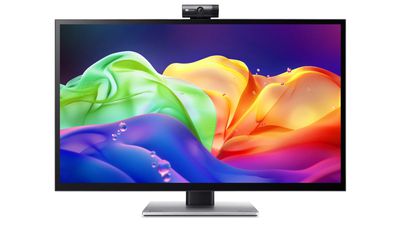
This is a big, heavy display. It's thicker than my Apple Studio Display, and it's thicker than any other display I've tested, likely because of the touch layer. It does have a tapered design so the sides aren't quite as thick as the middle, but this isn't a modern-looking monitor. It doesn't resemble something designed in 2026, especially with the button-based controls and the thick bezels. If someone told me this was a display from 2006, I'd believe it. With its stand, the ProDesigner weighs about 22 pounds, and it takes up a lot of room on my desk.
The display uses an IPS panel and has a resolution of 6016 x 3384, and it can connect to a Mac using HDMI or USB-C. I tested it on a 16-inch M1 Max MacBook Pro running macOS Golden Gate and an M4 MacBook Air. By default, macOS uses a 3008 x 1692 scaled resolution, which is a good compromise between display quality and sizing. It can be set at higher resolutions, including the full 6016 x 3384, but window sizing and text get smaller as resolution goes up.
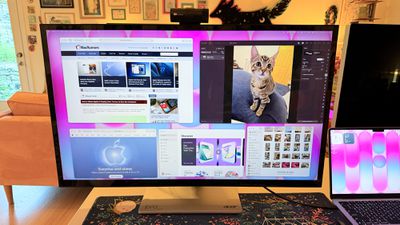
Text is crisp and everything looks sharp at the default resolution, but brightness is limited to 400 nits and contrast is just fair, not outstanding. My office is bright, and in the daytime, 400 nits is a little too dim, especially if I'm simultaneously using the MacBook Pro's much better mini-LED screen or a Studio Display with the Acer ProDesigner. Brightness does go up to 600 nits for HDR content, but I wouldn't recommend it for HDR movies because it doesn't have the local dimming you get from mini-LED or OLED.
Though brightness wasn't where I wanted it to be, quality and color were excellent. With some displays, it's unpleasant to use them with a MacBook Pro because of the pixel density mismatch, but 6K resolution makes a difference when using the display next to a MacBook Pro. Text and interface elements don't look soft or low-resolution. Acer says the display is Calman-verified for color accuracy with support for 99 percent of the Adobe RGB and P3 color gamuts. I don't have a colorimeter or a reference display for testing, but colors were saturated and seemed similar to those on my MacBook Pro. I did notice a little light bleed at the edges of the display when viewing a dark image in a dark room, but it's not something I noticed in regular use and the display otherwise looked uniform.
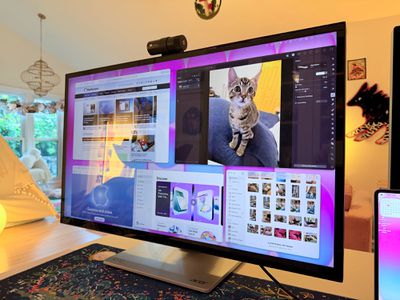
One of the main concerns with any kind of color work is the glossiness of the display. This is one of the most reflective displays I've used, and it is problematic when viewing dark content in a room with bright light. If you have lights behind you, they're going to reflect and make it harder to see what you're working on. Acer says it's an anti-glare display, but I disagree.
This is a display with a 60Hz refresh rate, and I do notice the lower refresh rate when scrolling through webpages because I'm used to my Mac's 120Hz option. This isn't a display I'd choose for games because of it, but games do look good thanks to the resolution.
Controls
Acer doesn't have a native macOS app for controlling the display, so there's no way to control brightness from the Mac unless you download third-party display software. I use BetterDisplay, and it works well.
Without third-party display software, you're limited to the brightness controls on the monitor itself. There are five buttons on the bottom right of the display. On-device controls are not as convenient as software-based controls, and it takes too many button presses to adjust brightness. I need to press one button to toggle the brightness setting, then use a different button and press several times to adjust up or down.
The brightness control is right next to the power button, so I've accidentally turned the display off several times. It's hard to imagine a control scheme that would be less ergonomic than the one Acer chose. You can tediously control all of the display settings with the physical buttons, or use third-party software to solve the problem.
Stand
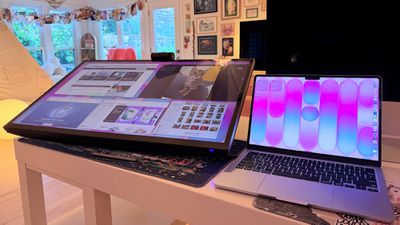
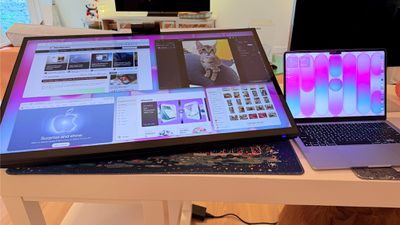
The ProDesigner uses a folding stand made for switching between an upright and a tilted, low-angle orientation, with the latter meant to be used for drawing, sketching, and other tablet-style work. Since the stand is meant to tilt into a tablet position, it doesn't have much height adjustment, with about six inches of range. If you need the display to be taller, you'll need a monitor riser.
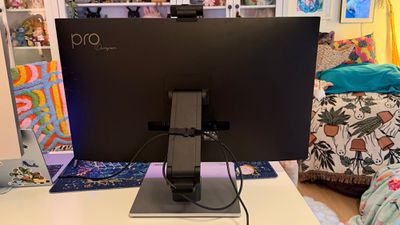
It is easy to pull it down into more of a tablet mode, and when it's oriented like that, it's like using a giant iPad or drawing tablet. It can be adjusted to several different angles, and it swivels 360 degrees so you can find the best position for whatever you're doing. The stand mechanism feels well-designed and there's little friction when making changes.
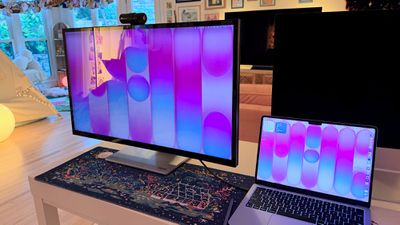
I didn't think attempting to draw or write on a display this size was going to be comfortable, but being able to angle the display helped. I had no issue when using it at my desk, though it does take up a lot of space. This isn't a situation where you can pick up your drawing surface and pop over to the couch to draw. You need the right setup for this display and its large stand.
The stand design makes the most sense if you're often using the display in touch mode, and less sense if you just want a display. It doesn't have the range of height adjustment of a standard desktop display because of the mechanism to shift it into a tablet position.
Ports and Charging
The display connects to a Mac over USB-C and offers 90W passthrough charging. That's not enough power to reach the 140W maximum charging speed of a 16-inch MacBook Pro, but it was enough to keep my Mac topped up over the course of the day, even while gaming.
It has two HDMI 2.1 ports, one DisplayPort 1.4 port, a USB-C port with power delivery, two USB-A 3.2 Gen 1 ports, a USB-B upstream port, and a 3.5mm jack. There is no Thunderbolt support, so you can't daisy-chain displays.
Touchscreen and Software
macOS doesn't have native touchscreen support, so third-party software is required to make the Acer display's touchscreen function. Acer suggests the UPDD Touch Software driver from Touch-Base, and it allows for 10-finger touch input.

You can use all of the Mac gestures you're familiar with on the ProDesigner, but it's clear this is a display that wasn't built with the Mac in mind. The UPDD software requires per-app customization of touch gestures for some workflows. It's nice that the customization is available, but the software can be confusing. I don't know who is going to want to put in the work to get this running in a way that doesn't involve at least some frustration. In an app like Pixelmator Pro, I'd have to manually tweak the gestures to be able to use it efficiently, and the same goes for most apps. Apps on the Mac just weren't built for touch input.
With the UPDD software, touch input works, and works well. Finger taps are accurate, and Acer has a stylus that goes along with the display (that is a separate purchase). With the stylus, fine-line writing and drawing are supported, and features I'd expect with a stylus, like palm rejection and tilt, are available. Using the stylus is similar to using an iPad with an Apple Pencil that has hover. I can see the mouse cursor when the stylus is close to the screen so I can tell what I'm doing. Using touch or the stylus didn't seem laggy, and writing on the display was responsive.
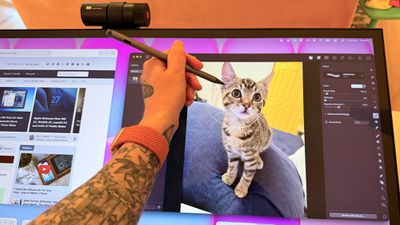
Touch works on macOS, and I can tap with a finger to launch apps, change settings, adjust windows, and control on-screen elements, but it's not a feature I need or want. It would take me months, if not years, to get as fast with touch gestures as I am with a trackpad, and I'd never be able to replace the keyboard.
The display's touch feature is useful for drawing and sketching, and likely convenient for workflows like video editing, but I'm not sure it has appeal beyond that. There aren't many Mac tasks that are easier to do or more accessible with touch controls. Also, a display this big and this glossy really shows fingerprints.
Webcam and Speakers
There is a built-in 8-megapixel webcam, and it is higher quality than the camera in my MacBook Pro (not hard to achieve). Since I don't do a ton of video calls, it's not a super important feature for me, but someone who is often in video meetings might appreciate it more.
The camera can tilt for adjusting the angle depending on where you're positioned, but it is a wider angle than I'm used to with a webcam and the framing is awkward. When the camera is not in use, there's a physical cover for privacy purposes.
The speakers are fine, but nothing special. I wouldn't use them over standalone speakers or a Mac's speakers. Voice calls and short video content sound fine, but music sounds one-dimensional.
Bottom Line
Acer's ProDesigner PE320QXT wasn't built for the Mac, and it's obvious. It requires a lot of software to work, and it's software that Acer didn't even design. You can use it with the Mac, but the Mac was an afterthought.
The touch hardware works well, and if you want a 31.5-inch drawing surface, this display does that. You can make this work with a favorite creative app, and it's a lot of fun to have such a big digital canvas. There are rumors that Apple is working on a touchscreen OLED MacBook, so macOS could get more touch-friendly in the near future and that might change how useful the display is.
macOS wasn't built to be used with a touchscreen, and I would bet money that no Mac user is going to speed up an established and comfortable Mac workflow with Acer's display.
The only reason to choose this display over another 6K display is the touch feature. If you want a big touch surface, the ProDesigner is a good option and it's priced well for what it is. If you need a Mac display for any other purpose, you're probably better off getting something else.
How to Buy
The Acer ProDesigner PE320QXT can be purchased from B&H for $1,299.99.














































Top Rated Comments
I got mine November for more than that & have not had any issues with it.
Built-in speaker's ass but given the price relative to other 6K displays before it, when I bought it and today it's a solid display with best effort macOS support.