Skip to Content

iOS 18: Use the New Text Formatting Options in Messages

by

Apple has introduced new text formatting options in the Messages app with iOS 18, giving you more ways to express yourself in conversations. The latest update allows you to add emphasis to your text messages using bold, italic, underline, and strikethrough formatting.
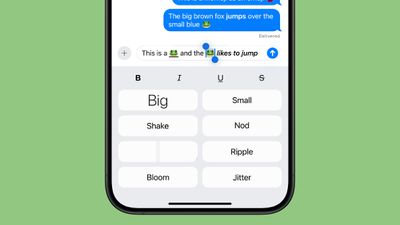
ios 18 messages formatting
The new feature provides a richer messaging experience, moving beyond the limitations of plain text and all-caps for emphasis. You can now apply these formatting options to entire messages, individual words, or even specific letters, offering a high degree of customization in how you communicate.

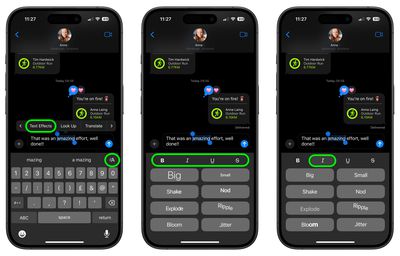
To access the new formatting tools, you can tap the "A" icon that appears above the keyboard after typing a message. This action highlights the entered text and presents a range of formatting options. Alternatively, you can double-tap to select specific words and then choose the desired formatting from the options that appear.

Here's a step-by-step walkthrough to get you started:

  1. Select the text that you want to add formatting to with a double tap. (You can use the anchors to shorten and widen your selection.)
  2. Tap the "A" icon, or select the Text Effects option in the popup menu (tap right to reveal it).
  3. Above the text effects, choose the formatting option that you'd like to use. From left to right, they are Bold, italics, underline, and strikethrough.
messages

That's all there is to it. Did you know that in iOS 18, the Messages app also has a new Send Later option to let you schedule messages? Click the link to learn how it works.


Popular Stories

Apple Event Logo

Apple Released Seven New Products Today

Wednesday March 11, 2026 7:05 am PDT by
Starting today, the seven new Apple products that were announced last week are available at Apple Stores and beginning to arrive to customers. The colorful MacBook Neo and all of the other new products are on display at most Apple Store locations around the world starting today. Apple Stores have inventory of the new products for both walk-in customers and Apple Store pickup, but...


ios 26 4 yellow

Everything New in iOS 26.4 Beta 4

Monday March 9, 2026 3:50 pm PDT by
Apple is continuing to test the iOS 26.4 beta, and the latest update is now available for developers and public beta testers. As testing goes on, there are fewer new features in each beta, but today’s release adds new emoji characters and a few other changes. New Emoji Apple added new emoji characters, including trombone, treasure chest, distorted face, hairy creature, fight cloud, orca,...
Apple 50 Years of Thinking Different

Apple Announces 50th Anniversary Plans

Thursday March 12, 2026 6:10 am PDT by
Apple today announced that it will celebrate the company's 50th anniversary over the coming weeks, but it has yet to reveal any specific plans. Apple was founded on April 1, 1976, so the company will turn 50 on April 1, 2026. "While Apple is known for looking forward, this milestone offers a special moment to reflect on the journey that has brought the company here, to celebrate the...