Skip to Content

Prevent Siri and Search From Accessing Specific iPhone Apps

by

In iOS 27.2, Apple has a new settings menu that lets you choose which apps Siri, Search, and suggestions can access, all from one list. Here's what's changed and how to use the new menu.

Siri AI Icon
With iOS 27.2, Apple has replaced the old App Access controls with a redesigned Excluded Apps feature that makes it a lot simpler to keep specific apps away from Siri, Search, and suggestions.

It's actually a bigger change than it might sound. Previously, excluding an app in iOS meant opening Settings ➝ Apple Intelligence & Siri ➝ Apps and adjusting each app's toggles individually. This included a switch that let Siri "Learn from this App," and several suggestion options that appeared in Search and widgets.

What was confusing is that some of these switches controlled on-device personalization, rather than access to an app's contents. Moreover, fully keeping an app's content out of search results also required toggling off a separate "Show Content in Search" switch that was buried in each app menu in Settings ➝ Apps.

Thankfully, in iOS 27.2, Excluded Apps consolidates all of this into a single multi-select list, where you can add an app once and make it unavailable to Siri, Search, and suggestions. Here's where to find it.

How to Exclude Apps From Siri and Search

  1. Open the Settings app on your iPhone.
  2. Tap Siri.
  3. Tap Excluded Apps.
  4. Tap Add Apps, select the apps you want to exclude, then confirm your selection.
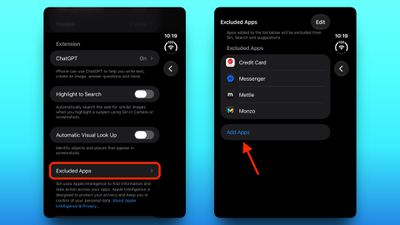
siri exclude apps

Bear in mind that excluding an app can disable some Siri features for it. For example, the Electronic Freedom Foundation found that excluding Messages stops Siri AI from reading or replying to messages. Also, onscreen awareness – where you invoke Siri and ask it for information about what you're currently looking at – will no longer work in any app you exclude.

Let an App Back Into Siri and Search

To return individual app access to Siri and Search, simply tap the Edit button in the Excluded Apps menu, then tap the minus button next to the app in question and hit the checkmark at the top to confirm.
Top Rated Comments

sleep_to_dream Avatar
3 weeks ago
This is a huge win. It drove me crazy having to turn off all those switches for each app individually! Then remembering to do it every time I installed a new app...

Thank you so much Apple 🥹

Oh, has anyone else noticed that the "Show Related Content" switch under Search reverts back when you turn it off?
Score: 9 Votes (Like | Disagree)
CharlesShaw Avatar
3 weeks ago
Anything that makes it easier to assess what's what and what's doing what is welcome to me. The older I get, the less I trust my ability to understand my personal technology which continues to become more complex.
Score: 6 Votes (Like | Disagree)
Johnny907 Avatar
3 weeks ago
lol she gets so pissy when you block her from apps. I asked Siri what my new messages were and she specifically whined about “excluded apps” three times in her response. So I told her to stop mentioning excluded apps because it was redundant and she got even more pissy 😆
Score: 4 Votes (Like | Disagree)
TroyBoy30 Avatar
3 weeks ago
i excluded every app on my phone a while back
Score: 3 Votes (Like | Disagree)
3 weeks ago
Very good to see this. This is how it should have been always. Now it is really easy.
Score: 3 Votes (Like | Disagree)
Starfia Avatar
3 weeks ago
On the face of it, this sounds like a great move. I keep Apple Intelligence as disabled as possible ('https://stevebarnes.org/blog/1791665750/') on Golden Gate, but when I briefly tried it, the Siri AI conversation app was the one thing I was impressed by and could see myself using routinely – but I know I didn't need (or want) it to access personal data, and it was nebulous whether it was possible to truly restrict that.

Ideally one could do the inverse, as one can with notifications: start with everything off and then opt in deliberately and selectively.
Score: 2 Votes (Like | Disagree)

Popular Stories

Siri AI Icon

Siri AI Settlement: Here's How Much Apple Will Pay You

Saturday November 21, 2026 9:08 am PST by
In May, Apple agreed to pay $250 million to settle a U.S. class action lawsuit over Siri AI's delayed launch, and there is one month remaining to submit a claim through the settlement website. In a court document earlier this week, lawyers said that claimants will likely receive at least $61 per eligible iPhone, based on early participation data so far. The exact payment amount per eligible ...
Siri AI Icon

iOS 27.3 Beta Adds Daily Siri AI Limits and iCloud+ Upgrades

Monday November 16, 2026 10:14 am PST by
With the latest iOS 27.3, iPadOS 27.3, and macOS 27.3 betas, Apple is starting to test limits and paid upgrades for Siri AI and Apple Intelligence features. Every Apple device gets a free daily access allowance for Siri AI and Apple Intelligence features that rely on server-side AI processing, such as Image Playground and Clean Up in Photos. When that limit is hit, there will be an option to ...
Apple TV 4K 4th Generation feature0

Apple Releases tvOS 27.2.1 With Siri AI for Older Apple TVs

Friday November 13, 2026 11:26 am PST by
Apple today released tvOS 27.2.1, an update to the tvOS 27 operating system that launched in September. tvOS 27.2.1 comes nearly three weeks after Apple released tvOS 27.2. tvOS 27.2.1 brings Siri AI support to the 2nd- and 3rd-generation Apple TV 4K models, but it is available for all Apple TV 4K models that support tvOS 27. Apple announced Siri AI for the Apple TV when debuting the...
Latest Stories
Apple's Official 2026 Black Friday Offer Starts Rolling Out
1 hour ago
Halide Adds Fill Light Feature for iPhone Duo
1 hour ago
MacBook Air Black Friday Deals Now Live With Massive $399 Savings
2 hours ago
Amazon Discounts All MacBook Neo Models by $99 for Black Friday
3 hours ago
Kodak Launches Unique AirTag Rival With E-Ink Display
4 hours ago
Here's Why the Apple Store is Going Down
4 hours ago
Apple Still Working on Giant Foldable iPad That Could Cost $5,000
4 hours ago
iPhones Dominate China's Weak Singles' Day Smartphone Sales
5 hours ago
iPhone 20 Pro Could Feature Ceramic in Limited-Edition Model
5 hours ago
Apple Faces Korean Regulator Review Over iPhone 16 AI Advertising
6 hours ago
Apple Watch Ultra 4 Hits New Best-Ever Price of $649.99 for Black Friday
7 hours ago
New Apple Store Opening in India, Download the Special Wallpaper Now
13 hours ago
Redesigned OLED MacBook Air Could Launch in 2027 or 2028
18 hours ago
AirPods Pro 3 for $149 is One of The Best Black Friday Deals This Year
19 hours ago
1Password Security Breach: What Was Accessed and What Wasn't
20 hours ago
WhatsApp Finally Adds Scheduled Messages
21 hours ago
Get Apple's Cheapest iPad for $379 During Amazon's Black Friday Sale
21 hours ago
Rumor: iOS 28 to Revamp Notifications
22 hours ago
iPhone 18 Pro Max Battery Exhausts a Toy Cyclops in New Apple Ad
1 day ago
$799 Smart Glasses Promise Vision Pro-Style Controls in a 45g Frame
1 day ago
How To Get an iPhone Duo or iPhone 18 Pro at No Cost Through T-Mobile for Black Friday
1 day ago
Apple Has an iPhone Notifications Problem
1 day ago
Amazon Sweetens Black Friday Deals on PROLED MacBook Pro
1 day ago
Apple Has iPads Running macOS Internally, Says Gurman
1 day ago
Apple Is Far From Done With 2026: Here's What's Still Coming
1 day ago
Threads App for iPad Now Available
1 day ago
Claude Now Lets You Install Artifacts as Desktop Apps
1 day ago
Tidal Bans AI Music, While Apple Music Sticks to Labels
2 days ago
Add Holiday Lights and Snow to Your Mac With Festivitas
2 days ago
Meta's Muse AI Agent Comes to Instagram DMs
2 days ago