

If you're eager to change your screen time habits – like staying off Instagram or reading more books – the iPhone Duo may offer a solution. It's the first iPhone with two screens, and there's a trick that you can use to make it consistently open a specific app whenever you unfold it and look at the bigger display.
In the Shortcuts app, there's a new iPhone Duo trigger called "Opened or Closed" that runs an automated action when the device is unfolded or folded. One of the best uses for it, I've found, is launching a specific app the moment you open your Duo – so that unfolding the phone takes you straight into the app experience you're expecting, and nothing else distracts.
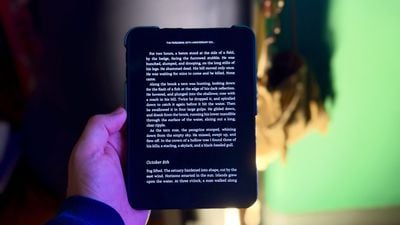
I've always been keen to read more on my iPad, so in this example, I'll show you how to make the iPhone Duo launch the Kindle app whenever you unfold the device. It makes flipping the phone open feel like opening a book to where you left off. But you can substitute any app you like. The following steps show you how it's done.
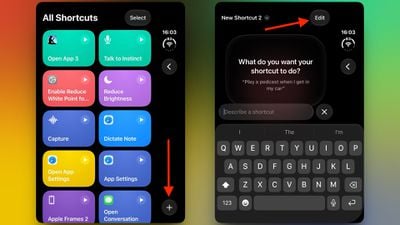
- Open the Shortcuts app on your iPhone Duo.
- On the "All Shortcuts" screen, tap the plus (+) button in the bottom-right corner.
- On the "What do you want your shortcut to do?" screen, tap Edit in the top-right corner.

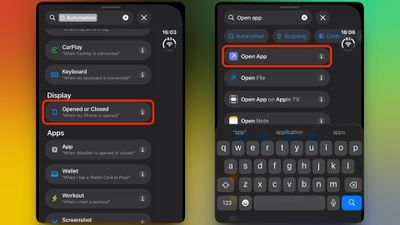
- Tap the Search field at the bottom of the editor, type "Automation," then under the "Display" section, tap Opened or Closed ("When my iPhone is opened").
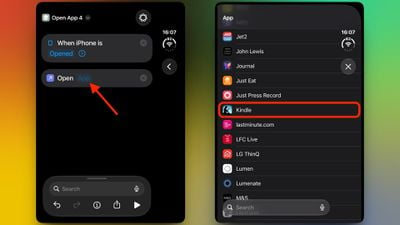
- Select Opened as the trigger in the editor screen, then search for the Open App action.
- Tap the App placeholder in the "Open App" action, then choose the app you want to launch. In this example, we'll choose Kindle.
- Now leave the Shortcuts app – the automation saves automatically and is active right away. You can rename the shortcut if you like, but it's not required.
That's all there is to it. Now when you open your iPhone Duo, your chosen app will launch automatically.
If you'd rather run an action when you close your Duo, simply choose Closed as the trigger instead, or select Opened or Closed to run it both ways. The Shortcuts app also allows you to add conditions to an automation, like a time or a focus mode, ensuring that it only triggers when your chosen conditions are met.
This new automation opens up many possibilities. Let us know what you come up with in the comments below.














































Top Rated Comments
I should have taken a picture.
1. The security cage around the Duo made holding it in-hand, near-impossible. Once removed from it's pedestal, there was enough slack in the cable to pull it about 4' off it' base. Completely useless.
2. The unit was dead. The employee comes over, asking if he could help me, notices it's dead and then unplugs a neighboring iPad and places the Duo on the table behind the iPad to connected the USB-C cable. Making it even more cumbersome to hold (couldn't) and view (couldn't). We both chuckled. Mine was out of annoyance. I should have taken a photo. It was pretty funny how unsells that demo unit was.
WTF is the point of having demos out if you can't hold them, let alone close enough to see them?
I've not ventured into an Apple Store. Are their demo units any more "usable?"