When you shoot video on iPhone 16 models, multiple formats like Spatial Audio and Stereo are recorded to allow more audio customization. If you record video with Spatial Audio turned on, you can later edit the video sound — to reduce background noise to focus on the person speaking on camera, for example.
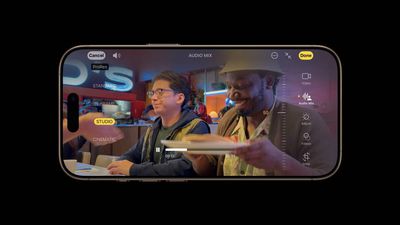
audio mix iphone 16
Spatial Audio is automatically enabled on all iPhone 16 models when you record video. Spatial Audio produces a more realistic and immersive audio recording, but it also allows you to edit the sound of your video later in the Photos app using the new Audio Mix feature.

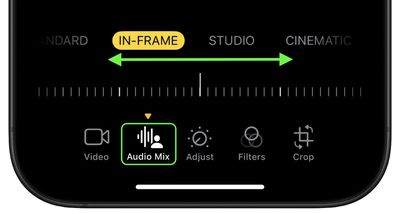
Audio Mix uses machine learning to identify and separate background audio and speech, allowing you to choose one of the following options to remix your video's sound:

  • Standard: Play the original audio you recorded.
  • In-Frame: Reduce sounds and voices from sources not visible in the video frame.
  • Studio: Reduce background sounds and reverb, to make it sound more like you’re recording in a professional studio.
  • Cinematic: Put all the voices onto a front-facing track and leave environmental noises in surround, like the audio in movies.

Editing With Audio Mix

The following steps show you how to edit the audio of a video captured on iPhone 16:

  1. Open the Photos app on your iPhone.
  2. Open a video, then tap the Edit icon (it looks like three sliders).
  3. Tap Audio Mix, then choose one of the following: Standard, In-Frame, Studio, and Cinematic.
  4. Drag the slider below the mix options to increase or decrease the effect and background noise levels.
  5. Tap Done to finish.

photos

That's all there is to it. On iPhone 16 models, when you record video with Spatial Audio or Stereo, wind noise is automatically reduced while recording. You can turn off this this setting by going to Settings ➝ Camera ➝ Record Sound, then turning off Wind Noise Reduction.

Related Roundup: iPhone 16
Related Forum: iPhone

Top Rated Comments

SantaFeNM Avatar
16 months ago

Has anyone found this particular feature useful? The few videos I've seen demonstrating this on YouTube didn't seem like an improvement over the audio in older phones. ?️
For filming auditions, the new mics and Audio Mix features are incredibly useful to me. Eliminating or reducing reverb/background noise on-device, while not having a clip/take ruined is a Godsend. I adjust the intensity of the different effects to get just the right sound quality, never to the point that it sounds overly processed/robotic.

Sound....Audio Mix with the better mics, is one of the reasons I purchased the 16 Pro, coming from a 13 Mini.
Score: 4 Votes (Like | Disagree)
LIVEFRMNYC Avatar
16 months ago
This works extremely well. Recorded a short video in the rain. Went from standard to studio, and the results were amazing.
Score: 4 Votes (Like | Disagree)
vantelimus Avatar
16 months ago

Has anyone found this particular feature useful? The few videos I've seen demonstrating this on YouTube didn't seem like an improvement over the audio in older phones. ?️
The few videos you’ve seen on YouTube were rushed there to beat other reviews. Wait until people who actually use the features learn how to use them before you listen to the reviews.

Honestly, reviews within the first couple of weeks are mostly suspect. They fall into one of three categories: product promotion, negative fud, or useless self promotion.
Score: 3 Votes (Like | Disagree)
Reeneman Avatar
16 months ago
The feature itself is a good one.
Score: 3 Votes (Like | Disagree)
heretiq Avatar
16 months ago
This is a very impressive integration of pro audio features in a consumer device. The capability is out of the way for those who don’t need it, but there and implemented in an elegant way for those who do need it. A great example of innovation in managing complexity of devices deployed at billions of units scale.
Score: 3 Votes (Like | Disagree)
coffeemilktea Avatar
16 months ago
Has anyone found this particular feature useful? The few videos I've seen demonstrating this on YouTube didn't seem like an improvement over the audio in older phones. ?️
Score: 2 Votes (Like | Disagree)

Popular Stories

iOS 26

iOS 26.2 Coming Soon With These 8 New Features on Your iPhone

Thursday December 11, 2025 8:49 am PST by
Apple seeded the second iOS 26.2 Release Candidate to developers earlier this week, meaning the update will be released to the general public very soon. Apple confirmed iOS 26.2 would be released in December, but it did not provide a specific date. We expect the update to be released by early next week. iOS 26.2 includes a handful of new features and changes on the iPhone, such as a new...
iOS 26

iOS 26.4 and iOS 27 Features Revealed in New Leak

Friday December 12, 2025 10:56 am PST by
Macworld's Filipe Espósito today revealed a handful of features that Apple is allegedly planning for iOS 26.4, iOS 27, and even iOS 28. The report said the features are referenced within the code for a leaked internal build of iOS 26 that is not meant to be seen by the public. However, it appears that Espósito and/or his sources managed to gain access to it, providing us with a sneak peek...
AirPods Pro Firmware Feature

Apple Releases New Firmware for AirPods Pro 2 and AirPods Pro 3

Thursday December 11, 2025 11:28 am PST by
Apple today released new firmware designed for the AirPods Pro 3 and the prior-generation AirPods Pro 2. The AirPods Pro 3 firmware is 8B30, up from 8B25, while the AirPods Pro 2 firmware is 8B28, up from 8B21. There's no word on what's include in the updated firmware, but the AirPods Pro 2 and AirPods Pro 3 are getting expanded support for Live Translation in the European Union in iOS...
iOS 26

Apple Releases iOS 26.2 With Alarms for Reminders, Lock Screen Changes, Enhanced Safety Alerts and More

Friday December 12, 2025 10:10 am PST by
Apple today released iOS 26.2, the second major update to the iOS 26 operating system that came out in September, iOS 26.2 comes a little over a month after iOS 26.1 launched. ‌iOS 26‌.2 is compatible with the ‌iPhone‌ 11 series and later, as well as the second-generation ‌iPhone‌ SE. The new software can be downloaded on eligible iPhones over-the-air by going to Settings >...
Google maps feaure

Google Maps Quietly Added This Long-Overdue Feature for Drivers

Wednesday December 10, 2025 2:52 am PST by
Google Maps on iOS quietly gained a new feature recently that automatically recognizes where you've parked your vehicle and saves the location for you. Announced on LinkedIn by Rio Akasaka, Google Maps' senior product manager, the new feature auto-detects your parked location even if you don't use the parking pin function, saves it for up to 48 hours, and then automatically removes it once...
AirTag 2 Mock Feature

Apple AirTag 2: Four New Features Found in iOS 26 Code

Thursday December 11, 2025 10:31 am PST by
The AirTag 2 will include a handful of new features that will improve tracking capabilities, according to a new report from Macworld. The site says that it was able to access an internal build of iOS 26, which includes references to multiple unreleased products. Here's what's supposedly coming: An improved pairing process, though no details were provided. AirTag pairing is already...
macOS Tahoe 26 Thumb

Apple Releases macOS Tahoe 26.2 With Edge Light

Friday December 12, 2025 10:08 am PST by
Apple today released macOS Tahoe 26.2, the second major update to the macOS Tahoe operating system that came out in September. macOS Tahoe 26.2 comes five weeks after Apple released macOS Tahoe 26.1. Mac users can download the macOS Tahoe update by using the Software Update section of System Settings. macOS Tahoe 26.2 includes Edge Light, a feature that illuminates your face with soft...
iOS 26

15 New Things Your iPhone Can Do in iOS 26.2

Friday December 5, 2025 9:40 am PST by
Apple is about to release iOS 26.2, the second major point update for iPhones since iOS 26 was rolled out in September, and there are at least 15 notable changes and improvements worth checking out. We've rounded them up below. Apple is expected to roll out iOS 26.2 to compatible devices sometime between December 8 and December 16. When the update drops, you can check Apple's servers for the ...