iOS 26: Screen and Filter Messages From Unknown Senders - MacRumors
Skip to Content

iOS 26: Screen and Filter Messages From Unknown Senders

by

In iOS 26, Apple has introduced enhanced message filtering that gives you more control over unwanted texts, separating spam messages from unknown senders into distinct categories. Here's how to set up and use these new filtering options to keep your Messages app clutter-free.
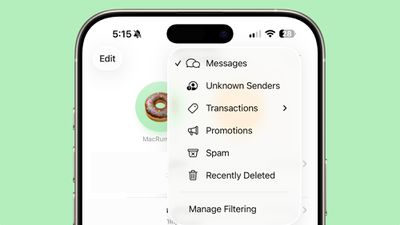
ios 26 messages filtering

Enable Message Filtering Settings

Before you can filter messages from unknown senders in iOS 26, you need to enable the filtering options in your Messages settings.

  1. Open the Messages app on your iPhone.
  2. Tap the filter menu icon (three horizontal lines) in the top-right corner.
  3. Select Manage Filtering. This takes you directly to the Messages section in Settings.
  4. Toggle on Screen Unknown Senders to enable filtering.
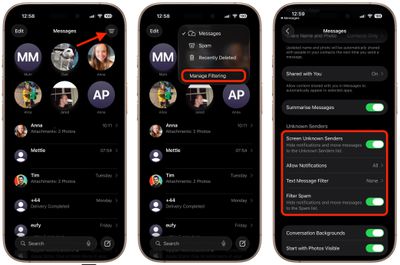
messages

Once activated, "Unknown Senders" will appear as an option in the Messages app's filter menu.

Configure Additional Filtering Options

While you're in the message filtering settings, you'll find several other options worth configuring:

  • Allow Notifications lets you choose whether to receive alerts for certain messages from unknown senders, such as verification codes.
  • Text Message Filter provides additional screening options (this setting may not appear unless you have a third-party app with message filtering extensions installed, depending on your region and carrier).
  • Filter Spam is enabled by default and automatically routes suspected spam to a separate folder.
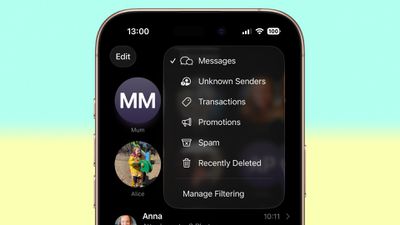
messages filter menu full ios

If the Text Message Filter option appears, selecting it will add "Transactions" and "Promotions" to your filter menu, giving you even more granular control over business-related messages.

Review Messages From Unknown Senders

Once filtering is active, messages from contacts not saved in your address book automatically go to the Unknown Senders section. You'll see a number in brackets next to Unknown Senders in the filter menu indicating new messages, but you won't receive disruptive alerts.

To access these filtered messages, tap the filter menu icon and select Unknown Senders. From here, you can review messages and take action on legitimate senders.
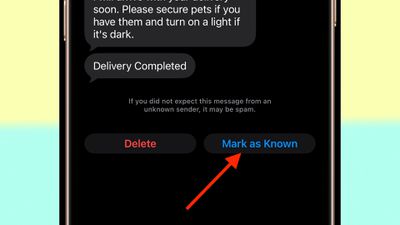
unknown message sender mark as known
Tap any message thread to view its contents. At the bottom of the conversation, you'll see a blue Mark as Known button. Tapping this ensures future messages from that number appear in your main Messages list.

Alternatively, tap the phone number at the top of the conversation to add the sender directly to your Contacts app. Both approaches prevent future messages from this sender being filtered to Unknown Senders.

Recover Spam Messages

By default, messages that iOS 26 classifies as spam are automatically moved to the Spam folder.

To recover a legitimate message that was incorrectly filtered, open the Spam section from the filter menu, tap the message you want to recover, then tap Not Spam. The message will move back to your main Messages list, and future messages from that sender won't be filtered as spam.

If spam filtering isn't working for you as intended, you can turn off the Filter Spam toggle in the Messages app's Settings menu.


Top Rated Comments

14 months ago
Too bad it doesn't work like this with the Apple Watch, defeating the purpose.... My phone hides these like I want but the notifications still fly into my wrist.0
Score: 3 Votes (Like | Disagree)
14 months ago

Too bad it doesn't work like this with the Apple Watch, defeating the purpose.... My phone hides these like I want but the notifications still fly into my wrist.0
Agreed. If I’m wearing my Apple Watch I get spam phone calls and texts but not on the phone. I turned off all messages and calls on watch for now as I rarely use my watch for texts or calls anyway. The check box that says mirror phone doesn’t help either.
Score: 2 Votes (Like | Disagree)
13 months ago

See my post above ('https://forums.macrumors.com/threads/ios-26-screen-and-filter-messages-from-unknown-senders.2467489/post-34178598'), considering the above quote.
Advertising a random app did nothing to address the question I asked.
Score: 1 Votes (Like | Disagree)
14 months ago
Think it will be very useful for me especially taking control of notifications from unknown senders. Will have to try it out after updating.
Score: 1 Votes (Like | Disagree)
14 months ago

Agreed. If I’m wearing my Apple Watch I get spam phone calls and texts but not on the phone. I turned off all messages and calls on watch for now as I rarely use my watch for texts or calls anyway. The check box that says mirror phone doesn’t help either.
One sure way to prevent it. Do not have that feature if possible.

It would be a little difficult though to not use at all because it is not even there.

Other ways yes but not a guarantee to work always or at all.
Score: 1 Votes (Like | Disagree)
14 months ago

Thanks for the article.. I was a bit confused with the changes in iOS 26.

Question for anyone, what are the Transaction and Promotion categories? I have never seen anything be put in either of the groups. Do they actually do anything?
They do

If it's some promotional text I get, instead of just coming into my main incoming messages folder, it will get filtered into there

For the most part, they're just spam so I'll just go to there and hit the report spam button and then choose the delete and report spam option that appears after that

Oddly enough, though I don't get most of them on my primary number, on my secondary number I have for T-Mobile's satellite plan I have alongside my regular service (though with another carrier) I get a ton of them
Score: 1 Votes (Like | Disagree)

Popular Stories

doordash

DoorDash Unveils AI Food Ordering Through Apple's Messages App

Wednesday September 30, 2026 7:24 am PDT by
DoorDash is inviting U.S. customers to join a waitlist for an AI assistant that can take food orders through Apple's Messages app (via Bloomberg). The phone number used in the conversation connects the request to a customer's DoorDash account. The assistant can use previous purchases and preferences to help put together an order, then use a saved payment method at checkout. Customers can...
iphone 17 pro max battery 1 year

Three Years of 80% Charge Limits on iPhone: The Results

Tuesday October 6, 2026 12:59 pm PDT by
Since 2023, Apple's newer iPhones have had an 80 percent charge limit for those who want to extend battery lifespan. Charging to 80 percent instead of 100 percent is supposed to put less stress on the battery, improving longevity. For the last three years, I've used that setting on my iPhone. I started with the iPhone 15 Pro Max, then did the iPhone 16 Pro Max, and most recently, the iPhone...
MagSafe 3 Cable Midnight Feature

Apple Releases MagSafe 3 Charging Cable Firmware Update

Monday October 5, 2026 5:59 am PDT by
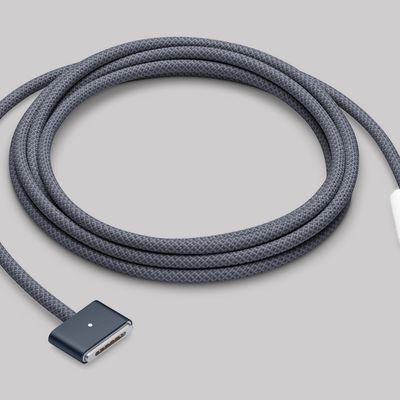
For the first time since February 2023, Apple has released a firmware update for the MagSafe 3 charging cable for the MacBook Pro and MacBook Air. Specifically, Apple last week released firmware version 3.2.0 for the USB-C to MagSafe 3 Cable. The previous firmware version for the cable was 3.1.12. It is unclear what is included in the latest firmware, as Apple does not publish release...
Latest Stories
Gurman: OLED MacBook Pro Won't Be 'Significantly Thinner'
23 minutes ago
Microsoft Launches $2,599 Surface Laptop Ultra to Take on MacBook Pro
8 hours ago
Google's SynthID AI Detector is Now Available to Everyone
9 hours ago
ChatGPT Gets GPT-6 and New Intelligent UI With Visual Answers
10 hours ago
Get AirPods Pro 3 for $179, Apple Watch for $199, and More Before Prime Day Ends Today
11 hours ago
Apple Watch Series 12 and Ultra 4 Score 4/10 for Repairability
11 hours ago
Apple Launches Creative Labs Program With The King's Trust
11 hours ago
Apple Watch Series 12, Ultra 4 Owners Report Skin Irritation
14 hours ago
Boston's MBTA Testing New Charlie Card With Apple Wallet Support
15 hours ago
Manchester's Bee Card Now Fully Supported in Apple Wallet
17 hours ago
You Can Get Up to $149 Off Every New Mac Mini During Prime Day
17 hours ago
Best Buy Takes $260 Off All iPhone Air Models During Techtober Sale
18 hours ago
The Best Anker Prime Day Deals: Score Big on MagSafe Chargers and More
18 hours ago
12 New Things to Expect From Apple in October
18 hours ago
Prime Day Offers Best TV Prices of the Year From Samsung, Sony, and More
19 hours ago
First Look at LG's Smart Home Products Made With Apple
19 hours ago
Apple Watch Ultra 3 and Ultra 4 See Record Discounts During Prime Day
20 hours ago
Apple Drops Intel Macs From Magic Mouse/Trackpad Compatibility Lists
20 hours ago
Apple Reportedly Waiting on Samsung for Ultimate Bezel-Free iPhone Display
21 hours ago
Apple's Own Home Security Camera Still Coming Next Year
22 hours ago
Unfolded iPhone Duo Lets You Preview Documents in a Two-Page Layout
23 hours ago
Formula 1 Coverage on Apple TV to Get Dolby Atmos Later This Month
1 day ago
LG Making Doorbell, Lock, and Cameras for Apple's Home Hub
1 day ago
Apple to Report Q4 2026 Earnings on November 2
1 day ago
Three Years of 80% Charge Limits on iPhone: The Results
2 days ago
macOS 27.2 Further Hints at MacBook With Touch-Enabled OLED Display
2 days ago
The 15 Best Apple Deals Under $200 for Prime Day
2 days ago
AirPods Pro 3 and AirPods Max 2 Get Big Price Drops for Prime Day
2 days ago
Apple Releases Second Public Betas of iOS 27.2 and macOS Golden Gate 27.2
2 days ago
'Crossy Road Rush' Launching Exclusively on Apple Arcade in November
2 days ago