iOS 27 Finally Unlinks Alarm Volume From Your iPhone Ringer - MacRumors
Skip to Content

iOS 27 Finally Unlinks Alarm Volume From Your iPhone Ringer

by

For the better part of two decades, an iPhone's alarm volume has matched its ringer. In other words, if you slide the ringtone volume down to silence your iPhone overnight, you're also turning your alarm's volume down with it. That's no longer the case in iOS 27.

apple alarm app
Settings now includes an "Alarms and Timers" section with its own Match Ringtone Volume toggle. If you toggle it off, a dedicated slider appears that allows you to drop the ringer volume to nothing, and you'll still be woken at whatever alarm volume you choose.

How to Set a Separate Alarm Volume

  1. Open Settings on your iPhone.
  2. Tap Sounds & Haptics.
  3. Under "Alarms and Timers," toggle off Match Ringtone Volume.
  4. Drag the slider that appears to set your alarm and timer volume.
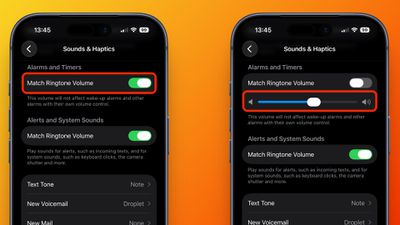
settings

That's all there is to it. Alarms and timers now have their own level, regardless of how quiet or loud your iPhone's ringer is set at.

Bear in mind that alarms carrying their own volume control – like any wake-up alarm you have selected in your Sleep schedule – will keep the level you set for them individually. To go back to the old behavior, simply toggle Match Ringtone Volume back on, and the slider will disappear.

A Second Toggle for Alerts and System Sounds

You may notice that directly below the "Alarms and Timers" controls sits a second Match Ringtone Volume switch in a separate section. This covers alerts and system sounds, like incoming texts, keyboard clicks, and suchlike. Toggle off this setting and you'll get a similar independent slider. It's a neat fix if, say, you've ever wanted a loud ringer without a loud keyboard.

iOS 27 is currently available in public beta and is expected to be generally available this coming September.

Related Roundups: iOS 27, iPadOS 27

Top Rated Comments

7 hours ago at 06:41 am
This, right here, is a reason to upgrade.
Score: 36 Votes (Like | Disagree)
PsykX Avatar
6 hours ago at 07:02 am
This is one of the rare things where I would prefer the Android implementation


Attachment Image
Score: 32 Votes (Like | Disagree)
7 hours ago at 06:41 am
“Can’t innovate anymore, my @ss!”

Finally, though.
Score: 20 Votes (Like | Disagree)
7 hours ago at 06:52 am
What a time to be alive.
Score: 17 Votes (Like | Disagree)
7 hours ago at 06:50 am
Which developer resigned over this change? This feels like it only stayed the same because of a single persons reign of terror over development of a feature that no one liked.
Score: 12 Votes (Like | Disagree)
7 hours ago at 06:44 am
My alarm volume has always been unlinked from my phone because my phone doesn’t stay in my bedroom, and I have an actual dedicated alarm clock.
Score: 10 Votes (Like | Disagree)

Popular Stories

Everything New Your iPhone Can Do on iOS 27 Feature 1

25 New Things Your iPhone Can Do in iOS 27

Thursday July 30, 2026 6:10 am PDT by
Apple will release iOS 27 in September, and despite the company's focus this year on refining its flagship operating system and nixing bugs, there are still many additional features on the way, not least of which is Apple's new context-aware Siri, re-tooled for the generative AI era. This year's major iPhone software update isn't all about AI, though, as the following feature list...
iCloud iPhone 17 Pro

iPhone Users Who Pay for iCloud Storage Get Two New Perks on iOS 27

Thursday July 2, 2026 6:10 am PDT by
If you pay for certain iCloud+ storage plans beyond the 5GB that Apple offers for free, you will receive two more perks on iOS 27 at no additional cost. A summary of the two new iCloud+ perks on iOS 27:Increased daily usage limits for some new Apple Intelligence features, including image generation in the revamped Image Playground app. HomeKit Secure Video cameras receive generated video...
ios 27

iOS 27 Brings These Five New Features to Your iPhone Lock Screen

Thursday July 23, 2026 4:05 am PDT by
Apple unveiled iOS 27 at WWDC this week, and while the headline-grabbing Siri overhaul has received the most attention, the Lock Screen has picked up several refinements that you may have missed. Some are brand-new additions, while others are tweaks to features Apple introduced in iOS 26, but together they give you more control over how your Lock Screen looks and behaves. Here are five...