Apple has made the second macOS 27 Golden Gate public beta available for testing before the new Mac operating system's official release in the fall. Keep reading to learn whether you should install it on your Mac, and if so, how to go about it.
Getting access to the macOS Golden Gate public beta is simple, and can be done by enrolling your Mac in Apple's free Apple Beta Software Program. The steps you need to complete to install the software on your Mac are provided towards the end of this article, but before you jump ahead, here are a few things worth considering.
Should I Install macOS Golden Gate Public Beta?
With macOS Golden Gate, Apple includes the same Siri AI features as iOS 27 and iPadOS 27, accessed through Spotlight with the Command + Space keyboard shortcut. Siri can search the web, find information in your photos, emails, and messages, answer questions about what's on your screen with Visual Intelligence, and complete actions within and across apps. A dedicated Siri app also supports ongoing conversations.
Apple has also refined the Liquid Glass design introduced last year. A new transparency slider lets you adjust the overall system effect, while updated opacity improves readability by better diffusing complex content. Additional interface refinements also add depth and separation, making it easier to identify the active window. There are a lot more improvements beyond the above, so the availability of the public beta will no doubt generate a lot of interest among Mac users.
But before you commit, bear in mind that Apple does not recommend installing macOS beta updates on your main Mac. However stable you may have heard it is anecdotally, this is beta software, which means there are almost certainly bugs and issues that can prevent certain software from working properly or cause other problems with the system. Indeed, one of the reasons that Apple releases the beta early is so that users can feed back problems and help Apple debug them. If you have a spare Mac hanging around, by all means use that, otherwise consider holding off until the general release in the fall.
Is My Mac Supported?
The update confirms the end of Intel Mac support. Apple said last year that macOS Tahoe would be the final release to run on pre-Apple silicon machines, and macOS 27 makes that official – you'll need an Apple silicon Mac to install it.
Here are the Macs compatible with macOS Golden Gate:
- MacBook Neo (2026)
- MacBook Air with Apple silicon (2020 and later)
- MacBook Pro with Apple silicon (2020 and later)
- iMac with Apple silicon (2021 and later)
- Mac mini with Apple silicon (2020 and later)
- Mac Studio with Apple silicon (2022 and later)
- Mac Pro with Apple silicon (2023 and later)
Four models that ran macOS Tahoe didn't make the cut this year. They include the MacBook Pro (16-inch, 2019), the MacBook Pro (13-inch, 2020, Four Thunderbolt 3 ports), the iMac (2020), and the Mac Pro (2019).
Don't Forget to Back Up Your Mac
Be sure to back up your Mac using Time Machine before installing the software using the method, otherwise you won't be able to revert back to the previous version of macOS if things go wrong.
How to Install macOS Golden Gate Public Beta
- Head over to Apple's Beta Software Program website and sign up using your Apple Account credentials, then agree to the terms and conditions if required.

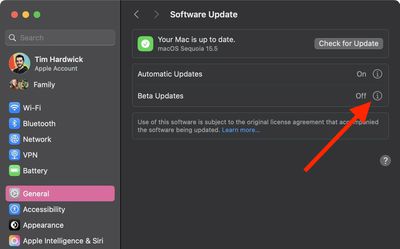
- Next, open System Settings on your Mac and select General ➝ Software Update.
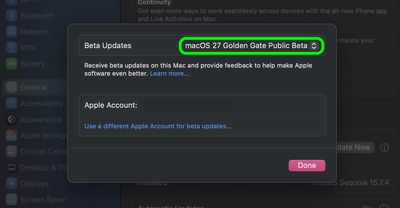
- Look for "Beta Updates" and click the info (i) symbol next to it.
- Choose macOS 27 Golden Gate Public Beta from the dropdown list.
- Click Upgrade Now to begin the update process to macOS 27.

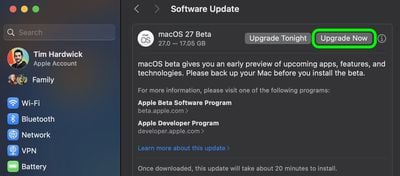
That's all you need to do. The installation process will complete just like a standard macOS update, so sit back and let the installation finish, after which your Mac will boot directly into the macOS Golden Gate beta.