

How to Hard Reset or Force Reset iPhone 14 - MacRumors
Skip to Content

How to Hard Reset or Force Reset iPhone 14

by

Apple's iPhone 14, ‌‌iPhone 14 Plus‌‌, iPhone 14 Pro, and ‌‌iPhone 14 Pro‌‌ Max come in different size options compared to last year's iPhone 13 series, but they still share similar design elements with Apple's 2021 models, such as an all-screen design and no Home button on the front.
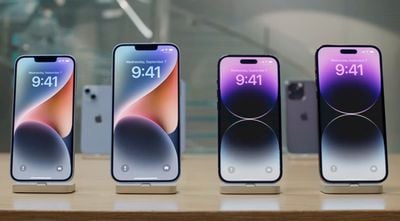
iphone 14 lineup
As such, the method of hard resetting or force restarting hasn't changed from the previous series. Still, if you're upgrading from a device with a Home button, keep reading to learn how to hard reset or force reset your iPhone 14, as the process can come in handy if your device bugs out or stops responding for any reason.

How to Hard Reset the iPhone 14 (All Models)

  1. Quickly press and release the Volume Up button.
    force restart iphone 14

  2. Quickly press and release the Volume Down button.
  3. Press and hold the Side button until the Apple logo appears, then release the Side button.
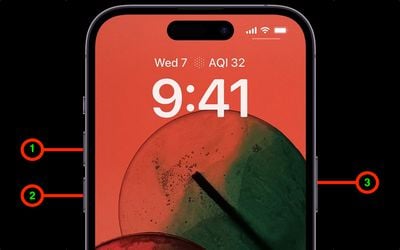
During this process, you will see a slider to power off the iPhone. You're going to want to ignore it and continue holding down the Side button until the screen goes black. At that point, the Apple logo will pop up, and after the restart is complete, the screen will activate once again.

Using the force restart process prevents you from having to shut the iPhone down entirely, which takes a few more steps and takes longer to boot up again.

If you do want to shut the iPhone down, you can do so by going to the General section of the Settings app, scrolling down to the bottom, and choosing the Shut Down option.


Related Forum: iPhone

Popular Stories

iOS 26

iOS 26.4 Adds Two New Features to CarPlay

Tuesday March 24, 2026 1:55 pm PDT by
iOS 26.4 was released today, and it includes a couple of new features for CarPlay: an Ambient Music widget and support for voice-based chatbot apps. To update your iPhone 11 or newer to iOS 26.4, open the Settings app and tap on General → Software Update. CarPlay will automatically offer the new features so long as the iPhone connected to your vehicle is running iOS 26.4 or later....

Apple Business hero

Apple Unveils 'Apple Business' All-in-One Platform

Tuesday March 24, 2026 8:53 am PDT by
Apple today announced Apple Business, a new all-in-one platform that unifies device management, productivity tools, and customer outreach features. The service is designed to be a consolidated replacement for several of Apple's existing business-focused offerings, including Apple Business Essentials, Apple Business Manager, and Apple Business Connect. It provides organizations with a single...
AirPods Pro Firmware Feature

Apple Releases New Firmware for AirPods Pro 3, AirPods Pro 2 and AirPods 4

Tuesday March 24, 2026 12:31 pm PDT by
Apple today released new firmware for the AirPods Pro 2, AirPods Pro 3, and the AirPods 4. The firmware has a version number of 8B39, up from 8B34 on the AirPods Pro 3, 8B28 on the AirPods Pro 2, and 8B21 on the AirPods 4. There is no word on what's included in the firmware, but Apple has a support document with limited notes. Most updates are limited to bug fixes and performance...









































