Clear Safari Browsing History and Cache - MacRumors
Skip to Content

Clear Safari Browsing History and Cache

by

Whenever you browse the web in Safari, the browser stores website data so that it doesn't have to download it again each time you revisit a site. In theory this should speed up your browsing experience, but there are some scenarios where you might want to clear the cache and start anew. Keep reading to learn how it's done on Mac, iPhone, and iPad.

safari macos icon banner
There are a couple of situations where you might benefit from clearing Safari's cache.

If a site you regularly frequent has elements that have stopped working, or if a site has stopped loading completely, there may be a conflict between an older version of it that Safari has cached and a newer one.

Or perhaps you simply want to protect your privacy by wiping the slate clean and removing all the data associated with websites you've visited. Either way, here's how it's done on macOS and iOS.

How to Clear Safari's Cache on Mac

There are two ways to clear Safari's cache on a Mac. The first method outlined below deletes everything relating to a website you've visited, including not only the cached versions of the site, but also cookies and any other related data. The second method described offers a more targeted approach and clears only Safari's cache, but it does involve enabling a hidden menu.

Method 1:

  1. Launch Safari browser on your Mac.
  2. Select Safari -> Settings... in the menu bar.
  3. Click the Privacy tab, then select Manage Website Data....
    safari

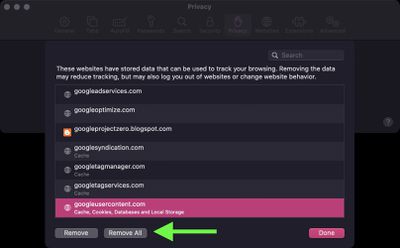
  4. Select a website that is listed, then click Remove. To remove all website data from Safari, click Remove All.

    safari

Method 2:

  1. Launch Safari browser on your Mac.
  2. Select Safari -> Settings... in the menu bar.
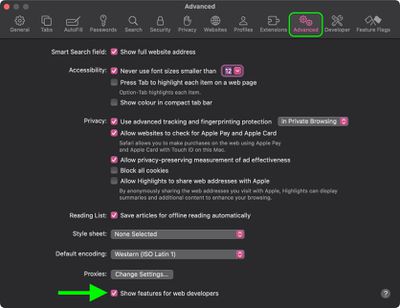
  3. Click the Advanced tab and check the box next to Show features for web developers.
    safari

  4. From the menu bar, select Develop -> Empty Caches for All Profiles.
    safari

How to Clear Safari's Cache on iPhone and iPad

Note that the following steps clear all history, cookies and website data on your device, regardless of when the sites were accessed.

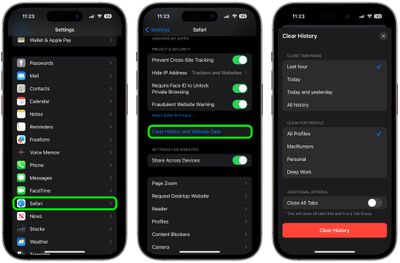
  1. Launch the Settings app on your iOS device.
  2. Swipe to the bottom of the menu and select Apps, then find Safari in the list and tap it.
  3. Scroll down and select Clear History and Website Data.
  4. Choose the time frame to clear (Last hour, Today, Today and yesterday, or All history), choose the profile or select All Profiles, then tap Clear History.
  5. Tap Clear History and Data in the pop-up menu to confirm.
    settings

For another way to protect your privacy while browsing the web, be sure to check out our guide on how to use Safari's Private Browsing Mode.


Tag: Safari

Popular Stories

Switch to Safari

Apple Explains Why Chrome Users Should 'Switch to Safari'

Tuesday October 13, 2026 5:29 am PDT by
Apple has launched a new "Switch to Safari" marketing campaign that encourages Chrome users to switch to Safari as their web browser of choice on the Mac. "Safari is a more powerful and private browser than Chrome," says Apple. Apple has a new "Switch to Safari" page on its website that outlines more than 10 reasons that Chrome users should switch to Safari, including faster performance...


M5 MacBook Pro

RIP, MacBook Ultra

Monday October 19, 2026 9:37 am PDT by
Apple today sent out invites for an experience in Los Angeles on Wednesday, October 28, and the "Pro and tell" tagline on the invitation likely means that the rumored MacBook models with touch-enabled OLED displays will stick with MacBook Pro branding instead of the once-rumored "MacBook Ultra" name. The long-rumored "iPhone Ultra" ended up being named iPhone Duo, so speculation that Apple...
iPhone Duo Trio

Here's What Apple's Apps Look Like on the iPhone Duo

Tuesday October 20, 2026 11:12 am PDT by
With just three days to go until the iPhone Duo is released, Apple is getting ready for the launch. Behind the scenes, the App Store now has screenshots of Apple's built-in apps running on the Duo. We've seen some apps in marketing materials, but images of the ones we haven't seen give us an idea of what it will be like using the iPhone Duo day to day. Many apps are shown in landscape...
Latest Stories
iPhone Duo Has 'Edge Light' Feature That Debuted on Macs Last Year
3 minutes ago
Apple Support App Updated for iPhone Duo's Larger Display
5 minutes ago
Amazon Sweetens the Deal on Entry-Level 16-Inch MacBook Pro With $570 Off
26 minutes ago
iPhone Duo Tips Over on MagSafe Stands When Unfolded
35 minutes ago
Apple Music's New Look Officially Announced
2 hours ago
iPhone Duo Supports Apple Pencil Starting With iOS 27.2
3 hours ago
iPhone Duo Accessories Roundup: Cases and Screen Protectors From OtterBox, ZAGG, and More
4 hours ago
Apple Stores Will Have 'Limited' Availability of iPhone Duo for Walk-In Customers
4 hours ago
iPhone Duo Reviews Explain Why Device is Both 'Fun' and 'Frustrating'
4 hours ago
Apple Says 'Reachability' Feature Coming to iPhone Duo Later This Year
5 hours ago
Loop Capital Cuts Apple Rating Over iPhone Sales Outlook
9 hours ago
Apple Stores in Bordeaux and Lille Looted During French Protests
9 hours ago
Bluesound Adds Native Apple Music Support
10 hours ago
Apple CEO John Ternus Explains What Makes Good Product Design
11 hours ago
UK Proposes New Ways to Help Apple Pay Rivals
13 hours ago
WhatsApp Developing In-App Browser for All Chat Links on iPhone
14 hours ago
Apple's App Store Chief Explains Its Push for Premium Games
14 hours ago
Apple Could Owe Even More After $5.7 Billion Patent Verdict
15 hours ago
Skyrim Comes to Apple Silicon Macs With New Unofficial Installer
15 hours ago
Apple Highlights Mac and iPad Use in Paris Design Exhibition
16 hours ago
Apple Seeks 6G Modem Engineers as It Plans for Post-5G iPhones
18 hours ago
First iPhone Duo Unboxing Video Appears Ahead of Friday Launch
18 hours ago
Perplexity Computer Can Now Run Fully Locally on Mac
20 hours ago
Apple's Touchscreen OLED MacBook Pro: Everything We Know
22 hours ago
iPad Mini 8 Expected Next Week With These 10 New Features
22 hours ago
Here's What Apple's Apps Look Like on the iPhone Duo
1 day ago
iOS 27.3 May Expand RCS Support to Australia's Telstra in December
1 day ago
New Apple TV 4K Features 'Whole Room Audio' With Four HomePods
1 day ago
Apple Now Sells DIY Repair Parts for iPhone 18 Pro and Two New Macs
1 day ago
Amazon's HomeView Pre-Order Discount Returns, Plus Save on Apple TV 4K
1 day ago