macOS Sonoma Features You Should Check Out First

After three months of beta testing, macOS Sonoma is finally available to everyone. macOS updates often don't get as much attention as iOS updates during the beta testing process, but there are plenty of notable reasons to install the new software.


Aerial Screensavers

If you're a fan of the aerial screensavers on the Apple TV, you're in luck because Apple brought them to the Mac in macOS Sonoma.
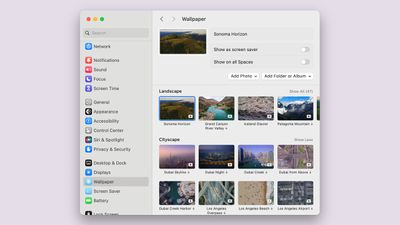
macos sonoma new aerial wallpaper
There are more than 100 videos to choose from across categories that include Landscape, Cityscape, Underwater, and Earth. Most of these are from the ‌Apple TV‌, but there are some from the Sonoma region of California that are new this year. The aerial screensavers accompany matching wallpapers that animate when you wake your display for a seamless transition from screensaver to wallpaper.

Interactive Desktop Widgets

Widgets aren't constrained to the Today Center in macOS Sonoma, and the focus on widgets is perhaps the most notable change in the update. ‌Widgets‌ can be added directly to the desktop, and they are interactive, just like widgets on iPhone.
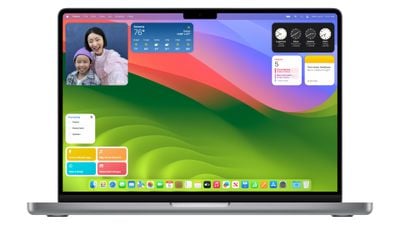
macos sonoma widgets
You can check off Reminders, control smart home products, and interact with third-party apps from your Mac's desktop without the need to open up the full app. ‌Widgets‌ blend in to the background when not in use, and through Continuity, there's also an option to see and use your ‌iPhone‌ widgets on your desktop without having to install the corresponding Mac app.

Videoconferencing

Apple added a Presenter Overlay that is designed to let you share your screen in FaceTime or third-party video apps like Zoom without blocking your face. The feature basically shows you over your background, so you can present and remain on-screen.

For fun, there are also new 3D reactions that pop up with hand gestures during ‌FaceTime‌ calls and calls in apps like Zoom. Reactions include Love (hearts), Like (thumbs up), Dislike (thumbs down), Balloons, Confetti, Lasers, Fireworks, and Thunderstorm. The gestures that trigger the effect are listed below.

  • Heart - Heart emoji
  • Thumbs up - Thumbs up emoji
  • Two thumbs up - Fireworks
  • Single thumbs down - Thumbs down emoji
  • Two thumbs down - Storm
  • Peace sign with one hand - Balloons
  • Peace sign with two hands - Confetti
  • "Rock on" sign with two hands - Lasers

You will need an Apple silicon Mac to see the reactions, and they can pop up in any app that uses the camera.

Safari Profiles

Safari supports separate profiles, so you can divide work browsing from personal browsing. Profiles have distinct browser history, extensions, Tab Groups, cookies, and favorites.
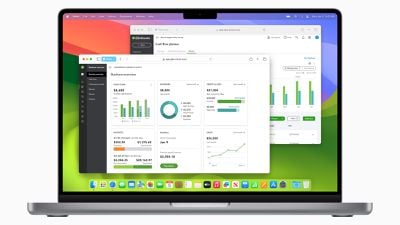
macOS Sonoma Safari Profiles
You can create different browsing profiles for any purpose, so it serves as an extension of the Tab Groups feature that came out with macOS Ventura. You can do Work and Personal, separate out hobbies, plan trips with a separate profile, and more.

Web Apps

A website like MacRumors.com can now be added to the macOS dock as a web app, so you can get to your favorite websites right from the dock. Web apps saved to the dock feature a simplified toolbar and support notifications.
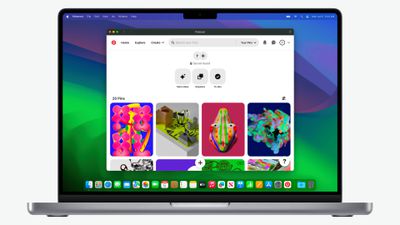
macOS Sonoma Web App 1

Game Mode

If you have an Apple silicon Mac you game on, you can turn on Game Mode, which prioritizes CPU and GPU performance for gaming purposes. Game Mode cuts down on audio latency for AirPods and input latency for select game controllers, speeding up your response times.
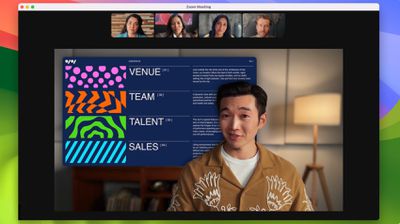
macos sonoma presenter overlay

Compatibility

Compared to macOS Ventura, macOS Sonoma drops support for the 2017 MacBook Pro, the 2017 iMac, and the 2017 12-inch MacBook. It can run on the Macs below:

  • iMac - 2019 and later
  • iMac Pro - 2017 and later
  • Mac mini - 2018 and later
  • MacBook Air - 2018 and later
  • MacBook Pro - 2018 and later
  • Mac Pro - 2019 and later
  • Mac Studio - 2022 and later

Read More

More on the new features that are available in macOS Sonoma can be found in our macOS Sonoma roundup.

Related Forum: macOS Sonoma

Popular Stories

iOS 26

iOS 26.2 Coming Soon With These 8 New Features on Your iPhone

Thursday December 11, 2025 8:49 am PST by
Apple seeded the second iOS 26.2 Release Candidate to developers earlier this week, meaning the update will be released to the general public very soon. Apple confirmed iOS 26.2 would be released in December, but it did not provide a specific date. We expect the update to be released by early next week. iOS 26.2 includes a handful of new features and changes on the iPhone, such as a new...
iOS 26

iOS 26.4 and iOS 27 Features Revealed in New Leak

Friday December 12, 2025 10:56 am PST by
Macworld's Filipe Espósito today revealed a handful of features that Apple is allegedly planning for iOS 26.4, iOS 27, and even iOS 28. The report said the features are referenced within the code for a leaked internal build of iOS 26 that is not meant to be seen by the public. However, it appears that Espósito and/or his sources managed to gain access to it, providing us with a sneak peek...
iOS 26

Apple Releases iOS 26.2 With Alarms for Reminders, Lock Screen Changes, Enhanced Safety Alerts and More

Friday December 12, 2025 10:10 am PST by
Apple today released iOS 26.2, the second major update to the iOS 26 operating system that came out in September, iOS 26.2 comes a little over a month after iOS 26.1 launched. ‌iOS 26‌.2 is compatible with the ‌iPhone‌ 11 series and later, as well as the second-generation ‌iPhone‌ SE. The new software can be downloaded on eligible iPhones over-the-air by going to Settings >...
AirPods Pro Firmware Feature

Apple Releases New Firmware for AirPods Pro 2 and AirPods Pro 3

Thursday December 11, 2025 11:28 am PST by
Apple today released new firmware designed for the AirPods Pro 3 and the prior-generation AirPods Pro 2. The AirPods Pro 3 firmware is 8B30, up from 8B25, while the AirPods Pro 2 firmware is 8B28, up from 8B21. There's no word on what's include in the updated firmware, but the AirPods Pro 2 and AirPods Pro 3 are getting expanded support for Live Translation in the European Union in iOS...
macOS Tahoe 26 Thumb

Apple Releases macOS Tahoe 26.2 With Edge Light

Friday December 12, 2025 10:08 am PST by
Apple today released macOS Tahoe 26.2, the second major update to the macOS Tahoe operating system that came out in September. macOS Tahoe 26.2 comes five weeks after Apple released macOS Tahoe 26.1. Mac users can download the macOS Tahoe update by using the Software Update section of System Settings. macOS Tahoe 26.2 includes Edge Light, a feature that illuminates your face with soft...
AirTag 2 Mock Feature

Apple AirTag 2: Four New Features Found in iOS 26 Code

Thursday December 11, 2025 10:31 am PST by
The AirTag 2 will include a handful of new features that will improve tracking capabilities, according to a new report from Macworld. The site says that it was able to access an internal build of iOS 26, which includes references to multiple unreleased products. Here's what's supposedly coming: An improved pairing process, though no details were provided. AirTag pairing is already...
ipados 26 1 slide over

Apple Releases iPadOS 26.2 With Multitasking Improvements

Friday December 12, 2025 10:09 am PST by
Apple today released iPadOS 26.2, the second major update to the iPadOS 26 operating system released in September. iPadOS 26.2 comes a month after iPadOS 26.1. The new software can be downloaded on eligible iPads over-the-air by going to Settings > General > Software Update. iPadOS 26.2 continues with the multitasking improvements that were added with iPadOS 26.1. You can now drag and...
bug security vulnerability issue fix larry

Update Now: iOS 26.2 Fixes 20+ Security Vulnerabilities

Friday December 12, 2025 11:11 am PST by
Apple today released iOS 26.2, iPadOS 26.2, and macOS 26.2, all of which introduce new features, bug fixes, and security improvements. Apple says that the updates address over 20 vulnerabilities, including two bugs that are known to have been actively exploited. There are a pair of WebKit vulnerabilities that could allow maliciously crafted web content to execute code or cause memory...

Top Rated Comments

tmmacops Avatar
29 months ago
Not to be a jerk, but I find desktop widgets to be a waste. I have virtual desktops and most have a full screen of apps. I can’t see any of the widgets so a bit of a waste.

It’s an ok update, but not really seeing much. Couldn’t care less about screensavers. How about improving Mail, Calendar, and some of the other built in stuff?
Score: 36 Votes (Like | Disagree)
erikkfi Avatar
29 months ago
Widgets were better when they had their own Space (as part of Dashboard). I don't understand why I'd want a bunch of attention-grabbing widgets on my desktop. Am I misunderstanding how this works?
Score: 27 Votes (Like | Disagree)
Lynxpoint Avatar
29 months ago
I will likely update at some point, but not for any of these features.
1. I don't use screensavers
2. I don't like desktop widgets (don't use on iPad or iPhone)
3. Don't do screen sharing
4. Tried doing third party web apps in dock and did not like the clutter effect on dock, so ditched it
5. Safari profiles might be useful, although I currently accomplish the equivilant of this through the use of different browsers.
Score: 25 Votes (Like | Disagree)
BeatCrazy Avatar
29 months ago
Call me a simpleton, the aerial screensavers are my favorite feature of Sonoma.

The last few macOS releases were very limited in background/screensaver options.
Score: 22 Votes (Like | Disagree)
jchap Avatar
29 months ago
Just installed macOS Sonoma 14.0 on a MacBook Pro 16-inch 2019 (Core i9, 64 GB RAM) this morning.

Interesting to find this setting in System Settings, where you can now just click on the desktop to temporarily show the desktop and hide everything else!


Attachment Image
Score: 20 Votes (Like | Disagree)
jayducharme Avatar
29 months ago

If I add the stock widget to my desktop, it doesn't display my stocks. If I click on it, it says open on iPhone to continue? What am I missing?
A bug-free OS?
Score: 11 Votes (Like | Disagree)