

Safari is one of the apps that Apple focused on in iOS 27, and it includes multiple new Apple Intelligence features. From automatically organizing tab groups to custom extensions, Safari is getting useful new capabilities.

Automatic Tab Organization
Safari uses Apple Intelligence to organize your open tabs into relevant topics, grouping like concepts together to make it easier to browse your open tabs.
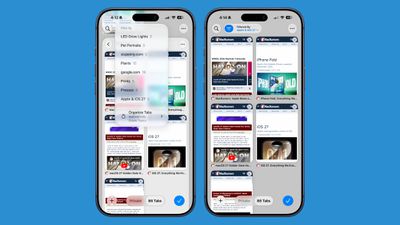
If you're searching for a new couch while also planning a weekend trip, websites that you open for each topic are grouped together. Automatic sorting can be enabled by tapping on the icon with three lines in the upper right of the display while in tab view and turning on the Automatically Create Topics setting.
This same Safari menu also lets you see all of the groups and filter by topic so you can open just the tabs related to a specific topic while avoiding the other tabs.
There is a new "Resume Browsing" section of the Start Page that lets you continue browsing topics you recently closed or topics you have open on other devices.
You can also group pages you've saved to Bookmarks and Reading List by topic.
Custom Extensions
You can use AI to create Safari Extensions in iOS 27 with Apple's new Create an Extension option.
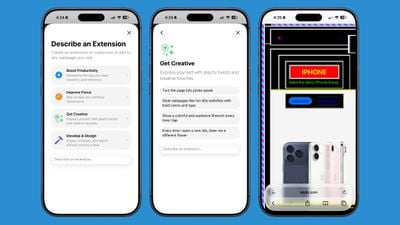
In the Safari settings accessible from the left of the URL bar, tapping into Create an Extension brings you to an interface where you can type in whatever you want an extension to do. Apple also includes suggestions in categories that include Boost Productivity, Improve Focus, Get Creative, and Develop and Design. Some of Apple's extension suggestions:
- Create a citation for the current webpage and copy it to my clipboard
- Create a 3-minute focus timer for the page
- Set the minimum font size to 14pt
- Turn the page into pirate speak
- Style websites like 90s websites with bold colors and type
- Every time I open a new tab, draw me a different flower
- Highlight and show the dimensions of webpage elements when I tap on them
- Enter the design mode for a website so that I can edit the contents
Notify Me
Safari can monitor a website for changes and alert you when new information is detected. Apple says it's useful for monitoring when concert tickets go on sale or watching for a product to be restocked.
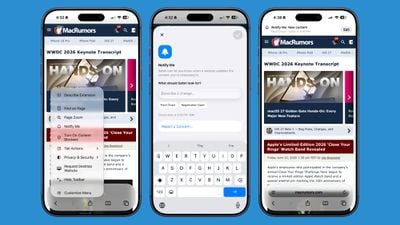
To use it, navigate to a website, then tap on the settings icon to the left of the URL bar, and choose the Notify Me option. You can type in what you want Safari to watch for and set a frequency and a time.
At most, Safari will check websites once per hour, with daily, weekly, and monthly checks also available.
Passwords
The Passwords app can use Safari to automatically change flagged weak and compromised passwords, turning them into strong passwords.
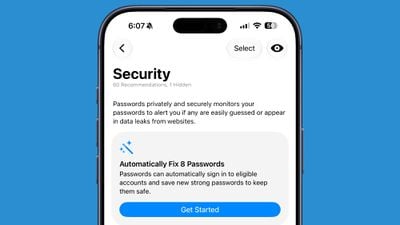
The feature uses Apple Intelligence to automatically navigate to eligible websites, sign in, and update your password with a tap.
Ask to Browse
Apple added new parental controls in iOS 27, including an "Ask to Browse" feature that requires children to get parental approval before visiting a new website.
Performance Improvements
Apple says Safari's power efficiency has improved, so it will drain less battery. Web apps and start page content load faster, JavaScript handling is faster, and animations and graphics are smoother.
Compatibility
Safari features like automatic tab grouping, custom extensions, and custom notifications require Apple Intelligence. Apple Intelligence is available on the iPhone 15 Pro and later.
Availability
iOS 27 is available to both developers and public beta testers, so you can try it now. The update will launch in the fall alongside new iPhone models.
















































