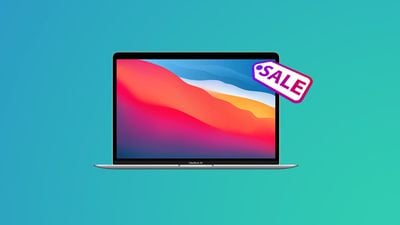
Amazon has Apple's M1 MacBook Air on sale this week, with all in stock and ready to ship today. You can save up to $100 on these 2020 notebooks, and you'll find the 256GB model matching its holiday season price tag.
Note: MacRumors is an affiliate partner with some of these vendors. When you click a link and make a purchase, we may receive a small payment, which helps us keep the site running.
Prices start at $899.00 for the 256GB model, down from $999.00, and available colors are Space Gray, Silver, and Gold. This isn't the lowest we've ever seen the 256GB model go, but it's one of the more consistent deals on this model over the past few months.
You can get the 512GB model for $1,149.00, down from $1,249.00. This is the same price we saw around the holidays, and all three colors are again available on Amazon.
You can find even more discounts on other MacBooks by visiting our Best Deals guide for MacBook Pro and MacBook Air. In this guide we track the steepest discounts for the newest MacBook models every week, so be sure to bookmark it and check back often if you're shopping for a new Apple notebook.
Microsoft today announced that it will purchase the game studio Activision Blizzard, the maker of hit games such as Call of Duty, Candy Crush, World of Warcraft, and more, for almost $70 billion. Microsoft says this purchase will help it "bring the joy and community of gaming to everyone, across every device."
The seismic purchase for Microsoft will see several of Activision's games move to Xbox Game Pass, Microsoft's gaming subscription service.
The acquisition also bolsters Microsoft's Game Pass portfolio with plans to launch Activision Blizzard games into Game Pass, which has reached a new milestone of over 25 million subscribers. With Activision Blizzard's nearly 400 million monthly active players in 190 countries and three billion-dollar franchises, this acquisition will make Game Pass one of the most compelling and diverse lineups of gaming content in the industry. Upon close, Microsoft will have 30 internal game development studios, along with additional publishing and esports production capabilities.
Microsoft's Xbox Game Pass is available on the iPhone and iPadthrough Safari, but not the App Store. While Apple does allow all-in-one gaming subscription services to be on the platform, every game offered on the service must be submitted individually for approval through the App Store review process.
Apple's equivalent games subscription service to Xbox Game Pass is Apple Arcade. Launched in 2019, Apple Arcade has continued to add new games to its catalog for users to play across the iPhone, iPad, Mac, and Apple TV. The purchase of Activision and the addition of more hit games to Xbox Game Pass may put more pressure on Apple to bolster Apple Arcade's offerings.
Apple today filed unreleased iPhone and iPad models in the Eurasian Economic Commission database, as spotted by French blog Consomac.
The filings likely represent the rumored third-generation iPhone SE, fifth-generation iPad Air, and potentially more. The unreleased iPhone models have the identifiers A2595, A2783, and A2784, while the unreleased iPad models have the identifiers A2588, A2589, A2591, A2696, A2757, A2759, A2761, A2766, and A2777.
Eurasian Economic Commission filings like these have foreshadowed the release of new Apple products on numerous occasions over the years, including several Mac, iPhone, iPad, iPad Pro, Apple Watch, and AirPods models. The filings are legally required for any devices that offer encryption sold in Russia and select other countries.
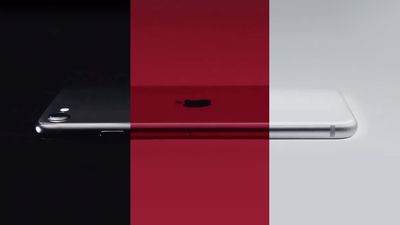
The third-generation iPhone SE is expected to have the same design as the current iPhone SE, including a 4.7-inch display. Key new features rumored for the device include the same A15 Bionic chip as iPhone 13 models and 5G support.
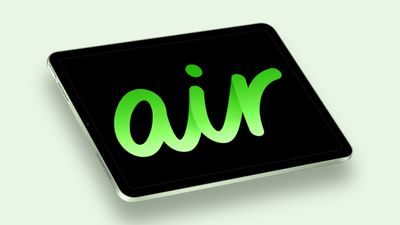
The fifth-generation iPad Air is expected to adopt features from the sixth-generation iPad mini, including an A15 Bionic chip, 12-megapixel Ultra Wide front camera with Center Stage support, 5G for cellular models, and Quad-LED True Tone flash.
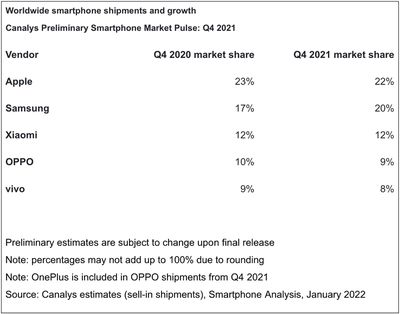
iPhones accounted for around one-fifth of all smartphone shipments in the fourth quarter of 2021, allowing Apple to reclaim first place as the biggest smartphone vendor, according to a report from Canalys.
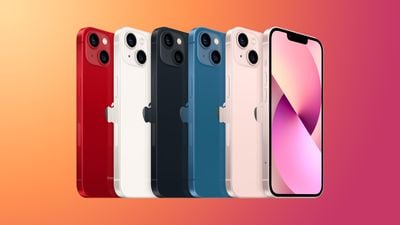
Canalys estimates that the iPhone accounted for 22 percent of worldwide smartphone shipments in the fourth quarter of 2021. The scale of Apple's shipments is thanks to strong demand for the iPhone 13 lineup, which launched in September last year. Canalys analyst Sanyam Chaurasia said:
Apple is back at the top of the smartphone market after three quarters, driven by a stellar performance from the iPhone 13. Apple saw unprecedented iPhone performance in Mainland China, with aggressive pricing for its flagship devices keeping the value proposition strong. Apple's supply chain is starting to recover, but it was still forced to cut production in Q4 amid shortages of key components and could not make enough iPhones to meet demand. In prioritized markets, it maintained adequate delivery times, but in some markets its customers had to wait to get their hands on the latest iPhones.
Apple reclaimed first place from Samsung, which had reigned as the top smartphone vendor in the previous quarter. Samsung fell slightly short of Apple's shipments with a market share of 20 percent. Xiaomi retained its third-place position with 12 percent share of shipments.
Overall smartphone shipments grew just one percent globally due to supply chain issues, but supply chain disruption primarily affected low-end vendors rather than titans such as Apple. Canalys also noted that it may be several years before component manufacturers are able to sufficiently increase their production capacity to meet demand. Industry bottlenecks are not expected to ease until the second half of 2022.
Telecom giant Ericsson has filed another set of patent infringement lawsuits against Apple in a long-running dispute between the two companies over royalty payments for the use of 5G wireless patents in iPhones.
In 2021, both companies sued each other in the US after negotiations failed over the renewal of a seven-year licensing contract for telecom patents covering 2G, 3G, and 4G technologies that was established in 2015.
Despite long negotiations, the two companies have been unable to reach a new patent-licensing agreement that also covers 5G, and in October, Ericsson sued Apple claiming that the company was unfairly trying to reduce royalty rates. Two months later, Apple countersued Ericsson, accusing the Swedish company of using "strong-arm tactics" in its bid to renew patents.
"Since the prior agreement has expired, and we have been unable to reach agreement on the terms and scope of a new license, Apple is now using our technology without a license," an Ericsson spokesman told Reuters.
Ericsson might be a relative minnow in the smartphone business, but its portfolio of telecommunications patents is vast. The company holds over 57,000 patents, royalties from which account for around a third of its operating profit. As for its 5G patent, the company usually collects $2.50 to $5 in royalties per phone.
According to a recent Ericsson filing, that's the rate it still wants to collect: "Ericsson is willing to continue to offer Apple our publicly announced 5G multimode rate of $5 per phone (with a $1 early signing discount) a rate which we will continue to honor assuming we execute a license relatively quickly."
However, following its acquisition of Intel's smartphone modem business, Apple believes it now holds a share of declared 5G patent families that is comparable to Ericsson's share. As such, Apple thinks its net payments to Ericsson should decrease compared to the 2015 license.
Shortly after it acquired Intel's patents, Apple published a statement on its website covering the fair, reasonable and non-discriminatory (FRAND) licensing of standard essential patents (SEPs). In the statement, Apple cautioned against any companies that "use the power conferred by standardization to eliminate competition through selective patent licensing or discriminatory and excessive royalties."
Despite its position, Florian Mueller, an intellectual property expert who runs the Foss Patents website, believes Apple is fighting a losing battle and that Ericsson has the advantage, thanks to recent terms it agreed with Samsung for the use of its 5G patents.
"The overall circumstances suggest to me that Ericsson is going to win this, and the only leverage Apple has is 'hold-out.'" says Muller. "I believe the Ericsson-Samsung license deal involves a somewhat lower royalty rate on those Samsung phones that cost a fraction of an iPhone, but that whenever the terms of the Ericsson-Samsung license come into play (comparable licenses, non-discrimination), Ericsson can argue that even Samsung accepted to pay a royalty rate that is consistent with demanding $5 per iPhone from Apple."
Microsoft has released a new version of its Office for Mac productivity suite that includes an updated Excel app with 100% native support for Apple silicon machines.
According to the release notes accompanying version 16.57, Excel will now run natively on Macs powered by Apple's M1-series processors without having to use the Rosetta 2 translation layer, which means anyone using a Mac with an M1, M1 Pro, or M1 Max processor can expect better performance and energy efficiency when working with Excel spreadsheets, particularly those that make use of the Power Query function.
Excel is fully supported on devices with Apple Silicon CPUs: Power Query in Excel for Mac is now natively supported on Apple Silicon processors. If you previously used Rosetta emulator to run Excel, you may now disable it and run Excel natively on your devices.
The latest update applies to Office 365, Office 2019 for Mac, Office LTSC 2021 for Mac, and Office 2021 for Mac, which are available as a one-time purchase from a retail store or through a volume licensing agreement. Users can get the new version from Microsoft AutoUpdate (MAU). To use Microsoft AutoUpdate, start an Office application, such as Word or Excel, and then choose Help -> Check for Updates.
Apple built its Rosetta 2 translation software so that Macs can run x86-64 code that's written for Intel Macs. In contrast to the original Rosetta – the version that allowed PowerPC apps to run on Intel-based Macs – code isn't interpreted in real-time. Instead, the Rosetta 2 translation process happens entirely on first launch, though there is a slight performance hit as the initial x86–64 translation of instructions takes place.
Apple says Rosetta 2 is a temporary solution for developers to make their existing Intel-based programs to run on Arm-based Macs, meaning they will eventually need to create native apps for Apple Silicon machines. Notably, Apple ended support for the original Rosetta three years after its release.
Apple's largest manufacturing partner Foxconn is again offering bumper signing bonuses to new and former workers in an effort to boost recruitment at its Zhengzhou campus, one of its main iPhone factories in China, according to the South China Morning Post.
The report claims Foxconn is giving returning workers a signing bonus of 9,500 yuan ($1,470), in addition to a monthly income of 6,865 yuan ($1,080), at its sprawling production park, which employs more than a quarter of a million workers and produces an estimated 80% of the world's iPhones.
The Taiwan company has also promised an 8,500 yuan ($1,338) reward for new recruits hired through its internal referral program, as well as 1,000 yuan ($157) for the corresponding referrer. New joiners who applied on their own are being offered a 9,000 yuan ($1,417) bonus.
The same bonus package was previously offered in July, when the factory was ramping up production of the iPhone 13 series. On that occasion, the amount was in fact an increase on a record-high signing bonus Foxconn began offering the previous month.
The increased incentives indicate Foxconn's need for experienced workers ahead of the Lunar New Year holiday, which runs from January 31 to February 6, when migrant workers across China typically return home to be with their families.
The run-up to the holiday is also being impacted by a recent surge in Omicron and Delta coronavirus cases in Henan province, where authorities have put restrictions on people entering and leaving the region. In Zhengzhou, the capital of Henan, Foxconn's production lines are said to be located in low-risk zones for infections, but the company is taking no chances and continues to conduct multiple rounds of testing on its workers.
Global demand for the iPhone 13 has remained steady going into 2022, having outstripped supply in the fourth quarter of last year by around 12 million units, with Apple selling 40 million iPhone 13 models over the holiday season, according to Wedbush analysts.
The Authority for Consumers and Markets (ACM) in the Netherlands plans to assess Apple's announced plans for allowing dating apps on the App Store in the country to use third-party payment methods, ensuring those plans "meet the requirements" of a previous ruling.
Over the weekend, Apple announced that it would exclusively allow dating apps on the App Store in the Netherlands to use third-party payment methods for in-app purchases. The rule change is the first of its kind for Apple, which previously required all developers worldwide to use its own system for all in-app purchases.
Apple's concessions came following a December ruling from the ACM that, by restricting dating apps from using third-party payment methods, Apple is engaging in an "abuse of market power." The ACM threatened to fine Apple up to a maximum of 50 million euros per week if it did not change its policies.
Now that Apple has announced changes, the ACM wants to assess whether those changes meet the requirements of its previous ruling, according to a press release. As part of its probe into the changes, the ACM will meet with dating app providers, such as The Match Group, which owns Tinder, to ensure Apple's changes sufficiently address concerns.
While Apple will allow dating apps in the Netherlands to use third-party payment methods, there are some caveats to the concessions. Importantly, Apple will continue to receive a commission even for purchases made outside the App Store in-app purchasing system, although Apple has yet to reveal what that commission rate will be.
Developers will also be required to maintain separate app binaries for distribution in the Netherlands if they choose to offer alternate in-app purchasing options.
From a user experience perspective, Apple is warning that by using third-party payment methods, the experience of requesting a refund, managing subscriptions, viewing purchase history, and more will be made significantly more complicated.
Because Apple will not be directly aware of purchases made using alternative methods, Apple will not be able to assist users with refunds, purchase history, subscription management, and other issues encountered when purchasing digital goods and services through these alternative purchasing methods. You will be responsible for addressing such issues with customers.
Apple said it plans to appeal the ACM's ruling and has expressed concern that the order "could compromise the user experience, and create new threats to user privacy and data security."
LG Display is preparing to supply Apple with OLED display panels destined for upcoming iPad models, ETNews reports.
LG's preparations to supply Apple with OLED displays for the iPad reportedly include the expansion of its plant in Paju, South Korea. The increased production capacity is said to take account of next-generation iPhone and iPad models.
The introduction of OLED panels to the iPad ostensibly presents a new opportunity for LG Display due to the size and aspect ratio of the device's display, which rival suppliers are currently not able to facilitate as easily. A separate recent report claimed that BOE is similarly gearing up to supply OLED panels for future iPad models.
Although an OLED display could come to the iPad for the first time next year, LG is planning to start mass production of these panels at the Paju facility in 2024. This timing broadly lines up with other recent reports, which has placed the launch of the OLED iPad between 2023 and 2024.
Early last year, LG was forced to halt LCD panel production for the iPhone and shut down its smartphone division. The company has since restructured its business toward OLED panels and is accelerating the expansion of its production capacity. Now, LG plans to aggressively increase its presence in Apple's display supply chain with an expansion investment strategy that will enable the Paju plant to make twice as many sixth-generation OLED panels by 2024.
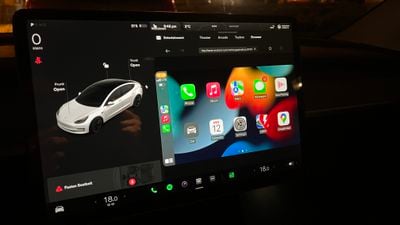
A Tesla Model 3 owner has resorted to a workaround to implement Apple CarPlay in his vehicle, amid no sign of official support from Tesla (via Tesla North).
Apple CarPlay and Apple Music support are among the most-requested Tesla features, but with no indication that Tesla is willing to implement Apple CarPlay in its vehicles, Polish developer Michał Gapiński took matters into his own hands. Using a Rasberry Pi and the car's browser, Gapiński was able to get a fully functional version of Apple CarPlay running on his Tesla's display and shared the result on Twitter.
The system works using a Rasberry Pi with an LTE modem and a Wi-Fi access point, running a custom Android-based firmware. The in-car browser is then used to connect to the Rasberry Pi and display the CarPlay interface on the Tesla's screen, with all apps working as expected, including Maps and Apple Music. The Tesla Apple CarPlay solution continues to work while driving and can even be controlled with the car's steering wheel buttons.
Steering wheel controls + current state of #teslaCarPlay on video. Next step is to improve Wi-Fi connection, the stream is 2x smoother when viewed on my laptop pic.twitter.com/0wFFUQQPkx
— Michał Gapiński (@mikegapinski) January 14, 2022
Gapiński is now working on improving the Wi-Fi connection to make the stream smoother. He says that the project is still in its early stages, but once it is ready he plans to release the solution to the public.
Tesla has a strained relationship with Apple and seems to want full control over its infotainment system, making the chances of Apple CarPlay support in the near future very unlikely. Despite signs that Tesla was planning to support Apple Music, this has similarly not come to fruition.
Most carmakers offer Apple CarPlay in their vehicles, making Tesla's omission a notable exception. Some electric cars that seek to directly compete with Tesla, such as the BMW i4, BMW iX, and Porsche Taycan, offer heavily integrated versions of Apple CarPlay, as well as other Apple services such as Apple Music and Apple Podcasts, including support for features such as time-synced lyrics.
Apple is planning to release a fourth-generation iPhone SE with a larger 5.7-inch display as early as 2023, according to display industry consultant Ross Young, who has proven to be a reliable source of information for future Apple products.
The fourth-generation iPhone SE has until now been rumored to launch in 2024, but Young now says a 2023 release is looking more likely.
Interestingly, Young also said the third-generation iPhone SE that is widely expected to launch this year is rumored to be named the iPhone SE+ 5G. The device is expected to feature the same design as the current iPhone SE, including a 4.7-inch display, with key new features being a faster A15 chip and 5G support.
My bad, 2023/2024 model would be 4th generation.
— Ross Young (@DSCCRoss) January 17, 2022
iPhone SE+ 5G would be rather unordinary branding for an Apple product, so this rumored name should be treated with some skepticism for now.
The British Government is reportedly preparing a publicity attack on end-to-end encryption in an effort to mobilize public opinion against the technology by framing it as a child safety issue, with its main aim being to derail Facebook's plan to end-to-end encrypt its Messenger platform.
According to Rolling Stone, the Home Office has hired the M&C Saatchi advertising agency to plan the campaign, which will include a media blitz with TV ads, campaigning efforts from UK charities and law enforcement agencies, calls to action for the public to contact tech companies directly, and multiple real-world stunts, some of which have been designed to make the public "uneasy."
According to documents reviewed by Rolling Stone, one the activities considered as part of the publicity offensive is a striking stunt — placing an adult and child (both actors) in a glass box, with the adult looking "knowingly" at the child as the glass fades to black. Multiple sources confirmed the campaign was due to start this month, with privacy groups already planning a counter-campaign.
The anti-encryption stance from the UK government isn't new, but its latest effort is focused on the argument that improved encryption would hamper efforts to tackle child exploitation online. "We have engaged M&C Saatchi to bring together the many organizations who share our concerns about the impact end-to-end encryption would have on our ability to keep children safe," a Home Office spokesperson told Rolling Stone.
In a presentation produced by the UK government to recruit potential not-for-profit coalition partners, one slide notes that "most of the public have never heard" of end-to-end encryption, which means "people can be easily swayed" on the issue. Tellingly, the slide also notes that the campaign "must not start a privacy vs safety debate."
The UK government has allocated £534,000 ($730,500) of public funds for the campaign, according to a letter sent from the Home Office in response to a freedom of information request.
Facebook, recently rebranded to "Meta," has already delayed plans to use end-to-end encryption for Messenger and Instagram messages until at least 2023, a year later than previously planned. Meta said the delay was to give it extra time to coordinate with experts in the field of combating online abuse while also protecting user privacy.
Messaging platforms like Signal, Telegram, Facebook's WhatsApp and Apple's iMessage all use end-to-end encryption that prevents communications between sender and recipient from being accessed by anyone else, including the service providers. Security experts have long argued that weakening encrypted systems for such platforms would mean weakening security for everyone.
Both Meta and Apple have long fought against anti-encryption legislation and attempts to weaken platform and device encryption. In 2019, Meta successfully challenged a court order to force it to decrypt Facebook Messenger calls. The order was the result of an investigation into the MS-13 gang's activities on Facebook Messenger in California.
Apple's most public battle against the US government came in 2016, after Apple was ordered to help the FBI unlock the iPhone owned by Syed Farook, one of the shooters in the December 2015 attacks in San Bernardino.
Apple opposed the order and claimed that it would set a "dangerous precedent" with serious implications for the future of smartphone encryption. Apple ultimately held its ground and the U.S. government backed off after finding an alternate way to access the device, but Apple has continually had to deal with further law enforcement efforts to combat encryption.
Note: Due to the political or social nature of the discussion regarding this topic, the discussion thread is located in our Political News forum. All forum members and site visitors are welcome to read and follow the thread, but posting is limited to forum members with at least 100 posts.
Today marks Dr. Martin Luther King, Jr. day, a federal holiday in the United States that pays respect to and honors the civil rights movement leader. As it's done in the past, Apple is commemorating the day with a full-page tribute on its website.
On its home page, Apple remembers the civil rights leader with a photo of King and one of his quotes: "I believe that we can transform dark yesterdays of injustice into bright tomorrows of justice and humanity." Apple adds, "Today and every day, we honor his life and legacy of service."
Apple CEO Tim Cook also commemorated King on Twitter, saying that he "could paint a powerful vision in dark times."
Dr. King could paint a powerful vision in dark times, reminding us that we could “hew out of the mountain of despair a stone of hope.” May his words continue to inspire us to bind up our nation’s wounds and protect the civil rights of all who call it home. #MLKDaypic.twitter.com/VVhOnWfc25
— Tim Cook (@tim_cook) January 17, 2022
A bug in WebKit's implementation of a JavaScript API called IndexedDB can reveal your recent browsing history and even your identity, according to a blog post shared on Friday by browser fingerprinting service FingerprintJS.
In a nutshell, the bug allows any website that uses IndexedDB to access the names of IndexedDB databases generated by other websites during a user's browsing session. The bug could allow one website to track other websites the user visits in different tabs or windows, as the database names are often unique and specific to each website. The correct and normal behavior should be that websites can only access their own IndexedDB databases.
In some cases, websites use unique user-specific identifiers in IndexedDB database names. For example, YouTube creates databases that include a user's authenticated Google User ID in the name, and this identifier can be used with Google APIs to fetch personal information about the user, such as a profile picture, according to FingerprintJS. This personal information could help a malicious actor to determine a user's identity.
The bug affects newer versions of browsers using Apple's open source browser engine WebKit, including Safari 15 for Mac and Safari on all versions of iOS 15 and iPadOS 15. The bug also affects third-party browsers like Chrome on iOS 15 and iPadOS 15, as Apple requires all browsers to use WebKit on the iPhone and iPad. FingerprintJS has a live demo of the bug that indicates older browsers like Safari 14 for Mac are unaffected.
FingerprintJS noted that no user action is required for a website to access IndexedDB database names generated by other websites.
"A tab or window that runs in the background and continually queries the IndexedDB API for available databases can learn what other websites a user visits in real-time," the blog post said. "Alternatively, websites can open any website in an iframe or popup window in order to trigger an IndexedDB-based leak for that specific site."
Private browsing mode does not protect against the bug in affected Safari versions.
Users will need to wait for Apple to address the bug with software updates — we've reached out to Apple to see if a fix is planned. In the meantime, Safari 15 users could temporary switch to a different browser on the Mac, but this is not possible on the iPhone or iPad since all browsers are affected by the WebKit bug on those devices.
The bug was reported to the WebKit Bug Tracker on November 28. More details can be found in FingerprintJS's blog post, reported earlier by 9to5Mac.
Update: Apple has prepared a fix for the bug, according to a WebKit commit on GitHub, but Apple still needs to release macOS and iOS updates with an updated version of Safari before the fix is available to users. Apple declined to provide a timeframe.
Earlier this month, Apple discontinued the Beats Pill+, its last battery-powered speaker. Following this news, Bloomberg's Mark Gurman has revealed that Apple once internally discussed and prototyped a battery-powered smart speaker.
In the latest edition of his Power On newsletter, Gurman said that while Apple prototyped a battery-powered smart speaker years ago, he would be surprised if one ever launches under the Apple brand. For now, the HomePod mini is the only smart speaker that Apple sells, and it must be connected to a power source to operate at all times.
Gurman addressed a few other topics in his newsletter this week, including Apple's long-rumored AR/VR headset, which he again said will have performance on par with the M1 Pro chip in the new MacBook Pro and could be priced above $2,000 when released.
Gurman also backed a MacRumors report claiming that Hyundai's luxury brand Genesis is planning to support Apple's digital car key feature, which lets users lock, unlock, and start their vehicles using a pass stored in the Wallet app on the iPhone or Apple Watch. The feature has been limited to select BMW models since launching in 2020, but Gurman said Genesis plans to roll out support for the feature by the summer.
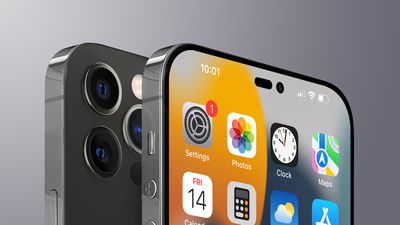
Continuing the tradition set with the iPhone 13 Pro, only the highest-end iPhone 14 models will feature Apple's ProMotion display technology, according to a respected display analyst.
Ross Young, who on multiple occasions has detailed accurate information about Apple's future products, said in a tweet that ProMotion will not be expanded to the entire iPhone 14 lineup and will remain exclusive to the Pro models. This comes following a report earlier in the week claiming that all models of the iPhone 14 lineup would feature ProMotion technology.
In his tweet, Young suggests that Chinese manufacturer BOE would be the supplier of LTPO OLED displays for lower-end iPhone 14 models, but he said the company does not have enough production capacity to do so right now. Samsung is currently the exclusive supplier of LTPO OLED displays for iPhone 13 Pro models, while a report last year claimed that LG would also start making LTPO OLED displays in hopes of supplying them to Apple this year.
Apple first introduced ProMotion on the iPhone with the iPhone 13 Pro and iPhone 13 Pro Max in September 2021. ProMotion allows the display to automatically refresh at up to 120Hz for smoother appearing content and scrolling, and as low as 10Hz for longer battery life, depending on the type of content on the screen.
Apple has so far limited ProMotion to "Pro" products such as the iPhone 13 Pro, iPad Pro, and the newly launched 14-inch and 16-inch MacBook Pros.
Apple is expected to release four iPhone 14 models this year, including two 6.1-inch and 6.7-inch standard models and two 6.1-inch and 6.7-inch Pro models, with the 5.4-inch "mini" model to be discontinued. Learn more about everything we know so far about the iPhone 14 by reading our comprehensive roundup.
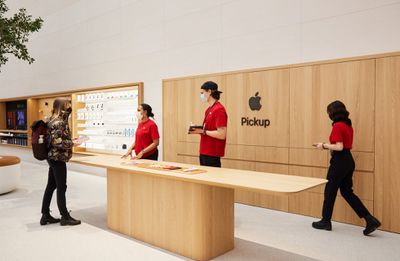
Apple will require retail and corporate employees to submit proof of receiving a COVID-19 booster shot, or else face frequent testing to enter the workplace, the company announced in an internal email obtained by The Verge.
"Due to waning efficacy of the primary series of COVID-19 vaccines and the emergence of highly transmissible variants such as Omicron, a booster shot is now part of staying up to date with your COVID-19 vaccination to protect against severe disease," Apple said in the internal email, according to The Verge.
The report claims that once an Apple employee becomes eligible for a booster shot, they will have four weeks to submit proof of receiving the third dose. Employees who do not comply with this requirement will be subjected to frequent tests to enter an Apple retail store, partner store, or office starting February 15, the report adds.
Employees who do submit proof of any COVID-19 vaccination will also be subjected to testing to enter the workplace starting January 24, but it is not immediately clear if this requirement applies to both retail and corporate employees, the report said.
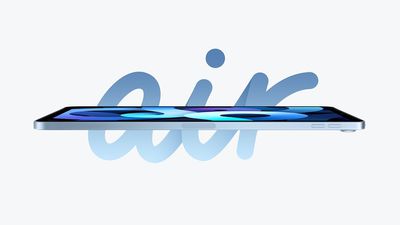
Apple is planning to release a fifth-generation iPad Air with similar features as the sixth-generation iPad mini, including an A15 Bionic chip, 12-megapixel Ultra Wide front camera with Center Stage support, 5G for cellular models, and Quad-LED True Tone flash, according to Japanese blog Mac Otakara.
The new iPad Air will have the same overall design as the current model, including a single-lens rear camera, the report adds. Released in October 2020, the current iPad Air features a 10.9-inch display with slim bezels, a Touch ID power button, and a USB-C port, with color options including Space Gray, Silver, Green, Rose Gold, and Sky Blue.
Apple's first product event of the year will likely take place in March or April as usual, according to Bloomberg's Mark Gurman, so it's possible that the new iPad Air and iPhone SE models could be announced at that event.
Mac Otakara accurately reported that the fourth-generation iPad Air would be equipped with a USB-C port, and that the latest 12.9-inch iPad Pro would be 0.5mm thicker to accommodate for a mini-LED display. On the other hand, the website has made some inaccurate claims, including that new AirPods Pro would launch in April 2021.


 Note: MacRumors is an affiliate partner with some of these vendors. When you click a link and make a purchase, we may receive a small payment, which helps us keep the site running.