Comcast this week announced plans to launch a new xFi Advanced Gateway that incorporates WiFi 6E, providing Comcast customers with access to faster broadband speeds on compatible devices.
The xFi Gateway supports three WiFi bands, 2.4GHz, 5GHz, and 6GHz, which is the new band that denotes a "6E" device. According to Comcast, the xFi Gateway will offer reduced interference and up to 3x more bandwidth to support homes with a multitude of connected devices.
Comcast says that it is also working to "evolve its network to 10G" for multigigabit upload and download speeds.
The xFi Advanced Gateway will begin rolling out to Comcast customers over the coming months, with those subscribed to the Gigabit Internet or xFi Complete Package receiving the first devices.
Customers will need to pay a $14 monthly fee for the xFi Advanced Gateway, which is the same monthly price as the current Gateway hardware rental fee.
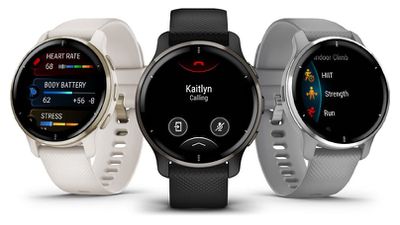
Fitness technology company Garmin today announced the launch of its latest smart watch, the Venu 2 Plus, which brings a microphone and voice assistant integration to the Venu 2 smart watch launched last year.
With an added microphone, the Venu 2 Plus is able to work with the Siri when connected via Bluetooth to an iPhone. Siri integration offers all of the same Siri features that are available on the iPhone, so Siri can be asked to send messages, make phone calls, answer queries, and more.
Measuring in at 43mm, the Venu 2 Plus has a round watch face that sets it apart from the Apple Watch. Like many smart watches on the market, the Venu 2 Plus features several health tracking capabilities. It monitors heart rate, respiration, daily energy levels, stress, sleep, and it has a built-in pulse oximeter.
As for battery life, the Venu 2 Plus lasts for up to nine days, which means that it significantly outperforms the Apple Watch, and it is also compatible with Android devices whereas the Apple Watch is limited to iPhones. Garmin's devices also have more of a fitness focus with built-in sports apps and animated on-screen workouts, as well as strength training features, HIIT workouts, and more.
Apple's mixed reality headset that's set to launch in 2022 will be equipped with three displays, according to a research report shared today by display analyst Ross Young.
The display configuration will include two micro OLED displays along with one AMOLED panel, with Sony set to supply the micro OLED displays that Apple will use. The micro OLED displays will be the main displays for the headset, but it's not yet known just what the AMOLED display will be used for.
Modern VR headsets don't use AMOLED technology because the pixel density is too low, so it's possible that Apple is going to add it for low-resolution peripheral vision.
Sony recently showed off a 4K display with 4000 pixels per inch designed for use with VR headsets, and the report suggests that it's possible Sony developed this display specifically for Apple. If Apple is indeed using this Sony technology, an assumed array of 4000 x 4000 pixels indicates the display for the headset will measure in at 1.4 inches diagonally.
This kind of advanced display configuration will come at a "high price," and Young suggests that the headset will cost several thousand dollars, which is in line with previous reports that have indicated a price of around $3,000.
The first iteration of the AR/VR headset from Apple will likely be targeted at professionals and developers and will be used to expand Apple's AR/VR ecosystem. Current rumors suggest the headset could perhaps see an introduction at this year's Worldwide Developers Conference and a debut later in the year, but it is not yet clear if it will be ready in time.
Apple in 2022 could expand its services portfolio to add an audiobooks service, according to a report from The Economist (via 9to5Mac) that outlines Apple's efforts to break into media and compete with Netflix, Amazon, and other companies.
The Economist goes over all of Apple's existing services like Apple TV+, Apple Music, Apple News+, Apple Arcade and Apple Fitness before throwing in a one line mention of a possible audiobooks offering.
In the past couple of years Apple has made smaller media bets including Arcade, a subscription gaming package, News+, a publishing bundle, and Fitness+, which offers video aerobics classes. There is talk of an audiobooks service later this year.
There are no details beyond the quick mention of an audiobooks option, so it's not clear where The Economist's information is coming from nor what an audiobooks product from Apple might look like, but with Apple already competing in podcasts and books, audiobooks could be the next logical step.
Apple already sells audiobooks through its Apple Books app, but books are only sold on a one-off basis with no option for unlimited listening. Apple could perhaps develop a service similar to Amazon's Audible, which offers credits for audiobooks for a monthly fee along with a selection of "Audible Plus" titles that do not require credits.
Pricing on Audible Plus starts at $7.95 for a limited selection of audiobooks that does not include new releases, while Audible Premium Plus is priced at $14.95 for Plus access and a credit for a new book each month. Offering an audiobooks service that includes unlimited access to new audiobooks is probably unlikely given the cost and royalties involved with audiobooks, so Apple would likely need to use Amazon's format or something close to it.
Apple's music discovery and identification platform Shazam today shared its Shazam Predictions 2022 playlist, which is available on Apple Music. The playlist offers songs from 50 artists "poised to have a breakthrough year."
Data was calculated through Shazam's predictive algorithms, and the tracks included were hand-selected by the Apple Music global editorial team. The songs show indicators of future growth, including early and consistent Shazam activity and discovery in more than one country.
Apple also highlighted the top five musicians that are considered "artists to watch."
Ayra Starr - Ayra in July launched a breakout track called "Bloody Samaritan" that was the most Shazamed song by a local female artist in Nigeria.
DannyLux - Mexican American singer is part of a wave of young artists reinventing corridos for a new generation, and he is featured on song "Jugaste y Sufri."
Lyn Lapid - Singer-songwriter Lyn Lapid is known for "Producer Man," which came out in 2020. She followed it up with "In My Mind" in 2021, which was the most Shazamed song in six countries.
Sad Night Dynamite - Duo Sad Night Dynamite offers up a blend of electronica, hip-hop, and Britpop, and they had a hit with their latest single "Demon."
STAYC - K-pop girl group STAYC released hit single "ASAP" in April, which has remained on the South Korean Shazam chart since then.
With last year's predictions, Shazam suggested artist "Masked Wolf" would be an artist to watch, and his track "Astronaut in the Ocean" has since been Shazamed more than 11 million times. It became the most Shazamed song of 2021 globally after it went viral on social media.
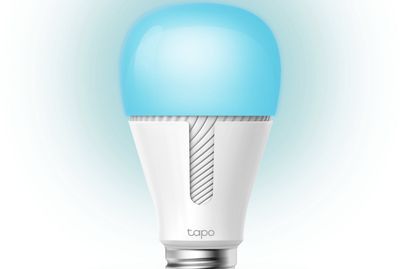
TP-Link today at CES 2022 announced that it will be expanding its Tapo line of smart home accessories from Europe to the United States, and some of the accessories will also be gaining support for Apple's smart home platform HomeKit, allowing the accessories to be controlled with Siri or the Home app on Apple devices.
Some of the HomeKit-enabled accessories will include the Tapo P125 Mini Smart Plug, Tapo S500D Dimmer Switch, and Tapo P306 Wall Power Strip, according to TP-Link. The Verge reported that the Tapo L535E Color Lightbulb and Tapo L930 Light Strip will also be compatible with HomeKit. Pricing has yet to be announced.
The new Tapo accessories are slated for release throughout 2022. The Verge reported that the P125 Mini Smart Plug will be released in the first quarter, followed by the Wall Power Strip, Dimmer Switch, and Light Strip in the second quarter and the Color Lightbulb in the third quarter. None of the accessories require a hub.
TP-Link will continue to sell its Kasa line of smart home accessories alongside the Tapo line in the United States, but a spokesperson for the company informed MacRumors that HomeKit support for the Kasa line is not currently planned.
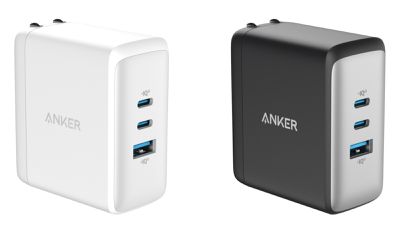
Popular charging accessory company Anker today is announcing two new charging solutions, starting with the new Anker 736 Charger, also known as the Nano II 100W. The Anker 736 features 100 watts of total charging power and is equipped with two USB-C ports and a USB-A port to allow for charging three devices simultaneously.
Anker says the 736 is the world's smallest 100-watt GaN wall charger that doesn't compromise on charging power, and it features PowerIQ 3.0 technology for optimized charging. GaN II technology delivers double the operating frequency of traditional GaN, along with an updated stacked design and an upgraded circuit board for maximum efficiency.
The Anker 736 will be priced at $79 and will be available starting in March.
Anker's second product announcement for CES is the Anker 535 Portable Power Station, also known as the PowerHouse 512Wh. As the name suggests, this is a rather large portable power station with a multiple of ports for powering all sorts of devices while camping, during power outages, and in other scenarios where you need to power a lot of devices while off the grid.
The power station features four AC outlets supporting up to 500 watts total, as well as a 60-watt USB-C port, three USB-A ports, one DC/cigarette lighter output port, and a light bar to help illuminate your surroundings. The unit can be charged from 0 to 80% in under two and a half hours.
The Anker 535 is priced at $499 and is available starting today.
Beyond those two charging solutions, Anker has several other product announcements today under its other brands.
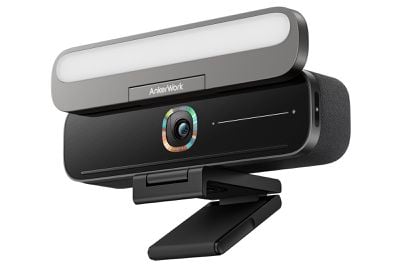
The first is the AnkerWork B600 Video Bar, an all-in-one package that integrates a video camera, speakers, microphone array, and dimmable key light for video conferencing. The camera supports 2K video at 30 fps with auto focus and image enhancements, while AI-powered "VoiceRadar" technology helps provide clear audio in noisy environments. The B600 launches on January 25 and is priced at $219.99.
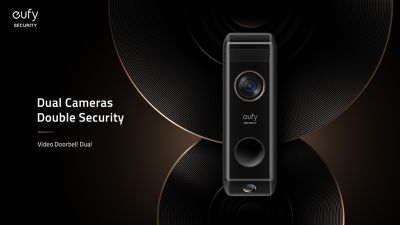
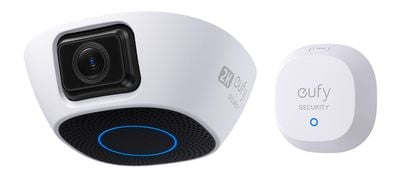
Anker's eufy brand has a couple of smart home product announcements although they aren't compatible with Apple's HomeKit ecosystem. The first is the eufy Security Video Doorbell Dual, featuring a top 2K camera to capture the face and body of visitors and a 1080p bottom camera to monitor packages left at your doorstep.
Detection features include AI-powered family recognition and package detection, as well as dual motion detection to help reduce false alerts. With a Homebase 2 providing 16GB of local storage, there's no monthly fee required for storing recorded video. The video doorbell is priced at $259.99 and launches on February 8.
The second eufy announcement is the Security Garage-Control Cam, which offers not only remote control garage door access but also includes a camera to monitor what's going on in your garage in real time with 32GB of local storage. It will launch in March and will be available in two versions, the $99 standard version with a 1080p camera and control for a single garage door and a $129 "Plus" version with a 2K camera and two-door control.
Finally, Anker's Nebula brand is introducing a new video projector, the Cosmos Laser 4K. Priced at $2,199, it offers 4K resolution and 2,400 lumens of brightness and runs Android TV 10.0. It features 30-watt speakers with Dolby Audio, while it includes a convenient carry handle and sets up in just seconds with automatic gridless keystone correction and seamless autofocus. The Cosmos Laser 4K will be available as a Kickstarter project on January 11 and will begin shipping in March.
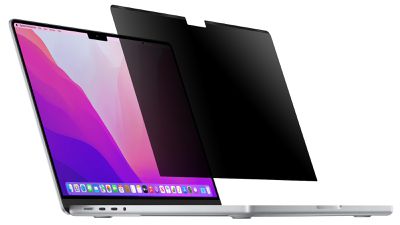
As part of CES 2022, accessory maker Kensington today announced that it will be introducing a new line of MagPro privacy screens for the latest 14-inch and 16-inch MacBook Pro models. Pricing and availability details were not disclosed.
Kensington said the new privacy screens attach to the MacBook Pro with magnets and narrow the field of vision to +/- 30 degrees so that a person looking from off to the side only sees a dark screen, helping to ensure that sensitive information remains private. The privacy screens have a cutout for the notch on the 14-inch and 16-inch MacBook Pro and feature a reversible design with matte or glossy viewing options.
Kensington also announced last month that its StudioDock now supports the 2021 version of the 12.9-inch iPad Pro, which is 0.5mm thicker than the 2020 model as a result of its Liquid Retina XDR display with mini-LED backlighting.
The StudioDock is an iPad Pro docking station with built-in iPhone and AirPods wireless charging and an optional Apple Watch charger. A recipient of a CES 2021 Innovation Award, the StudioDock expands an iPad Pro's connectivity with three USB-A ports, one USB-C port, one HDMI 2.0 port, a 3.5mm headphone jack, an SD card reader, and a Gigabit Ethernet port. It is also compatible with the 11-inch iPad Pro and the latest iPad Air.
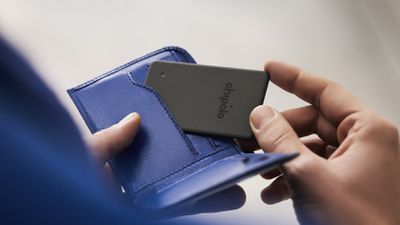
Chipolo in 2021 introduced the ONE Spot, its first Find My-enabled Bluetooth-compatible item tracker, and now the company is adding to its lineup of Find My products with the debut of the Chipolo CARD Spot, designed to be placed inside a wallet.
The Chipolo CARD Spot works with Apple's Find My network, so it can be added to the Items tab in the Find My app and tracked right alongside Apple devices like iPhones and Macs. When out of range of your own devices, the CARD Spot can leverage Apple products owned by others to relay its location, allowing a lost wallet to be tracked down wherever it is as long as an Apple device is nearby.
According to Chipolo, the CARD Spot has been designed to be thin and sleek, so that it can fit in the card slot of a wallet without adding too much extra bulk. It measures in at 2.4mm or 0.09 inches, which Chipolo says is almost as thin as a bank card.
The CARD Spot's battery is designed to last for up to two years, and it has IPX5 water resistance so it can withstand unexpected splashes of water. The battery is not replaceable, but Chipolo has a renewal program that allows users to purchase a new CARD Spot at a 50 percent discount after two years with a pre-paid envelope to recycle the old one.
In addition to being trackable through the Find My app, the Chipolo CARD Spot supports all of the other available Find My features as well. A lost wallet with the CARD Spot can be located through sound if it is nearby, and the Notify if Left Behind feature will let you know if you walk off and leave your wallet behind.
The Chipolo CARD Spot can be pre-ordered today from the Chipolo website, and it will start shipping out to customers in February. The Chipolo CARD Spot is priced at $35 for a single tracker and $60 for a two-pack.
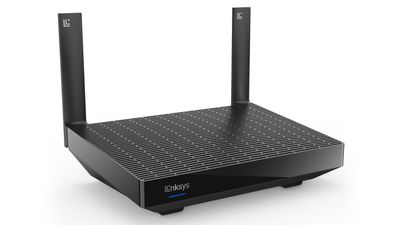
Linksys today announced the launch of its newest WiFi 6 router, the Hydra Pro 6. Priced at $300, the Hydra Pro 6 is meant to deliver fast, reliable, and secure connectivity for those working and learning from home.
The Linksys Hydra Pro 6 supports more than 30 devices per node and offers 2700 square feet of coverage, so it's able to cover even larger homes. Intelligent Mesh technology allows for whole home mesh WiFi coverage that can be expanded by adding additional nodes.
It supports wireless speeds of up to 5.4Gb/s for seamless video streaming, fast downloads, and more, plus it works with Qualcomm's Immersive Home 216 Platform and has access to the 160MHz channel for true WiFi 6 connectivity.
With the Linksys app, Hydra Pro 6 owners can view and prioritize devices, plus there's support for WPA3/WPA2-Personal encryption and SPI firewall, automatic security updates, parental controls, and a separate guest network.
Nomad is celebrating the new year with new discounts in its Outlet Sale, including USB-C cables, Apple Watch straps, AirPods cases, iPhone 11 cases, and more. This sale includes up to 90 percent off these accessories.
Note: MacRumors is an affiliate partner with Nomad. When you click a link and make a purchase, we may receive a small payment, which helps us keep the site running.
Besides a trio of refurbished Base Station wireless chargers, all of the products in Nomad's Outlet Sale are in new condition. All items during this event are final sale, so returns won't be accepted. You can find the full list of items in the sale listed below.
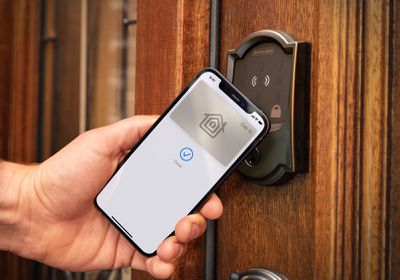
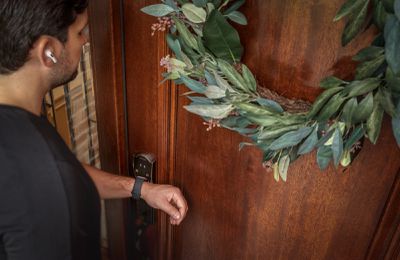
One of the Wallet features introduced in iOS 15 was support for home keys, which will let users add digital keys for compatible HomeKit door locks to the Wallet app on their iPhone and Apple Watch. With the system, users can take advantage of NFC connectivity to quickly unlock their home by simply bringing their device close to the lock.
Schlage today is introducing the Schlage Encode Plus Smart WiFi Deadbolt, which is the first smart lock in North America to support Apple's home key system.
The Encode Plus operates as a traditional HomeKit deadbolt, working over Wi-Fi without the need for a separate hub to integrate with the Home app across Apple's platforms. As part of the HomeKit setup process, however, you're also offered the option of adding a home key for the lock in the Wallet app.
With Apple's home key system, you won't need to unlock your iPhone or Apple Watch in order to unlock your door, and it supports Power Reserve so it will continue to function for up to five hours after your iPhone runs out of battery.
It is also a traditional keypad deadbolt with physical key backup, so there are multiple options for unlocking your door. Up to 100 access codes can be created to distribute to users who may need access to your home, and the codes can be scheduled to be valid only at certain times or revoked if no longer needed.
In addition to HomeKit and Apple home key support, the Encode Plus also features Google Assistant and Alexa support.
The Encode Plus will be priced at $299.99 and will launch this spring. It will be available in two versions, a more traditional Camelot style and a more modern Century style, with both styles available in several color options.
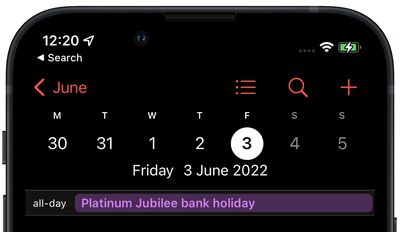
If you live in the United Kingdom, there's a good chance you enjoyed yesterday's first official bank holiday of the year with your feet up. But if all you'd done was rely on the Calendar app on your iPhone, you may never have even known you were due a day off. That's because a persistent bug that has plagued the app for months still prevents Apple's UK bank holidays subscription option from populating the calendar view for 2022.
Based on the number of complaints online, many iPhone users in the UK have been aware of this issue for some time, but with 2022 now upon us, that number has risen exponentially. Apple surely knows there's a problem with its UK Holidays subscription webcal, but until it does something about it, here's an alternative way to get the full list of dates for England and Wales, Scotland, or Northern Ireland booked into your calendar in a few quick steps.
Monday, January 3 - New Year's Day
Friday, April 15 - Good Friday
Monday, April 18 - Easter Monday
Monday, May 2 - May Day
Thursday, June 2 - Spring bank holiday
Friday, June 3 - Platinum Jubilee bank holiday
Monday, August 29 - Summer bank holiday
Monday, December 26 - Boxing Day
Tuesday, December 27 - Christmas Day (substitute)
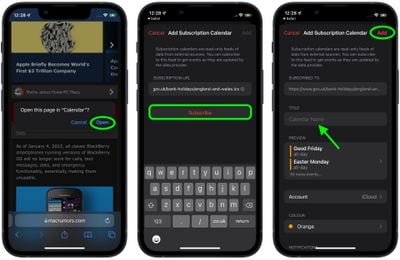
The above public holidays list is the official one for England and Wales for 2022 provided by the UK government, which helpfully provides Apple users with its own ICS calendar files that can be imported into the iPhone calendar app. Follow the steps to import the one that applies to your country into your calendar now.
Tap Subscribe. You can give the calendar subscription a recognizable name (and color if you want), then add it to your iCloud or iPhone account.
Tap Add.
After that, the months in your chosen calendar should now be populated with all the bank holidays you're already looking forward to in the year ahead.
Update: As noted by MacRumors readers, this is also an issue in Spain, Germany, Portugal, Sweden, Denmark, Australia, and several other countries. Given that it might be a worldwide issue, Apple could have a fix coming in a future update.
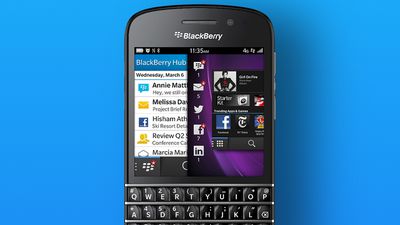
As of January 4, 2022, all classic BlackBerry smartphones running versions of BlackBerry OS will no longer work for calls, text messages, data, and emergency functionality, essentially making them unusable.
BlackBerry announced the news in September 2020 as part of a broader company shift to focus on enterprise security and solutions. "As another milestone in the BlackBerry journey, we will be taking steps to decommission the legacy services for BlackBerry 7.1 OS and earlier, BlackBerry 10 software, BlackBerry PlayBook OS 2.1 and earlier versions, with an end of life or termination date of January 4, 2022," the company said at the time.
BlackBerry made a few attempts to reenter the smartphone market over the years by selling Android-based smartphones rather than those running its own operating system. Those devices failed to reach mainstream adoption, however, leading BlackBerry to announce that the company would focus on cybersecurity software for enterprise customers instead of making hardware.
For customers still using classic BlackBerry smartphones, the company is providing some information on how the January 4 decommission may impact you and steps you can take to prepare.
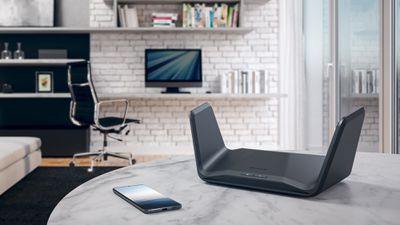
Netgear today announced the launch of its latest Nighthawk router, the Nighthawk RAXE300 Tri-Band WiFi 6E, which offers the 6GHz band for WiFi 6E-compatible devices.
The RAXE300 offers up to eight WiFi streams and supports Gigabit+ WiFi speeds up to 7.8Gb/s in homes that are up to 2,500 square feet. Six antennas are included for improved signal strength and coverage, and there's a 2.5 Gigabit Ethernet port for Gigabit+ connectivity. Five additional Gigabit Ethernet ports are available for wired connections to other smart home devices.
The 6GHz WiFi band is only available on the newest devices, so it is less congested and is able to provide faster connectivity speeds with low latency. Apple devices do not yet support WiFi 6E, but Apple is expected to adopt it in the near future, perhaps as soon as this year.
This is Netgear's third WiFi 6E router, and it joins the pricier Nighthawk RAXE500 and the Orbi Quad-Band Mesh WiFi 6E System. The RAXE300 will be available in the first quarter of 2022 and it will be priced at $400.
Netgear is also announcing the launch of the Netgear Game Booster, a new service that provide Orbi users with the same tools that are normally limited to the Nighthawk ProGaming routers. Orbi owners will be able to enhance network performance and minimize lag by identifying and selecting the fastest game servers, as well as prioritizing network bandwidth to gaming devices and applications.
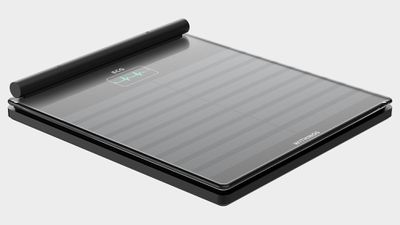
Withings today announced the launch of a new smart scale, the Body Scan, which is designed to track all kinds of health-related metrics. It monitors segmental body composition, weight, heart rate, and vascular age, plus it can assess nerve activity and heart rhythm using a 6-lead ECG.
Body Scan features a tempered glass platform with a retractable handle. It is equipped with four weight sensors and 14 ITP electrodes, along with four stainless steel electrodes in the handle for the ECG and body composition analysis functionality. A built-in battery lasts for a year before needing to be recharged, and health metrics are displayed on a 3.2-inch color LCD screen.
According to Withings, the Body Scan scale is able to provide precise weight measurements in addition to using multi-frequency Bioelectrical Impedance Analysis to measure overall body composition, providing readings on whole-body fat, water percentage, visceral fat, muscle mass, bone mass, and extra cellular and intracellular water. It's also able to provide readings for body parts that include the torso, arms, and legs.
The Body Scan is able to track sweat gland activity in the feet and it will offer a daily assessment of small nerve activity, plus it can determine vascular age through cardiovascular measurements to give users an idea of their arterial health. For the ECG function, Body Scan can detect arrhythmias using two electrodes located on each side of the handle and one in the base of the scale.
Withings is pairing the Body Scan's health monitoring features with access to coaching, clinical specialists, and holistic plans to reach health goals through the Withings health and wellness programs, with a three-month free subscription included.
Withings is planning to launch the Body Scan scale in the second half of 2022 following FDA clearance. It will be priced at $299.95.
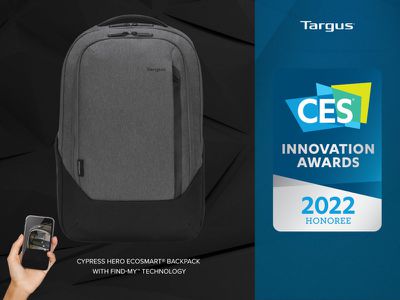
Accessory maker Targus today announced that its Cypress Hero EcoSmart Backpack with built-in support for Apple's Find My app will be available in spring or summer 2022 for a suggested price of $149.99 in the United States.
The backpack is equipped with a small tracking module that allows the backpack's location to be tracked in the Find My app on the iPhone, iPad, Mac, and Apple Watch without needing to use an AirTag. Based on an image shown on the CES website, it appears the backpack will support Precision Finding, which allows users with an iPhone 11 or newer to see the exact distance and direction to the backpack with audible, visual, and haptic feedback. Apple opened up the U1 chip to third-party accessories last year.
Targus said the built-in tracker is "highly integrated" into the backpack, whereas an AirTag could be taken out of the backpack and tossed away if stolen. The backpack comes with a replaceable battery for the tracker that is rechargeable via USB.
If the backpack is separated from its owner but outside of Bluetooth range, there is still a chance that the crowdsourced Find My network can help track it down. If another iPhone user happens to walk by the backpack, for example, their iPhone can detect Bluetooth signals from the backpack and relay the location back to its owner anonymously.
Targus said the backpack has a padded compartment that can hold up to a 16-inch MacBook Pro, and several other compartments and pockets for additional devices and personal items. The backpack is made with some recycled materials.
This story was originally published in November and has been updated with new information.
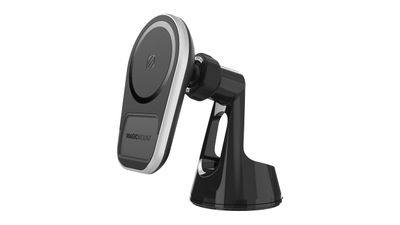
Scosche today announced the launch of a number of new products in its MagicMount product lineup, along with other MagSafe-compatible accessories like wireless chargers and speakers.
The MagicMount Pro Charge5 mounts from Scosche are compatible with Apple's MagSafe iPhones, which includes the iPhone 12 and iPhone 13 models. Scosche promises a strong hold, but it's worth noting that these are not using Apple's MagSafe protocol and are limited to 7.5W wireless charging.
There's a 360-degree adjustable head to allow the iPhone to be used in portrait or landscape mode, and all mounts come with a car adapter for charging and a 20W USB-C charging port for when faster charging is needed.
Though designed for MagSafe iPhones, the MagicMount Pro Charge5 mounts can also be used with older iPhones by attaching the included MagicPlate magnet. Scosche's MagicMount Pro Charge5 can be purchased in four options: Window/Dash, Dash/Vent, Telescoping, and Cup Holder, with a launch planned for spring 2022 at a $64.99 price point. There are also less expensive MagicMount Pro MagSafe options at $44.99.
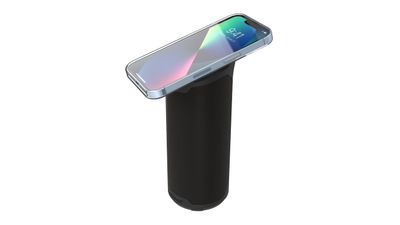
Scosche is also introducing MagSafe-compatible speakers and wireless chargers. The $40 BoomCanMS Portable is a small, Bluetooth-enabled speaker that's designed to adhere to the back of a MagSafe iPhone. The MagSafe technology doesn't add anything for sound, but it does keep the speaker from becoming lost and it also doubles as a kickstand.
The larger $130 BoomBottle Magnetic Portable Speaker allows the iPhone to be attached to the top for easy access to streaming music, hands-free calls, and more. Both new speakers are set to launch later in 2022.
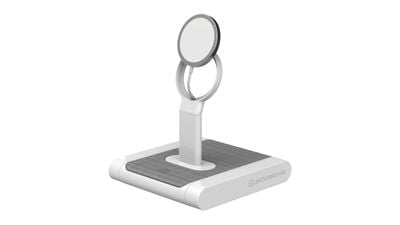
For those who already have a MagSafe Charger from Apple, Scosche is introducing the BaseLynx MS, which is designed to integrate with the BaseLynx system for multi-device charging. The BaseLynx MS accommodates a MagSafe Charger and allows for charging in an upright position, and because it's using Apple's own technology, it charges at the full 15W (12W for the iPhone 12 and 13 mini models).
The BaseLynx MS Wireless Stand for MagSafe Charger is set to launch in spring 2022 for $50.









 Note: MacRumors is an affiliate partner with Nomad. When you click a link and make a purchase, we may receive a small payment, which helps us keep the site running.