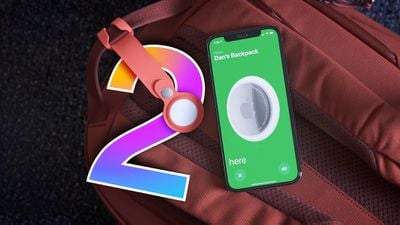
Apple introduced AirTags in 2021, and over the last several years, the item tracker has been growing in popularity. Rumors suggest that Apple has a new version of the AirTag in the works, and while we don't know a lot just yet, a new model is said to be coming in the near future.
This guide highlights everything that we know about the AirTag 2 so far, and we'll be added to it as new rumors surface.
Design
There are no rumors of an AirTag redesign at this point, and Apple will likely keep the same general shape. There have been complaints about how easy it is to access the battery, which some worry could be a danger to children, so Apple could potentially change the way the AirTag opens.
The AirTag has a replaceable CR2032 battery, and Apple doesn't plan to transition to a built-in rechargeable battery. The AirTag 2 is likely to continue to use a CR2032 battery.
As an anti-stalking measure, Apple could make the speaker in the AirTag more difficult to remove. That would prevent would-be stalkers from removing the speaker to prevent the AirTag from making a sound.
Vision Pro Integration
According to Apple analyst Ming-Chi Kuo, the AirTag will integrate with the Vision Pro headset as part of a spatial computing ecosystem, but he did not provide specifics on just what that means.
It's possible the Ultra Wideband chip in the AirTags could be used for relaying positional information to the Vision Pro in some capacity, or there could be some kind of VR item tracking interface.
Upgraded Ultra Wideband Chip
The next-generation AirTag will have a much longer tracking range thanks to the inclusion of a second-generation Ultra Wideband chip. The updated Ultra Wideband chip was introduced in the iPhone 15 models and it has three times the range as the original Ultra Wideband chip.
There may be a feature that allows you to find the precise location of an AirTag when it's moving, and to better locate an AirTag in crowded areas.
Other Features
The AirTag 2 could include an improved pairing process, and there may be more information on battery level.
Launch Date
A new AirTag was rumored to be launching in late 2025, but at this point, it looks like the device has been delayed until early 2026.
Amazon today has the AirPods 3 (Lightning Charging Case) for $139.99, down from $169.00. The earbuds are in stock and ready to delivery between August 16 and August 19 if ordered today.
Note: MacRumors is an affiliate partner with some of these vendors. When you click a link and make a purchase, we may receive a small payment, which helps us keep the site running.
This is a match for Amazon's all-time low price on this version of the AirPods 3, and it's a price we haven't tracked in months. Even during the last major deal event, Prime Day, the AirPods 3 only reached around $149.00 in their best sale.
There are a few other notable AirPods deals on Amazon this week, including the AirPods 2 for $99.00 ($30 off) and the AirPods Pro 2 for $199.00 ($50 off). Keep up with all of this week's best discounts on Apple products and related accessories in our dedicated Apple Deals roundup.
iPhone owners who signed up to receive a payment under Apple's "batterygate" iPhone throttling lawsuit settlement should soon be receiving their payments. As noted by The Mercury News, the judge overseeing the lawsuit has thrown out an appeal from two iPhone owners who were attempting to object to the settlement, clearing the way for the payments to be sent out.
Apple in 2020 agreed to pay $500 million to settle the "batterygate" lawsuit, which accused the company of secretly throttling older iPhone models. The class action lawsuit was open to U.S. customers who had an iPhone 6, 6 Plus, 6s, 6s Plus, 7, or 7 Plus running iOS 10.2.1 or iOS 11.2 prior to December 21, 2017.
The lawsuit stemmed from the iOS 10.2.1 update that Apple released in 2017. The software tweaked the performance of older iPhones with degraded batteries to prevent them from shutting down. The processor was effectively throttled down because the battery could not keep up, and some users saw slower performance speeds when this occurred. The only way to restore full performance was to replace the degraded battery.
Apple did not initially tell customers that iOS 10.2.1 introduced performance throttling, which outraged consumers and led to a major headache for Apple, including this class action lawsuit. Apple ultimately apologized for its lack of communication and dropped the price of battery replacements to $29 through the end of 2018.
iPhone owners eligible for a payout would have needed to submit a claim back in 2020, and submissions were open through October 6, 2020. Those who submitted a claim back then will be eligible for a payment, which will be around $65 per claimant.
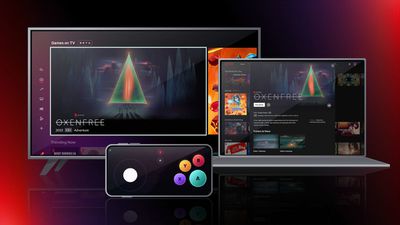
Netflix today announced that it is expanding the games that it offers to select TVs, PCs, and Macs as part of a test that is being conducted in Canada and the UK.
A limited number of Netflix customers in these countries can visit Netflix.com on supported browsers on a PC or Mac to play two Netflix test games, including Oxenfree and Molehew's Mining Adventure. The games can be played with a standard keyboard and mouse.
As for TVs, Netflix says that games can be played through Amazon TV Streaming Media Players, Chromecast with Google TV, LG TVs, Nvidia Shield TV, Roku devices and TVs, Samsung Smart TVs and Walmart ONN. At the current time, Netflix's games are not available on the Apple TV, but Netflix says additional devices will be added "on an ongoing basis."
TV games can be played with the Netflix Game Controller app, which is available for iPhones and Android devices. The app was released last week and is designed to pair a smartphone with a TV for playing Netflix games.
Netflix has offered mobile games since 2021, and there are now more than 50 titles available, but prior to now, the games could only be played on a smartphone or tablet. Access to games is included in a Netflix membership, with no additional fees or in-app purchases.
During the beta testing period, Netflix will be working on its game streaming technology and controller, aiming to improve the experience over time. The company says that by expanding games to more devices, it hopes to "make games even easier to play" for Netflix subscribers worldwide.
Apple is researching strain gage sensors, likely in an effort to improve the Apple Watch's strength training capabilities, according to a recent job listing (via MyHealthyApple).
The job listing from Apple's Health Technologies team seeks engineers with "exposure to analog electronics, preferably mechatronic systems utilizing actuators, temperature sensors, strain gages, and photodiodes." The candidate will help design, build, test, and troubleshoot early prototype health hardware. Apple is presumably conducting this biomechanics research and development in relation to the Apple Watch.
The Apple Watch already contains an actuator, temperature sensor, and photodiodes, but it does not have a strain gage. Strain gages measure variations in electrical resistance when force is applied. They are already widely used in motion-tracking and physiological monitoring systems. Researchers have demonstrated how a single, non-invasive strain sensor placed on the wrist can accurately measure the full range of strains on human skin, as well as monitor blood pressure – another health feature rumored for future Apple Watch models.
The Apple Watch can only track active calories, time, and heart rate during strength training workouts. These metrics are more useful for tracking aerobic activities like running or cycling, but are less insightful in the context of strength training because heart rate is not proportional to effort and load. Strain gages, on the other hand, can help track the specific impact of various strength training exercises. In addition, the Workout app does not offer any ability to capture weights, reps, and sets to calculate muscular loads, so there is much Apple could do to improve strength training tracking with the Apple Watch.
Amazon today has the 256GB M1 MacBook Air for the record low price of $749.99, down from $999.00. This has been one of the best all-around discounts on any MacBook model this summer, following its initial debut during Prime Day in July.
Note: MacRumors is an affiliate partner with Amazon. When you click a link and make a purchase, we may receive a small payment, which helps us keep the site running.
You can get the notebook in all three colors of Gold, Silver, and Space Gray at this price. Silver and Gold have an estimated delivery date of August 16 to August 19, but Space Gray is seeing a slightly delayed delivery estimate of August 25 to August 29.
There are many internal and external differences between the 13.3-inch M1 MacBook Air and the newer 13.6-inch and 15.3-inch M2 MacBook Air models, but as an entry-level computer the M1 device should work great for common tasks, especially at this all-time low pricing. You can read our guide to get a better look at all the similarities and differences between the generations.
Be sure to visit our full Deals Roundup to shop for even more Apple-related products and accessories.
Apple's upcoming M3 Pro, M3 Max, and M3 Ultra chips could feature more CPU and GPU cores, Bloomberg's Mark Gurman reports.
In his latest "Power On" newsletter, Gurman set out the key changes to the CPU and GPU core numbers of the M3 Pro, M3 Max, and M3 Ultra chips, including how many of the CPU cores are dedicated to performance or efficiency:
10 or 12 CPU cores (6 or 8 high-performance and 4 energy-efficient) 16 or 19 GPU cores
12 or 14 CPU cores (6 or 8 high-performance and 6 energy-efficient) 18 or 20 GPU cores
Max
12 CPU cores (8 high-performance and 4 energy-efficient) 30 or 38 core GPU cores
16 CPU cores (12 high-performance and 4 energy-efficient) 32 or 40 GPU cores
Ultra
24 CPU cores (16 high-performance and 8 energy-efficient) 60 or 76 GPU cores
32 CPU cores (24 high-performance and 8 energy-efficient) 64 or 80 GPU cores
The standard M3 chip will apparently feature the same CPU and GPU core configuration as the M2 chip, with eight CPU cores (four performance and four efficiency) and ten GPU cores. This chip is expected to be offered in the 13-inch MacBook Pro, 13- and 15-inch MacBook Air, Mac mini, iMac, and iPad Pro.
Apple is also apparently testing MacBook Pro models with 36GB and 48GB of memory, suggesting that new memory options may be available in the future. Currently, the high-end MacBook Pro models can be configured with 16GB, 32GB, 64GB, and 96GB of memory.
Gurman reaffirmed that the first Macs with the M3 chip should debut in October, while Macs with the M3 Pro and M3 Max chips will not arrive until 2024. Macs with the M3 Ultra chip, such as the next-generation Mac Studio, may not arrive until the end of 2024 at the earliest.
Apple is planning a complete revamp of the Apple Watch for the device's tenth anniversary, according to Bloomberg's Mark Gurman.
In the latest edition of his "Power On" newsletter, Gurman dubs the overhauled device "Apple Watch X," similar to 2017's iPhone X that celebrated ten years of the iPhone. Since the original Apple Watch was unveiled in 2014 and launched in 2015, Gurman is unsure whether the Apple Watch X will be released in 2024 or 2025.
Apple is apparently working on a thinner casing for the Apple Watch X, as well as different ways for bands to attach to the device. The mechanism for connecting bands to the Apple Watch's casing has remained the same since the device's introduction, allowing bands to be compatible throughout different generations of the Apple Watch.
Individuals involved in developing new Apple Watch models told Gurman that the existing band system takes up a large amount of space that could be better utilized for bigger batteries or other internal components. As such, Apple is now considering a magnetic band attachment system, but it is currently unclear whether it will be ready or present on the Apple Watch X.
The Apple Watch X could also coincide with Apple's introduction of microLED display technology, which surpasses the color and clarity of existing OLED screens. It may also be the first Apple Watch to feature blood pressure monitoring.
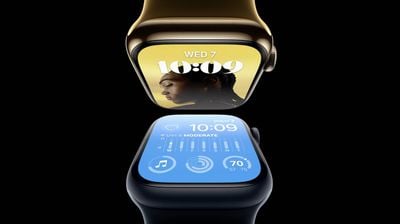
Gurman added that the Apple Watch Series 9 is due to be only a "minor refresh," similar to the incremental updates that the device has received in recent years. The new devices are expected to receive faster processors and new color options, but will otherwise be largely the same as the existing models. Gurman says it is "arguably the most minor upgrade in the product's history."
As a result, Apple has recently been considering switching the Apple Watch away from an annual upgrade cycle to offer more substantial updates less frequently, Gurman says. He noted that the iPad started with an annual upgrade cycle, but this has now slowed to a refresh around every 18 months or so.
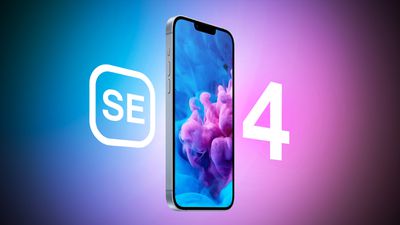
The fourth-generation iPhone SE will have an iPhone 15 Pro-style Action Button, among several other significant new features, according to the leaker known as "Unknownz21."
Earlier this week, the leaker described the fourth-generation iPhone SE as "effectively an iPhone 14 derivative," echoing previous reports from the likes of Apple analyst Ming-Chi Kuo.
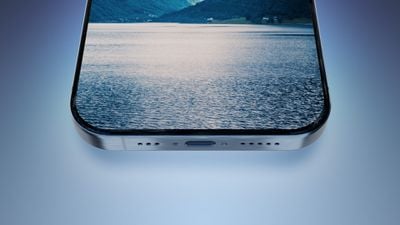
In their latest tweet, Unknownz21 provides some new details about Apple's next low-cost iPhone and reiterates that its design will be based on the iPhone 14. The device will apparently feature a USB-C port, moving the iPhone SE away from Lightning for the first time. It will also purportedly have Face ID, dispelling previous rumors that the iPhone SE could retain a Touch ID button.
Most interestingly, they claim that the device will sport an Action Button like the iPhone 15 Pro and iPhone 15 Pro Max. This would be a clear differentiator between the iPhone SE and the iPhone 15 and iPhone 15 Plus, which are not expected to offer the feature. The iPhone SE will also reportedly retain a single rear camera setup like the current model.
Earlier this week, it was reported that manufacturers are currently bidding to receive orders from Apple for the fourth-generation iPhone SE's OLED display panels, which would be a significant upgrade over the existing model's LCD. The next-generation iPhone SE is also believed to be among the first to contain Apple's long-rumored custom 5G modem. It is not expected to launch until 2025.
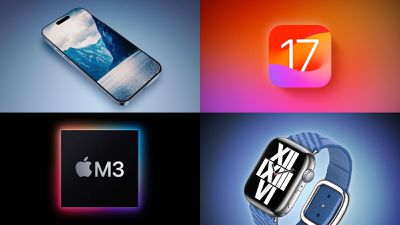
If rumors are to believed, we're now exactly one month away from Apple's big September event where we're expecting to see several product announcements led by the iPhone 15 lineup.
In addition to iPhone 15 rumors, this week also saw fresh claims about the upcoming Apple Watch Series 9, while we're seeing more details about the M3 family of chips coming to next-generation Mac models. Apple should also be winding down work on iOS 17 ahead of a release next month, though the company is continuing to fix bugs and make tweaks, so be sure to read on below for all the details on this week's top stories!
Apple's iPhone 15 Event Likely to Be Held on September 12
Apple's annual iPhone event is pretty much always held in the first two weeks of September, but with just about a month to go it appears the exact date for 2023 is getting pinned down.
Following the usual pattern, pre-orders for the new iPhones should begin a few days later on Friday, September 15, with a launch following a week later on September 22. It is possible, however, that some models may see tight initial supplies or slightly delayed launch dates depending on how early production is going.
Images of Alleged iPhone 15 USB-C Connector Parts Leak Online
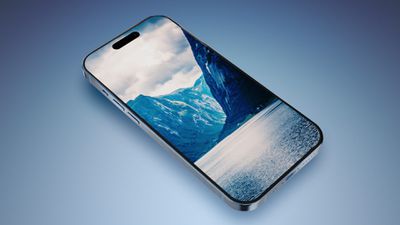
The iPhone 15 lineup is all but confirmed to be switching from Lightning to USB-C, but this week saw some photographic evidence in the form of alleged USB-C ports from the various models.
This week also saw a claim that the Pro models will have storage options up to 2TB, while code included in tvOS 17 betas suggests Apple will continue this year's pattern of using a new A17 chip for the iPhone 15 Pro models while the regular iPhone 15 models use an A16 chip.
And finally, another rumor claims that A17 chip in the Pro models will be paired with 6GB of RAM as on iPhone 14 Pro models, despite other reports saying RAM will be bumped to 8GB this year.
Apple Watch Series 9 'Basically Unchanged' Other Than Performance Boost From S9 Chip
Alongside the iPhone 15 lineup, we're also expecting to see new Apple Watch models at the September event. Rumors suggest we'll be seeing a nice performance boost with a new S9 chip, but otherwise the Apple Watch Series 9 is said to be "basically unchanged."
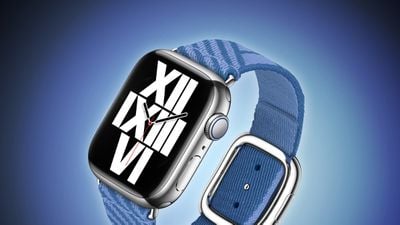
One rumor suggests we may see a new band option alongside the Series 9, a woven fabric one with a magnetic buckle priced at $99 when purchased on its own.
Everything New in iOS 17 Beta 5
Apple seeded a fifth developer beta and third public beta of iOS 17 this week, alongside related beta updates such as macOS Sonoma and watchOS 10.
Apple Testing M3 Max Chip With 16-Core CPU and 40-Core GPU
We're continuing to learn more about the upcoming M3 family of chips for the Mac, thanks to Bloomberg's Mark Gurman digging into third-party app developer logs.
Those logs indicate that the next-generation M3 Max chip for higher end machines like the 14-inch and 16-inch MacBook Pro will include up to 16 CPU cores and 40 GPU cores. Built using a new 3nm process, the chip should include significant speed and efficiency improvements even beyond the increased core counts.
There's also a new Mac model with the base M3 chip that recently showed up in logs, and it's presumably an updated version of the Mac mini. That chip is also expected to appear in updated iMac, 13-inch MacBook Pro, and MacBook Air models.
10 Hidden Easter Eggs in macOS
This week, we took a fun look at a number of Easter eggs hidden in macOS, ranging from the infamous "Blue Screen of Death" on Windows and Clarus the dogcow to Steve Jobs' eyeglasses and the iconic "Here's to the crazy ones" poem from Apple's "Think Different" marketing campaign.
Check out our full list and let us know what other Easter eggs you're aware of in Apple's operating systems
MacRumors Newsletter
Each week, we publish an email newsletter like this highlighting the top Apple stories, making it a great way to get a bite-sized recap of the week hitting all of the major topics we've covered and tying together related stories for a big-picture view.
In iOS 17, Apple added a handful of new improvements to on-device personal assistant Siri and the Spotlight search feature. There aren't any major changes, but Spotlight search has improved, and for Siri, it's easier than ever to use.
This guide highlights all of the Siri and Spotlight features and changes in iOS 17.
No More Hey Siri
You can just say "Siri" to activate Siri, dropping the "Hey" that's been used as a wake word for years. Siri will activate when you say the Siri word, so you can speak more naturally.
"Siri, can you tell me what time it is?" is a phrase that Siri recognizes, for example.
Back-to-Back Requests
Siri is able to recognize and respond to multiple back-to-back requests without needing to be reactivated.
You can, for example, ask Siri to tell you the time, and then follow that up with a request to text your friend that you're going to be late all in the same Siri request.
Web Articles
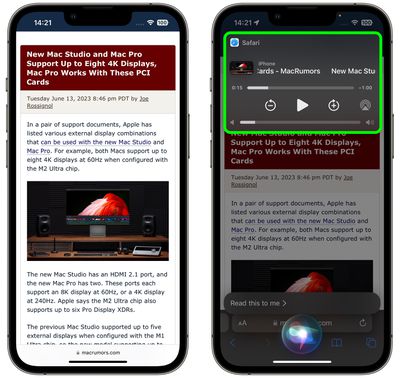
In Safari, there's a new Siri feature that allows the personal assistant to read a web article to you. As long as a site has Reader View available, you can say "Siri, read this to me" to have Siri read the content on the page.
There are playback tools, so you can fast forward, pause, resume, and rewind from the Lock Screen.
Siri Messaging
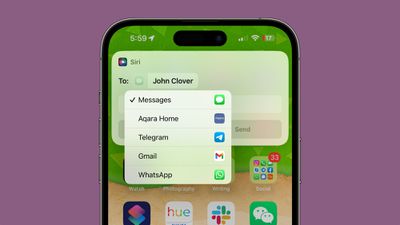
When you ask Siri to send a message, you can now tap to select which app you want to send it from. This allows you to send messages not just from Apple's built-in Messages app, but also third-party apps like Telegram and WhatsApp.
The feature is compatible with any third-party app that has "Use with Ask Siri" enabled in the Settings app.
Siri and StandBy
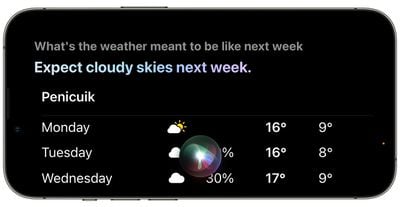
Siri can be activated in StandBy mode, the new option for turning a charging iPhone into a home hub. When you ask Siri a question, there's a new full-screen UI that will show the results in landscape mode.
If you ask about the weather, for example, you'll see the current temperature and icons that denote the weather conditions.
Siri UK Voices
There are two new "British" Siri voices available in iOS 17, making a total of four.
Siri in India
iOS 17 supports bilingual Siri queries that mix English with Hindi, Telegu, Punjabi, Kannada, or Marathi.
Spotlight Search
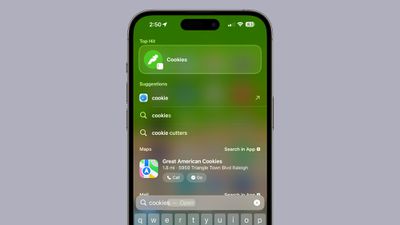
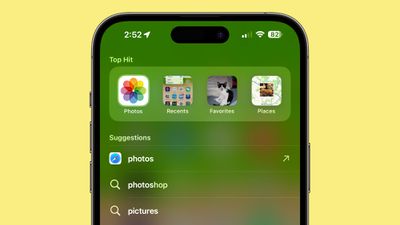
Search results have been improved with new colors and app icons to make it easier to see what's what. If you search for cats, for example, and one of the results is an option to tap into Safari for a web search, you'll see a Safari icon instead of the prior magnifying glass icon.
App Shortcuts
When searching for an app, Spotlight now offers App Shortcuts in the top hits section. If you search for Photos and often go to the Favorites album, Spotlight will show you a link to get directly to the Favorites album from the search interface.
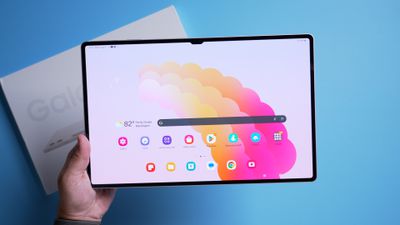
Samsung in July introduced its latest tablet offering, the 14.6-inch Galaxy Tab S9 Ultra. This is Samsung's best and biggest tablet to date, so we thought we'd see how it compares to the 12.9-inch iPad Pro.
At 14.6 inches, The Tab S9 Ultra is notably bigger than the iPad Pro, and it has an impressive OLED display with deep blacks and rich colors. Apple is using mini-LED for the latest iPad Pro and there are rumors that it will transition to OLED, but Apple hasn't made it there yet.
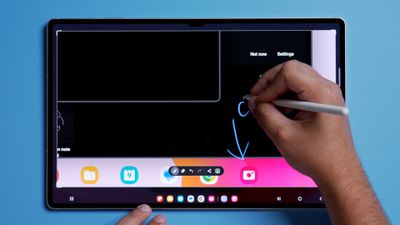
There's an under-display fingerprint sensor that is supplemented by facial recognition (Samsung's facial recognition still can't compare to Face ID), and a horizontal front camera so you can use the front-facing camera in landscape orientation, unlike with the iPad Pro. There's no Apple Pencil, but Samsung's tablets use the S-Pen, which is feature rich and comparable to Apple Pencil (plus it's included in the price). Latency is about the same, and there's a convenient charging spot for it at the back of the tablet.
The battery lasts for about eight hours and for storage, it supports a microSD card, which is not true of any Apple products. It's IP68 water and dust resistant, which is a higher ingress rating than the iPads.
There are some notable annoyances, such as the $350 keyboard cover that's heavy, can't be used on a lap, and has a jittery, hard-to-use trackpad. The speakers are not as good as the speakers in the iPad Pro, and overall, Android on a tablet doesn't have the smoothness or usability of iPadOS on an iPad.
What do you think of the Galaxy Tab S9 Ultra? Let us know in the comments below.
Earlier this year, General Motors revealed it is planning to phase out support for CarPlay and Android Auto in all of its electric vehicles, citing the need for tighter integration with the vehicle as GM rolls out a new infotainment system co-developed with Google.
With this week's high-profile unveiling of the $130,000+ Cadillac Escalade IQ that will launch in late 2024, GM followed through on its promise as the automaker confirmed to The Verge yesterday that the luxury electric SUV won't support CarPlay or Android Auto anywhere on its massive 55-inch dashboard display.
The move to discontinue to CarPlay and Android Auto is more of a political one than a technical one, however, as MacRumors alum and car journalist Jordan Golson noted in his video overview of the new Escalade IQ.
Golson spoke to GM representatives about the omission and they shared that the decision was made due to EV-specific functionality such as utilizing vehicle charge state information to assist with navigation routing. When using CarPlay or Android Auto, the user's phone has no knowledge of the vehicle's charge state, and GM believes that forcing users to use the built-in Google-based system which can account for this information will deliver a better user experience.
Golson says that given this is not a technical decision, GM could update the infotainment system on the Escalade IQ and other upcoming EVs to add CarPlay and Android Auto if it finds customers are demanding it, but there are no guarantees about what GM will do.
While GM's argument about tighter integration with vehicle data does have some merit, there is nothing preventing the company from offering users the option of using either the built-in system or CarPlay/Android Auto, as is the case in millions of vehicles on the road today.
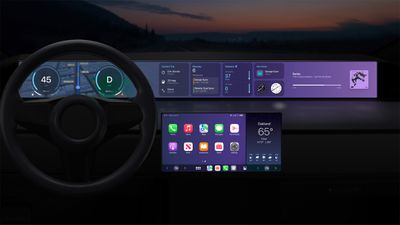
Apple's next-generation CarPlay
It also appears the argument could largely become moot with the next-generation version of CarPlay teased by Apple at WWDC 2022, which integrates very closely with vehicle systems and expands the CarPlay experience across the entire dashboard. We should learn more about next-generation CarPlay and see the first vehicles introduced with it later this year, but GM is not included in the list of over a dozen brands announced by Apple as partners on the feature.
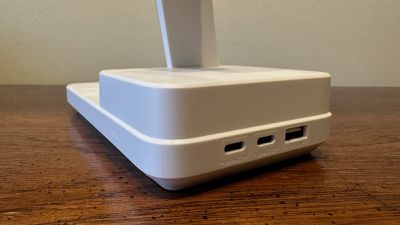
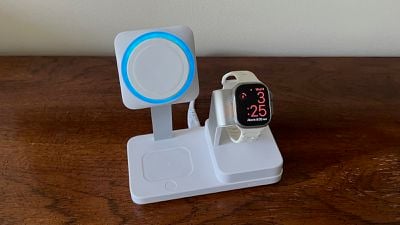
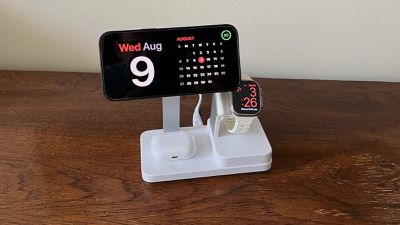
A few weeks ago, ESR launched a Kickstarter campaign for a new 100W 6-in-1 Charging Station, offering support for charging an iPhone via MagSafe, Apple Watch with fast charging, and AirPods, plus three additional ports (two USB-C and one USB-A) for charging additional devices. The campaign runs through September 1, and ESR recently sent me a preview unit to test out.
While my review unit arrived in a plain white box with no manuals or other documentation, ESR says the unit itself is identical to the final production units, so it should be reflective of what campaign backers will see when shipments begin in October.
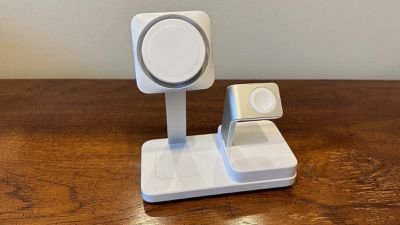
My initial impression of the 6-in-1 Charging Station is that it's a bit on the large side, but perhaps that shouldn't be unexpected considering the number of devices it supports and the fact that all of the hardware is built into the base of the charger with only a removable 6-foot standard power cord rather than requiring a separate bulky power adapter. But if you've got enough room on your nightstand or desk, the bulk shouldn't be a major issue.
The charging station is made primarily of a relatively plain "Arctic White" matte plastic, although I would have preferred a black or gray color to blend in a bit more and perhaps be a little less prone to picking up smudges and other dirt over time. The only exceptions to the white color theme are the arms for the iPhone and Apple Watch chargers, which are a matte silver color that offers a nice bit of visual interest.
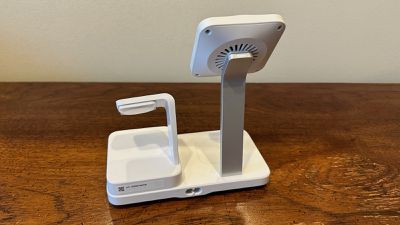
The overall design is fairly simple with a bit of tiering going on, starting with a baseplate that tapers toward the bottom, making it look thinner than it really is. The left side of the plate includes the arm of the MagSafe phone charger and a depression for AirPods charging, while the right side includes a second tier of the base where more of the charging hardware is housed, with the Apple Watch charging arm sticking up out of that. The three USB ports are located along the right side of the baseplate, which can be a positive or a negative for cable routing depending on your setup.
The phone sits up fairly high on the charging arm, which gives plenty of clearance for slipping AirPods into their charging spot below, but could also lead to setup challenges if you're planning to use it on a desk in front of a display, for example. When mounted on the charger, the top of my iPhone 14 Pro Max is about 9.25 inches above the desk or table surface, compared to several other MagSafe multi-device chargers I've used over the years that put the phone height more typically in the range of 6 inches to 7.5 inches.
The MagSafe charger includes ESR's "CryoBoost" technology, which includes a fan surrounding the MagSafe charging surface that's intended to keep your device cooler, allowing it to maintain maximum charging speed rather than having to ramp down the wattage to prevent damage from overheating.
In my testing with a phone not in active use, I didn't find any difference in speeds when charging an unattended iPhone 14 Pro Max from 20% to 90% compared to using Apple's MagSafe charger, with both chargers taking around 85 minutes. That's better than some other third-party MagSafe chargers, so it's good to see ESR's charging hitting maximum performance.
Where CryoBoost does make a difference is if you're trying to simultaneously charge and use your iPhone for watching video or using other apps that generate more heat. For example, leaving a fairly battery-intensive idle game running on my phone saw ESR's charger able to boost the battery level from 20% to 91% over a period of two hours, while the phone remained fairly cool. Trying the same thing with Apple's first-party MagSafe Charger saw the battery level only reach 57% over the same time period while the charger and phone became quite warm.
The CryoBoost fan is pretty quiet, and even at night in a quiet room with it on my nightstand I could barely hear it over the sound of crickets outside. But if you're in a particularly quiet environment and the fan noise is too much for you, you can easily turn it off by hitting a button on the charging base next to the AirPods charging spot. Otherwise you can consider it just a bit of white noise.
I did need to use that button nightly, but not for the fan. The charger also includes a blue LED light around the MagSafe pad that lights up while your device is charging. It's kind of a cool effect, but it can be distracting in a dark room when you're trying to sleep. That button on the base turns off both the light and fan, but it's not a permanent solution as you'll have to hit it each time you dock your phone.
The AirPods charging spot includes some magnets, so if you have an AirPods model with MagSafe in the charging case, it'll snap right into place on the charger, which is nice. There's an LED on the front of the baseplate that lets you know the AirPods are charging and blinks if they're not quite seated properly on the charger. It's tiny and quite dim, so it's a nice balance that provides the necessary information while I didn't find it to be distracting at night.
When it comes to the Apple Watch charging functionality, ESR says it supports Apple's fast-charging standard for Series 7, Series 8, and Ultra, and I did find that to be the case. ESR's charger took just 40–45 minutes to charge my Apple Watch Ultra from 20% to 80%, right in line with Apple's first-party USB-C Apple Watch fast charging cable. That's faster than the ~60-minute times I've seen with some other third-party chargers that claim to support fast charging and other tests sometimes approaching three hours with standard-speed chargers.
Moving on to the additional USB ports, I mentioned in my initial coverage of the Kickstarter launch that things get a bit complicated in terms of available power, simply because there is a maximum of 100 watts available to all devices being charged on the station. So if everything is in use, you'll only get 40 watts to the first USB-C port, 20 watts to the second USB-C port, and 5 watts to the USB-A port, with the remaining power going to the iPhone/AirPods/Apple Watch chargers. But if you only have a single device connected to one of the USB-C ports, you can get up to the full 100 watts delivered to that device.
What all of that boils down to is that you may not want to use this charging station to keep a MacBook Pro charged up while also trying to recharge or power other devices, although a MacBook Air should be okay. If you've got an iPad or a Nintendo Switch or other accessories that need charging, this will work just fine.
ESR's Kickstarter campaign quickly blew past its modest initial goal and has already raised roughly $200,000 in pledges from over 1,000 backers. The limited Super Early Bird pricing has already run out, but the Early Bird tier remains available with discounted pricing of around $154, compared to the future retail price of $179. Shipping is an additional $10, and all orders are planned to be shipped in October.
Other Options
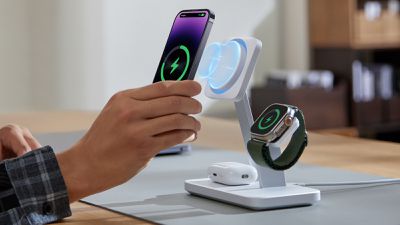
For those interested in other certified MagSafe charging options, ESR has also recently launched a 25W 3-in-1 Wireless Charger that is essentially the same general design as the 6-in-1 station but without the extra USB ports and without some of the extra bulk needed to support them.
25W 3-in-1 Wireless Charger
As with the 6-in-1 station, ESR says the CryoBoost technology in the 3-in-1 charger significantly cuts down on charging time under load, with an iPhone 14 Pro being charged to full in just over three hours while a video is being played, compared to a traditional Apple-certified MagSafe charger which took four-and-a-half hours to get the phone to 80% before stopping due to heat. The 25W 3-in-1 Wireless Charger is normally priced at $119.99 on Amazon, but there's currently a 10% off on-page coupon that can be combined with a MacRumors-exclusive 10% off promo code ESRPR10OFF to bring the price down to $95.99.
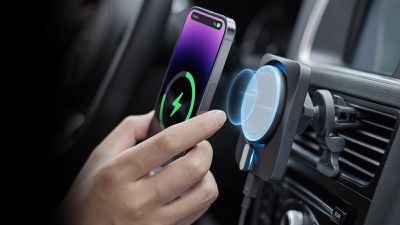
And for use in the car, there's a 15W MagSafe Car Charger with CryoBoost that clips onto your car's air vent and includes a USB-C cable and a 40-watt dual USB-C car adapter. With ESR's CryoBoost technology included, the company says it has shown significant improvement in charging speeds compared to other chargers when used under load.
15W MagSafe Car Charger with CryoBoost
Independent testing has shown the CryoBoost charger can charge an iPhone 14 Pro to full in just over two hours while using a navigation app, while a traditional MagSafe charger spent eight hours charging the device before giving up at 94% due to overheating. The 15W MagSafe Car Charger is normally priced at $99.99 on Amazon, but with a $5 on-page coupon and a MacRumors-exclusive 10% off promo code ESRPR10OFF, you can bring the price down to $84.99. If you prefer to order direct from ESR, discount code affj20 will drop the price to $87.99 there.
Note: ESR provided MacRumors with the 100W 6-in-1 Charging Station for the purpose of this review. No other compensation was received. MacRumors is an affiliate partner with ESR and Amazon. When you click a link and make a purchase, we may receive a small payment, which helps us keep the site running.
On this week's episode of The MacRumors Show, we discuss Apple's next event, which is rumored to see the unveiling of the iPhone 15 lineup, Apple Watch Series 9, and second-generation Apple Watch Ultra.
According to Bloomberg's Mark Gurman, Apple's next event will likely take place on Tuesday, September 12, followed by the launch of new devices on Friday, September 22. The event is expected to take place with a similar format to last year's iPhone unveiling, involving an in-person component with members of the media invited to Apple Park, a pre-recorded video presentation, and hands-on time with Apple's new products afterwards.
With just over a month to go until then, we discuss our expectations of the iPhone 15 lineup and some of the latest rumors about the devices, including a potential 2TB storage option for the Pro models. We also talk through the significance of the S9 chip as the Apple Watch Series 9 and second-generation Apple Watch Ultra's main upgrade and what else we could see announced at the event, such as new accessories with USB-C ports.
For this week's giveaway, we've teamed up with GRID Studio to offer MacRumors readers a chance to win a 256GB iPhone 14 Pro. GRID Studio is a company that purchases old, discarded Apple electronics, tears them apart, and turns them into works of art for Apple fans.
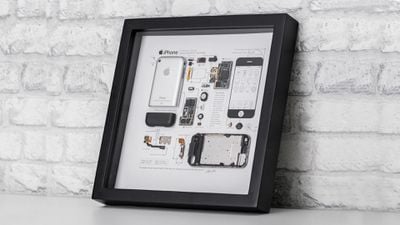
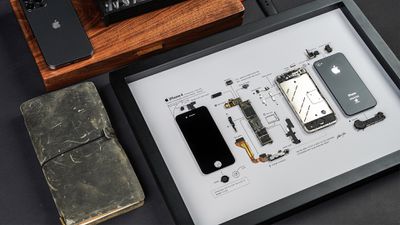
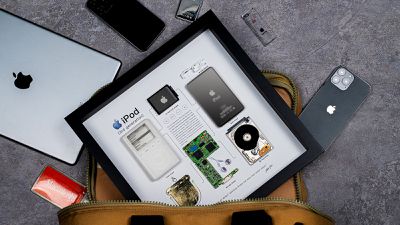
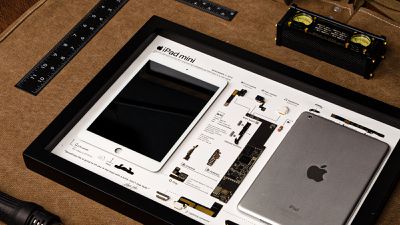
Each of GRID's art pieces includes a deconstructed Apple device with the components displayed underneath a glass frame. Labels make it clear what each part of the device was used for, and interesting and relevant historical facts and details are also added for context.
A vintage Apple device with all of its components artfully arranged makes great decor for an office space, living room, or workshop, and the simple style blends in with a range of decorating styles. GRID Studio has a range of different options, with prices that start at $40 and go up based on the complexity of the piece.
The GRID 1 is one of GRID Studio's most popular options, as it showcases the first iPhone that Apple ever made. Available for $400, the GRID 1 showcases the internal components that Apple used for the original iPhone. Each component is separated and labeled, so you can see the entire makeup of the iPhone at a glance.
The iPhone's shell is positioned next to the power button, headphone socket, speaker, logic board, ear piece, and other components. Note that GRID doesn't include the original batteries from the device because of the risk of fire, but replicas are available.
Another iconic device is featured in the GRID 4, which is at its lowest price ever thanks to GRID Studio's back to school sale. Available for $99, the GRID 4 showcases Apple's iPhone 4, the first major iPhone redesign that Apple came out with. The GRID 4 features the iconic squared frame that the iPhone 4 is known for, complete with the poorly located antenna bands that spurred one of the biggest Apple "gates," antennagate.
GRID Studio doesn't just tear down iPhones. If you're an iPod fan, there's the $400 GRID iPod Classic, featuring the third-generation iPod that Apple released in 2003. The "iPod 3G" had the classic white color and the wheel design that made the iPod lineup famous. It's a true piece of history because Apple stopped selling iPods altogether in 2022.
For iPad fans, GRID has a deconstructed 2012 iPad mini available for $220. Featuring the first iPad mini that Apple made. The iPad mini was popular due to its small 7.9-inch size compared to the prior 9.7-inch iPads that Apple made available.
Along with Apple devices, GRID Studio sells deconstructed Android phones, disassembled Nintendo devices, and art featuring consoles from Sony and Microsoft. GRID Studio is hosting a back to school sale this week, and through August 17, the GRID 4 is available for $99. All other devices can be bought at a 15 percent discount using the code "M15."
We have a (fully assembled) 256GB iPhone 14 Pro for one lucky MacRumors reader. To enter to win, use the widget below and enter an email address. Email addresses will be used solely for contact purposes to reach the winner(s) and send the prize(s). You can earn additional entries by subscribing to our weekly newsletter, subscribing to our YouTube channel, following us on Twitter, following us on Instagram, or visiting the MacRumorsFacebook page.
Due to the complexities of international laws regarding giveaways, only U.S. residents who are 18 years or older, UK residents who are 18 years or older, and Canadian residents (excluding Quebec) who have reached the age of majority in their province or territory are eligible to enter. All federal, state, provincial, and/or local taxes, fees, and surcharges are the sole responsibility of the prize winner. To offer feedback or get more information on the giveaway restrictions, please refer to our Site Feedback section, as that is where discussion of the rules will be redirected.
The contest will run from today (August 11) at 9:00 a.m. Pacific Time through 9:00 a.m. Pacific Time on August 18. The winner will be chosen randomly on or shortly after August 18 and will be contacted by email. The winner will have 48 hours to respond and provide a shipping address before a new winner is chosen.
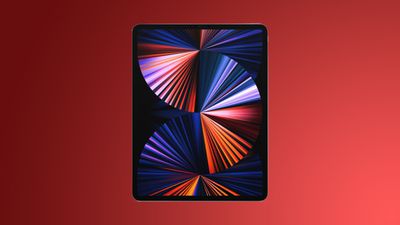
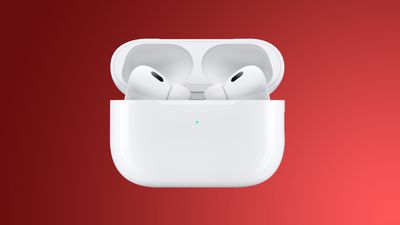
This week we saw a good number of deals on various iPads, with the best sales coming from the previous generation M1 iPad Pro at Woot. In addition to the tablet discounts, you can get the AirPods Pro 2 for $50 off on Amazon.
Note: MacRumors is an affiliate partner with some of these vendors. When you click a link and make a purchase, we may receive a small payment, which helps us keep the site running.
M1 iPad Pro
What's the deal? Take up to 52 percent off M1 iPad Pro
Woot this week opened up a major sale on the previous generation M1 iPad Pro, providing as much as 52 percent off select tablets. Prices start at $659.99 for 11-inch (22 percent off) and at $859.99 for 12.9-inch (22 percent off), and include both Wi-Fi and cellular models. All tablets in this sale are in new condition and include a one year Apple warranty.
Amazon is still discounting the AirPods Pro 2 to their all-time low price of $199.00 as we end the week. This is $50 in savings on the earphones and the most consistent deal that we've tracked in 2023.
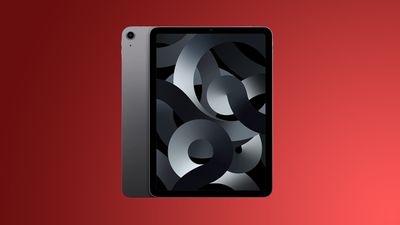
Amazon has $99 off the M1 iPad Air, and both 64GB and 256GB Wi-Fi models are on sale. You can also get the cellular versions of the tablet for as much as $119 off this week.
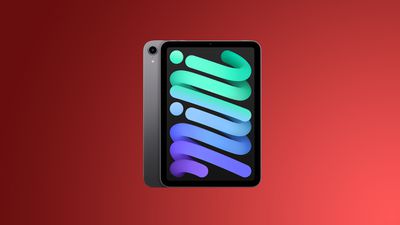
In another iPad-related deal, Amazon has up to $170 off the iPad mini 6 this week. You can get the 64GB Wi-Fi tablet for $399.99 ($99 off) and the 256GB cellular tablet for $629.00 ($170 off), the latter of which is an all-time low price.
If you're on the hunt for more discounts, be sure to visit our Apple Deals roundup where we recap the best Apple-related bargains of the past week.
Chinese display manufacturers are now bidding to supply Apple with OLED displays for the fourth-generation iPhone SE, ITHome reports.
Suppliers, including Tianma, are currently seeking to obtain orders from Apple for AMOLED panels suitable for the fourth-generation iPhone SE. Tianma would be a secondary supplier, since a bigger manufacturer like BOE is likely to take the lion's share of orders. Apple staff responsible for panel procurement reportedly visited several major OLED panel factories in China in the first half of 2023 in relation to the iPhone SE.
According to Apple analyst Ming-Chi Kuo, the fourth-generation iPhone SE will feature a 6.1-inch OLED display with a design similar to the iPhone 14. It is also expected to sport Apple's long-rumored custom 5G modem. The device is not expected to launch until 2025.


 Note: MacRumors is an affiliate partner with some of these vendors. When you click a link and make a purchase, we may receive a small payment, which helps us keep the site running.

 Note: MacRumors is an affiliate partner with Amazon. When you click a link and make a purchase, we may receive a small payment, which helps us keep the site running.



 Apple's next-generation CarPlay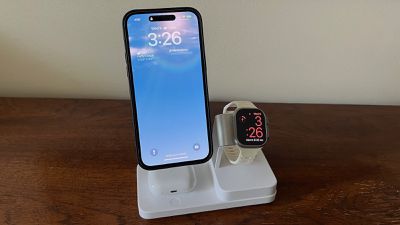
 25W 3-in-1 Wireless Charger
 15W MagSafe Car Charger with CryoBoost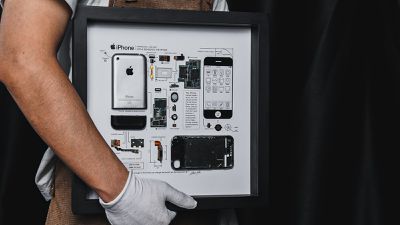
 Note: MacRumors is an affiliate partner with some of these vendors. When you click a link and make a purchase, we may receive a small payment, which helps us keep the site running.