Next year's iPhone 17 Pro models will reportedly feature a major redesign, specifically centering around changes to the rear camera module, and now new supply chain information appears to confirm the striking change, according to a Chinese leaker.
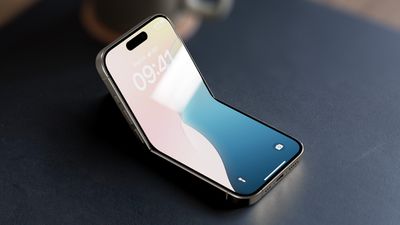
iPhone 17 Pro concept render
Late last month, The Information's Wayne Ma claimed that the rear of the iPhone 17 Pro and iPhone 17 Pro Max will feature a "rectangular camera bump made of aluminum rather than traditional 3D glass," while the bottom half will continue to be made of glass to support wireless charging. The report also said the "iPhone 17 Air" currently has a "large, centered camera bump on its back" with a single camera.
Concept renders like the one pictured above have been making the rounds ever since The Information report. However, this morning, Digital Chat Station, a Weibo user responsible for a range of details about the camera technology of upcoming iPhone models, claimed that supply chain materials they have seen appear to confirm the major camera module change.
"The details of the camera arrangement are unclear, but the module is of this elongated oval shape," said the leaker, commenting on the concept render image. "Many new Android phones next year are also expected to adopt a similar design," the leaker added.
If accurate, the Google Pixel-style module redesign would be one of the most significant changes to Apple's signature square iPhone camera bump since September 2019 when the iPhone 11 debuted.
The iPhone 11's square camera module was a marked shift from previous models, which featured a more traditional vertical camera layout. Apple's decision to switch to a square design was mainly driven by the need to accommodate a third camera in the form of a new Ultra Wide lens, along with improved sensors and optics. The introduction of the square bump set a new aesthetic standard for subsequent models, influencing the design of later releases right up to today's iPhone 16.
Commenting on the rumor, Ice Universe, another well-known Weibo-based leaker, noted that such an external change would require the internal structural design to undergo a "major overhaul — much like redesigning the layout of an old house," that would require a significant amount of time for validation. "Would Apple really take such an aggressive approach?" they added.
As always, the look of the devices is based on scraps of information at this point, and Apple's plans could always change. Regardless, what do you think of the rumored new redesign for the iPhone 17 Pro models? Let us know in the comments.
Apple's new Mail sorting features in iOS 18.2 are notably absent from both iPadOS 18.2 and macOS Sequoia 15.2, raising questions about the company's rollout strategy for the email management system.
The new feature automatically sorts emails into four distinct categories: Primary, Transactions, Updates, and Promotions, with the aim of helping iPhone users better organize their inboxes. Devices that support Apple Intelligence also surface priority messages as part of the new system.
Users on iPhone who updated to iOS 18.2 have the features. However, iPad and Mac users who updated their devices with the software that Apple released concurrently with iOS 18.2 will have noticed their absence. iPhone users can easily switch between categorized and traditional list views, but iPad and Mac users are limited to the standard chronological inbox layout.
Noting the disparity, Bloomberg's Mark Gurman suggests that engineering resources might be behind the selective rollout, rather than technical limitations. Indeed, implementing the feature on iPad in particular shouldn't require significant additional development effort.
Definitely an odd omission that the new Mail sorting is available in iOS 18.2 but not on iPad/Mac. It doesn’t seem there would be any reason to make it iPhone exclusive other than engineering resources - and I’d assume, at least on the iPad, cross compatibility isn’t that big of…
— Mark Gurman (@markgurman) December 12, 2024
Apple typically strives to maintain feature parity across its ecosystem, particularly for core applications like Mail, so it remains a curious state of affairs, and Apple has not provided any updated timeline for when the new Mail features might expand to other platforms.
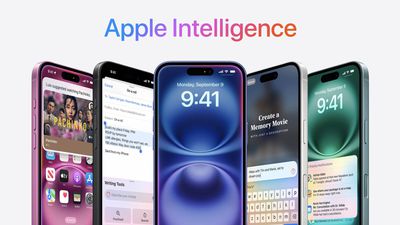
Apple Intelligence is what Apple calls its artificial intelligence feature set, previewed at WWDC in June 2024. The first Apple Intelligence features launched with iOS 18.1, iPadOS 18.1, and macOS Sequoia 15.1, and additional features came in iOS 18.2, iPadOS 18.2, and macOS Sequoia 15.2. There's still more to come, though, and the rest of the Apple Intelligence features are set to come later in 2025.
Proofread text checks for spelling and grammar errors, including word choice and sentence structure. You can accept all suggestions with a tap or go through them one by one with explanations.
Rewrite cleans up what you've written and shifts the tone without impacting your content. Options include Friendly, Professional, and Concise.
You can select text and get a summary of it with Apple Intelligence. You can choose to create a paragraph, pull out key points, make a list, or create a table. Summaries are available in Mail, Messages, and more.
There is an open-ended Writing Tools option that lets you describe a change you want to make to something you've written. You can choose any mood or writing style that you want, with varying degrees of success. If you want something to be more flowery or elaborate, Writing Tools can make it happen. You can also ask for your text to be converted into a different format, like a poem.
Writing Tools has a "Compose" feature that uses Siri ChatGPT integration. With this option, Siri can leverage ChatGPT to compose writing from scratch rather than just rewriting text.
You can select any text on your iPhone, iPad, or Mac and use Apple Intelligence to access Writing Tools for summaries and other features.
There's a glow around the edges of the display when Siri is activated, applicable to iPhone, iPad, and CarPlay. On Mac, the Siri window can be placed anywhere. The glow animates responsively to the sound of your voice so you can tell when Siri is listening without interrupting other things you're doing.
A double tap at the bottom of the display brings up the Type to Siri interface so you can type requests instead of speaking them. On Mac, you need to press the Command key twice to bring up Type to Siri. Type to Siri includes suggested requests so you can get your questions answered faster.
Siri can maintain context between requests so you can ask a question and then reference it in a second reply. If you ask about the temperature in Raleigh, for example, and then follow up with "what's the humidity?" Siri should know you mean in Raleigh.
If you stumble over your words when speaking to Siri, or change what you're saying mid-sentence, Siri will follow along.
Siri has Apple's product knowledge and support base for answering questions about your device's features and settings, and can even find settings when you don't know the exact name by using natural language search.
Mail
There is a summarize button for summarizing any of your incoming emails, plus you will see a brief summary of an email in your inbox list rather than the first few lines of the email.
Mail surfaces time sensitive messages first when applicable, putting them at the top of your inbox so you see what's important right away.
Smart Reply provides quick-tap responses to emails that you've been sent, with contextual options based on what's in the email.
Multiple notifications from Mail will be summarized on your Lock Screen so you can see what's in an email without opening the app.
Messages
Messages has Smart Reply options for incoming texts, which analyze the content of messages to offer suggestions of what you might want to say.
Multiple Messages notifications are summarized on your Lock Screen.
You can use all of the Writing Tools features in the Messages app for proofreading and refining what you're planning to send.
Photos
You can create a Memory Movie with just a description, such as "My cat in 2024," or "Orlando in the summer." The feature automatically picks relevant photos and chooses songs, but you can tweak through the Memory Mixes feature or choose a mood to guide the direction of the audio. You can also add in specific scenes and images you want to see throughout the memory when you're creating the prompt.
Natural language search is available in Photos, so you can just describe what you're looking for, such as "Eric rollerskating while wearing green."
Search can also find specific moments in video clips.
Search offers up smart complete suggestions for narrowing down what you might want to find.
Clean Up
The Photos app also includes "Clean Up," a feature that lets you remove unwanted objects from your photos. The Clean Up tool in the Photos app is able to automatically detect objects in an image that might not be wanted, but you can also tap, circle, or brush over an unwanted object to remove it.
Zooming in on an image can help with using a finger as a brush to remove smaller blemishes and issues with an image, and it is intelligent enough not to remove part of a person even if a person or main subject is selected.
Clean Up works on all images in the Photos library, including older images and images captured by other devices like a point and shoot camera or a DSLR.
Transcription Summaries
In Notes and other apps, you can record audio and get a transcript along with a summary of your transcript, which is useful for recording lectures and other audio. Transcription isn't an Apple Intelligence feature, but summaries are.
Focus Modes
There is a dedicated Reduce Interruptions Focus Mode that only shows you important notifications that need attention while filtering out everything else.
When customizing an existing Focus mode or creating a new one, there is a new toggle to turn on Intelligent Breakthrough and Silencing. This option allows important notifications to interrupt you, while muting notifications that are not important, which is the same thing that the Reduce Notifications Focus does. You can override the notification settings for specific apps and people, which is how it worked prior to iOS 18.1.
Notification Summaries
Your incoming notifications are summarized so you can see what's new for each app at a glance.
Summaries of transcriptions generated from your phone calls are supported. You can record a phone call and get a transcription in iOS 18, which is not an Apple Intelligence feature. What does require Apple Intelligence, though, is getting a summary from that transcription without reading through the entire thing.
Note that you can start a recording by tapping on the record button in the upper left corner of the display when on a phone call. All participants are notified that the call is being recorded before the recording starts.
Recorded phone calls are stored in the Notes app, where you can tap in to view a transcript and get a summary generated from that transcript.
Safari
When reading an article in Reader Mode, there is an option to have Apple Intelligence summarize the article for you.
Image Playground
Image Playground can be used to generate images in cartoon-like styles using a text-based prompt. Apple has built-in suggestions and concepts that you can choose from, like costumes, locations, items, and themes.
While Image Playground is a standalone app, it is also integrated into the Messages and Notes app. In these apps, Apple can use context from what you've typed for image generation suggestions.
For inspiration, you can upload or take a photo, and then get a cartoon AI version of it, and you can also use images of friends and family members pulled from the People album in the Photos app.
You can start with a base suggestion or photo and then continue to add to it until you get what you want. You can remove suggestions at any time, and save your favorite creations for use in other apps. Anytime you create something with Image Playground, you'll get multiple options so you can choose the best one.
There are only Animation and Illustration styles for Image Playground, so there is no option for creating photorealistic images.
Image Wand is basically the same thing as Image Playground, but in the Notes app. When you have notes that you've taken, you can circle an empty spot or some text and Image Wand will add a contextually relevant image.
So if you have notes on photosynthesis, you can add in an image of a plant under the sun. Image Wand isn't able to generate complex images, so if you want a picture of the internal structure of mitochondria, you're out of luck, but it can make a stylized image featuring the organelle.
On an iPad, you can draw a rough sketch of what you want to add to your notes with an Apple Pencil, and then use Image Wand to generate something more polished.
Genmoji are custom emoji characters that you can create using a text-based description. If there's an emoji you can't find but need, like a duck eating a sandwich or an alligator skateboarding, Genmoji can make it for you.
Genmoji aren't too far off from Image Playground images, but the generation system tends to want to add a person for a lot of requests. You can choose yourself or a friend or family member, or just use a generic emoji character as your base.
In Messages and other apps, Genmoji behave like emoji, but they're not going to display properly for anyone running an operating system earlier than iOS 18.1, or on an Android device.
To create a Genmoji character, tap into the Emoji keyboard and tap on the Emoji with a "+" button next to the search bar. From there, you can type in your idea.
Siri ChatGPT integration lets Siri hand requests over to OpenAI's ChatGPT. ChatGPT is off by default, but you can turn it on in the Apple Intelligence and Siri section of the Settings app.
If ChatGPT integration is enabled, Siri will consult ChatGPT for complex requests. Complex requests might include creating an image, generating text from scratch, making recipe ideas based on what's in your refrigerator, describing what's in a photo, and more.
Siri analyzes each request to see if it's something that needs to be answered by ChatGPT, but you can also automatically invoke ChatGPT for a request by using a request like "Ask ChatGPT to give me a chocolate chip cookie recipe."
Siri asks your permission before querying ChatGPT, but there is an option to turn off that extra permission step by toggling off "Confirm ChatGPT Requests" in the ChatGPT section of Settings.
You don't need an account to use ChatGPT, and it is free, but if you have a paid account, you can sign in. If you're not signed in, OpenAI does not store any of your ChatGPT requests, nor is your information used for training ChatGPT. If you sign in, ChatGPT can save a copy of your queries. Apple does not store ChatGPT queries.
ChatGPT can be used with Siri, but it is also integrated into Writing Tools and Visual Intelligence. With Writing Tools, ChatGPT can generate text, and with Visual Intelligence, ChatGPT can answer questions about what the Camera sees.
Visual Intelligence
Visual Intelligence is an iPhone 16 feature that uses the Camera Control button. If you long press it, you can get into Visual Intelligence mode, where the Camera app can be used to identify what's around you.
If you point the camera at a store, for example, you can see ratings, hours, and other information. If you take a photo of an object, you can get more information about the object from ChatGPT, or use it with Google Search to find similar images. The Google Search feature is a good way to search for products that you want to find.
Other Visual Intelligence features include reading text out loud, detecting phone numbers and addresses to add them to the Contacts app, copying text, and summarizing long passages of text.
Apple Intelligence Features Coming Later
Additional Languages
Apple Intelligence currently supports localized English in Australia, Canada, New Zealand, South Africa, Ireland, and the UK in addition to U.S. English, but additional languages are coming in an update that's slated to be released in April. Languages that will be added include French, German, Italian, Portuguese, Spanish, Japanese, Korean, and simplified Chinese.
Priority Notifications
Priority notifications will show up at the top of your notification stack, so you can get to what's most important first.
Siri
Some initial Siri updates are available now such as Siri's new glow that encompasses the edges of the display and ChatGPT integration, but more Siri capabilities will be added in an update later in 2025. Apple is working on onscreen awareness, personal context, and the ability to take more actions in and across apps.
Onscreen awareness will let Siri take actions when you ask something about what's on your display. If you're looking at a photo and want to message it to your friend Eric, you'll be able to tell Siri to "Send this picture to Eric," and Siri will understand and do it.
Personal context will let Siri do more with your personal data like emails and messages. This is an on-device feature, and it will let Siri learn more about you, who you're communicating with, and how you use your device. Personal context will let you do things like ask Siri to find a specific message, or remind you when you took a photo that you're looking for.
The Siri option to take more actions in and across apps will drastically improve what Siri is capable of. You'll be able to move files from one app to another and control app functions with Siri that you never could before. It'll work in third-party apps as well as Apple's own apps.
When to Expect More Apple Intelligence Features
Additional Apple Intelligence features are set to come in future updates. Apple originally planned to add new Siri capabilities to iOS 18.4, but the functionality is not ready to go so we will be waiting a bit longer. Apple will likely hold the new Siri features until iOS 18.5.
Apple Intelligence Device Requirements
Apple Intelligence requires a device with one of Apple's newest chips and 8GB RAM. Eligible models are listed below.
In the Privacy and Security section of the Settings app you can access an Apple Intelligence Report that lets you export your Apple Intelligence data as part of Apple's promise for transparency around Apple Intelligence. Biometric authentication is required to access and export Apple Intelligence data.
You can also disable Apple Intelligence by toggling off the setting under the Apple Intelligence and Siri section in the Settings app.
Apple Intelligence Availability
Apple Intelligence is only available in U.S. English at this time, along with localized English in Australia, Canada, New Zealand, South Africa, and the UK is supported in addition to U.S. English.
Apple plans to add support for additional languages later in 2025, like Chinese, English (India), English (Singapore), French, German, Italian, Japanese, Korean, Portuguese, Spanish, and Vietnamese. Apple Intelligence will launch on the iPhone and the iPad in the European Union in April 2025.
Apple today shared a new Apple Intelligence ad that promotes Genmoji, a feature that became available today with the launch of iOS 18.2 and iPadOS 18.2.
The spot features a custom song called "Anything You Like" by The Dare, and it runs through a list of rhyming Genmoji creations like gnome, foam, pink comb, and skeleton made out of chrome, showing each Genmoji as it's mentioned in the song.
Genmoji can be created on an Apple Intelligence-capable iPhone or iPad running the latest version of iOS or iPadOS. Genmoji are crafted in the Messages app from text-based descriptions, and can be shared with friends and family in text messages.
iOS 18.2 is the second major update to iOS 18, and it brings the first Apple Intelligence image generation features, ChatGPT integration with Siri, and plenty more changes and bug fixes.
This guide highlights everything that's new in iOS 18.2.
Apple Intelligence
There are several new Apple Intelligence features in iOS 18.2, including Image Playground and Genmoji. It's a more fun update than iOS 18.1 thanks to the image generation features.
Image Playground - There's an Image Playground app and Messages integration for creating stylized images based on prompts and images of you and your friends.
Image Wand - Image Wand is for adding images to what you've written in the Notes app. On iPad, you can use the Apple Pencil to make a rough sketch and have Image Wand turn it into something nicer.
Genmoji - With Genmoji, you can create custom emoji. It's similar to Image Playground, but on a smaller emoji-sized scale. People that have iOS 18.1 installed will see Genmoji and can even get information about them, but they can only be created in iOS 18.2. In earlier versions of iOS and on Android devices, they show up as an image.
Siri ChatGPT - Siri can now hand over requests to ChatGPT, a feature that's entirely opt-in. You don't need an account, and anything you ask Siri can be sent to ChatGPT if you want. ChatGPT has more advanced info than Siri and can also generate images and text. If you want to make it simpler to turn requests over to ChatGPT, you can toggle off the Ask Every Time setting so Siri doesn't always need your permission to contact ChatGPT. Siri with ChatGPT integration supports on-screen responses, so you can do things like ask "what's in this photo?" when you're looking at an image.
Visual Intelligence - On iPhone 16, Visual Intelligence can be used to identify objects and places around you. Long press the Camera Control button to get to Visual Intelligence, and then point your iPhone at something. You can get hours and reviews if the camera is looking at a restaurant, copy text, get text read aloud, search for items on Google, ask ChatGPT questions about objects, and more.
Writing Tools - The Rewrite Writing Tools feature is no longer limited to three styles. You can describe the tone or content that you want, such as adding more dynamic words or turning an email into a poem.
Languages - With iOS 18.2, Apple Intelligence supports English in Australia, Canada, New Zealand, South Africa, and the UK in addition to U.S. English, so if you're in Canada, you no longer have to set your iPhone to U.S. English to use Apple Intelligence.
We have a much more in-depth Apple Intelligence guide that goes over all of the available features, which is well worth checking out. We also have individual guides on the new additions in iOS 18.2.
For iPhone 16 users, there's now an option lock your auto exposure and auto focus settings with a light press. The AE/AF Lock toggle can be turned on by going to Settings > Camera > Camera Control.
There is also an option to adjust the double click speed of Camera Control. Options include Default, Slow, and Slower. The adjustment options join prior options to tweak the double light press speed and the light press force.
As mentioned above, Camera Control now supports Visual Intelligence.
The update also adds a new setting for the Camera Control button. In the Settings app under Display & Brightness, there is now a toggle for "Require Screen On." When this setting is turned on, you can only launch the Camera app or a supported third-party camera app with the Camera Control button when the iPhone's screen is turned on.
Mail App Categorization
In the Mail app, there are new built-in categories for separating out important emails, deals, newsletters, transaction emails, and more.
The Mail app includes bigger pictures for contacts and businesses, and all emails from a single person or source will be pooled together.
You can swap between categories (the new option) and List View (the non-categorization standard view) by tapping on the three dots in the upper right corner of the app. In the Mail section of the Settings app, you may need to go to Notifications > Customize Notifications > and toggle on All Unread Messages if you're using list view, because the other setting only shows you unread messages categorized as "Primary," which can be confusing.
Tweaked Video Player and More in Photos App
Apple added a tweaked video player that takes up more of the screen in iOS 18.2. This change eliminates the thick borders around videos that appear on earlier iOS 18 versions, meaning you no longer have to tap on a video for full-screen playback.
It's now possible to scrub through a video frame-by-frame, plus there is a setting to turn off auto-looping video playback in the Photos section of the Settings app.
When using the Collections views in the Photos app, you can swipe right to go back to the previous view, plus the Favorites album now appears in the Utilities collection along with the Pinned Collections section.
You're also now able to clear Recently Viewed and Recently Shared album history.
Safari
In the Safari section of the Settings app, there's a new "Not Secure Connection Warning" toggle that lets you know if you're visiting a website that does not have a valid SSL certificate for an encrypted connection. It is not advised to send passwords or other sensitive data on a site that pops up a "Not Secure" warning.
Apple's "Not Secure Connection Warning" toggle is not turned on by default. Apple says that HTTPS Priority will upgrade URLs to HTTPS whenever possible.
The Settings app has a new section for managing website data and history, with options for Clear History and Website Data. The Website Data section includes options for exporting data from Safari and importing data from another app into Safari.
Apple added new background images for customizing the Safari start page.
Safari Downloads
The progress of Safari downloads can now be tracked on the iPhone's Lock Screen and Dynamic Island.
Voice Memos
With Voice Memos, two tracks can be layered on top of one another. There's also an option to separate layers and edit layer mixes.
Two-track projects can be imported directly into Logic Pro on the iPhone 16 Pro and iPhone 16 Pro Max.
Find My
Find My has a new option to Share Item Location with an "airline or trusted person" that can help you locate something that you've misplaced. Choosing the Share Item Location option creates a link that lets someone view the location of a lost item when they open the link.
The link can be opened on a non-Apple device, so an iPhone or Mac is not required to provide someone with your item's location. Links expire after a week or when you're reunited with your lost item.
There's also an option to Show Contact Info, which lets any phone or tablet connect to an item to view a website with more information about it, including the phone number and email address of the owner.
Apple Music
Apple Music now supports natural language search. You can search for genres, moods, activity, decades, and more. Examples include "songs about cats," "songs with a vibe," "relaxing songs," "artists similar to Taylor Swift," "sad 80s songs," and "songs about food."
Apple Music now displays the disc number in some albums.
Apple TV
In the Apple TV app, you can also use casual language search terms to find exactly what you're looking for, typing in genres, actors, and moods. Searches like "movies about natural disasters," "movies with cats," "movies with Zendaya," and "exhilarating movies" all bring up relevant results.
The navigation bar in the TV app can be customized, with options to add different apps and Library categories. Existing options like MLS and Apple TV+ cannot be removed.
Podcasts
You can favorite categories in the Podcasts app in iOS 18.2, and see categories in the library for a new way to navigate through shows and episodes.
A new personalized search page in Podcasts suggests the most relevant categories and editorially curated collections tailored to your listening preferences.
Apple News+
For Apple News+ subscribers in the United States, iOS 18.2 adds daily sudoku puzzles. The sudoku puzzles join existing the Crossword, Crossword Mini, and Quartiles offerings. There are three difficulty levels to complete each day, including easy, moderate, and challenging.
Stocks
In the Stocks app, there are now pre-market price quotes for tracking NASDAQ and NYSE tickers prior to when the market opens.
AirPods Pro Hearing Test and Hearing Aid Expansion
The AirPods Pro 2 Hearing Test feature is now available in Cyprus, Czechia, France, Italy, Luxembourg, Romania, Spain, United Arab Emirates, and the UK.
The Hearing Aid feature is available in the United Arab Emirates.
Apple Arcade
In the Apple Arcade section of the App Store, the "All Games" section has a new drop down filter menu and the option to turn off game previews.
EU App Changes
In the European Union, users can now delete core apps that include the App Store, Safari, Messages, Camera, and Photos.
Third-party browser apps in the EU will be able to create web apps for the iPhone's Home screen using their own custom engines when iOS 18.2 launches.
iPadOS 18.2 requires selecting a Default Browser when opening Safari. This is a Digital Markets Act requirement, with Apple adding an updated interface that will let users select a default web browser of their choice from a list of options.
Apple already implemented this change in iOS 18.
Default Apps Section
In the Settings app under "Apps," there's a new "Default Apps" section that can be used to manage your default apps for the iPhone.
There are Default App settings for Email, Messaging, Calling, Call Filtering, Browser App, Passwords and Codes, and Keyboards. In the U.S. and other countries, you can use this section to choose your preferred Email, Call Filtering, Browser, and Passwords, and Keyboard apps. In the EU, there are more options for choosing non-Apple calling and messaging apps.
Volume Limit
In the Sound and Haptics section of the Settings app, there's a new Volume Limit option with a "Limit Maximum Volume" toggle to control how loudly the iPhone speaker can play audio like songs, movies, and other media.
It does not impact phone calls, FaceTime calls, alarms, and other sounds.
Control Center
In Control Center, there's a new quick access option for Type to Siri. Apple has also removed the Satellite control from the Connectivity section, and changed the icon for Adaptive Audio.
Adjusting Camera Control can be done by opening Settings and going to Accessibility > Camera Button.
Settings App Icons
In Dark Mode, the icons in the Settings app have a new, darker look that shows color on a black background rather than icons that are a solid color with white accents.
iPhone Mirroring With Hotspot
iOS 18.2 allows you to use iPhone Mirroring while your iPhone's hotspot connection is being shared with your Mac. Having your Mac connected through Personal Hotspot previously did not allow you to use iPhone Mirroring.
Fitness Shortcut Actions
There are new Fitness app Shortcut actions that you can use when creating a Shortcut, including Open Fitness Settings, Open Award, Open Session History, and Open Trophy Case.
Lock Screen Volume Slider
In iOS 18.2, there's a new option to force the volume control bar to always be visible on the Lock Screen when adjusting sound.
The feature can be enabled in the Accessibility section of the Settings app. Accessibility > Audio and Visual > Always Show Volume Control.
Vehicle Motion Cues
There's an option see Vehicle Motion Cues in the Dynamic Island when the feature is activated. Vehicle Motion Cues are designed to cut down on motion sickness while riding in a vehicle.
Mac Connection
When connecting to a Mac or PC, you can use Face ID to trust a device.
iMessage Reporting
Children in Australia have access to a tool to report iMessages that contain nude photos and videos. Reported images will be reviewed by Apple, and actions could be taken such as disabling the sender's Apple Account or reporting the incident to law enforcement.
The feature will expand globally in the future.
Music Recognition
In iOS 18.2, the Music Recognition feature in the Control Center has a Musical Memories feature that shows you where you were when you identified a song. You will need to long press on the Music Recognition toggle in Control Center, tap on History, and then allow location access to use the feature.
AirDrop
The AirDrop icon in the share sheet now appears dark in Dark Mode, rather than staying white.
Web Restrictions in Utah
Utah residents under the age of 17 will be opted in to web content restrictions that block adult content in iOS 18.2. This is required by Utah law.
Bug Fixes
There are fixes for a couple of notable bugs in iOS 18.2. The update addresses an issue that could cause captured photos to not immediately appear in the All Photos grid.
It also fixes a bug that could cause Night mode photos to appear degraded when capturing long exposures, a problem that impacted the iPhone 16 Pro and iPhone 16 Pro Max.
Security Updates
iOS 18.2 addresses multiple security vulnerabilities, which means it's a good idea to update as soon as you can.
A full list of the vulnerabilities fixed can be found on Apple's website, but it includes updates for the kernel, Passwords, Safari, WebKit, VoiceOver, and more.
Read More
For more detail on the Apple Intelligence features in iOS 18.2, we have a dedicated guide. Our iOS 18 roundup has a list of all of the features in iOS 18 if you want a recap.
The iOS 18.2 update that Apple introduced today brings layered Voice Memos recordings to the iPhone 16 Pro and iPhone 16 Pro Max for the first time, making it easier for musicians to flesh out song ideas and experiment with new ideas.
Apple teamed up with Canadian singer songwriter Michael Bublé, country star Carly Pearce, and record producer Greg Wells to demonstrate the feature. The trio recorded Michael Bublé's new song "Maybe This Christmas" with vocals recorded using the Voice Memos app on an iPhone 16 Pro.
"I don't think people realize the critical role Voice Memos on iPhone plays in the creation process for musicians," said Bublé. "And now with Layered Recordings, if an artist has a moment of inspiration, being unencumbered by the traditional studio experience becomes the advantage, not the limitation. It's so typically Apple to build something we didn't know we needed -- and now won't be able to live without."
Once installing iOS 18.2, iPhone 16 Pro and Pro Max users can layer a vocal track on top of an existing instrumental recording, with no headphones needed. Instrumental compositions can be played through the iPhone's speaker while vocals are recorded at the same time using the iPhone 16 Pro microphones.
Apple says that this feature is powered by the A18 Pro chip, using advanced processing and machine learning to isolate the vocal recording. Voice Memos is able to create two individual tracks so users can apply additional mixing and production in apps like Logic Pro.
A variety of background instrumentals like acoustic guitar or piano can be used as the first layer for a recording, and using Logic Pro, artists and producers can send an instrumental music mix as a compressed audio file directly to Voice Memos for layering vocals on top.
Michael Bublé's "Maybe This Christmas" song can be streamed on Apple Music in Spatial Audio.
With iOS 18.2, Apple introduced several new Apple Intelligence features, like Genmoji, ChatGPT Siri integration, and Image Playground, so many of the capabilities that Apple introduced at WWDC 2024 have gone live.
We are still waiting on new Siri functionality that will make Siri smarter than before, plus Apple is still working to expand Apple Intelligence to more countries. Below, we've highlighted the Apple Intelligence features we know are still in development and that are slated for iOS 18.3 and iOS 18.4, updates coming in 2025.
More Siri Features
Apple is making some major changes to Siri, and has outlined new functionality that will make Siri much more helpful. Siri will be able to learn more about you through your communications and actions on your iPhone, but this personal context won't be coming until sometime in 2025.
Personal context will incorporate texts, emails, notes, and more, so you'll be able to ask Siri for things like a flight number buried in an email, or a recipe that a friend once texted you.
Siri will also be able to do more in apps, both first and third-party, with in-app actions. Siri will be able to do things like edit a photo for you and then send it to someone in the Messages app, or pull a PDF from an email and save it to the Files app.
Siri will also be able to get information and take action in third-party apps, doing things like getting a weather readout from Carrot Weather or scheduling an event in Fantastical.
New Siri capabilities will either come in iOS 18.3 or iOS 18.4 in 2025.
Sketch Style for Image Playground
As of right now, Image Playground has two different styles to choose from, animation and illustration. There is a third, though, that Apple plans to add in the future. Sketch is described as a "highly detailed and academic" style that "produces gorgeous drawings on stark backgrounds." It is distinct from the illustration style that has strong outlines, bold colors, and simple shapes, and the animation style that has a "whimsical, 3D cartoon look."
The animation, illustration, and sketch styles, respectively
If you want to see what the sketch style looks like, you can check it out in the Image Wand feature in the Notes app, where it is available now.
Genmoji on macOS
macOS Sequoia 15.2 includes support for Image Playground, but it does not have Genmoji integration as of yet. You can create Genmoji with iOS 18.2 and iPadOS 18.2, but there is no Mac feature for making custom emoji characters. Apple plans to add it in a later update.
Memory Movies on macOS
The Memory Movie feature that lets you create slideshows from your photos using text descriptions is limited to the iPhone and iPad in iOS/iPadOS 18.1 and later. It will come to macOS Sequoia in the future.
Priority Notifications
Apple is working on a feature that will show you your most important notifications first. Priority Notifications will show up at the top of your notification stack, but this option isn't live yet.
More Languages
Apple plans to add support for more languages in 2025, including Chinese, English (India), English (Singapore), French, German, Italian, Japanese, Korean, Portuguese, Spanish, and Vietnamese. Apple says that the first "set" of new languages will come in a software update in April (likely iOS 18.4), while more will come throughout the year.
Apple Intelligence Support in the European Union
Apple plans to start rolling out Apple Intelligence features to iPhone and iPad users in the European Union in April. EU users will officially get access to Writing Tools, Genmoji, the updated Siri with better language understanding, Siri ChatGPT integration, and more.
Apple Intelligence Release Timing
Writing Tools, the new Siri design, Type to Siri, notification summaries, smart replies, Clean Up in Photos, and several other features launched in iOS 18.1, which was released on Monday, October 28.
Image Playground, Genmoji, Siri ChatGPT integration, and other features were released in iOS 18.2, which launched on Wednesday, December 11. iOS 18.2 will be the last public iOS update of 2024.
All other Apple Intelligence features are expected in iOS 18.3 and iOS 18.4, which will be released in 2025. iOS 18.3 could come as soon as late January, while iOS 18.4 will likely be an April update.
Apple today made a mistake with its macOS Sequoia 15.2 update, releasing the software for two Macs that have yet to be launched. There is a software file for "Mac16,12" and "Mac16,13," which are upcoming MacBook Air models.
The leaked software references the "MacBook Air (13-inch, M4, 2025)" and the "MacBook Air (15-inch, M4, 2025)," confirming that new M4 MacBook Air models are in development and are likely not too far off from launching.
It's been widely rumored that Apple is working to bring the M4 chips to its entire Mac lineup, and the MacBook Air is expected to get an M4 refresh in the spring of 2025, so sometime between March and June.
We are not expecting to see design updates for the MacBook Air, and the refresh will focus on the internals, namely the new M4 chip upgrade.
Apple today released iOS 18.2 and iPadOS 18.2, the second major updates to the iOS 18 and iPadOS 18 updates that came out in September. The new updates come over a month after Apple released iOS 18.1 and iPadOS 18.1.
The new software can be downloaded on eligible iPhones and iPads over-the-air by going to Settings > General > Software Update.
iOS 18.2 and iPadOS 18.2 introduce new Apple Intelligence features, including the first image generation capabilities. Image Playground is a new app for creating images based on text descriptions, and you can add all kinds of costumes, items, backgrounds and more. You can even make your images look like your friends and family members.
Genmoji is similar to Image Playground, but it's for creating custom emoji characters that you can use in Messages. The third image generation feature is Image Wand, which is Image Playground but in the Notes app. You can make a rough sketch and use Apple Intelligence to make it better. The update includes ChatGPT integration for Siri, so Siri can hand complicated requests over to OpenAI's ChatGPT. For iPhone 16 users, the update adds Visual Intelligence to the Camera Control feature, so you can get more information on items and locations around you.
There are also new features for Photos, Safari, Mail, and more, with Apple's full release notes available below.
Apple Intelligence (All iPhone 16 models, iPhone 15 Pro, iPhone 15 Pro Max)
Image Playground - A new app that lets you use concepts, descriptions, and people from your photo library to create fun, playful images in multiple styles - Swipe through previews and choose from as you add concepts to your playground - Choose from animation and illustration styles when creating your image - Create images in Messages and Freeform, as well as third party apps - Images are synced in your Image Playground library across all your devices with iCloud
Genmoji - Genmoji allows you to create a custom emoji right from the keyboard - Genmoji are synced in your sticker drawer across all your devices with iCloud
ChatGPT support - ChatGPT from OpenAI can be accessed right from Siri or Writing Tools - Compose in Writing Tools allows you to create something from scratch with ChatGPT - Siri can tap into ChatGPT when relevant to provide you an answer - A ChatGPT account is not required and your requests will be anonymous and won't be used to train OpenAI's models - Sign in with ChatGPT to access your account benefits, and requests will be covered by OpenAI's data policies
- Image Wand turns sketches and handwritten or typed notes into images in Notes - Describe your change in Writing Tools allows you to suggest how you'd like something rewritten, for example as a poem - Camera Control (iPhone 16, iPhone 16 Plus, iPhone 16 Pro, iPhone 16 Pro Max) - Visual Intelligence with Camera Control helps you instantly learn about places or interact with information simply by pointing your iPhone at the object, with the option to tap into Google Search or ChatGPT - Camera Control two-stage shutter lets you lock focus and exposure in Camera when light pressing the Camera Control
Mail - Mail Categorization sorts your messages to help you prioritize the most important messages - Digest view groups all of the messages from one sender into a single bundle for easy browsing
Photos - Video viewing improvements, including the ability to scrub frame-by-frame and a setting to turn off auto-looping video playback - Improvements when navigating Collections views, including the ability to swipe right to go back to the previous view - Recently Viewed and Recently Shared album history can be cleared - Favorites album appears in the Utilities collection in addition to Pinned Collections
Safari - New background images to customize your Safari Start Page - Import and Export enables you to export your browsing data from Safari and import browsing data from another app into Safari - HTTPS Priority upgrades URLs to HTTPS whenever possible - File Download Live Activity shows the progress of a file download in the Dynamic Island and on your home screen
This update also includes the following improvements and bug fixes: - Voice Memos supports layered recording, letting you add vocals over an existing song idea without the need for headphones -- then import your two-track projects directly into Logic Pro (iPhone 16 Pro, iPhone 16 Pro Max) - Share Item Location in Find My helps you locate and recover misplaced items by easily and securely sharing the location of an AirTag or Find My network accessory with trusted third parties, such as airlines - Natural language search in Apple Music and Apple TV app lets you describe what you're looking for using any combination of categories like genres, moods, actors, decades, and more - Favorite Categories in Podcasts allows you to choose your favorite categories and get relevant show recommendations that you can easily access in your Library - Personalized Search page in Podcasts highlights the most relevant categories and editorially curated collections tailored to you - Sudoku for News+ Puzzles provided in three difficulty levels and available for News+ subscribers - Support for the Hearing Test feature on AirPods Pro 2 in Cyprus, Czechia, France, Italy, Luxembourg, Romania, Spain, United Arab Emirates, and United Kingdom - Support for the Hearing Aid feature on AirPods Pro 2 in United Arab Emirates - Pre-market price quotes in Stocks lets you track NASDAQ and NYSE tickers prior to market open - Fixes an issue where recently captured photos do not appear immediately in the All Photos grid - Fixes an issue where Night mode photos in Camera could appear degraded when capturing long exposures (iPhone 16 Pro, iPhone 16 Pro Max)
Some features may not be available for all regions or on all Apple devices. For information on the security content of Apple software updates, please visit this website: https://support.apple.com/100100
We have a range of guides on the new Apple Intelligence features, which might be helpful if you're new to the update and wondering what you can do with Apple Intelligence.
Apple today released macOS Sequoia 15.2, the second update to the macOS Sequoia operating system that was released in September. macOS Sequoia 15.2 comes over a month after the release of macOS Sequoia 15.1.
Mac users can download the macOS Sequoia update through the Software Update section of System Settings.
macOS Sequoia 15.2 adds Image Playground, an app that lets you create images based on text descriptions. You can type in whatever you like, but Apple will suggest costumes, locations, and items that you can add to an image. You can generate images that resemble your friend and family, and you can choose a photo for Image Playground to use as inspiration.
The update also adds ChatGPT integration to Siri, which is an opt-in feature. When enabled, Siri is able to hand complicated requests over to OpenAI's ChatGPT. Siri ChatGPT can essentially do much of what the dedicated ChatGPT app can do, but with the convenience of using Siri instead of a third-party app.
ChatGPT can generate text and realistic looking images from scratch, which isn't possible with Apple Intelligence, and it can tell you what you're looking at on your screen using a screenshot.
macOS Sequoia 15.2 also adds new features to Photos and Safari, with Apple's release notes for the update available below.
This update introduces new features powered by Apple Intelligence, the personal intelligence system that unlocks powerful new ways to communicate, work, and express yourself, all while protecting your data with an extraordinary step forward for privacy in AI.
New features include Image Playground which lets you create delightful, fun images, ChatGPT support integrated right into Siri and Writing Tools, and more. This release also includes enhancements to Photos and Safari, as well as other features, bug fixes, and security updates for your Mac.
Some features may not be available for all regions, or on all Apple devices.
For detailed information about the security content of this update, please visit: https://support.apple.com/100100
More information on the features that are new in macOS Sequoia can be found in our macOS Sequoia roundup.
Alongside iOS 18.2 and iPadOS 18.2, Apple today released new HomePod Software 18.2 that's designed for the HomePod and the HomePod mini.
The new HomePod software adds support for Apple Music natural language search, which means you can describe what you want to hear in more casual language.
You can ask Siri for music using different combinations of genres, moods, activity, decades, and more. Examples include "songs about cats," "songs with a vibe," "relaxing songs," "artists similar to Taylor Swift," "sad 80s songs," and "songs about food."
The update also improves Enhance Dialogue with the Apple TV 4K to make speech clearer over background sounds.
Software version 18.2 includes bug fixes and stability improvements.
Siri on HomePod is now integrated with Apple Music natural language search so you can describe what you want to hear using any combination of categories like genre, mood, decade or activity.
Enhance Dialogue on HomePod (2nd generation) when paired with Apple TV 4K gives you the option to hear speech more clearly over background sounds using real-time audio processing and machine learning.
HomePod software is installed automatically on the HomePod unless the feature is disabled, but the HomePod can also be manually updated in the Home app by tapping on the More button, choosing Home Settings, and then selecting the Software Update option.
Apple today released visionOS 2.2, the second major update to the visionOS 2 operating system that came out in September. visionOS 2.2 comes more than a month after the launch of visionOS 2.1.
visionOS 2.2 can be downloaded on all Vision Pro headsets by navigating to the Settings app, selecting the General section, and choosing the Software Update option.
To install an update, the Vision Pro headset needs to be removed, and there is a software progress bar available on the front EyeSight display.
visionOS 2.2 adds new wide and ultrawide aspect ratios to the Mac Virtual Display feature, so you can have more workspace when using the Vision Pro as a display for your Mac. Apple says that the ultrawide setting is the equivalent of two 5K monitors side by side.
The update also includes Multiview for watching up to five MLS and MLB games at once, and it lets you view spatial photos and videos that are embedded on web pages. Apple's full release notes for the update are below.
Mac Virtual Display - Use Mac apps and games with a new aspect ratio: wide (21:9) and ultrawide (32:9) - the equivalent of two 5K monitors side by side - Route audio from your Mac to Apple Vision Pro
Apple TV - Watch up to five MLS and MLB games at once with Multiview - Watch live sporting events together with SharePlay
Safari - Tap to view spatial photos and videos embedded on web pages
Apple today released tvOS 18.2, the newest version of the tvOS 18 operating system that came out in September. tvOS 18.2 comes more than a month after Apple released tvOS 18.1, and it is available for the Apple TV 4K and the Apple TV HD models.
tvOS 18.2 can be downloaded using the Settings app on the Apple TV. Open up Settings and go to System > Software Update to get the new software. Apple TV owners who have automatic software updates activated will be upgraded to tvOS 18.2 automatically.
tvOS 18.2 adds a selection of new Snoopy screen savers that are available as an alternative to the aerial, memory, and portrait screen saver options, plus it includes natural language search support for Siri for looking for movies, music, and TV shows.
The update also includes an option that lets the Apple TV automatically detect the best aspect ratio for a television or projector, along with new aspect ratios for projectors. Options include 16:9, 21:9, 2.37:1, 2.39:1, 2.40:1, DCI 4K, and 32:9.
Apple shares full release notes for tvOS in its tvOS support document, which is updated after each new version of tvOS comes out.
Apple today released watchOS 11.2, the second major update to the operating system that runs on the Apple Watch. watchOS 11.2 comes more than a month after Apple released watchOS 11.1. watchOS 11.2 is compatible with the Apple Watch Series 6 and later, all Apple Watch Ultra models, and the Apple Watch SE 2.
watchOS 11.2 can be downloaded on an iPhone running iOS 18.2 by opening up the Apple Watch app and going to General > Software Update. To install the new software, the Apple Watch needs to have at least 50 percent battery and it needs to be placed on a charger.
According to Apple's release notes, watchOS 11.2 lets you pause video that you're recording on the iPhone using the Camera Remote app on Apple Watch. Apple's full notes are below.
This update includes improvements for your Apple Watch, including:
- Tides app expands map support for tidal conditions and coastal locations in China - Camera Remote app can pause recording of iPhone video
For information on the security content of Apple software updates, please visit this website: https://support.apple.com/100100
Apple recently announced that iOS 18.2, iPadOS 18.2, and macOS Sequoia 15.2 will be released today, following more than six weeks of beta testing. These software updates make Apple Intelligence available in localized English spoken in Canada, Australia, New Zealand, Ireland, the U.K., and South Africa, meaning the features are formally launching in those countries for the first time. Until now, using Apple Intelligence internationally required setting the iPhone's device and Siri language to U.S. English.
Apple Intelligence is currently compatible with the iPhone 15 Pro, iPhone 15 Pro Max, all four iPhone 16 models, any Mac with an M-series chip, any iPad with an M-series chip, and the latest iPad mini model with the A17 Pro chip.
On the iPhone, the first Apple Intelligence features debuted in U.S. English as part of iOS 18.1, with key features including writing tools for summarizing and proofreading text, suggested replies in the Messages and Mail apps, notification summaries, and more. iOS 18.2 adds additional Apple Intelligence features, including Genmoji for creating custom emoji, Image Playground for generating images, ChatGPT integration for Siri, and more. Exclusive to iPhone 16 models running iOS 18.2 is a new Visual Intelligence feature that allows you to quickly identify real-world things around you using the Camera Control button.
Apple Intelligence will continue to expand, with support for English (India), English (Singapore), French, German, Italian, Chinese, Japanese, Korean, Portuguese, Spanish, and Vietnamese set to roll out throughout 2025. And more features will debut next year, such as on-screen awareness and deeper per-app controls for Siri, likely as part of iOS 18.4 in April. And with iOS 19.4 in 2026, Siri is expected to become more conversational, like ChatGPT.
Apple's Vision Pro headset has been named 2024's innovation of the year by Popular Science.
Popular Science's annual list of the 50 greatest innovations celebrates groundbreaking achievements in science and technology, and this year, Apple's Vision Pro earned the top spot. According to Popular Science, the device represents a pivotal moment in AR innovation, providing a glimpse of the future of immersive computing.
The Vision Pro boasts a 23-million-pixel display system, delivering over 4K resolution to each eye. External cameras on the headset capture a live feed of the user's surroundings, blending the digital and physical worlds in real-time. The absence of traditional controllers or physical buttons further distinguishes the Vision Pro from its competitors, as users interact with its interface using hand gestures, eye tracking, and voice commands. Popular Science noted that these features make it "something different, important, and honestly pretty amazing."
The publication acknowledged some of the headset's hurdles, including its "massive $3,500 price tag," but emphasized its potential to drive future innovation in the AR space:
While AR headsets have existed before, this one gets our award because of how much potential it shows. It's part of Apple's overall hardware plan. The new iPhone cameras have a specific arrangement to shoot spatial video for consumption in AR. Familiar apps can offer augmented experiences specifically meant for headsets. We expect the next version of the hardware will skip the creepy image of your eyes that shows up on the exterior screen. Still, we're curious to see what Apple does next, because a consumer-friendly price on an experience like this could be a true game changer.
Other innovations highlighted by Popular Science this year include the Oura Ring 4, Sony A9 III mirrorless camera, Boox Palma e-ink smartphone, and LG Signature OLED T TV. See the full list for more information.
Apple this "past summer" canceled the development of a high-performance Mac chip that would have consisted of four smaller chips stitched together, in order to free up engineering resources for a planned AI server chip, according to The Information.
Based on the report's description of the chip, it sounds like Apple has canceled a previously-rumored "Extreme" chip for the Mac. It was previously reported that an "M2 Extreme" chip was scrapped a few years ago, but perhaps Apple had revisited the idea since then. In any case, it now sounds like an "M4 Extreme" chip is also unlikely.
Apple likely would have introduced the "M4 Extreme" in its high-end Mac Pro tower. The chip would have offered even faster performance than the M4 Ultra chip that is expected to launch in new Mac Studio and Mac Pro models later next year.
If the "M4 Extreme" were to have been a quadrupled version of the M4 Max chip that debuted in the MacBook Pro a few months ago, it would have had massive specifications, including up to a 64-core CPU and up to a 160-core GPU.
While the "Extreme" chip may be off the table once again, it seems like Apple has repeatedly shown interest in developing such a chip, so perhaps it will eventually materialize as part of the M5 series or later. For now, though, the wait continues.
Update: After this story was published, Daring Fireball's John Gruber made a good point about how there is a long, multi-year gap between Apple designing and shipping new chips. Accordingly, it is possible the latest chip canceled actually would have been an "M5 Extreme" chip or later if development was only recently ended.
Developers now have access to cloud-based M4 and M4 Pro Mac mini units via MacWeb, a Silicon Valley-based provider of cloud services.
The company has launched three configurations of the new Mac mini, powered by Apple's M4 and M4 Pro chips. Developers and IT teams can rent these machines for tasks ranging from basic development to advanced artificial intelligence modeling, providing an efficient and scalable infrastructure option without the need to purchase expensive hardware outright. A new Mac mini can range from $599 for a base M4 model to $1,999 for a high-end M4 Pro model with 64GB of unified memory.
The three configurations include the MacWeb Base M4 at $99 per month, the MacWeb Power M4 Pro at $199 per month, and the MacWeb Ultimate M4 Pro at $299 per month. The Base M4, featuring the standard M4 chip, is designed for virtual desktops and small-scale tasks. The Power M4 Pro includes a 12-core CPU and 24GB of unified memory, making it suitable for application development and testing. The Ultimate M4 Pro, MacWeb's most advanced tier, offers a 14-core CPU, a 20-core GPU, and 64GB of unified memory, capable of handling intensive workloads such as AI model training and mission-critical applications.
MacWeb touts the potential of its M4 Pro configurations to support advanced networking capabilities using Thunderbolt 5. According to the company, Thunderbolt 5 delivers 80 Gbps of bi-directional bandwidth, a performance leap described as being up to 800 percent faster than 10G Ethernet. This apparently enables seamless clustering of Mac minis, allowing users to pool resources for distributed computing tasks, including video editing and large-scale software testing.
Companies like AWS has offered similar services in recent years, but MacWeb's integration of Apple's latest Mac hardware positions it at the forefront of the market, along with MacStadium. MacWeb has retained its M2-based offerings for developers with less demanding performance requirements.