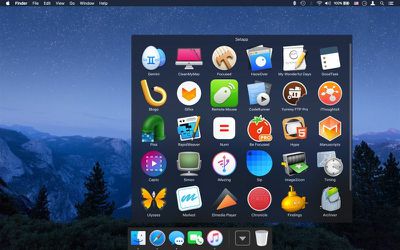
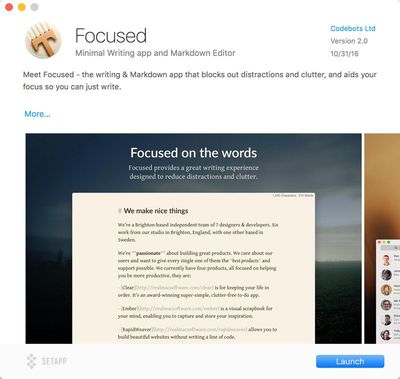
Setapp, an upcoming subscription service from MacPaw, aims to offer a Mac App Store alternative and change the way customers obtain software for their Macs. Setapp will make 40+ popular Mac apps available to Mac users for a flat monthly fee at launch, and there are plans to continually add new apps as the service grows.
Much like Netflix, Setapp will charge users a flat $9.99 fee per month, giving them access to a wide range of Mac apps like RapidWeaver, Marked 2, Ulysses, iMazing, iStat Menus, Toast Titanium, CodeRunner, Blogo, Pagico, and more. It's an interesting concept that has already attracted quite a few app developers, and could attract many more popular apps should the concept catch on.
Setapp includes continual updates, so users who pay the subscription fee to access apps will not need to pay separately for future updates, nor will they need to make in-app purchases or pay additional money to access full app functionality. Setapp apps will also work offline, when no internet connectivity is available, and will be installed through a main Setapp app.
Much like Apple's own Mac App Store, Setapp pays 70 percent of revenue to developers and takes a 30 percent cut, but it also provides developers with a continuous monthly revenue stream, which could be more appealing than the Mac App Store.
Setapp is rumored to be planning to have a beta testing period in the near future, which will give Mac users a chance to try out the subscription service before it launches. Mac users can sign up to request a beta invite through the Setapp website.
Apple today uploaded a new MacBook Pro ad to its YouTube channel, showcasing the machine's Touch Bar and comparing it to major inventions throughout time.
Called "Bulbs," the ad features hundreds of exploding lightbulbs alongside brief glimpses of world-changing innovations, starting with fire and running through tilling, blacksmithing, trains, flight, the telephone, the typewriter, toilet paper, the microwave, the television, the freezer, cameras, computers, robotics, and space flight before finishing with a glimpse of the new MacBook Pro.
The ad ends with the lines "Ideas push the world forward" and "Introducing a tool for all the ideas to come" as a MacBook Pro with Touch Bar is displayed. In line with the rest of the ad, an image of a lightbulb is briefly shown on the MacBook Pro's screen before being exploded and unexploded via a quick gesture on the Touch Bar.
Introduced in October, the new MacBook Pro with Touch Bar began arriving in the hands of customers earlier this week and is now available for purchase in some Apple retail stores.
The new MacBook Pro features the first major redesign to the MacBook Pro in four years. It includes a new Touch Bar, Skylake processors, a thinner, smaller body, a larger trackpad, a new keyboard, and more.
Earlier today, reports surfaced on The Intercept and Forbes claiming Apple "secretly" syncs Phone and FaceTime call history logs on iCloud, complete with phone numbers, dates and times, and duration. The info comes from Russian software firm Elcomsoft, which said the call history logs are stored for up to four months.
Likewise, on iOS 10, Elcomsoft said incoming missed calls that are made through third-party VoIP apps using Apple's CallKit framework, such as Skype, WhatsApp, and Viber, also get synced to iCloud. The call logs have been collected since at least iOS 8.2, released in March 2015, so long as a user has iCloud enabled.
Elcomsoft said the call logs are automatically synced, even if backups are turned off, with no way to opt out beyond disabling iCloud entirely.
“You can only disable uploading/syncing notes, contacts, calendars and web history, but the calls are always there,” said Vladimir Katalov, CEO of Elcomsoft. "One way call logs will disappear from the cloud, is if a user deletes a particular call record from the log on their device; then it will also get deleted from their iCloud account during the next automatic synchronization.
Given that Apple possesses the encryption keys to unlock an iCloud account for now, U.S. law enforcement agencies can obtain direct access to the logs with a court order. Worse, The Intercept claims the information could be exposed to hackers and anyone else who might be able to obtain a user's iCloud credentials.
In some cases, hackers could access an iCloud account even without account credentials, such as by using Elcomsoft's Phone Breaker software. The tool is being updated today with the ability to extract call histories from iCloud with only an authentication token for an account from the accountholder's computer.
However, the entire narrative is largely overblown. In a 63-page white paper about iOS security, Apple clearly defines which information it collects for iCloud backups, emphasis our own. Likewise, in its Legal Process Guidelines, Apple notes FaceTime call invitation logs can be stored for up to 30 days.
Here’s what iCloud backs up:
• Information about purchased music, movies, TV shows, apps, and books, but not the purchased content itself • Photos and videos in Camera Roll • Contacts, calendar events, reminders, and notes • Device settings • App data • PDFs and books added to iBooks but not purchased • Call history • Home screen and app organization • iMessage, text (SMS), and MMS messages • Ringtones • HomeKit data • HealthKit data • Visual Voicemail
Further, in a statement today, Apple said the call history syncing is intentional.
“We offer call history syncing as a convenience to our customers so that they can return calls from any of their devices,” an Apple spokesperson said in an email. "Device data is encrypted with a user’s passcode, and access to iCloud data including backups requires the user’s Apple ID and password. Apple recommends all customers select strong passwords and use two-factor authentication.”
Security researcher Jonathan Zdziarski told The Intercept he "doesn't think Apple is doing anything nefarious in syncing the call logs," which are very clearly stored for the purposes of Continuity and being able to access your call history across Apple devices, even after restoring from a backup.
Nevertheless, Zdziarski emphasized the need for Apple to be clear to users about the data being collected and stored on iCloud. As noted by The Intercept, Apple does not indicate call logs are synced even with iCloud Backup disabled, while FaceTime call logs appear to be stored longer than Apple's claim of up to 30 days.
iCloud users concerned about their accounts being compromised should set a strong password and enable two-step verification.
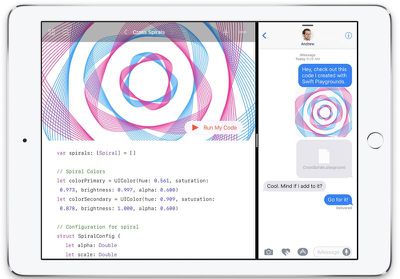
Apple's Swift Playgrounds app received its first update today, introducing a new set of coding lessons and a few new features to enhance the coding experience.
Included in the update is the "Learn to Code 3" module, which features a fresh guided learning experience designed to walk children and adults through basic coding with Apple's Swift programming language. Learn to Code 3 features lessons based around Blu, a fun character that's aimed at making it easy to learn to code.
Along with Learn to Code 3, Swift Playgrounds version 1.1 features an Hour of Code challenge, which Apple says is meant to give new Swift Playground users a taste of the Learn to Code lessons.
Apple today announced plans to host several free one-hour Hour of Code workshops between December 5 and December 11 at retail stores across the world. Registration for Hour of Code is now open.
Also new in Swift Playgrounds are music and sound effects, notifications for new content, and a feature that highlights each line of code as it is run.
What's New in Version 1.1 - Learn to Code 3 continues the guided learning experience as you help Blu explore the universe - Hour of Code challenge gives a Byte-sized introduction to the Learn to Code lessons - Step through your code to highlight each line as it is run - Learn to Code now includes music and sound effects - Notifications for new and updated content
Note: Download new copies of Learn to Code from the Featured page to get the music, sound effects, and line highlighting features.
Swift Playgrounds, which is available for all the iPad Air and later, iPad mini 2 and later, and all iPad Pro models, can be downloaded from the App Store for free. [Direct Link]
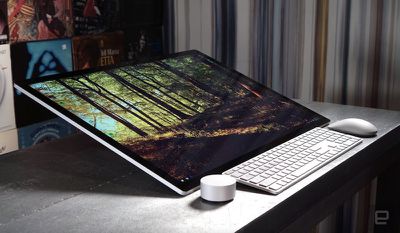
A few weeks after Microsoft unveiled the Surface Studio to the public at a media event in New York City, a few websites have begun publishing the first reviews for Microsoft's new desktop PC/tablet hybrid. During its announcement in October, the Surface Studio was revealed to have a 12.5mm thin touch screen, with a 28-inch PixelSense Display that packs in 13.5 million pixels. Microsoft said that there's "no monitor like this on the planet."
The first reviews of the Surface Studio are largely positive, with many reviewers enamored with the computer's large screen and slick design, as well as its purpose to fulfill and enhance productivity for creatives. However, in line with the unrest over the price of the new MacBook Pros, most of the people who have been reviewing the Surface Studio for the past week admit the $3,000 price tag is one that prohibits casual users and sets an entry bar for serious power users only.
Images via Engadget
The Verge began by looking at the 28-inch display, which was described as "truly one of the best desktop monitors I’ve ever used." Everything from plain text to videos were said to look great on the screen, and even the 3:2 aspect ratio for the desktop monitor produced better environments for reading and writing, according to the site.
The Verge also had a freelance illustrator test out the Surface Studio, and they came away largely impressed, but hoped future iterations introduced a rotating display, more ergonomic stylus, and new input options for the Surface Dial accessory. Although a slight mention, one of the site's minor annoyances was the way the Surface Dial slipped down the screen slowly when not being cradled by the user's hand, even at the computer's lowest 20-degree angle.
Since OS X El Capitan, the operating system that runs on Macs has been protected by a feature called System Integrity Protection (SIP), which is designed to keep your Mac safe from malware by restricting the permissions of the root user account and preventing unauthorized access to protected files and folders.
System Integrity Protection runs behind the scenes and is generally enabled by default in Macs running OS X El Capitan or later, but it seems the feature is inexplicably turned off on some new MacBook Pro models, leaving them vulnerable.
Developer Jonathan Wight noticed System Integrity Protection was disabled on some machines and tweeted about it this morning, prompting developer Steven Troughton-Smith to do an informal Twitter survey asking users about the status of their new machines.
Consensus seems to be that some (but not all) Touch Bar models are shipping with SIP disabled. No reports of a non-Touch Bar/Escape doing so
— Steve T-S (@stroughtonsmith) November 17, 2016
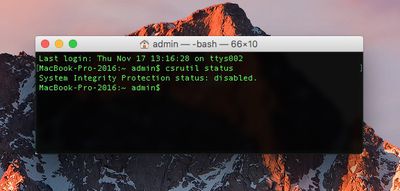
System Integrity Protection is indeed disabled out of the box on a number of 13 and 15-inch MacBook Pro models, including one machine owned by MacRumors. Not all MacBook Pro models are affected, however, as there are users who are reporting that System Integrity Protection is turned on as expected.
As outlined in Apple's developer documentation, users can check whether SIP is turned on by entering the "csrutil status" command in Terminal. Enabling SIP requires booting into Recovery mode, turning it on using Terminal, and rebooting.
Apple is aware of the issue and will undoubtedly deliver a fix for the issue in an update, but timing for a release is unknown.
Popular automation app Workflow is being updated today with a new design, a much-improved Gallery experience, and a streamlined on-boarding process, all of which help to make the app more powerful and easier to use.
For those unfamiliar with Workflow, it's an automation app that can essentially do anything. It lets you create workflows to accomplish a wide variety of tasks like creating GIFs from a series of photos, grabbing images from a web page, translating an article, calculating a tip, posting photos to multiple social networks at once, and much, much more.
When you first open the Workflow app after updating, there's a new on-boarding process that walks you through how the app works and all of the different things you can do with it. After a short tutorial, you're asked to choose a few workflows that sound useful, like a teeth brushing timer or directions to the nearest coffee shop. The new on-boarding process makes it easier for new users to get started because the app no longer opens to a blank slate.
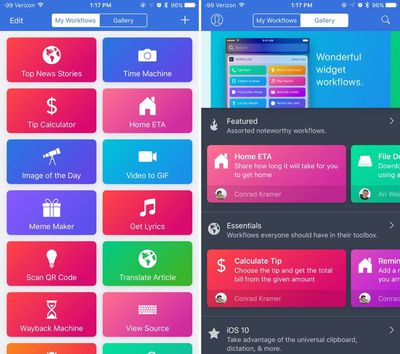
Workflow's Gallery, which is what's used to download new workflows, has been overhauled to make it simpler to find new ways to use the Workflow app. The Gallery is organized into several different curated sections that you can scroll through, like Essentials, iOS 10, Quick Shortcuts, Morning Routine, Around the House, Stay Healthy, Collaborate Better, Photography, and more.
Category names are more descriptive than they were previously, and there's more content right at your fingertips. With a new search function, it's easy to find exactly what you're looking for, and there's also an option to submit your own Workflows to the Gallery so other users can download them.
When adding workflows, there's now an Import Questions option that simplifies customization, and some existing workflows have been updated to add more context for an improved experience. You'll also notice that Workflow has seen some slight design changes, brightening up the look of the app.
PlayStation today announced that its PlayStation Vue television service has expanded to the fourth-generation Apple TV, allowing PlayStation Vue subscribers to watch live TV and access other Vue features on Apple's set top box.
Priced at $30 to $65 per month, PlayStation Vue provides several different live streaming television packages that include live TV, sports, movies, and more, plus it offers on-demand video and cloud-based DVR streaming so recorded content can be watched across multiple devices.
Starting today, PlayStation Vue will be supported on Apple TV (4th generation), leveraging Apple TV's latest hardware to create an innovative experience. You will be able to take advantage of Apple TV's Siri Remote and easy navigation with touch, while enjoying PlayStation Vue's sleek look and feel. PlayStation Vue brings popular programming to Apple TV, from live sports networks like ESPN and NFL Network, to premium channels like AMC, FX, HBO, and Showtime.
PlayStation Vue subscribers can link their accounts to the Apple TV after downloading the PlayStation Vue app, which is available as of this morning. PlayStation Vue allows for content to be streamed simultaneously on up to five devices at once, making it ideal for families.
Twitter's first-party iOS app recently began rolling out support for rich notifications for anyone on iOS 10, letting users get a larger glimpse at their incoming notifications without having to open their iPhone or the Twitter app. The new notifications include a few formatting retouches, as well as the inclusion of images in relevant posts.
With the new notification set-up, users will get pop-ups for the usual Twitter activities, including @ mentions and direct messages, but now a small thumbnail appears alongside the text of the Tweet on the iPhone lock screen and in Notification Center. Whenever users force touch the notification, they'll get an expanded view of the content with a larger image, along with the normal options to like and retweet.
Rich notifications were one of the flagship features when iOS 10 launched in September, and have been included in many of Apple's first-party apps like Messages and Mail. Other companies have slowly been adding support for the feature, including apps like Netatmo Security, which let users watch clips of a connected security camera directly within the notification.
Apple manufacturing partner Foxconn has been studying the possibility of moving iPhone production to the United States, according to Japanese website Nikkei Asian Review, leading to hopeful speculation some iPhones could one day be "Made in America" rather than be assembled and imported from China.
The report claims Apple asked both Foxconn and rival supplier Pegatron, which denied the request, to look into making iPhones stateside, although Foxconn chairman Terry Gou is said to be less enthusiastic about the idea due to inevitably higher production costs in the United States compared to China.
"Apple asked both Foxconn and Pegatron, the two iPhone assemblers, in June to look into making iPhones in the U.S.," a source said. "Foxconn complied, while Pegatron declined to formulate such a plan due to cost concerns."
In a speech at Liberty University in Virginia earlier this year, President-elect Donald Trump said "we're going to get Apple to start building their damn computers and things in this country instead of in other countries," while he has also threatened to introduce a 45% tax on products imported from China.
Apple CEO Tim Cook previously told 60 Minutes it manufactures iPhones in China because of "skill," not lower wages. Cook said China has put an "enormous force on manufacturing," adding that the U.S. workforce has a smaller number of individuals with the "vocational kind of skills" needed.
China put an enormous focus on manufacturing. In what we would call, you and I would call vocational kind of skills. The U.S., over time, began to stop having as many vocational kind of skills. I mean, you can take every tool and die maker in the United States and probably put them in a room that we're currently sitting in. In China, you would have to have multiple football fields.
Meanwhile, an industry executive told Nikkei the U.S. does not have the "cluster of suppliers" needed to manufacture iPhones. In Asia, Taiwan's TSMC makes A-series chips for iPhones, Japan's Sharp and Japan Display supply iPhone displays, and South Korea's SK Hynix and Japan's Toshiba produce memory chips for the device.
"To make iPhones, there will need to be a cluster of suppliers in the same place, which the U.S. does not have at the moment," the executive said. "Even if Trump imposes a 45% tariff, it is still possible that manufacturers will decide to continue production overseas as long as the costs together with the tariffs are lower than the amount they need to spend on building and running production lines in the U.S."
U.S. manufacturing would inevitably raise concerns about Apple's profit margins and, in turn, how much the iPhone costs for customers. iPhone 7 component costs are estimated to start at $220, compared to a base price of $649, although Cook has previously dismissed third-party cost estimates as being highly inaccurate.
TSMC and Sharp have acknowledged that while U.S. manufacturing would prove more expensive, the companies would certainly consider the move over losing a major customer such as Apple. But, for now, the idea likely remains a stretch even in light of new political pressures.
Note: Due to the political nature of the discussion regarding this topic, the discussion thread is located in our Politics, Religion, Social Issues forum. All forum members and site visitors are welcome to read and follow the thread, but posting is limited to forum members with at least 100 posts.
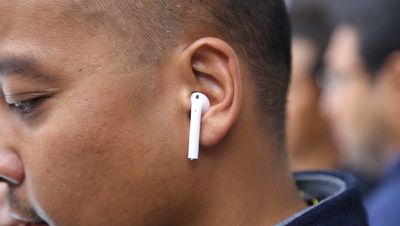
Adding to the pile of recent guesswork rumors centering around the launch of Apple's AirPods, this week a collection of foreign retail websites have listed the Bluetooth headphones with new dates suggesting availability before the end of the year.
First off, today Mac4Ever discovered that French retail website Fnac has posted the AirPods for pre-order, with a suggested shipping date of November 30. If true, that would mark a launch following Black Friday and Cyber Monday, but still leave customers plenty of time to add AirPods to their holiday shopping list.
One of many predicted AirPods shipping dates from foreign resellers, this one Fnac
Last week, a launch supposedly set for around tomorrow, November 18, was floated by an Apple reseller, which reportedly told a customer it would be getting AirPods stock today, November 17. Although an impending launch as soon as tomorrow is unlikely, many Apple retail stores have been receiving demo units of the AirPods to demonstrate to customers and teach employees how to use them, suggesting Apple still intends to launch the device sooner rather than later next year.
Earlier in the week Letem svetem Applem discovered that Czech website Alza had listed the AirPods as launching December 2016. That date has since been removed from the site, which now simply states that it "accepts pre-orders" for the AirPods.
If production does begin in December, as predicted by Barclays, that still leaves the option that AirPods might not launch until January 2017, which was one of the first delayed date estimates for the headphones after Apple postponed the launch beyond October. Despite that rumor, and a few other extraneous websites that mark AirPods availability as late as March 2017, many still believe it's most likely that Apple will get the AirPods out in time for the holiday shopping season.
With the highly divergent launch dates sprouting up online, it's clear that no one officially knows exactly when the AirPods will come out. On Apple.com, the AirPods are listed as both "coming soon" and "currently unavailable." Following the delay, Apple explained that it needed "a little more time" with the AirPods before they would be ready to launch, but didn't divulge specific reasons why it chose to do so.
Apple today announced it has opened registration for free one-hour "Hour of Code" workshops between December 5 and December 11 at all 487 of its retail stores worldwide. This year's workshops will include an introduction to Apple's new educational Swift Playgrounds coding app for iPad.
“Hour of Code embodies our vision for Apple stores as a place for the community to gather, learn and be entertained,” said Angela Ahrendts, Apple’s senior vice president of Retail. “We’re proud to introduce the Swift Playgrounds app into the workshops and honored to again work side-by-side with Code.org on this incredibly important initiative. Hour of Code is one of the absolute highlights of the year for both our teams and the families that visit our stores.”
Since 2013, Apple has hosted Hour of Code workshops during Computer Science Education Week to teach kids and students the basics of computer science using non-profit website Code.org's programming tutorials.
Apple said it has developed new tools to extend the Hour of Code initiative into schools and community centers, including a free facilitator guide offering lesson ideas, group activities, and more. Apple will also provide resources to assist ConnectED schools in the U.S. with hosting their own Hour of Code workshops.
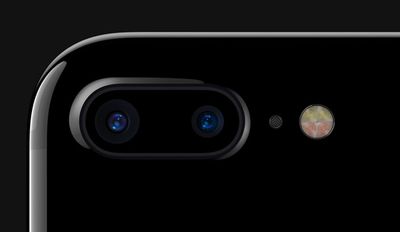
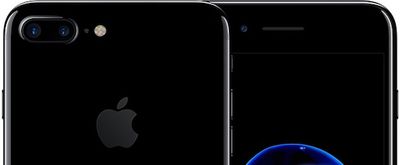
While the iPhone 7 Plus has a dual-lens camera, only the wide-angle lens supports optical image stabilization. However, that could change next year.
In a research note obtained by MacRumors, KGI Securities analyst Ming-Chi Kuo maintains his belief new dual-camera iPhone models in 2017 will support dual optical image stabilization. Kuo believes Apple will redesign the telephoto lens to support the feature in addition to existing auto focus functionality.
We believe Apple will add OIS function to the telephoto CCM in order to enhance the selling points of next year’s new iPhone. We think photo quality and optical zoom range may both improve as a result. We expect the telephoto lens will be redesigned to support OIS in the telephoto CCM, with challenges likely coming from: (1) the need to increase the image circle of the telephoto lens, which will lead to longer calibration time and a more complex assembly processes; and (2) a redesign of the telephoto lens, as an increased image circle will result in degraded photo quality around the corners.
Kuo said Apple's rumored 5.1"-5.2" OLED iPhone and a new 5.5-inch iPhone with a traditional LCD display will feature dual cameras with dual optical image stabilization, while a new 4.7-inch model with an LCD display is expected to retain a single-lens camera, also with optical image stabilization.
Kuo expects Apple supplier Largan Precision to remain the exclusive provider of 6P and telephoto lens for the trio of new iPhones.
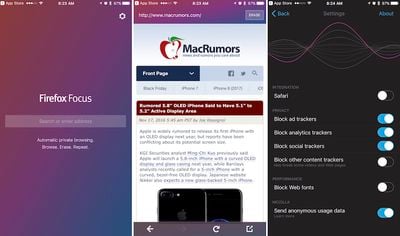
Mozilla today launched a new app called "Firefox Focus," which automatically blocks advertisements as well as online trackers. The company said that due to the new app's removal of heavy ads and tracking software by other companies, "web pages may require less data and load faster."
The privacy-focused web browser also comes with an easily accessible "Erase" button at the top of the app, which users can tap and erase all browsing history, searches, cookies, and passwords instantly.
Firefox Focus also offers extensive customizable browsing options, with the ability to disable a website's custom font, and users can choose to load a page in another browser -- Firefox or Safari -- if they're willing to leave the security of Firefox Focus.
Browse like no one’s watching. The new Firefox Focus automatically blocks a wide range of online trackers — from the moment you launch it to the second you leave it. Easily erase your history, passwords and cookies, so you won’t get followed by things like unwanted ads.
“Private browsing” on most browsers isn’t comprehensive or easy to use. Focus is next-level privacy that’s free, always on and always on your side — because it’s backed by Mozilla, the non-profit that fights for your rights on the Web.
The app is otherwise simplified, with a single search bar greeting users when they open it, and only one tab available to view at a time. The settings of the app also include an additional layer of security to block other content trackers, but Mozilla warns that toggling it on "may break some videos and web pages."
Now, in a new research note, Kuo said the much-rumored premium iPhone model will indeed have a 5.8-inch OLED panel, but with a smaller actual active display area of between 5.1 and 5.2 inches. Kuo said this is for "specific design purposes," which likely points towards a wraparound or curved display of some sort.
We predict OLED iPhone will be 5.1-5.2”, despite various market speculation. In terms of the display size of the OLED iPhone, current information from the upstream points to 5.8”, while that from the downstream points to 5”, which does not conflict, in our view. We predict OLED iPhone will adopt a 5.7-5.8” flexible OLED panel (with Samsung (KR) as the exclusive supplier). Nonetheless, for ‘specific design purposes’, the actual active area may be around 5.1-5.2”. Other than the OLED model, we expect Apple to launch new 4.7” and 5.5” TFT-LCD iPhone models.
Kuo reiterated the all-new OLED-based iPhone will be accompanied by new 4.7-inch and 5.5-inch iPhones with traditional LCD displays.
Russia's communications regulator has blocked public access to LinkedIn after an earlier court ruling found the social networking firm to have violated data storage laws (via Reuters).
LinkedIn, which has over 6 million registered users in Russia, becomes the first major social network to be blocked by Russian authorities after falling afoul of the country's stringent data storage laws, which require personal information of Russian citizens to be stored on Russian servers.
LinkedIn's site will be blocked within 24 hours, according to a report by the Interfax news agency. One Internet service provider, Rostelcom, said it had already blocked access to the site, while two others – MTS and Vimpelcom – said they would do so within 24 hours.
LinkedIn has yet to comment on the order by the Russian communications regulator, but the U.S. company warned earlier this month that the court ruling risked denying access to its site for millions of individual and corporate members situated in Russia.
A spokesperson for Russian communications regulator Roskomnadzor told Reuters it had received a letter from LinkedIn management on Friday requesting a meeting, but that the watchdog had to get approval from the country's foreign ministry before the meeting could take place.
The law requiring companies that store the personal data of citizens to do so on Russian servers was introduced in 2014, but has never previously been enforced. The law was adopted on grounds of "overall state security issues" and "increased instances of personal data leakage", but critics see it as part of a broader effort to tighten control over internet access.
Apple is looking into integrating its Siri virtual assistant into the company's Messages platform, according to a patent published today, enabling the AI to provide directions, retrieve movie times, and assist with peer-to-peer payments, among other potential uses.
Picked up by AppleInsider, Apple's application for a "Virtual assistant in a communication session" appeared on the U.S. Patent and Trademark Office's website on Thursday, and details a system in which iMessage users can invoke Siri from within chat threads to get answers to relevant queries, complete scheduling tasks, and more.
One scenario describes an instance in which users chatting amongst themselves bring Siri into the conversation simply by including it in the group thread. Using semantic analysis, the AI detects when it may be of help to complete a task and pitches in accordingly - such as finding a place to eat nearby, and telling the user how long it will take for their friends to arrive.
Although Siri's responses don't appear to other users, the assistant is able to parse their messages in order to work out whether it can help with a task. For instance, in another example, the user asks "Siri, help us schedule a meeting," in a group chat thread and the AI cross-checks open calendar dates for the present users to suggest a potential meeting date and time. Participants can then vote for a preferred time and place, after which Siri schedules the meeting in everyone's calendar.
In another example, chat members are notified that a user is utilizing Siri and are asked if they would like to do the same, and participants can approve or deny AI access to personal data about them during the chat session. Meanwhile other scenarios depict AI interactions during peer-to-peer payments, for example by determining which financial apps are being used by each chat member.
Some of the implementations in the patent bear similarities to actions already offered by Google Assistant in Google's Allo app, and by chat bots in Facebook Messenger, while third-party apps like PayPal and Uber currently offer Siri functionality following Apple's release of the Siri SDK to developers. Whether or not Apple decides to integrate Siri in Messages in a future update, the AI is likely to require extensive development before users consider inviting Siri to conversations and extending access to their data.
Amazon is set to cut its Prime annual membership price from $99 for a year to $79 on Friday, November 18. The one-day sale will run from 12am ET until 11:59pm PT and is only available for new members.
Amazon customers in the U.K. can take advantage of a similar promotion beginning today: Anyone who signs up for Amazon Prime between now and the end of Friday will receive a year's subscription for £59 instead of the usual £79 asking price, essentially amounting to three free months of the service.
The promotion coincides with the release of Amazon's new motoring show "The Grand Tour", the first episode of which can be streamed or downloaded on Friday morning by Prime members in the U.K., U.S., Germany, Austria, and Japan. Amazon says the show will be available to watch in 200 countries from December.
The benefits of Prime membership include free one-day delivery on eligible items, access to Amazon Prime Video and Prime Music, unlimited cloud photo storage with Prime Photos, access to the Kindle Owner's Lending Library, and early access to Amazon's Black Friday "lightning" deals.
Members also get an exclusive discount on subscriptions for Amazon's new Music Unlimited streaming service, giving them access to 40 million songs, compared to the 2 million included in the standard Prime Music package.








 Russia's communications regulator has blocked public access to LinkedIn after an earlier court ruling found the social networking firm to have violated data storage laws (via