Apple's "Let Us Loop You In" event kicks off at 10:00 AM Pacific Time today, and we're expecting to see several product announcements including a new 4-inch "iPhone SE," an updated 9.7-inch iPad perhaps branded as an "iPad Pro," and a few updates for the Apple Watch line, although upgrades to the watch itself will not be coming today.
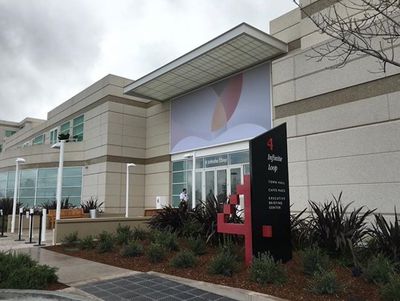
We're also expecting to see a full set of operating system upgrades today, as Apple has been beta testing iOS 9.3, OS X 10.11.4, tvOS 9.2, and watchOS 2.2 for several months now. Today's event is being held at the Town Hall auditorium on Apple's headquarters campus in Cupertino.
Apple is providing a live video stream on its website and via Apple TV.
In addition to Apple's video stream, we will be updating this article with live blog coverage and issuing Twitter updates through our @MacRumorsLive account as the keynote unfolds. Highlights from the event and separate news stories regarding today's announcements will go out through our @MacRumors account.
Sign up for our newsletter to keep up with Apple news and rumors.
Apple's online stores around the world are currently down in advance of the event.
Archive of Live Updates in Reverse Chronological Order
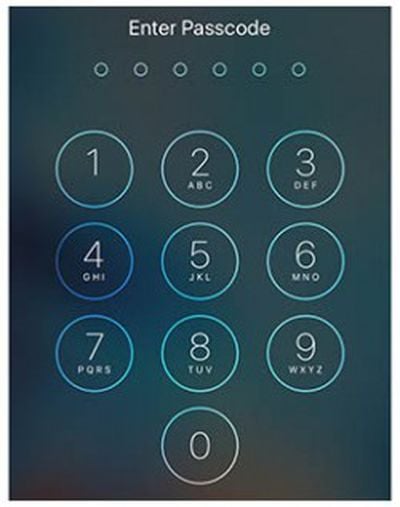
Ahead of Apple's court date with the Federal Bureau of Investigation tomorrow, Bloomberg has taken a dive into the company's history with the FBI to chart the buildup to the heated battle over security and encryption on smartphones. The timeline begins with Apple's introduction of iOS 8 in June of 2014, with Apple subsequently providing the FBI early access so the law enforcement agency "could study how the new system would change evidence-gathering techniques" ahead of the public release of iOS 8 in September of that year.
High-ranking officials at the FBI quickly learned that iOS 8 introduced a new form of encryption into the software that prevented any government agent, or Apple itself, from accessing data stored on the smartphone.
With that significant change in iOS 8, the relationship between Apple and the FBI began to destabilize, but the government didn't have enough backing to support legislation that would help it bypass the encrypted features of the new iOS. But with the San Bernardino terrorist attack last December, the FBI had a foothold to help it take the encryption issue public.
"The reason the relationship went south is the government was expecting some degree of accommodation on the part of the technology companies," said Timothy Edgar, the former director of privacy and civil liberties for the White House National Security Staff from 2009 to 2010. "They were expecting the companies to essentially back down and not go forward with new security measures that would make it impossible for you to access devices or communications. They were caught off guard by basically being told to get lost."
According to one of Bloomberg's sources, the government's first cause for concern with Apple's encryption actually began all the way back in 2010 when the company launched the encrypted video messaging service FaceTime, followed by iMessage in 2011. With the apps making it impossible for the FBI to even peek into criminal activity, the government was rapidly being made aware of "how much of a premium Apple put on privacy."
A few attempts at legislation that would allow the FBI to access encrypted data on smartphones with a court order were made sometime in 2013, but subsequently abandoned following the Edward Snowden controversy that year. According to Timothy Edgar, the former director of privacy and civil liberties for the White House, "there was a real split" in the administration regarding the encryption legislation.
When it became clear that the administration wouldn't support a new law that would help investigators gain access to iPhones and other devices, many FBI agents became frustrated and disappointed. Some recalled that the bureau was pilloried for not connecting the dots to prevent the Sept. 11, 2001, terrorist attacks, according to Leo Taddeo, the former special agent in charge of the New York FBI special operations and cyber division.
That sequence of events and the subsequent San Bernardino shooting ultimately led the government to take the issue public and seek a court order for Apple to unlock Syed Farook's iPhone, leading to Tim Cook's non-compliance letter, and the court date with the FBI on March 22. According to Edgar, now a senior fellow at Brown University, "Lawyers think privacy is you can't listen to my conversation without a warrant; technologists think privacy is you can't listen to my conversation, period. It's hard to reconcile those two points of view."
Apple has said that if the courts rule in favor of the FBI in the encryption case, it's ready to take the issue all the way to the Supreme Court. More recently, some Apple engineers have stated that if the company is forced to unlock the San Bernandino iPhone, they may decide to not comply with the ruling.
Check out Bloomberg's full story for more of the history between Apple and the FBI ahead of tomorrow's court date.
Note: Due to the political nature of the discussion regarding this topic, the discussion thread is located in our Politics, Religion, Social Issues forum. All forum members and site visitors are welcome to read and follow the thread, but posting is limited to forum members with at least 100 posts.
A nearly five-year-old design patent trial between Apple and Samsung has reached a new level, as the U.S. Supreme Court today agreed to hear Samsung's appeal of a lower court decision that ordered the South Korean electronics maker to pay a $548 million settlement to its Cupertino-based rival in December.
According to Reuters, Samsung plans to appeal what it believes are "excessive penalties" for allegedly "copying the patented designs of the iPhone," including the smartphone's rounded rectangular bezel and colorful grid of icons. The 2011 lawsuit targeted select Galaxy-branded smartphones and tablets.
Samsung has already paid the $548 million settlement to Apple, but it can obtain reimbursement if the U.S. Supreme Court reverses or modifies the original judgment. Apple had urged the high court to deny the appeal, accusing Samsung of raising issues that do not "deserve review" in an effort to prolong court proceedings.
The appeal will likely delay a damages retrial that was scheduled to begin later this month in the Northern District of California, according to FOSS Patents.
Manufacturers of counterfeit Apple products often go to great lengths to make their knock-offs look genuine, which brings the added risk of concealing potentially dangerous flaws in substituted electrical components.
In the past we've covered the efforts manufacturers go to when counterfeiting iPhone and iPad chargers, courtesy of product teardowns on Ken Shirrif's technology blog. Now, a new post on Shirrif's site offers a detailed teardown and analysis of the differences between a counterfeit MacBook charger and a genuine unit, providing a great example of how cosmetic similarities can hide major safety defects.
A counterfeit MagSafe 45W charger (left) and a genuine 60W charger (right).
Shirrif notes that counterfeit chargers he's examined in the past have usually had external flaws that give them away, but that this latest MacBook charger knock-off almost had him fooled, too.
The exterior text on this charger was correct, no "Designed by Abble" or "Designed by California". It had a metal ground pin, which fakes often exclude. It had the embossed Apple logo on the case. The charger isn't suspiciously lightweight. Since I've written about these errors in fake chargers before, I half wonder if the builders learned from my previous articles.
Only when Shirrif cracks open the charger are the differences laid bare. A real Apple charger is packed full of complex circuitry, but the counterfeit contains a fairly low density board that uses a simpler power supply with a dangerously small isolation gap between the AC input and the low-voltage output.
Shirrif also identifies a distinct lack of insulation tape between the two voltages on the circuit board, a metal grounding pin not connected to anything, and a fluctuating power output. See his post for the full comparison.
Three years ago, a Chinese woman was electrocuted by a counterfeit charger while charging her iPhone, highlighting the significant dangers these products pose to consumers. Users who suspect they have a counterfeit charger can take part in Apple's third-party charger takeback program to safely dispose of the adapters.
Apple's special event starts at 10 a.m. Pacific, with a live stream (spoiler free) available on Mac, PC, iPad, iPhone, iPod touch, and Apple TV. MacRumors will also have full coverage of the event, with a live blog on our front page and updates in 140 characters or less through our @MacRumorsLive account on Twitter.
We'll also have specific coverage of today's announcements in separate news stories, and our community forums are a great place for readers to discuss the announcements before, during, and after the event. Be sure to keep tabs on the iPhone, iPad, and Apple Watch sections for the latest discussions.
A flaw in Apple's encryption systems has been found that enables an attacker to decrypt photos and videos sent over its iMessage instant messenger service.
According to The Washington Post, the security hole in Apple's code was exploited by a group of Johns Hopkins University researchers, led by computer science professor Matthew D. Green.
Green reportedly alerted Apple to the problem last year after he read an Apple security guide describing an encryption process that struck him as weak. When a few months passed and the flaw remained, Green and his graduate students decided to mount an attack to show that they could break the encryption of photos and videos sent over iMessage.
The team succeeded by writing software that mimicked an Apple server and hijacked the encrypted transmission of the targeted phone. The transmission contained a link to a photo stored in Apple’s iCloud server as well as a 64-digit key to decrypt the photo.
While the students could not see the key's digits, they guessed them by a repetitive process of changing a digit or a letter in the key and sending it back to the target phone. Each time they guessed a digit correctly, the phone accepted it. The phone was probed in this way thousands of times until the team guessed the correct key and was able to retrieve the photo from Apple's server.
Apple said that it partially fixed the problem last fall when it released iOS 9, and will fully address the issue through security improvements in iOS 9.3, which is expected to be released this week. The company's statement read:
Apple works hard to make our software more secure with every release. We appreciate the team of researchers that identified this bug and brought it to our attention so we could patch the vulnerability. Security requires constant dedication and we're grateful to have a community of developers and researchers who help us stay ahead.
The news comes amid Apple's ongoing legal battle with the FBI in connection with the iPhone at the center of the San Bernadino shooter investigation. The FBI has requested help from Apple to unlock the phone, but the company has so far refused.
The FBI wants to access data stored on the iPhone in question, whereas the Johns Hopkins research focused on the interception of data transmitted between devices. However, Green believes that his team's work highlights the inherent security risks of the FBI's demands in the California case.
"Even Apple, with all their skills — and they have terrific cryptographers — wasn't able to quite get this right," Green told the newspaper. "So it scares me that we're having this conversation about adding backdoors to encryption when we can't even get basic encryption right."
Apple will face off against the FBI in court on Tuesday, one day after the company's March 21 event that will see the debut of the 4-inch iPhone SE and the 9.7-inch iPad Pro. MacRumors will post a direct link to Apple's media event once it becomes available.
Note: Due to the political nature of the discussion regarding this topic, the discussion thread is located in our Politics, Religion, Social Issues forum. All forum members and site visitors are welcome to read and follow the thread, but posting is limited to forum members with at least 100 posts.
Apple's March 2016 media event will be kicking off at 10:00 AM Pacific on Monday, and as is tradition some MacRumors readers who can't follow the event live are interested in avoiding all of the announcements and waiting until Apple posts the recorded video of the event so as to experience it without already knowing the outcome.
For those individuals, we've posted this news story, which will be updated with a direct link to the presentation once it becomes available from Apple. No other news stories or announcements will be displayed alongside this story.
Apple has become quicker about making event videos available for replay over the past several years, and videos are now frequently available within an hour of an event's conclusion.
Users waiting for the video to be posted are welcome to gather in the thread associated with this news story, and we ask that those who follow the events refrain from making any posts about Apple's announcements in this thread.
Video Posted: A direct link to the video file is now available, with no spoilers.
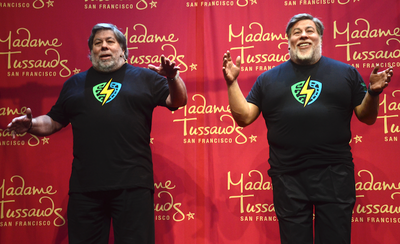
Madame Tussauds revealed its Steve Wozniak wax figure Saturday morning at the Silicon Valley Comic Con opening ceremony. The figure will be on display at Tussauds' Comic Con booth for the entire weekend before it's moved to its San Francisco location for permanent display.
Steve Wozniak, left, next to his wax figure, right.
Chris Cooper, Madame Tussauds general manager, said that the company held a vote to see which technological innovator would receive a figure. Wozniak overwhelmingly won the poll with over 60 percent of the vote, beating out other tech luminaries like Tesla CEO Elon Musk.
When the red covering dropped it was revealed that Wozniak, who had wandered off the stage moments before, was posing next to his figure, trying to keep as still as possible. After some quick antics, which included the opening ceremonies' hosts pretending the wax Wozniak was the real Wozniak, the Apple co-founder talked about how surprised he was about the process.
"The incredible art and precision that went into every little measured detail for about five hours," Wozniak said. "The features at every angle and the human work to make it come out realistic looking. I did not know there was so much involved, I thought you take a picture and a computer prints it out." Wozniak also said that it was an honor to have a wax figure because he had always wanted one, mentioning the wax figures of superheroes he saw in wax museums when he was younger.
Before inviting the attendees to have fun on the convention floor, Wozniak spoke a little about his inspiration for creating a Comic Con. He noted how that when he was younger, he and the other employees at Apple didn't dress up like employees at other tech companies. They were geeks and outcasts that didn't necessarily fit in. Naturally, they looked to science fiction and superhero stories as a way of escape, and Wozniak says modern technology makes him feel like he's a part of those worlds. He noted the ability to push a button in an app and summon a car to take you somewhere as similar to a super power.
"I love technology, it makes me feel like I'm a superhero in a way; I'm so much more powerful than I would be without it," Wozniak said. "Now the whole process is you have imagination. Things that maybe don't exist in the real world but they exist in your world, in your head. Then we have the ability to realize them, to make them real."
Apple will hold its first event of 2016 next Monday, and while it won't be as exciting as last year's event that saw the launch of the Apple Watch, Apple is planning to introduce several new products. Headlining the event will be the 4-inch iPhone SE, Apple's first 4-inch iPhone since 2013.
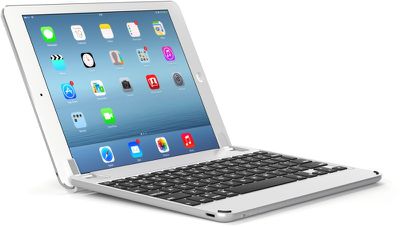
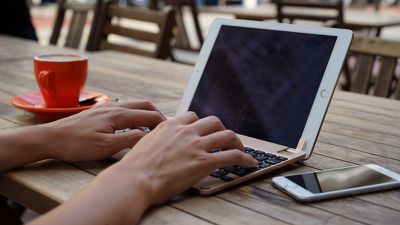
For this week's giveaway, we've teamed up with Brydge to give away five Brydge keyboards for the iPad Air, iPad Air 2, or iPad mini 1/2/3. Brydge's line of keyboards are some of the best available, made from high-quality materials with a comfortable, MacBook Pro-style key feel.
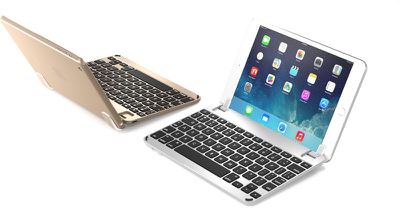
Brydge keyboards, which will turn your iPad into a mini MacBook, are all designed from aluminum to match the style of Apple's tablets and are available in Silver, Space Gray, and Gold.
Unlike some other keyboards, Brydge's products connect to an iPad using two silicone-lined tabs, with no back case included. This helps keep weight down while still providing protection for the iPad's screen when closed. Weight for the smaller keyboard is at .66 pounds while the larger keyboard weighs 1.15 pounds.
The 180-degree hinge on Brydge's keyboards allow them to be adjusted into multiple viewing angles and both of the models included in the giveaway, the BrydgeAir and the BrydgeMini, have backlit keys for use in low-light conditions. The larger BrydgeAir model for the iPad Air and iPad Air 2 also includes a built-in Bluetooth speaker for improved audio.
Brydge's keyboards receive largely positive reviews for their build quality, key feel, and feature set, and when we reviewed the BrydgeAir, we found it to be one of the best iPad keyboards we've used. The BrydgeAir for iPad Air and iPad Air 2 is priced at $149.99 and the BrydgeMini for the iPad mini 1, 2, and 3 is priced at $129.99, but five MacRumors readers will be able to get the Brydge keyboard of their choosing at no cost.
To enter to win, use the Rafflecopter widget below and enter an email address. Email addresses will be used solely for contact purposes to reach the winner and send the prize.
You can earn additional entries by subscribing to our weekly newsletter, subscribing to our YouTube channel, following us on Twitter, or visiting the MacRumorsFacebook page. Due to the complexities of international laws regarding giveaways, only U.S. residents who are 18 years of age or older are eligible to enter.
The contest will run from today (March 18) at 11:30 a.m. Pacific Time through 11:30 a.m. Pacific Time on March 25. The winners will be chosen randomly on March 25 and will be contacted by email. The winners have 48 hours to respond and provide a shipping address before new winners are chosen. The prizes will be shipped to the winners for free.
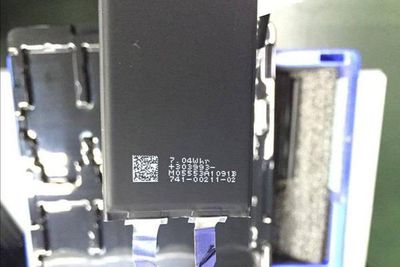
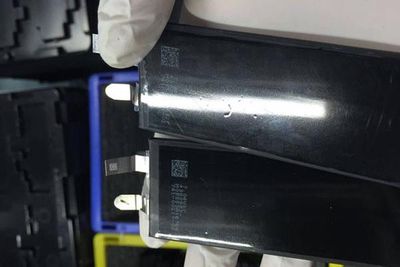
We've already seen several alleged part leaks for the next-generation iPhone 7, and now Chinese site Digi.tech.qq.com [Google Translate] (via HDBlog.it) has shared images of what is believed to be the battery that will be included in the device.
The battery lists a capacity of 7.04 watt-hours, slightly larger in capacity than the equivalent battery capacity listed for the iPhone 6s (6.61 watt-hours) and almost identical to the iPhone 6 (7.01 watt-hours). Voltage is not visible on the alleged iPhone 7 battery, so the exact charge capacity is not yet available, but should be similar to the iPhone 6 battery.
Rumors suggest the iPhone 7 and 7 Plus will be thinner than existing iPhones, with Apple perhaps making room for the similarly-sized battery by eliminating the headphone jack and cutting down on the extra space around the Lightning port.
Ahead of the release of the 4-inch iPhone SE next week, we managed to get our hands on some inexpensive TPU cases designed for the device. We've compared the iPhone SE cases to Apple's iPhone 5s in a new video to get a feel for the differences we might possibly see between the two devices.
On the whole, the iPhone SE case supports rumors the iPhone SE will look similar to the iPhone 5s. When put on an iPhone 5s, the iPhone SE case fits, but in our estimation, it's designed for either a device that's slightly thinner or one that has rounded edges, so the fit is not perfect.
There's also a noticeable discrepancy at the volume buttons due to the mismatched fit, and the buttons on the iPhone 5s do not align with the button indentations on the SE case. There have been no rumors suggesting the iPhone SE will be thinner than the iPhone 5s, but it has been rumored to include slightly curved glass at the edges rather than the sharper chamfered edges found on the iPhone 5s, so that could account for the difference in fit.
Cases created for iPhones ahead of launch are typically a solid indication of what a new device will look like, but with the iPhone SE, we've seen several case variations that leave the final design up in the air. Some, like the one in the video, closely resemble iPhone 5s cases, while others have a more iPhone 6 style design. We don't know if the case we've received is an accurate representation of what we'll see when the iPhone SE launches.
Along with case designs, rumors about the SE's shape have been similarly mixed, pointing towards an iPhone 5s-style shell with a slightly curved display glass, but all recent information has largely pointed towards a device that is identical to the iPhone 5s.
We don't have long to wait to see the design of the iPhone SE. Apple will introduce the device on Monday, at its "Let Us Loop You In" event that will also see the debut of the 9.7-inch iPad and new Apple Watch bands.
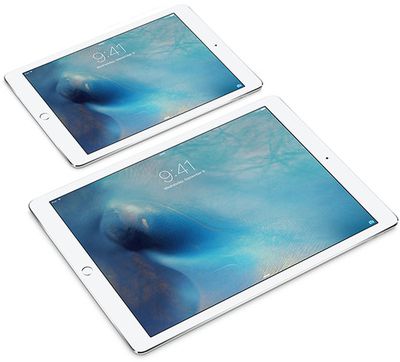
The base $599 price will apply to the 32GB model with Wi-Fi only, while 128GB and LTE versions will be sold at higher price points. The older iPad Air 2 will reportedly remain in Apple's tablet lineup, likely for $499.
Previous 9.7-inch iPads have had a $499 starting price, meaning the smaller iPad Pro could be Apple's most expensive tablet ever in its size class. However, 32GB base storage would be higher than 16GB for the base iPad Air 2.
MacRumors will be providing live blog and Twitter coverage (@MacRumorsLive) of Apple's media event, which commences on Monday at 10:00 a.m. Pacific. A new 4-inch iPhone SE and Apple Watch updates are also expected.
After filing for bankruptcy in 2014, and subsequently dissolving its supplier partnership with Apple, GT Advanced Technologies today announced its return from Chapter 11 "as a newly reorganized company." A group of unnamed financial sponsors have invested $80 million to assist in GT's emergence back into the market.
"Our emergence from Chapter 11 marks the start of a new chapter for our company," said David Keck, GTAT's President and Chief Executive Officer. "Through this process, we have resolved the issues which led to our decision to seek bankruptcy court protection. With our strengthened financial flexibility, we will focus on our industry leading capabilities in the solar and sapphire markets."
Before its Chapter 11 filing, GT was Apple's Arizona-based partner in sapphire production on the iPhone. In the weeks after the filing, Chief Operating Officer of GT Advanced, Daniel Squiller, blamed its rocky partnership with Apple as the main reason behind its bankruptcy. In an officially filed affidavit, Squiller described Apple's unquestionable control over GT's sapphire production -- and a legal contract which favored Apple -- as the culprit behind the manufacturer's inability to meet Apple's production targets, and eventual bankruptcy.
After a few more reports in late 2014, centering around what Squiller claimed was Apple's brusque response to GT's indecision over signing a contract with the Cupertino company, not much else was heard regarding GT Advanced before today. On the Apple side of things, in 2015 the company confirmed plans to take over GT's former home in Mesa, Arizona to act as a "command center" for its global data network.
In an official statement, GT Advanced thanked its customers and employees during the long restructuring process and says it looks forward to the future. "We believe GTAT is well positioned for the future," Keck said. "And we are excited about our market opportunities."
As promised, Ford has announced that its new 2017 Escape will be its first vehicle to support CarPlay and Android Auto through its SYNC 3 Connect platform.
The automaker's best-selling SUV has entered production in Louisville, Kentucky, and sales will begin at U.S. and Canadian dealerships in May 2016.
Ford's all-new 2017 Escape hits dealerships in May 2016 (Image: Ford)
CarPlay will bring Maps, Phone, Messages, Music, Podcasts, and a number of third-party apps, such as Spotify, to the 2017 Escape's in-dash multimedia system.
The Apple software can be controlled with Siri and your vehicle's built-in controls for convenient access to common iPhone features. iPhone 5 or later is required.
The new Escape also features available driver-assist technology that can "help keep drivers in their lane, maintain a set speed and distance on the highway, and even aid drivers in getting out of a tight parking spot."
Ford announced in January that it would be adding CarPlay and Android Auto to all 2017 vehicles in North America equipped with BlackBerry's QNX-based SYNC 3 platform, starting with the new Escape.
CarPlay and Android Auto will also be available in 2016 Ford vehicles with SYNC 3 as an upgrade later this year.
CarPlay is available in over 100 new 2016 and 2017 models worldwide from Acura, Audi, Buick, Cadillac, Chevrolet, Citroën, DS Automobiles, Ferrari, Ford, GMC, Honda, Hyundai, Mercedes-Benz, Mitsubishi, Opel, Porsche, Peugeot, Seat, Škoda, Suzuki, Volkswagen, Volvo, and other carmakers.
CarPlay and Android Auto will also available in select Chrysler, Dodge, and Jeep models beginning this year. Toyota, meanwhile, remains one of the largest automakers that has yet to adopt CarPlay, instead choosing SmartDeviceLink, despite being listed as a committed partner on Apple's website since 2014.
Communications chip maker and Apple supplier Broadcom is planning to phase out its Wi-Fi chip business in order to streamline its workforce and product line, according to industry sources in Taiwan (via DigiTimes).
The move follows the company's recent acquisition by Avago Technologies and forms part of a larger strategy to allocate more resources for research and development in the fiber-optic and server sectors, according to the report.
The Wi-Fi chip business is said to yield relatively low gross margins for Broadcom compared to other product lines. Sources cited fierce price wars for mass-market applications such as notebooks, tablets, TVs and smartphones as the reason behind the decision to phase out the company's involvement in the sector.
Broadcom has reportedly almost halved the workforce stationed at its plant in Taipei, while companies such as MediaTek, Realtek Semiconductor and RDA Microelectronics have already received a pull-in of short lead-time orders from Broadcom's customers in the Wi-Fi chip sector.
It's unclear whether the phase out, if confirmed, is a disruption for Apple as it gears up for annual product refreshes across its desktop and mobile devices. Apple currently uses Broadcom chips in its Apple Watch, iPhones and iPads, as well as its line of Macs that support 802.11ac, including the MacBook Air, Retina MacBook Pro, and iMac.
Two years ago, Apple hired two high-level baseband hardware engineers who left their longtime positions at Broadcom to join an engineering team at Cupertino. In 2013, Apple acquired low-power wireless chip provider Passif Semiconductor. The acquisitions were seen as part of a larger strategy by the company to better control the development and production of its core technologies.
Apple is working on building its own cloud infrastructure to reduce its dependence on services like Amazon Web Services, Microsoft Azure, and Google Cloud Platform, according to information shared by Re/code and VentureBeat. A project called "McQueen" is underway at Apple, with a team of employees working to create an in-house cloud storage system.
According to a source familiar with the matter, Apple already has a team working on this; it's known internally as "McQueen," as in Steve. It's unclear if that project will materialize or when. But a source tells Re/code that the codename refers to Apple's intent, sometime in the next few years, to break its reliance on all three outside cloud providers in favor of its own soup-to-nuts infrastructure.
According to VentureBeat, Apple is unhappy with AWS's inability to quickly load photos and videos onto iOS devices, something its own cloud system could fix. Apple executives reportedly believe that creating a full cloud infrastructure could pay for itself within three years. Estimates suggest Apple spends upwards of $1 billion on cloud services each year.
Project McQueen kicked off after a conversation between a Microsoft employee and an Apple employee, the source said. Azure won't be able to handle the growth of Apple's workloads in the future, meaning Apple would have to pay much more in order to help Microsoft cover the cost of expanding Azure's data center infrastructure, the Microsoft person told the Apple person.
Apple is already investing significant money into building new data centers around the world and is said to be planning for data centers in China and Hong Kong. Data centers are in the works in Ireland, Denmark, Reno, and Arizona, plus Apple is expanding its existing data center in Prineville, Oregon. Apple's Arizona data center, located in the former GT Advanced sapphire plant, is positioned as a "command center" for Apple's global data network. Apple has described the Arizona location is "one of the largest investments" the company has made.
While Apple carries out plans to build its own cloud computing service, it will continue to rely on Amazon Web Services (AWS), Microsoft Azure, and Google Cloud Platform. Apple has long used AWS and Microsoft Azure, while Google Cloud Platform is a new partner that inked a deal with Apple late last year.
VentureBeat cautions Apple's plan to create its own cloud infrastructure is still in the early stages, while Re/code says it is not clear if and when the project could materialize. Apple could abandon the plan and stick with its current providers or instead acquire a cloud infrastructure product in the future.
Should the FBI win its ongoing legal battle with Apple, resulting in the Cupertino company being ordered to unlock the iPhone 5c used by San Bernardino shooter Syed Farook, some Apple engineers may decide not to cooperate with law enforcement.
Apple employees who might be called on to help the FBI are already considering their actions should Apple lose the case, reports The New York Times, following interviews with half a dozen people involved in the development of mobile products and security at Apple.
Apple employees are already discussing what they will do if ordered to help law enforcement authorities. Some say they may balk at the work, while others may even quit their high-paying jobs rather than undermine the security of the software they have already created, according to more than a half-dozen current and former Apple employees.
Accessing the iPhone in question would require Apple to comply with an FBI request for a new version of iOS that would both bypass passcode restrictions on the device and allow the FBI to enter a passcode electronically instead of manually. Apple has said it will take six to ten engineers a period of two to four weeks to develop the new operating system.
Should Apple engineers decide not to develop the software the FBI is requesting, it could significantly delay the FBI's efforts to access the phone and it could result in legal consequences for those involved. As The New York Times points out, developing what Apple calls "GovtOS" would be difficult without the cooperation of key engineers, and Apple employees already have a solid idea who would be called on to help.
They include an engineer who developed software for the iPhone, iPad and Apple TV. That engineer previously worked at an aerospace company. Another is a senior quality-assurance engineer who is described as an expert "bug catcher" with experience testing Apple products all the way back to the iPod. A third likely employee specializes in security architecture for the operating systems powering the iPhone, Mac and Apple TV.
If Apple employees refuse to write the code for the software, Apple could potentially face hefty fines for non-compliance.
Apple will face off against the FBI in court next Tuesday, one day after the company's March 21 event that will see the debut of the 4-inch iPhone SE and the 9.7-inch iPad Pro. Both Apple and the FBI have previously submitted several briefs arguing their sides.
Note: Due to the political nature of the discussion regarding this topic, the discussion thread is located in our Politics, Religion, Social Issues forum. All forum members and site visitors are welcome to read and follow the thread, but posting is limited to forum members with at least 100 posts.


 Ahead of Apple's court date with the Federal Bureau of Investigation tomorrow,


 A flaw in Apple's encryption systems has been found that enables an attacker to decrypt photos and videos sent over its iMessage instant messenger service.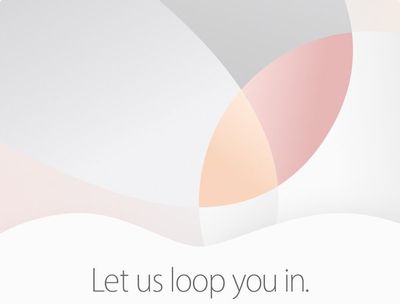



 Apple is working on building its own cloud infrastructure to reduce its dependence on services like Amazon Web Services, Microsoft Azure, and Google Cloud Platform, according to information shared by