macOS Golden Gate Release Candidate Now Available - MacRumors
Skip to Content

macOS Golden Gate Release Candidate Now Available

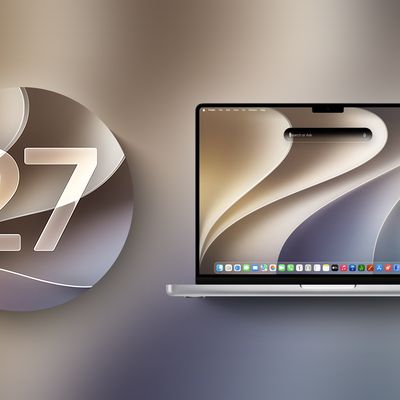
Apple today seeded the release candidate version of macOS Golden Gate, with the update coming a week after Apple seeded the eighth beta. The release candidate is the final version of ‌macOS Golden Gate‌ that developers and beta testers will get before the software sees a public launch.

macOS 27 next to MacBook Pro Running macOS 27
Testers can download ‌macOS Golden Gate‌ by going to System Settings > General > Software Update. Beta Updates will need to be enabled, and a free developer account is required.

‌macOS Golden Gate‌ includes multiple design improvements. Liquid Glass opacity has been improved to increase readability, there's a slider for controlling the level of transparency, and changes to shadowing make it easier to tell when a window is active. Apps now have uniform toolbars, edge-to-edge sidebars, and less rounded corners, and there are fewer icons in menu bars.

Siri has been transformed into ‌Siri‌ AI, a chatbot-style assistant that combines general world knowledge, your personal data, and onscreen awareness to answer questions about anything and find information for you. ‌Siri‌ lives in Spotlight, and you can ask questions with the new Search or Ask interface.

There's also a ‌Siri‌ app where you can chat with ‌Siri‌ and view past conversations, and on newer Macs, you can set a custom voice for ‌Siri‌ with personalized pace and expressivity. Visual Intelligence is now on the Mac so ‌Siri‌ can answer questions about what's on your screen, and a Write with ‌Siri‌ feature lets ‌Siri‌ generate text or give feedback on your writing.

There are AI photo editing tools in the Photos app, AI tab organization in Safari, an option to use AI to automatically update weak passwords in the Passwords app, and a revamped Image Playground app that can generate photorealistic images.

More on all of the new features in ‌macOS Golden Gate‌ can be found in our macOS Golden Gate roundup.
Related Roundup: macOS Golden Gate

Popular Stories

macOS 27 next to MacBook Pro Running macOS 27

Apple Releases macOS Golden Gate Beta 8

Monday August 31, 2026 10:14 am PDT by
Apple today provided developers with the eighth beta of macOS Golden Gate, with the update coming a week after Apple seeded the seventh beta. Developers can download macOS Golden Gate by going to System Settings > General > Software Update. Beta Updates will need to be enabled, and a free developer account is required. macOS Golden Gate includes multiple design improvements. Liquid Glass...

macOS Golden Gate HDR

macOS Golden Gate Seems to Hint at MacBook Pro With OLED Display

Tuesday September 1, 2026 12:34 pm PDT by
As noted by Broadcasts developer Steven Troughton-Smith, many Liquid Glass interface elements on the macOS Golden Gate beta have an even glassier appearance on certain high-end OLED displays with HDR support than they do on ordinary displays. Apple reportedly plans to release new MacBook Pro or "MacBook Ultra" models with an OLED display by early 2027, so it is likely that macOS Golden Gate...
iOS 26 6 1 iPhone

Apple Releases iOS 26.6.1, macOS 26.6.2, and More

Monday August 17, 2026 10:52 am PDT by
Apple today released iOS 26.6.1, iPadOS 26.6.1, visionOS 26.6.1, and macOS 26.6.2, with all of the updates containing security fixes. Apple also released iOS 18.7.10 and iPadOS 18.7.10 with security fixes. All of the iOS and iPadOS updates released today deliver security fixes that were first made available in the iOS 27 and iPadOS 27 betas, according to an Apple support document, which...

Top Rated Comments

matthew12 Avatar
21 hours ago at 12:40 pm
Oh god. Here's the worst time of the year as an IT admin. Upgrade time. I'm gonna upgrade my personal stuff, but now I gotta block the updates where I work for awhile so our internal tools don't break.
Score: 8 Votes (Like | Disagree)
21 hours ago at 12:54 pm
This is the biggest news of the day.
Score: 6 Votes (Like | Disagree)
19 hours ago at 03:21 pm

Oh god. Here's the worst time of the year as an IT admin. Upgrade time. I'm gonna upgrade my personal stuff, but now I gotta block the updates where I work for awhile so our internal tools don't break.
Could be worse. Could be a Windows admin and have Microsoft break something new and random every single month!
Score: 5 Votes (Like | Disagree)
18 hours ago at 03:32 pm

In the case of OP, it sounds like he's the sacrificial one doing the testing.
Testing the new OS for problems in the corporate workflow or tied between two pillars waiting for Kong.

Decisions, decisions...
Score: 4 Votes (Like | Disagree)
MrTemple Avatar
22 hours ago at 12:23 pm
The hardest part of adulting is when your main devices can no longer risk installing a beta and you have to wait for these release candidates.* 😂

* And still have to hope you don't bork something because you install it early. 🤞
Score: 4 Votes (Like | Disagree)
22 hours ago at 12:15 pm
build number is 26A428

others

macOS 26.7 RC 4 build 25G229
macOS 15.8 RC 4 build 24H23
iOS 27 RC 1 build 24A435
iPadOS 27 RC 1 build 24A435
iOS 26.7 RC 1 build 23H24
iPadOS 26.7 1 RC build 23H24
tvOS 27 RC 1 build 24J360
audioOS 27 RC 1 build 24J360
watchOS 27 RC 1 build 24R363
visionOS 27 RC 1 build 24M362
Score: 4 Votes (Like | Disagree)