Apple Wallet Driver's License Feature Just Launched in Virginia - MacRumors
Skip to Content

Apple Wallet Driver's License Feature Just Launched in Virginia

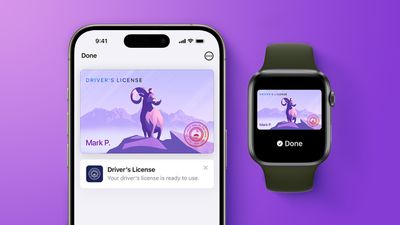
Starting today, Virginia residents can add a digital version of their driver's license to the Apple Wallet app on the iPhone and Apple Watch. The digital ID can be used to display proof of identity or age at TSA checkpoints in select airports, at select businesses, and in select apps, but the number of places where it is accepted is still quite limited.
apple wallet drivers license feature iPhone 15 pro purple 1
Virginia is the 15th state to implement support for Apple Wallet IDs in the U.S., joining Arizona, Arkansas, California, Colorado, Georgia, Hawaii, Illinois, Iowa, Maryland, Montana, New Mexico, North Dakota, Ohio, and West Virginia. The feature is also available in Puerto Rico, and it works with Japan's My Number Card.

Apple has been preparing for the feature to go live in North Carolina, Oklahoma, and Utah in the coming months, and years ago it announced that Connecticut, Kentucky, and Mississippi were committed to launching the feature at some point.

To set up the feature, open the Wallet app on the iPhone and tap on the plus sign in the top-right corner. Next, tap on Driver's License and ID Cards, select Virginia from the list, and follow the on-screen steps to complete the process. Then, you can present your digital ID where it is accepted without handing over your device.

Virginia ID Apple
You can present an Apple Wallet ID where accepted by simply tapping your iPhone or Apple Watch on an identity reader. Then, you will be able to view the specific information being requested by the TSA or business. Only after authorizing with Face ID or Touch ID is the requested identity information released from your device.

As mentioned, you do not need to unlock, show, or hand over your device to present an Apple Wallet ID in person, ensuring user privacy.

Apple Wallet IDs are generally not accepted by law enforcement, so carrying a physical ID is still legally required for traffic stops. In addition, the number of businesses that accept Apple Wallet IDs is still quite small. At least for now, Apple Wallet IDs are designed to be a convenient alternative where they are accepted.

Apple Wallet IDs are accepted at TSA checkpoints in more than 250 airports across the U.S. for domestic travel, according to Apple.
Popular Stories

apple wallet drivers license feature iPhone 15 pro

iPhone Driver's License Feature in Apple Wallet Launches in Oklahoma

Wednesday September 2, 2026 6:38 am PDT by
Starting today, Oklahoma residents can add a digital version of their driver's license to the Apple Wallet app on the iPhone and Apple Watch. The digital ID can be used to display proof of identity or age at TSA checkpoints in select airports, at select businesses, and in select apps, but the number of places where it is accepted is still quite limited. Oklahoma is the 16th state to...
ios 26 digital id passport wallet

iOS 27 Tweaks Apple Wallet's U.S. Passport Feature

Wednesday August 26, 2026 6:46 am PDT by
iOS 27 tweaks some of the information and menus shown alongside the Digital ID passport feature in the Apple Wallet app. As a result of these changes and/or a related bug, some iPhone users have seen their Digital ID deactivated on recent iOS 27 beta versions. Apple says affected users must remove the card and re-add it to the Apple Wallet app in order to use it...
apple wallet drivers license feature iPhone 15 pro

Apple Wallet Driver's License Feature to Launch in Four More U.S. States

Monday August 17, 2026 7:53 am PDT by
In select U.S. states, residents can add their driver's license or state ID to the Apple Wallet app on the iPhone and Apple Watch, and then use it to display proof of identity or age at select airports and businesses, and in select apps. According to a new report and evidence within Apple's code, the feature is set to expand to four more states. A few days ago, North Carolina's DMV announced ...

Top Rated Comments

Joe Rossignol Avatar
3 weeks ago

Can we look forward to 35 more MacRumor front page headlines as each of the remaining states begins to participate?
I'll do my best for you.
Score: 11 Votes (Like | Disagree)
smithrh Avatar
3 weeks ago
Thank you for heading off a lot of the silly discussion that goes off in the comments after a post like this.
Score: 6 Votes (Like | Disagree)
smithrh Avatar
3 weeks ago

"As mentioned, you do not need to unlock, show, or hand over your device to present an Apple Wallet ID in person, ensuring user privacy."

Tell that to the officer if you get pulled over. Great for other uses at least.
I perhaps should not have overestimated the readership...

FTA: "Apple Wallet IDs are generally not accepted by law enforcement, so carrying a physical ID is still legally required for traffic stops."
Score: 5 Votes (Like | Disagree)
3 weeks ago
"As mentioned, you do not need to unlock, show, or hand over your device to present an Apple Wallet ID in person, ensuring user privacy."

Tell that to the officer if you get pulled over. Great for other uses at least.
Score: 4 Votes (Like | Disagree)
3 weeks ago
Hmm, I got through the process and now appear to have to wait for the DMV to snail mail me a verification code. Guess that I should have not worn my glasses and maybe brushed my hair when doing the photo verification process.

ETA: I also have a mustache, so I am literally wearing a kid's disguise compared to my ancient DMV photo. I guess I have to be human reviewed to get the code.
Score: 3 Votes (Like | Disagree)
gaximus Avatar
3 weeks ago
I used the Colorado one the other day when flying, I was able to just scan my phone at the TSA desk(when they ask for ID and ticket), did FaceId and it just worked. I told the guy behind the desk, "That was cool" and he said "yeah I hadn't seen that before. Hope to many people don't start using that, I'll lose my job". It took me 3 seconds to get though, after watching everyone else take forever, matching Ids and tickets, and what ever else that guy has to do to slow down the line.
Score: 3 Votes (Like | Disagree)