Third iOS 27 and iPadOS 27 Public Betas Now Available - MacRumors
Skip to Content

Third iOS 27 and iPadOS 27 Public Betas Now Available

Apple today released the third public betas of iOS 27 and iPadOS 27, allowing anyone with a compatible device to download and test the new software. The third betas come two weeks after Apple seeded the second betas.
iOS 27 Feature Cool
You can get started by signing up on Apple's beta website and then opting in to the public beta by going to Settings > General > Software Update and choosing the ‌iOS 27‌ or ‌iPadOS 27‌ Public Beta option.

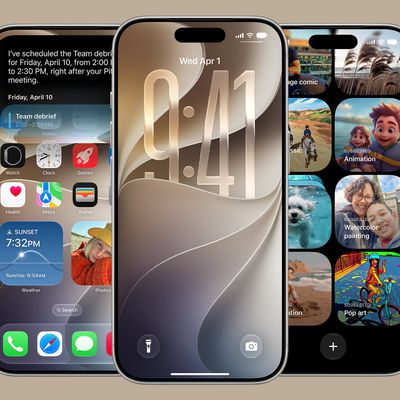
‌iOS 27‌ introduces Siri AI, a more capable version of ‌Siri‌ that can search the web, access your personal information, see what's on your screen, and take actions in and across apps. ‌Siri‌ in ‌iOS 27‌ is more similar to Claude or ChatGPT than the prior version of ‌Siri‌, with a dedicated ‌Siri‌ app for back-and-forth conversations. You can use ‌Siri‌ AI if you have a device that supports Apple Intelligence.

Apple updated the Liquid Glass design that debuted last year, adding a slider to adjust the transparency level and refining its look. There are new AI features in many of Apple's apps. Visual Intelligence moved to the Camera app and supports new features like getting the nutritional information for a meal or splitting a bill, and ‌Siri‌ is able to generate text for you or help you refine your writing with Write with ‌Siri‌.

There are new AI photo editing tools in the Photos app, Safari can organize your tabs automatically, and you can create Shortcuts and Safari extensions using natural language commands. AirPods have custom EQ, the Home app supports 4K video cameras, and there are new child safety controls for parents.

Apple made dozens of improvements to device performance, and everything feels faster, even on older iPhones. Apps launch quicker, AirDrop transfers are faster, the keyboard loads quicker, and more.

Additional information on the new features in ‌iOS 27‌ can be found in our dedicated iOS 27 roundup, with info on ‌iPadOS 27‌ available in our separate iPadOS 27 roundup.

Related Roundups: iOS 27, iPadOS 27

Popular Stories

Everything New Your iPhone Can Do on iOS 27 Feature 1

30 New Things Your iPhone Can Do in iOS 27

Tuesday August 11, 2026 8:07 am PDT by
Apple will release iOS 27 in September, and despite the company's focus this year on refining its flagship operating system and nixing bugs, there are still many additional features on the way, not least of which is Apple's new context-aware Siri, re-tooled for the generative AI era. This year's major iPhone software update isn't all about AI, though, as the following feature list...
ios 27

iOS 27 Brings These Five New Features to Your iPhone Lock Screen

Thursday July 23, 2026 4:05 am PDT by
Apple unveiled iOS 27 at WWDC this week, and while the headline-grabbing Siri overhaul has received the most attention, the Lock Screen has picked up several refinements that you may have missed. Some are brand-new additions, while others are tweaks to features Apple introduced in iOS 26, but together they give you more control over how your Lock Screen looks and behaves. Here are five...
iOS 27 Feature Dark

Apple Seeds Fourth iOS 27 and iPadOS 27 Betas to Developers

Monday July 20, 2026 10:06 am PDT by
Apple today seeded the fourth betas of iOS 27 and iPadOS 27 to developers for testing purposes, with the update coming two weeks after Apple released the third betas. Registered developers can download the betas from the Settings app on the iPhone or iPad by going to the General section and selecting Software Update. iOS 27 introduces Apple's smarter version of Siri, Siri AI. Siri AI is a ...

Top Rated Comments

9 hours ago at 11:10 am
Waiting so impatiently for final release on this one. Even the betas run better already. For example, all through iPadOS 26 it had me enter my numeric PIN with the full keyboard every time. It technically works but is asinine and needlessly difficult, like the rest of 26. I notice when going to install this update from beta 2 that it's finally back to the sensible number entry pad.
Score: 2 Votes (Like | Disagree)
2 hours ago at 05:44 pm

Bad question I know but…is it ok for daily use?
Just wait another month for the release candidate. That’s the earliest I’ll go these days. I am excited to see how it performs on my 13 Mini.

I’ve regretted betas on my main device every time.
Score: 1 Votes (Like | Disagree)
centauratlas Avatar
7 hours ago at 12:42 pm
“two weeks”. I think it was 3 weeks. 😀
Score: 1 Votes (Like | Disagree)
DravenInc Avatar
8 hours ago at 11:51 am

Bad question I know but…is it ok for daily use?
I've had the second public beta on my 16 Pro Max for a couple of weeks. Thus far, the only things I've noticed are some flickers when typing on the keyboard, and a little inconsistency with one app, which is a rather local one, not a major app.

Do a backup, read up on how to dial it back to iOS 26 if you need to, and give it a whirl.
Score: 1 Votes (Like | Disagree)
8 hours ago at 11:36 am
Bad question I know but…is it ok for daily use?
Score: 1 Votes (Like | Disagree)
9 hours ago at 10:45 am
Does the Siri interface from the dynamic island respect "Reduce Transparency"?
Score: 1 Votes (Like | Disagree)