iOS 27 Adds Four New Features to Notes App, Including Markdown Copy-and-Paste - MacRumors
Skip to Content

iOS 27 Adds Four New Features to Notes App, Including Markdown Copy-and-Paste

The upcoming iOS 27 update that Apple unveiled last week includes some new features and enhancements for Apple's Notes app on the iPhone.

iOS 27 and Notes Feature
iOS 27 is currently available as a developer beta, with a public beta to follow in July. The update is expected to be released to all users in September.

Below, we have outlined four additions to Apple's Notes app on iOS 27.

Siri AI

iOS 27 Adds Four New Features to Apples Notes App Article 4
On the iPhone 15 Pro and newer, the more intelligent and personal version of Siri known as "Siri AI" can create notes with generated content. For example, you can ask Siri AI to create a note with a list of all iPhone models that are compatible with iOS 27, and it will do so after retrieving this information from the internet.

On iOS 26 and earlier, Siri can only create notes based on the words you actually say.

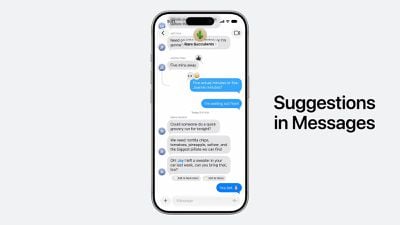
In addition, Siri AI will intelligently show an "Add to Notes" shortcut below certain messages in the Messages app based on the context of the conversation.
iOS 27 Messages Notes Suggestion

Copy and Paste in Markdown

iOS 27 Adds Four New Features to Apples Notes App Article 3
iOS 27 introduces the ability to copy and paste text that is formatted in the Markdown language, created by well-known Apple commentator John Gruber.

Markdown lets you add formatting to text without using HTML:

  • Bold text: **bold**
  • Italic text: *italic*
  • Linked text: [Apple](https://apple.com)
  • List item: - Example

For example, if you paste "Apple's next CEO is **John Ternus**" into the Notes app on iOS 27, "John Ternus" will appear in bold text.

In reverse, if you select formatted text in the Notes app and tap on the right arrow in the Cut/Copy/Paste menu that pops open, there is a new "Copy as Markdown" option on iOS 27. If you tap on this option, any rich text formatting in your selection will automatically be converted to Markdown that can be pasted elsewhere.

Apple Notes already gained support for importing and exporting Markdown files on iOS 26.

Divider Lines
iOS 27 Adds Four New Features to Apples Notes App Article 2
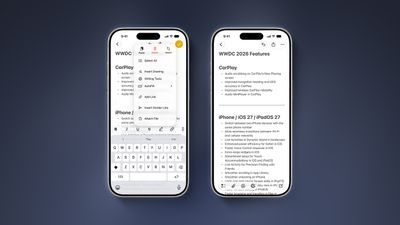
iOS 27 lets you organize notes with divider lines. Simply place the text cursor where you want the line to be inserted, tap on the right arrow in the Cut/Copy/Paste menu that pops open, and tap on the new "Insert Divider Line" option.

Section Links

iOS 27 Adds Four New Features to Apples Notes App Article 1
You can now add a link to a specific section of a note. When you tap on the link, the Notes app automatically jumps to that section of text.

For example, you could create a new note that links back to a section of a previous note.

Related Roundups: iOS 27, iPadOS 27

Popular Stories

iOS 27 Accessibility Feature

Apple Previews New Accessibility Features Powered by Apple Intelligence

Tuesday May 19, 2026 5:26 am PDT by
Apple today announced a suite of accessibility updates that use Apple Intelligence to expand capabilities across VoiceOver, Magnifier, Voice Control, and Accessibility Reader, with additional new features for generated subtitles and wheelchair control via Apple Vision Pro. Apple Intelligence powers several of the new features coming later this year: VoiceOver Image Explorer uses Apple...
iOS 27 on iPhone 17 1

iOS 27's Biggest New Feature Has 'Beta' Label

Tuesday May 19, 2026 12:12 pm PDT by
Apple has given the more personalized version of Siri a "beta" label on internal versions of iOS 27, according to Bloomberg's Mark Gurman. In his Power On newsletter over the weekend, Gurman said there is a "strong chance" that the revamped Siri will continue to have a "beta" label in the iOS 27 developer beta next month, and potentially even in the final version released to the public....
Apple Says iOS 27 Can Automatically Add Captions to Your Personal iPhone Videos Feature

Apple Says iOS 27 Can Automatically Add Captions to Your Personal iPhone Videos

Wednesday May 20, 2026 9:46 am PDT by
Apple this week previewed new accessibility features that are coming later this year, and one is particularly notable: automatic captions for personal videos. For videos that do not already have captions, Apple said a new on-device speech recognition model can automatically generate them for spoken audio. According to Apple, this feature will be available for videos that you record on your...

Top Rated Comments

Apple Knowledge Navigator Avatar
4 hours ago at 10:13 am
Never in my life have I thanked the Lord for divider lines!
Score: 8 Votes (Like | Disagree)
4 hours ago at 10:21 am
Those divider lines! - solid update, Notes is such a great app
Score: 6 Votes (Like | Disagree)
repoman016 Avatar
4 hours ago at 10:14 am
As someone who shares grocery lists via notes the divider lines will be welcomed when having to go to more than 1 store/location
Score: 5 Votes (Like | Disagree)
rchaser Avatar
3 hours ago at 11:17 am

As someone who shares grocery lists via notes the divider lines will be welcomed when having to go to more than 1 store/location
"As someone who uses the notes app for grocery lists instead of using the reminders app..."

😘

I mean, come on my guy. You pull your grocery list up on your watch and check off each item you get as you shop...why would you make it more difficult?

Do you keep your calendar in Numbers...??
Score: 3 Votes (Like | Disagree)
FoxyKaye Avatar
4 hours ago at 10:33 am
Left Evernote behind a few years ago, and have been quite pleased with Notes. These are welcome additions to it, with the hope that it doesn't suffer from function drift as time goes by the same way that Evernote did.
Score: 3 Votes (Like | Disagree)
2 hours ago at 11:47 am
I love Notes! It's my only go to app to take all sorts of notes and I can use it on all my apple devices. Over the years I must have created several thousand notes, and most of the time I have at around 90 notes that I keep for six months or longer. Personal notes, grocery list, recipes, plans, work or hobby notes, trip plans, trip plans, etc etc.

Do you know what I used for years and years before Notes?? Word Doc... yeah...it was like using a stone tablet.


.
Score: 2 Votes (Like | Disagree)