macOS 27 Finally Brings Direct Touch Control to Sidecar - MacRumors
Skip to Content

macOS 27 Finally Brings Direct Touch Control to Sidecar

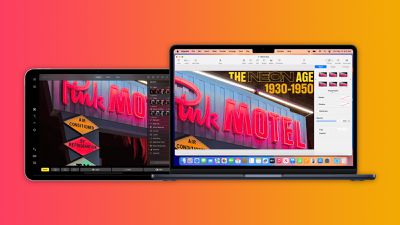
Apple has added direct touch input to Sidecar with macOS 27 Golden Gate and iPadOS 27, allowing users to tap and interact with macOS interface elements using a finger on their iPad for the first time.
macos sidecar
Previously, ‌Sidecar‌ was deliberately limited as a touch interface. While multi-touch gestures like two-finger scrolling, pinch-to-zoom, and three-finger editing gestures for copy, cut, paste, and undo have been supported for years, directly tapping to click links, open apps, or interact with macOS UI elements was not possible with a finger. Those interactions required either the Mac's connected mouse or trackpad, or an Apple Pencil.

The new Direct Touch capability closes that gap. In macOS 27, users can can now tap, swipe, and interact with macOS apps on their ‌iPad‌ screen using a finger, bringing ‌Sidecar‌ closer to how third-party tools like Luna Display have worked for some time. ‌Apple Pencil‌ support continues alongside the new touch capabilities.

The expanded ‌Sidecar‌ functionality requires an Apple Silicon Mac running macOS 27 Golden Gate and a compatible ‌iPad‌ running ‌iPadOS 27‌. As with previous versions of the feature, both devices must be signed into the same Apple ID, connected to the same Wi-Fi network, and have Bluetooth enabled, with the two devices within 10 meters of each other.

The feature is likely another indication of impending touch support on the Mac, along with other features like pull-to-refresh. Apple is said to be planning to launch a "MacBook Ultra" as a new top-tier laptop with a touchscreen OLED display, an M6-series chip, the Dynamic Island, and a thinner design. Reports suggest that the device is scheduled to launch in early 2027.

Related Roundup: macOS Golden Gate

Popular Stories

macOS 27 next to MacBook Pro Running macOS 27

macOS Golden Gate Beta 2 Now available for Developers

Monday June 22, 2026 10:09 am PDT by
Apple today provided developers with the second beta of macOS Golden Gate, with the update coming two weeks after Apple seeded the first beta. Developers can download macOS Golden Gate by going to System Settings > General > Software Update. Beta Updates will need to be enabled, and a free developer account is required. macOS Golden Gate includes multiple design improvements. Liquid Glass ...

macOS 27 next to MacBook Pro Running macOS 27

macOS Golden Gate Beta 3 Now Available for Developers

Monday July 6, 2026 10:25 am PDT by
Apple today provided developers with the third beta of macOS Golden Gate, with the update coming two weeks after Apple seeded the second beta. Developers can download macOS Golden Gate by going to System Settings > General > Software Update. Beta Updates will need to be enabled, and a free developer account is required. macOS Golden Gate includes multiple design improvements. Liquid Glass ...
macos 27 wallpaper

macOS Golden Gate Gets New Wallpaper

Monday July 6, 2026 12:22 pm PDT by
With the third beta of macOS 27, Apple added new Golden Gate-themed wallpaper options to the Mac. There are new Golden Gate Sunset and Golden Gate Night options, both of which join the prior Golden Gate abstract wallpaper that Apple introduced with the initial beta. Golden Gate Sunset and Golden Gate Night animate when unlocking the Mac, and can be set as a screen saver. When used as a...

Top Rated Comments

fenderbass146 Avatar
6 weeks ago
Well if this isn't a clue to a touchscreen Mac coming, IDK what is.
Score: 27 Votes (Like | Disagree)
sunapple Avatar
6 weeks ago
Apple is the kind of company that takes baby steps towards the touch screen Mac over a 20 year period while maintaining until the very end that they won't do it. And then they do and it's sold as some great innovation.
Score: 15 Votes (Like | Disagree)
6 weeks ago
C'mon Apple, make a final step: connecting iPad Pros (at least) as an external display via USB-C. As a display, not as a sidecar.
Score: 9 Votes (Like | Disagree)
6 weeks ago
This is a great way for devs who don’t have access to a touchscreen Mac (all devs at the moment) to be able to ensure their Mac apps work well on a touch screen.

Smart.

And also yes obviously this means touch screen Macs are coming.
Score: 7 Votes (Like | Disagree)
Hajj.david Avatar
6 weeks ago

C'mon Apple, make a final step: connecting iPad Pros (at least) as an external display via USB-C. As a display, not as a sidecar.
This is already a thing and has been for years. Just go to your display settings and extend or duplicate it to the ipad. You can hide any and all ipad UI at that point and use it as a purely external screen over USB C or wirelessly
Score: 5 Votes (Like | Disagree)
nortonandreev Avatar
6 weeks ago
Oh wow... but yeah, it's not very usable. Tap targets are too small on the macOS. Not sure what they will do for the touchscreen MacBook.
Score: 3 Votes (Like | Disagree)