

Astropad Workbench Lets You Remotely Control Your Mac and AI Agents From iPhone and iPad - MacRumors
Skip to Content

Astropad Workbench Lets You Remotely Control Your Mac and AI Agents From iPhone and iPad

Astropad, the company behind the popular Astropad Studio software for turning the iPad into a drawing tablet, today launched a new app called Astropad Workbench. Astropad Workbench is a remote desktop app designed for the Mac, and more specifically, built for use with AI.
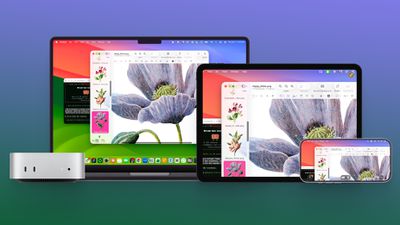
astropad workbench
With Astropad Workbench, you can control your AI agents remotely, which makes it useful for people who have set up a Mac mini as a personal server for use with OpenClaw and other AI agent features.

Astropad says that it created Workbench to help users monitor their AI agents from anywhere, without being tied to a desk. There are native apps for Mac, ‌iPad‌, and iPhone, so the iPhone and ‌iPad‌ are able to interface with the Mac desktop wherever you are.

It's simple to check logs and output to verify agent work, restart failed tasks, or reconnect to long-running jobs. There are also tools for switching between multiple Macs connected to a Workbench account.

Workbench offers high-fidelity streaming with a unified virtual display, low latency, speech-to-text input, and multiple control options from gestures to keyboard, mouse, and Apple Pencil. Setup is quick and easy without the need for network configurations, and AES-256 encryption is included. No display recordings are captured and saved.

New users are able to connect to Workbench for free for 20 minutes of daily access. Unlimited paid plans are priced at $10 per month or $50 per year. More information on Workbench can be found on Astropad's website.


Popular Stories

iPhone 18 Pro Deep Red Feature

iPhone 18 Pro Launching Next Month With These 12 New Features

Thursday August 6, 2026 7:03 am PDT by
It is now August, and that means the iPhone 18 Pro and iPhone 18 Pro Max are just a month away. The devices are expected to look similar to the iPhone 17 Pro and iPhone 17 Pro Max, but there will still be many year-over-year changes, with rumored features including a smaller Dynamic Island, 5G via satellite, and more. Apple is expected to unveil the iPhone 18 Pro, iPhone 18 Pro Max, and a...


Everything Apple Is Expected to Announce in September Feature

Everything Apple Is Expected to Announce in September

Tuesday August 4, 2026 3:10 pm PDT by
Apple is going to announce at least five new devices next month at its annual iPhone-centric event, though it's possible we'll also get devices that were waiting on Siri AI. Here's what's coming. iPhone 18 Pro Rumors suggest the iPhone 18 Pro is going to look a lot like the iPhone 17 Pro, but with a smaller Dynamic Island. It's getting a new Wide camera with a variable aperture for more...
Four iPhone 18 Pro Colors Mock Feature

iPhone 18 Pro and iPhone Ultra: Pre-Orders and Release Date

Sunday August 2, 2026 7:32 pm PDT by
Apple has yet to reveal when the iPhone 18 Pro and iPhone Ultra will be announced and released, but the dates usually follow a familiar pattern. Labor Day is September 7 this year. The last time the holiday fell on that day was in 2020, but the iPhone event that year was delayed until October due to the COVID-19 pandemic. So, the last time Labor Day was on September 7 in a normal year was in ...

Top Rated Comments

17 weeks ago
Whilst I won’t say this app looks great, the subscription model of never owning stuff is starting to become annoying.
Score: 9 Votes (Like | Disagree)
atonaldenim Avatar
17 weeks ago
Wow, even a remote desktop tool has to be promoted as “for AI” now.

I recommend Jump Desktop as a great remote desktop app that’s a one time purchase. But if 20 mins / day fits your use case, then this looks like a good free option. I don’t know if Jump Desktop supports the voice dictation feature this one has.
Score: 7 Votes (Like | Disagree)
17 weeks ago

Or you could just have Claude do this in an entirely integrated way. I have Claude on my Mac mini running automated tasks all day and use dispatch from my phone or other devices to do things remotely.
I think people getting into these comments curious about Workbench would appreciate if you shared a bit about how you've done that, and how you based on your practical experiences view the features of Workbench.
Score: 7 Votes (Like | Disagree)
Happy_John Avatar
17 weeks ago
It's a handly bit of functionality, but there's a lot of similar solutions available. And given that this is a means of connecting one of my machines to another one of my machines, I won't pay a subscription for it (I will only buy such a solution outright) and I won't sign up to any service that's running through the developer's own server.

The developers own alternative product, Luna Display, would be something I would choose over this. For remote access, I'd rely on something I had far more direct control over.
Score: 4 Votes (Like | Disagree)
17 weeks ago
Jump desktop does this very well and for a one time fee no subscription.
Score: 3 Votes (Like | Disagree)
CharlesShaw Avatar
17 weeks ago

Or you could just have Claude do this in an entirely integrated way. I have Claude on my Mac mini running automated tasks all day and use dispatch from my phone or other devices to do things remotely.
"Open the front door, Claude. My key isn't working, for some reason."
"Claude, open the front door."
"Please?"
[strangers approach] "Can I help you?" "We're good, we're just renting this Airbnb from Claude, the owner."
Score: 3 Votes (Like | Disagree)







































