Google Brings Vertical Tabs and Improved Reading Mode to Chrome - MacRumors
Skip to Content

Google Brings Vertical Tabs and Improved Reading Mode to Chrome

Google today updated its Chrome browser with support for vertical tabs, which are displayed in a sidebar instead of at the top of the browser.
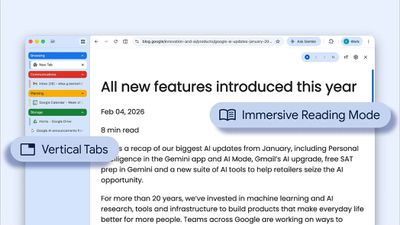
google chrome vertical tabs
The tab layout can be changed by right clicking on any Chrome window and choosing the "Show Tabs Vertically" option. Sidebar tabs feature full page titles and make it simple to organize tab groups.

Google has also added a new full-page interface for reading mode. Right clicking on a webpage and choosing the "Open in reading mode" option will remove distractions and initiate a full-page viewing experience rather than the current side panel default.

Google says the two new features are rolling out on the desktop version of Chrome starting today, so they should be available for all users soon.

Popular Stories

Chrome Feature 22

Gemini in Google Chrome Gets a Skills Library for Saving Custom AI Prompts

Tuesday April 14, 2026 10:00 am PDT by
Chrome has been updated today with a Skills library that's designed to let Chrome users turn AI tasks into repeatable skills that can be used on any website. Useful prompts you create for Gemini in Chrome can be saved as a Skill that can be accessed later with a single click. If you're shopping for skincare and ask Gemini about the ingredients in a product, for example, you can save the...
gemini for mac app google

Google Launches Native Gemini AI App for Mac

Wednesday April 15, 2026 10:46 am PDT by
Google is bringing Gemini to the Mac with a new native macOS app that's available starting today. Gemini for Mac can be activated with a keyboard shortcut, and it has built-in tools for generating images, analyzing what's on your screen, reviewing files, and more. Gemini is the last of the three major AI services to have a dedicated Mac app, because OpenAI and Anthropic have had Mac apps for ...
Gemini Siri Feature

Google Confirms Gemini-Powered Siri Coming Later This Year

Wednesday April 22, 2026 11:08 am PDT by
Google today commented on its partnership with Apple, confirming that Gemini will power a new, more personalized version of Siri that's set to be released later in 2026. Google Cloud chief Thomas Kurian mentioned the Apple partnership during Google Cloud Next 2026, a conference that's taking place in Las Vegas, Nevada today. Earlier this year, we announced a monumental partnership with one...

Top Rated Comments

CarlJ Avatar
3 weeks ago
Interesting - I tried the reading mode in Chrome some time back, and laughed out loud at how bad it was to use a little sidebar for "reading mode" vs. how Safari remakes the entire window. Figured it was because Chrome wouldn't want to detract from all those ads on the original page, many of which were likely sold by Google, so I assumed they'd never do a proper reading mode.

The side tabs could be useful if they have included a way for them to expand/withdraw easily, similar to the "peekaboo" dock setting on the Mac, where it only shows when the cursor is nearby. Otherwise, you're taking a several inch wide strip out of the window's width, which mostly won't go over well.
Score: 10 Votes (Like | Disagree)
BeatsByTim Avatar
3 weeks ago
Vertical tabs, like anime, is for perverts.
Score: 9 Votes (Like | Disagree)
transpo1 Avatar
3 weeks ago
You may be reading something in Chrome but Google’s reading you. 🕵️‍♂️ 👀
Score: 9 Votes (Like | Disagree)
3 weeks ago
I switched to Firefox when Chrome started reducing ad blocking functionality. Firefox already has vertical tabs and a reader mode!
Score: 8 Votes (Like | Disagree)
Avenged110 Avatar
3 weeks ago
I thought this had already been available for a couple of versions now. Either way, it's about time. I've been using this in Ungoogled Chromium and it's far superior, especially since Google removed the scrollable tab strip. Amazing to me that they consider tabs becoming invisible to the strip acceptable behavior. I just wish the sidebar was a more macOS-native implementation. The sidebar can be resized, but changes don't seem to persist across restarts. The scroll view is a janky mess with no elasticity, a non-native scrollbar, and sometimes leaves the currently-selected tab outside of the viewport when navigating tabs with the keyboard until you hover over the sidebar with the cursor. Hopefully it improves rapidly.
Score: 6 Votes (Like | Disagree)
3 weeks ago
I actually gasped aloud. I know everyone here loves to hate on chrome but this is still the default browser for most and improvements are welcome.
Score: 5 Votes (Like | Disagree)