Google Brings Vertical Tabs and Improved Reading Mode to Chrome
Google today updated its Chrome browser with support for vertical tabs, which are displayed in a sidebar instead of at the top of the browser.
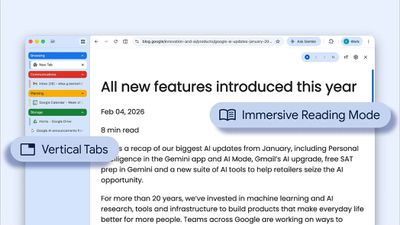
The tab layout can be changed by right clicking on any Chrome window and choosing the "Show Tabs Vertically" option. Sidebar tabs feature full page titles and make it simple to organize tab groups.
Google has also added a new full-page interface for reading mode. Right clicking on a webpage and choosing the "Open in reading mode" option will remove distractions and initiate a full-page viewing experience rather than the current side panel default.
Google says the two new features are rolling out on the desktop version of Chrome starting today, so they should be available for all users soon.
Popular Stories
While the iPhone 18 Pro and iPhone 18 Pro Max are not expected to launch for more than five more months, there are already plenty of rumors about the devices.
It was initially reported that the iPhone 18 Pro models would have fully under-screen Face ID, with only a front camera visible in the top-left corner of the screen. However, the latest rumors indicate that only one Face ID component...
NASA has shared three incredible photos shot on the iPhone 17 Pro Max by astronauts during the Artemis II mission to the Moon.
Shot on iPhone 17 Pro Max (Wiseman)
In February, NASA announced that the iPhone had been fully qualified for extended use in orbit, with reports indicating that each of the four crew members aboard the Orion are equipped with an iPhone 17 Pro Max for personal photos...
Apple is looking for a "breakthrough" with its push into wearable AI devices, including an "AirTag-sized pendant," according to Bloomberg's Mark Gurman.
In a report, he said the pendant is reminiscent of the failed Humane AI Pin, but it would be an iPhone accessory rather than a standalone product.
The pendant would feature an "always-on" camera and a microphone for Siri voice commands,...
Popular Stories
Google today added Gemini AI to Google Maps, enabling a new Ask Maps feature. Gemini in maps can answer complex, real-world questions that Google says "a map could never answer before."
There is a new Ask Maps button where Google Maps users can get answers to specific questions like "is there a public tennis court with lights on that I can play at tonight?" Google says that finding...
Google is bringing Personal Intelligence to all Google Gemini users starting today, after testing the feature with its paid plans. Personal Intelligence allows Gemini AI to provide personalized responses based on information pulled from connected Google apps like Gmail, Google Photos, YouTube, and more.
Personal Intelligence is expanding in the U.S. across AI Mode in Search, the Gemini app,...
Google is developing a native Gemini app for the Mac, reports Bloomberg. Right now, Mac users who want to use Google's Gemini AI have to use a web browser, but that will change with a dedicated Mac app.
Google competitors like Anthropic and OpenAI have dedicated Mac apps for their chatbots, potentially making Claude and ChatGPT more convenient to use than Gemini.
Google shared an early...