Apple Continues Promoting iOS 26 and macOS 26 Liquid Glass With Updated Design Gallery - MacRumors
Skip to Content

Apple Continues Promoting iOS 26 and macOS 26 Liquid Glass With Updated Design Gallery

Apple is continuing to highlight the Liquid Glass aesthetic that it introduced in iOS 26, iPadOS 26, and macOS 26. The company has shared an updated Liquid Glass Design Gallery that shows off Liquid Glass in third-party apps.
apple liquid glass design
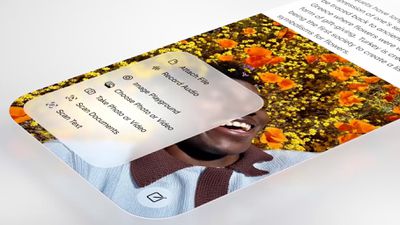
The visual gallery features several iPhone and iPad apps, with screenshots that show the difference between app design in iOS 18 and ‌iOS 26‌.

In the latest edition of our new design gallery, find out how teams of all sizes are taking advantage of the new design and Liquid Glass to create natural, responsive experiences across Apple platforms.

Apps included in the gallery have adopted Liquid Glass for elements like tab bars, navigation buttons, bottom toolbars, and more. Apple also highlights pop-out menu interfaces and the separate search buttons that some apps have implemented, both of which are Liquid Glass design elements that Apple has added to its own apps.

AllTrails, Carrot Weather, Fantastical, Kroger, SketchPro, Trello, and Le Monde are among the apps featured.

Apple previously shared a Liquid Glass gallery after the ‌iOS 26‌ launch, and that gallery provides more Liquid Glass design examples.

Since debuting Liquid Glass, Apple has made small changes like adding a slider bar to the Lock Screen clock for adjusting the Liquid Glass level, but no major updates have been introduced. Rumors suggest that iOS 27, iPadOS 27, and macOS 27 will continue to feature the Liquid Glass aesthetic with little change, but Apple could also add a system-wide slider bar for Liquid Glass opacity adjustments.

Related Roundups: iOS 26, iPadOS 26, macOS Tahoe
Related Forums: iOS 26, macOS Tahoe

Popular Stories

iOS 26

Here's What's New in iOS 26.5 So Far

Tuesday April 21, 2026 1:30 pm PDT by
iOS 26.5 has been in beta since late March, with a third beta released this week. The update is relatively minor so far, which is not too surprising given that Apple is starting to shift its focus towards iOS 27. Apple will unveil iOS 27 during its WWDC 2026 keynote on June 8, and the update should be released in September. iOS 26.5 lays the groundwork for two changes, including end-to-end...
iOS 26

Apple Seeds Third iOS 26.5 and iPadOS 26.5 Betas to Developers

Monday April 20, 2026 10:04 am PDT by
Apple today seeded the third betas of upcoming iOS 26.5 and iPadOS 26.5 updates to developers for testing purposes, with the software coming a week after Apple released the second betas. Registered developers can download the betas from the Settings app on the iPhone or iPad by going to the General section and selecting Software Update. iOS 26.5 and iPadOS 26.5 do not include new Siri...
macOS Tahoe 26 Thumb

Apple Releases New iOS 26.5, iPadOS 26.5 and macOS Tahoe 26.5 Public Betas

Tuesday April 21, 2026 10:17 am PDT by
Apple today provided public beta testers with new releases of upcoming iOS 26.5, iPadOS 26.5, macOS Tahoe 26.5, watchOS 26.5, and tvOS 26.5 updates for testing purposes. The public betas come a day after Apple provided the betas to developers. These are the third iOS 26.5 and iPadOS 26.5 betas, but the second macOS Tahoe 26.5 public beta. After signing up for beta testing on Apple's beta...

Top Rated Comments

6 weeks ago
Please just give us a toggle to opt out altogether. Then we’re all happy.
Score: 77 Votes (Like | Disagree)
turbineseaplane Avatar
6 weeks ago
Marketing it more won't help.

Making it a lot better, and with more optionality and customization available to the user, will.

It's also a little weird to be "marketing" your UI.
A well designed and functional UI shouldn't be a point of focus.
Score: 75 Votes (Like | Disagree)
turbineseaplane Avatar
6 weeks ago
On the right .. having the popup menu be translucent adds literally nothing other than making it harder to read.

This is NOT GOOD UI/UX DESIGN.

omg ..
UGH

Attachment Image
Score: 58 Votes (Like | Disagree)
6 weeks ago
Spend the time and money into polishing the UI instead of ads please.
Score: 54 Votes (Like | Disagree)
Avenged110 Avatar
6 weeks ago
My primary issue with the redesign isn't the glass effect itself (it makes controls more difficult to read, which is dumb, but Apple does amusingly offer the toggle to tone that effect down), but the horrible toolbar/button changes. Everything is huge, sometimes providing fewer controls in the same space, and removes the toolbar backgrounds so the content distractingly bleeds all around the controls, destroying any visual separation between the two planes (UI chrome/controls and content). And that's not even touching on the content-driven on-the-fly light/dark mode changes to chrome in places like Safari or the 'occasionally-compressing' toolbar button layouts. On a slightly different note, I still find it rather laughable that we were forced into offensively large screens, but then those screens were filled with oversized controls, useless whitespace, and ridiculously high corner radii so that we're not really getting a whole lot more, if any, usable content than on the smaller screens.
Score: 37 Votes (Like | Disagree)
6 weeks ago

It’s quite a minor change compared to iOS 18. I think Liquid Glass is an improvement over what we had before though. It gives more usable screen real estate and pulls us ever so slightly away from the years of flat design and back to something that’s as usable but more interesting to look at (in my opinion).

I know others don’t agree with me, I’m simply expressing my opinion. My opinion isn’t the right one for everyone (I’d not deign to speak for everyone), it’s just what I prefer. I think it's funny, however, when others express their opinion as if it's valid for all people.
Some like liquid glass, some don't We don't need to agree. What we need is an on/off switch.
Score: 35 Votes (Like | Disagree)