Apple on Wednesday released Final Cut Pro 11 for the Mac, with key new features including AI-generated captions, spatial video editing, and a Magnetic Mask tool for isolating people and objects in videos. The update also includes some smaller new features, changes, and bug fixes, as outlined in the full release notes on Apple's website.
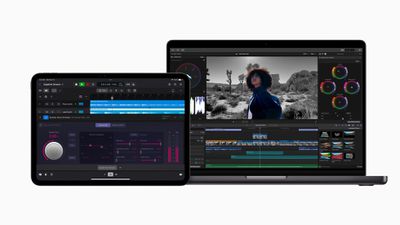
Many of these features were already outlined in Final Cut Pro 11's release notes on the App Store, but the notes on Apple's website are a little more comprehensive, revealing some specific new keyboard shortcuts and a list of bug fixes.
Apple also highlighted some new features in the Final Cut Pro user guide.
The full release notes:
Final Cut Pro 11.0 includes the following enhancements:
- Expand your creative freedom with the revolutionary AI-powered Magnetic Mask, and isolate people, objects, and shapes in any footage without a green screen or time-consuming manual rotoscoping (a Mac with Apple silicon recommended).
- Use Transcribe to Captions to automatically create captions from spoken audio in the timeline with a powerful AI language model built for speed and accuracy (Mac with Apple silicon and macOS Sequoia or later required).
- Import and edit spatial video clips from Apple Vision Pro or iPhone 15 Pro or later; add titles, color correction, and effects; and share captivating spatial projects that can be viewed on Apple Vision Pro (Mac with Apple silicon required).
- Edit in the timeline at 90, 100, and 120 fps.
- Reduce clutter in the browser by automatically hiding original clips when creating synced clips or multicam clips.
- Speed up your creative flow with new Picture in Picture and Callout effects.
- Create interesting visual reveals with new Modular transitions.
- Use Vertical Zoom to Fit to scale clip heights to fit in the timeline.
- Change the order of vertically stacked clips with a new keyboard shortcut.
- Quickly navigate clips in list view and edit clip text with a new keyboard shortcut.
- Increase efficiency with additional new keyboard shortcuts including Rename Clip, Show/Hide Audio Lanes, Expand/Collapse Subroles, Play Half Speed Forward/Reverse, Consolidate Motion Content, Paste Timecode, and Show Horizon.
- Install third-party Media Extensions to support playback and editing of more video formats (macOS Sequoia or later required).
Additional support and bug fixes:
- Improves performance in timelines that contain a high number of markers.
- Fixes an issue that caused the alert badge on an event to not disappear after all missing media was relinked.
- Fixes an issue that caused the Clouds generator to be partially transparent.
- Fixes an issue that caused the Collapse to Connected Storyline command to trim audio if the audio was leading video.
- Adds support for exporting uncompressed or ProRes MXF video with 32 kHz audio.
- Adds support for exporting directly to the Photos library.
- Updates FCPXML to version 1.13.
Final Cut Pro 11 is available now as a free update for existing users of the app. In the U.S., the app remains priced at $299.99 on the Mac App Store for new users. Some of the new features require a Mac with an M1 chip or newer.