Apple released iOS 18.2 in the second week of December, bringing the second round of Apple Intelligence features to iPhone 15 Pro and iPhone 16 models. This update brings several major advancements to Apple's AI integration, including completely new image generation tools and a range of Visual Intelligence-based enhancements. Apple has added a handful of new non-AI related feature controls as well.

While not all advertised Apple Intelligence features are available yet, iOS 18.2 introduces several capabilities that aim to make your iPhone smarter and more intuitive. Below, we've listed 22 new things your iPhone can do after you've updated your iPhone via Settings -> General -> Software Update.
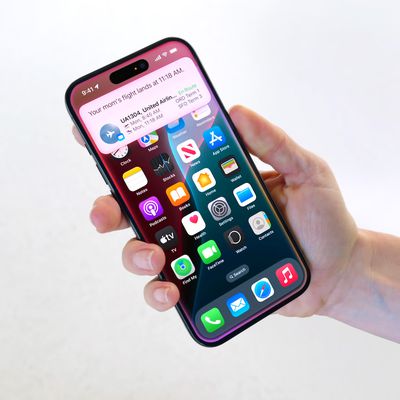
Share AirTag Location With Trusted Friend or Airline

Find My has a new option to Share Item Location with an "airline or trusted person" that can help you locate something that you've misplaced. Choosing the Share Item Location option creates a link that lets someone view the location of a lost item when they open the link.
The link can be opened on a non-Apple device, so an iPhone or Mac is not required to provide someone with your item's location. Links expire after a week or when you're reunited with your lost item. More than 15 airlines will offer the feature, which will be integrated into each airline's customer service process for locating mishandled or delayed baggage, according to Apple. In addition to items equipped with an AirTag, the feature also works with third-party accessories and item trackers that support the Find My network.
Require Screen On for Camera Control

On iPhone 16 models, under "Display & Brightness" in the Settings app, there is a new Camera Control toggle called Require Screen On. When enabled, this setting requires that your iPhone screen is illuminated before a press of the Camera Control button will open the Camera app or a compatible third-party camera app. It's a handy option if you find yourself pressing the button accidentally.
Lock Auto Exposure and Auto Focus

By applying light pressure on the Camera Control button on iPhone 16 models, you can now lock auto focus and auto exposure settings. The lock remains active until you release your finger from the button. Enabling the feature involves navigating to Settings ➝ Camera ➝ Camera Control and toggling on the AE/AF Lock option.
View Video Fullscreen in Photos
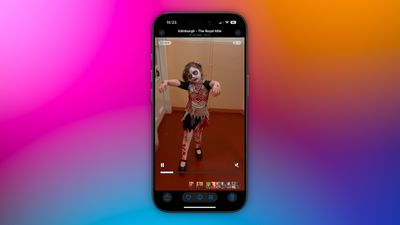
When iOS 18 was released in September, it brought a major redesign to the Photos app on the iPhone, but some of the updates received mixed feedback. Since announcing iOS 18, Apple has made ongoing adjustments to the app, and that looks set to continue in iOS 18.2. In the latest beta, the video player has been updated to occupy more screen space, removing the thick borders seen in earlier iOS 18 versions. Now, videos display in full screen without needing a tap to expand them.
iPhone Mirroring With Hotspot

With iOS 18.2, you can now use iPhone Mirroring even while your iPhone’s hotspot connection is shared with your Mac. Previously, connecting your Mac through Personal Hotspot prevented the use of iPhone Mirroring.
Track Safari Download Progress
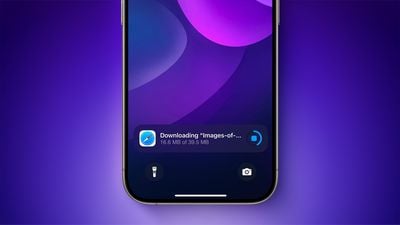
With iOS 18.2, tracking your Safari downloads should be more effortless and immediate, since you can keep an eye on download progress right from your iPhone's Lock Screen. On iPhone 14 Pro models and newer, it also appears in the Dynamic Island.
Adjust Media Volume on Lock Screen
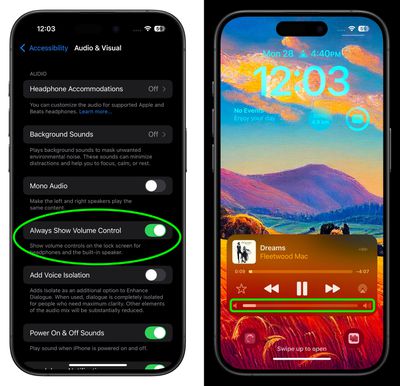
Prior to 2022, the volume slider was a familiar presence on the Lock Screen whenever media was playing. When Apple released iOS 16, however, it removed the control without explaining the reason, much to the dismay of many users.
Thankfully, Apple is bringing the control back as an option in iOS 18.2. If you're already on the iOS 18.2 beta, you'll find a toggle in Settings ➝ Accessibility ➝ Audio & Visual, labeled "Always Show Volume Control". Enable the switch, and you'll be able to adjust volume from the Lock Screen without having to unlock your iPhone or use the physical volume buttons.
Play Daily Sudoku Puzzles
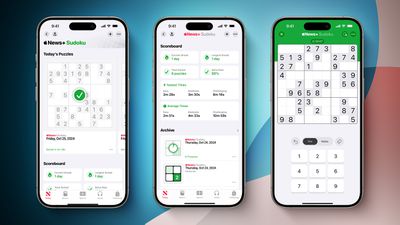
With iOS 18.2, Apple News+ subscribers in the U.S. will gain access to daily sudoku puzzles, offering easy, moderate, and challenging difficulty levels. A scoreboard will keep track of your sudoku statistics, including the total number of puzzles solved and your fastest completion times for each difficulty level. This addition will be the fourth puzzle game available with an Apple News+ subscription, joining Crossword, Crossword Mini, and Quartiles.
Easily Manage Default Apps
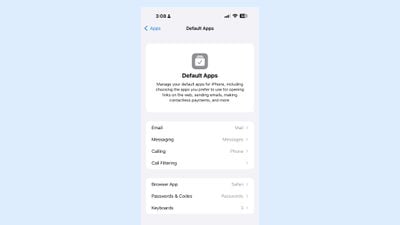
iOS 18.2 includes a new "Default Apps" section that can be found in the Settings app, which can be used to manage your default apps for the iPhone. This is a feature that Apple promised would be coming to the European Union, but it looks as if it may become available worldwide, based on the beta.
In the latest beta, US users can access the Default App interface to choose their preferred Email, Call Filtering, Browser, and Passwords, and Keyboards. EU users should have more options for choosing non-Apple apps as their default, as they are able to delete core apps like Messages, App Store, Safari, Camera, and Photos.
Adjust Camera Control Double-Click Speed
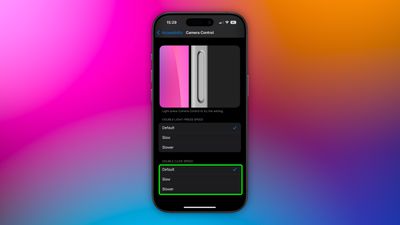
A new option in Settings ➝ Accessibility ➝ Camera Control allows you to adjust the double-click speed for the Camera Control button. The available options are Default, Slow, and Slower. The settings are added alongside existing options to adjust the speed of the double light press and the force of the light press.
Categorize Emails in Mail

In iOS 18.2, Apple is introducing an updated version of the Mail app for built-in categorization. Mail Categories effectively organize your incoming emails into distinct sections for easier navigation.
Important emails are grouped in a "Primary" category, while other types are categorized into three additional sections. The "Transactions" section streamlines access to receipts, orders, and shipping information, allowing you to quickly locate your purchases. Meanwhile, the "Updates" section gathers newsletters, appointment reminders, and various subscription emails, keeping you informed. Lastly, the "Promotions" category highlights special offers and promotional messages, to make sure you don’t miss out on any deals.
Generate Images Using Prompts
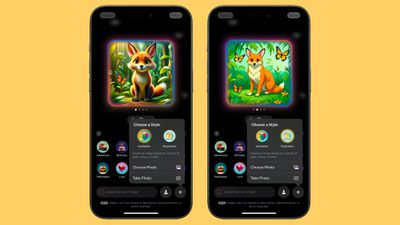
Image Playground is a totally new app designed to help you create images based on your ideas. Similar to ChatGPT, you can generate images by providing a prompt, and Apple offers suggested categories like themes, locations, and costumes to inspire your creativity. The app specializes in stylized content, meaning the generated images won't be realistic, but can choose from Animation and Illustration styles.
Additionally, you can include likenesses of friends and family by pulling images directly from your Photos app. While Image Playground functions as a standalone app, it can also be integrated into apps like Notes and Messages and added to third-party applications.
Get an iPhone Charge Time Estimate
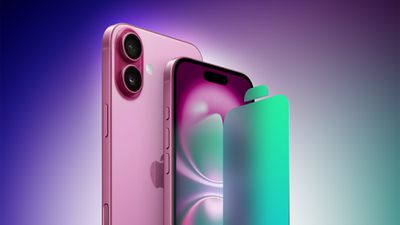
In iOS 18.2, newly discovered code suggests you may be able to get notified about how long it will take your iPhone to reach a specific charge level. This would build upon iOS 18's existing battery health capabilities, which include new options to limit maximum charging to 80%, 85%, 90%, or 95% to help preserve long-term battery health. iOS 18 also now alerts users when their iPhone is being charged with a slower-than-optimal charger.
Create Custom Emoji Characters
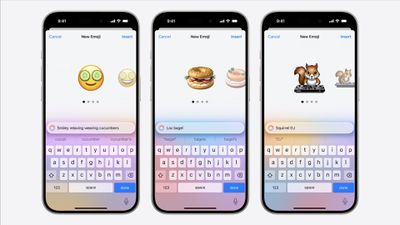
Genmoji are akin to traditional emojis but offer enhanced functionality. With Genmoji, you can create virtually any emoji you desire, freeing you from the limitations of the standard emoji set.
While they function like emojis on Apple devices, they are not encoded characters from the Unicode Consortium. Instead, Apple developed a unique API for Genmoji, ensuring they display correctly in any application that supports rich text. You can generate a Genmoji by providing a description of your desired design, and you even have the option to create Genmoji that resemble individuals from your Photos library.
Query ChatGPT via Siri
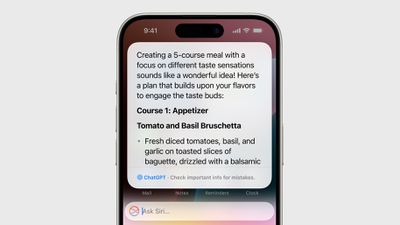
Apple is collaborating with OpenAI to incorporate ChatGPT into the iPhone, iPad, and Mac. This partnership allows Siri to handle complex requests by referring them to ChatGPT, such as generating images or creating text from scratch. With the Writing Tools feature, ChatGPT can produce and illustrate original content, expanding its capabilities beyond what Siri can currently offer.
For instance, you can open a lengthy PDF and ask Siri to summarize information on a specific topic; Siri can then pass this request to ChatGPT to generate a comprehensive summary. Apple envisions Siri as a facilitator for AI models and tools, optimizing available resources to provide you with answers without the need to switch between multiple apps.
View ChatGPT Limits

As part of Apple's collab with OpenAI, iPhone users can access ChatGPT for free but are limited to a small number of requests using the latest ChatGPT-4 turbo engine and a limited number of DALL-E 3 image generations. To that extent, the Apple Intelligence & Siri section in Settings will display ChatGPT limits for free users, but it also provides an option to upgrade to the paid ChatGPT Plus plan. Once these limits are reached, access reverts to a more basic version of ChatGPT, which is less costly for OpenAI to maintain. Full access requires a ChatGPT Plus subscription, priced at $19.99 per month.
Visual Intelligence

If you have an iPhone 16, you can make use of Visual Intelligence, a feature that offers insights about your surroundings. For instance, when you open the camera and aim it at a restaurant, you'll receive details such as opening hours and reviews.
Additional capabilities of Visual Intelligence include reading text aloud, identifying phone numbers and addresses for adding to Contacts, copying text, and summarizing information. Users can also search Google to find where to purchase a specific item they see, and by pointing the camera at an object, they can access further information through ChatGPT. Apple intends to enhance this feature by introducing more functionalities in the future.
More Options in Writing Tools
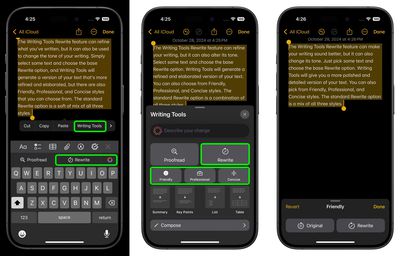
Apple is upgrading the Writing Tools feature to include options for more open-ended modifications. In iOS 18.1, Writing Tools can only adjust the tone to friendly, professional, or a simplified version. However, with the release of iOS 18.2, users will be able to specify the desired tone or content changes, such as incorporating more action words or transforming an email into a poem.
Search Apple Music and Apple TV in Natural Language
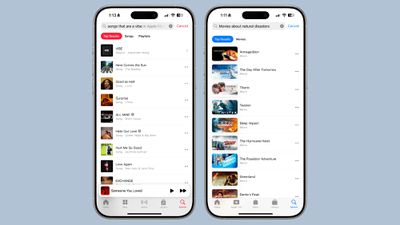
Apple has introduced a natural language search feature for Apple Music and Apple TV, making it easier to find what you're looking for. In the Apple TV app, you can use casual phrases to search for movies and shows. For example, you can type "family-friendly movies," "thrillers set in space," "movies starring Ryan Gosling," or "feel-good comedies" to get tailored results.
The Apple Music app offers similar functionality, letting you search for songs and playlists by mood, genre, or activity. Try searches like "upbeat workout songs," "romantic ballads," "90s pop hits," or "songs to dance to" to quickly discover music that fits your vibe.
Test Your Hearing With AirPods Pro
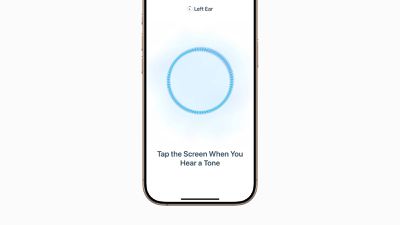
iOS 18.2 brings the AirPods Pro 2 hearing test feature to nine more countries, including Cyprus, Czechia, France, Italy, Luxembourg, Romania, Spain, the United Arab Emirates, and the United Kingdom. This feature initially launched in the U.S. and a few other countries in late October.
The hearing test takes about five minutes and helps adults determine if they might have hearing loss by assessing their ability to hear various sound frequencies. Once the test is complete, users receive a classification of their hearing and suggestions for next steps. For more details, Apple provides a support document explaining the feature in depth.
Limit iPhone's Speaker Volume
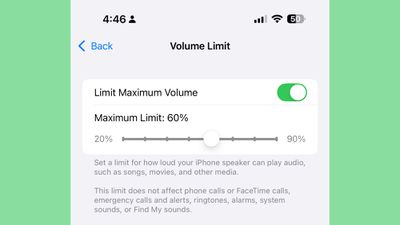
A new feature in iOS 18.2 lets you cap the maximum volume of your device's built-in speaker. It should be particularly useful if you're a parent or guardian and share your device with children, but it's also handy if you frequently find yourself in situations where sudden loud audio could be disruptive. The new "Limit Maximum Volume" option can be found in the Sound & Haptics section of the Settings app, under the "Volume Limit" section.
Layer Voice Memo Recordings
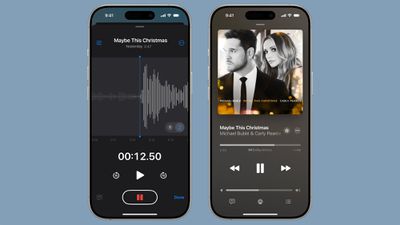
iOS 18.2 brings layered Voice Memos recordings to the iPhone 16 Pro and iPhone 16 Pro Max, which should make it easier for musicians to flesh out song ideas and experiment with new ideas. Users can layer a vocal track on top of an existing instrumental recording, with no headphones needed. Instrumental compositions can be played through the iPhone's speaker while vocals are recorded at the same time using the iPhone 16 Pro microphones. Apple says that this feature is powered by the A18 Pro chip and uses advanced processing and machine learning to isolate the vocal recording.