

iOS 18 Tidbits: Enhanced Flashlight Controls, Control Center Edit Mode, and More - MacRumors
Skip to Content

iOS 18 Tidbits: Enhanced Flashlight Controls, Control Center Edit Mode, and More

With the first beta of iOS 18 now in the hands of developers, there are a handful of smaller changes and quality-of-life improvements being discovered in Apple's iPhone software that are worth highlighting.
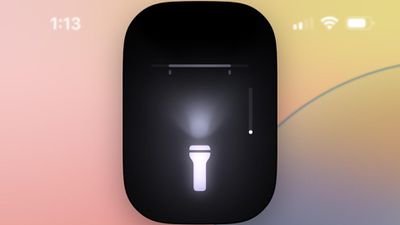
flashlight interface
First up, Apple has improved the flashlight controls. In iOS 18, turning on the Flashlight via the Lock Screen or Control Center now brings up a small interface that lets you adjust the flood of light from the LED. In other words, you now have granular control over not only the intensity of light, but also the breadth of illumination.

In the new Passwords app, you can generate QR codes for saved Wi-Fi passwords, allowing them to be shared more easily with others.
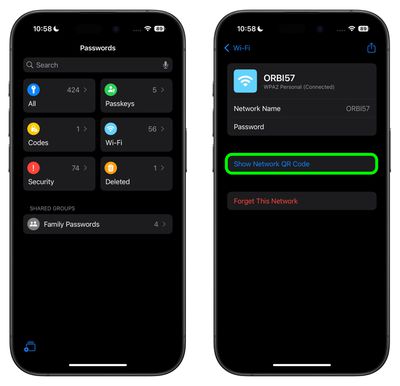
passwords app wi fi qr code
In the Settings app, usually you scroll down to get to settings for individual apps installed on your iPhone. In the iOS 18 beta, Apple has moved settings for apps to a separate screen, so now you tap "Apps" at the bottom of the menu to access a separate searchable list.
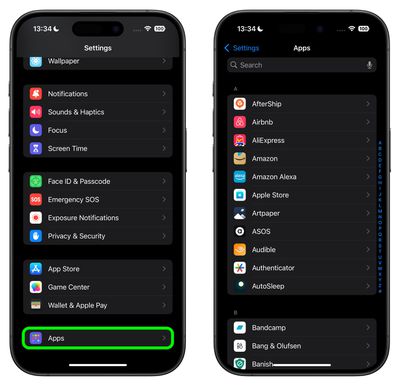
settings app menu
In the redesigned Control Center, which now extends to multiple screens, tapping a new + icon in the top-left corner (or long-pressing on an empty area) reveals minus icons that let you remove individual buttons, similar to how you remove apps from the Home Screen, and there's a new Add a Control option at the bottom. There are also anchors that let you resize buttons or cards like the media player. So if you've always wanted to make the Shazam icon a 4x4 button, for example, now you can.
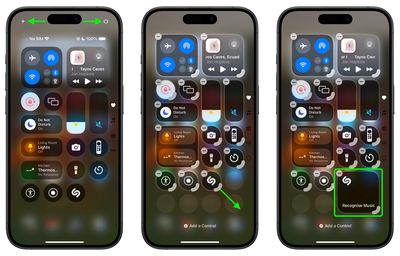
control center edit mode
Apple in iOS 18 has also added a new Power button to the top-right corner of the Control Center, so you don't have to physically hold the Side button to bring up the "Slide to power off" screen.

In the Weather app, you can show forecasts for separate Home and Work locations. The new Home and Work labels can be toggled in Settings ➝ Apps ➝ Weather, under a new "Locations" section. Home and work locations can be updated by editing your Contacts card.
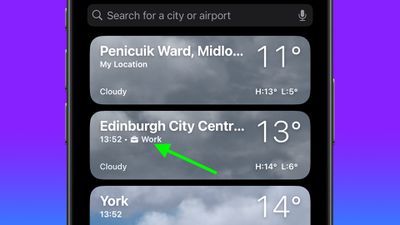
weather home location
The first developer beta of iOS 18 is now available, with a public beta following in July. Apple will officially release the new iPhone operating system to the public in the fall.


Related Forums: iOS 18, iPadOS 18

Popular Stories

Chase Sapphire Reserve Apple Perk Feature

New 'Apple One' Perk Extends to Chase's Sapphire Reserve Credit Card

Tuesday June 16, 2026 6:26 am PDT by
Yesterday, we reported that Chase's Sapphire Preferred credit card ($95 annual fee) now offers a complimentary one-year Apple TV streaming subscription, or a $7.50/month discount on an active Apple One subscription instead. It turns out that the Apple One discount now extends to Chase's premium Sapphire Reserve credit card too ($795 annual fee). The Sapphire Reserve has offered free...
Chase Sapphire Reserve Apple Perk Feature

Chase Sapphire Preferred Card Introduces New Perk for Apple Customers

Monday June 15, 2026 12:07 pm PDT by
Chase this week announced new perks for its Sapphire Preferred credit card, and one of them is a complimentary one-year Apple TV streaming subscription. To get the free year of Apple TV, which typically costs $12.99 per month in the U.S., you must activate the card by December 31, 2026. If you are already subscribed to Apple TV directly through Apple, the complimentary subscription from...
Rivian Explains Why CarPlay Debate Will Become Completely Obsolete Feature

iOS 27 Adds Major New Feature to CarPlay

Wednesday June 17, 2026 9:10 am PDT by
Last year, Apple revealed that it was planning to allow CarPlay users to watch video via AirPlay in their vehicles while they are not driving, and the company finally provided more specific details about this functionality at WWDC 2026. In a WWDC 2026 video aimed at developers, Apple said the CarPlay video feature is available in new vehicles that support it. When playing a video in an...

Top Rated Comments

PsykX Avatar
26 months ago

Nice features BUT is it just me or is the UI design all over the place and very Un-Apple like?
The new Home Screen is indeed one of the strangest Apple designs with those tinted icons.
I was skeptical in the demo, and after trying it myself, it's awful.

Score: 15 Votes (Like | Disagree)
contacos Avatar
26 months ago
Nice features BUT is it just me or is the UI design all over the place and very Un-Apple like?
Score: 13 Votes (Like | Disagree)
anakinfan8 Avatar
26 months ago
Really liking all these refinements so far. I hope we get to import from 1Password eventually.

Score: 11 Votes (Like | Disagree)
zorinlynx Avatar
26 months ago

Unfortunately, still just disconnects with Dev Beta 1.
I'm glad they're leaving this the same.

When I disconnect WiFi, it's almost always a temporary thing.

Like for example: "Aww crap this network is ******, I'm going to disconnect and use cellular for now."

I like that it turns back on eventually, so I don't forget to do so. It's never turned on sooner than I've wanted; usually it's the next day or when I'm at a new location.

I haven't wanted to turn Wifi completely off in years. I'd prefer the option I use the most to be in the control center, and the thing I do 2-3 times a decade to be in Settings.
Score: 8 Votes (Like | Disagree)
Dorv Avatar
26 months ago

Also, there’s been control over LED intensity on the flashlight for years - it used to be a 3D Touch action, but now you can just press + hold on the icon in Control Center.
You must have missed this part of the article:


"In other words, you now have granular control over not only the intensity of light, but also the breadth of illumination."
Score: 7 Votes (Like | Disagree)
26 months ago
The flashlight controls must be hardware specific. Don't have it on my 13 PM.
Score: 7 Votes (Like | Disagree)








































