Astropad's New 'Slate' App Lets You Control Your Mac With Your iPad and Apple Pencil

After several months of beta testing, Astropad is today officially launching its Astropad Slate app for the iPad. Slate turns an ‌iPad‌ into a large trackpad for a Mac, complete with Apple Pencil control.
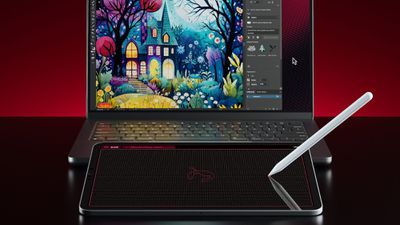
astropad slate
With Slate, you can use an ‌iPad‌ and ‌Apple Pencil‌ to perform several useful tasks. The ‌Apple Pencil‌ serves as a cursor for controlling the desktop mouse, and a tap on the screen is used as a click.

When you write on the ‌iPad‌, it is translated into typed text on the Mac, and there are two-finger gestures for actions like scrolling and zoom. If you have a newer ‌iPad‌ that supports ‌Apple Pencil‌ hover, you can use the hover gestures. For older iPads, Astropad added a simulated hover option.

In Mac apps that support drawing, sketching, and other creative work, you can use the ‌iPad‌ as a drawing tablet. It essentially serves as a no-screen interface for drawing, with the focus on the Mac.


You'll need an ‌iPad‌ that runs iPadOS 15 or later and a Mac that runs macOS 11 or later to use Astropad Slate. The devices can be connected over Wi-Fi, Peer-to-Peer networking, or an appropriate USB cable.

The Astropad Slate app is priced at $19.99 and can be purchased from the App Store. [Direct Link]

Popular Stories

iPhone Top Left Hole Punch Face ID Feature Purple

iPhone 18 Pro Launching Later This Year With These 12 New Features

Thursday January 15, 2026 10:56 am PST by
While the iPhone 18 Pro and iPhone 18 Pro Max are not expected to launch for another eight months, there are already plenty of rumors about the devices. Below, we have recapped 12 features rumored for the iPhone 18 Pro models, as of January 2026: The same overall design is expected, with 6.3-inch and 6.9-inch display sizes, and a "plateau" housing three rear cameras Under-screen Face ID...

iPhone Top Left Hole Punch Face ID Feature Purple

New Leak Reveals iPhone 18 Pro Display Sizes, Under-Screen Face ID, and More

Wednesday January 14, 2026 7:09 am PST by
While the iPhone 18 Pro models are still around eight months away, a leaker has shared some alleged details about the devices. In a post on Chinese social media platform Weibo this week, the account Digital Chat Station said the iPhone 18 Pro and iPhone 18 Pro Max will have the same 6.3-inch and 6.9-inch display sizes as the iPhone 17 Pro and iPhone 17 Pro Max. Consistent with previous...

2024 iPhone Boxes Feature

Apple Adjusts Trade-In Values for iPhones, Macs, and More

Thursday January 15, 2026 11:19 am PST by
Apple today updated its trade-in values for select iPhone, iPad, Mac, and Apple Watch models. Trade-ins can be completed on Apple's website, or at an Apple Store. The charts below provide an overview of Apple's current and previous trade-in values in the United States, according to the company's website. Most of the values declined slightly, but some of the Mac values increased. iPhone ...

Verizon New

Verizon Offering $20 Credit After Major Outage, Here's How to Get It

Thursday January 15, 2026 7:37 am PST by
Verizon today announced it will be offering customers a $20 account credit after a major outage on Wednesday, and action is required to receive it. The carrier said affected customers can accept the credit by logging into the My Verizon app, but it might take some time before this option shows up in the app. Affected customers will receive a text message when the credit is available. On...
Apple MacBook Pro M4 hero

These 5 Apple Products Will Reportedly Be Upgraded With OLED Displays

Friday January 16, 2026 7:07 pm PST by
Apple plans to upgrade the iPad mini, MacBook Pro, iPad Air, iMac, and MacBook Air with OLED displays between 2026 and 2028, according to DigiTimes. Bloomberg's Mark Gurman previously reported that the iPad mini and MacBook Pro will receive an OLED display as early as this year, but he does not expect the MacBook Air to adopt the technology until 2028 at the earliest. A new iPad Air is...

Top Rated Comments

tweaknmod Avatar
25 months ago
Imagine working hard on something then finally releasing it - and an accompanying media release - only to see the comments full of people mocking your product, even though they are in no way the target audience, would never be interested in such a product, and don’t understand it - yet they feel the need to tell the world how useless they think it is.

It’s a niche product. If this isn’t for you, and you “don’t get it”, ask about it respectfully or just move on with your life, maybe?

The widespread acceptance of disrespectful comments by people who don’t realize/care that people who worked on this stuff read them will never stop frustrating me. And I refuse to stop calling it out when I see it.

To the team who launched this - and I know they’re monitoring these forums, cause I do that for a living: Congrats on the launch! Good luck ?
Score: 23 Votes (Like | Disagree)
Jhonjhon236 Avatar
25 months ago

So … a Wacom tablet?
Pretty much, but great if you have an iPad but not a Wacom.
Score: 21 Votes (Like | Disagree)
turbineseaplane Avatar
25 months ago
So … a Wacom tablet?
Score: 8 Votes (Like | Disagree)
gk_brown Avatar
25 months ago

Why not just a touchscreen Mac? Odd solution to, well I'm not sure.
I'm not an artist, but it seems like this would be much more convenient than drawing on my laptop screen.
Score: 6 Votes (Like | Disagree)
Harry Haller Avatar
25 months ago

Why not just a touchscreen Mac? Odd solution to, well I'm not sure.
Apple wants to sell 2 devices instead of 1.
They believe the user experience is better with 2 highly focused devices instead of one lesser capable 2 in 1. I’ve used the windows 2 in 1s and they’re ok for what they are, but not nearly as polished as separate devices, imo.
Score: 5 Votes (Like | Disagree)
mister salty Avatar
25 months ago

Pretty much, but great if you have an iPad but not a Wacom.
What's the use case here?? "I have a tablet which is great for drawing, but I hate direct visual feedback and would instead prefer to use that tablet which is great for drawing as a slave device to a big monitor."

If that, why not just mirror the tablet's screen to a monitor?
Score: 5 Votes (Like | Disagree)