iOS 17: Revamp Your Home Screen With These Apps Featuring Interactive Widgets

Apple today released iOS 17 to the public after months of beta testing, which means the new operating system update is available to all iPhone users. iOS 17 makes widgets far more useful than before, adding a new interactive element that allows you to use them from the Lock Screen, Home Screen, or StandBy interface without having to open up an app.
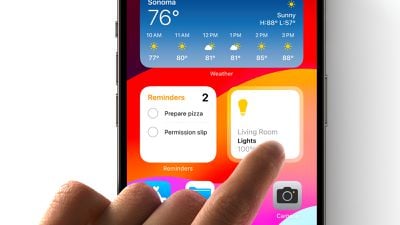
iOS 17 Interactive Widgets
We've rounded up a list of apps that take advantage of interactive widgets so you can update your widget workflow. Note that interactive widgets work on ‌iPhone‌, iPad, and will even be accessible on the Mac when macOS Sonoma comes out thanks to new interconnectivity between the iOS and macOS.

WidgetSmith (Free, Premium Subscription)

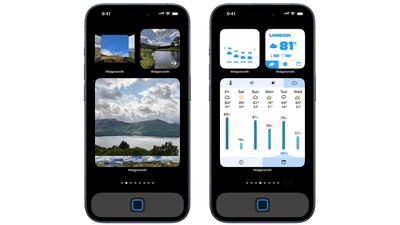
WidgetSmith has several interactive widgets to choose from, including a series of photo galleries that you can tap to flip through your photos and multi-purpose widgets where you can tap between things like photos and step count, hiding useful information behind images.
ios 17 widget smith
The app also includes a Music widget for flipping through music albums and playlists, a weather widget for swiping through the upcoming weather forecast without having to open the app, a calendar widget so you can see the day's upcoming events, and a number-adding tile game.

Spark Mail (Free, Premium Subscription)

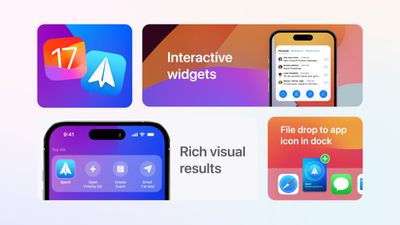
Spark's interactive widgets let users delete or mark emails as done to archive them without having to open up the Spark app. Spark will also have options to view emails directly from different categories (People, Priority, Newsletters, Notifications, and All Emails) in the Spark widget.
spark ios 17
Spark is also gaining new Drag and Drop features on the ‌iPad‌ for adding attachments, and App Shortcuts for creating calendar events, opening a priority list, and more.

Rise Sleep Tracker (Free, Premium Subscription)

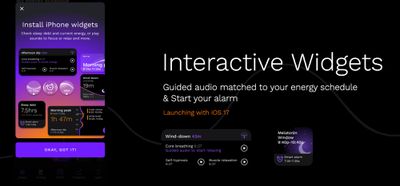
Sleep tracking app Rise has widgets that can be used for managing alarms and sleep sounds without opening up the app. The app also includes outdoor light exposure monitoring so you can see how light exposure affects sleep, and there is a dedicated ‌iPad‌ app.

ios 17 rise app

Copilot (Free, Premium Subscription

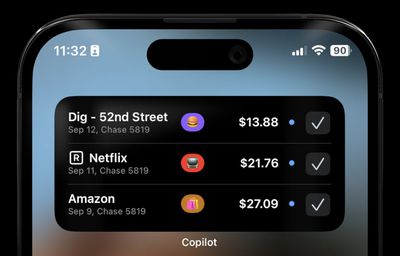
Budgeting and money tracking app Copilot has added a Review Transactions widget that can be used to view and confirm all of your purchases without having to open the app. Copilot lets you track all of your spending and investments in one place.
ios 17 copilot

Launcher (Free, Various Premium Unlocks)

App launching app Launcher has interactive folder widgets so you can nest several actions in one folder, accessing them with a tap without having to go into the Launcher app. There are also multi-contact widgets so you can do things like quickly contact a friend, and there are options for music controls.
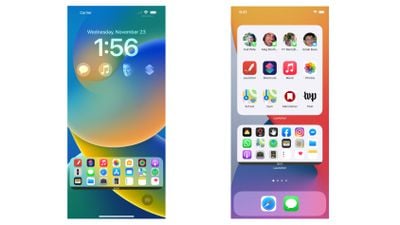
launcher ios 17

Other Apps With Interactive Widgets

  • Things ($9.99) - Task management app Things now supports interactive widgets so you can complete to-dos right from the ‌Home Screen‌.
  • TripIt (Free, Premium Subscription) - Travel planning app TripIt has interactive widgets that let you scroll through your entire travel itinerary from the ‌Home Screen‌.
  • Calendars ($30) - Calendars includes new widgets, such as a Load Indicator widget, an icon with the current date, and month calendar options, all of which can be used without opening the app. There's also support for StandBy mode.
  • Focus (Free, Premium Subscription) - Interactive widgets in productivity app Focus let you start a timer with a tap from the Home or Lock Screen. There's also a StandBy Focus widget and a redesigned Apple Watch app.
  • Timery for Toggl (Free, Premium Subscription) - Time-tracking app Timery, which is designed to work with Toggl, has interactive widgets that can be used for quickly setting timers, tracking time, and showing report details. There's a StandBy widget and a refreshed design for the Apple Watch.
  • Chronicling (Free, Premium Subscription) - Event tracking app Chronicling has interactive widgets for event logging from the ‌Home Screen‌, as well as a new watchOS app and StandBy support.
  • SmartGym (Free, Premium Subscription) - Fitness app SmartGym has an interactive widget that lets you swap between various metrics like heart rate and calories burned for your workouts. There's also a redesigned Apple Watch app and support for StandBy mode on ‌iPhone‌.
  • Liftin' (Free, Premium Subscription) - Weightlifting app Liftin' has interactive widgets that let you start a workout, plus there are widgets optimized for the Apple Watch Smart Stack and Live Activities.
  • Home Widget (Free, Premium Upgrade) - HomeKit app Home Widget offers a selection of widgets that can be used to control smart home devices from the ‌Home Screen‌.
  • Overcast (Free, $9.99 Premium Option) - Podcast app Overcast has interactive widgets that let you control episode playback without having to open the app.

Read More

Find an app with interactive widgets that we didn't mention here? Let us know in the comments below.

Related Forums: iOS 17, iPadOS 17

Popular Stories

iOS 26

iOS 26.2 Coming Soon With These 8 New Features on Your iPhone

Thursday December 11, 2025 8:49 am PST by
Apple seeded the second iOS 26.2 Release Candidate to developers earlier this week, meaning the update will be released to the general public very soon. Apple confirmed iOS 26.2 would be released in December, but it did not provide a specific date. We expect the update to be released by early next week. iOS 26.2 includes a handful of new features and changes on the iPhone, such as a new...
iOS 26

iOS 26.4 and iOS 27 Features Revealed in New Leak

Friday December 12, 2025 10:56 am PST by
Macworld's Filipe Espósito today revealed a handful of features that Apple is allegedly planning for iOS 26.4, iOS 27, and even iOS 28. The report said the features are referenced within the code for a leaked internal build of iOS 26 that is not meant to be seen by the public. However, it appears that Espósito and/or his sources managed to gain access to it, providing us with a sneak peek...
iOS 26

Apple Releases iOS 26.2 With Alarms for Reminders, Lock Screen Changes, Enhanced Safety Alerts and More

Friday December 12, 2025 10:10 am PST by
Apple today released iOS 26.2, the second major update to the iOS 26 operating system that came out in September, iOS 26.2 comes a little over a month after iOS 26.1 launched. ‌iOS 26‌.2 is compatible with the ‌iPhone‌ 11 series and later, as well as the second-generation ‌iPhone‌ SE. The new software can be downloaded on eligible iPhones over-the-air by going to Settings >...
AirPods Pro Firmware Feature

Apple Releases New Firmware for AirPods Pro 2 and AirPods Pro 3

Thursday December 11, 2025 11:28 am PST by
Apple today released new firmware designed for the AirPods Pro 3 and the prior-generation AirPods Pro 2. The AirPods Pro 3 firmware is 8B30, up from 8B25, while the AirPods Pro 2 firmware is 8B28, up from 8B21. There's no word on what's include in the updated firmware, but the AirPods Pro 2 and AirPods Pro 3 are getting expanded support for Live Translation in the European Union in iOS...
macOS Tahoe 26 Thumb

Apple Releases macOS Tahoe 26.2 With Edge Light

Friday December 12, 2025 10:08 am PST by
Apple today released macOS Tahoe 26.2, the second major update to the macOS Tahoe operating system that came out in September. macOS Tahoe 26.2 comes five weeks after Apple released macOS Tahoe 26.1. Mac users can download the macOS Tahoe update by using the Software Update section of System Settings. macOS Tahoe 26.2 includes Edge Light, a feature that illuminates your face with soft...
AirTag 2 Mock Feature

Apple AirTag 2: Four New Features Found in iOS 26 Code

Thursday December 11, 2025 10:31 am PST by
The AirTag 2 will include a handful of new features that will improve tracking capabilities, according to a new report from Macworld. The site says that it was able to access an internal build of iOS 26, which includes references to multiple unreleased products. Here's what's supposedly coming: An improved pairing process, though no details were provided. AirTag pairing is already...
ipados 26 1 slide over

Apple Releases iPadOS 26.2 With Multitasking Improvements

Friday December 12, 2025 10:09 am PST by
Apple today released iPadOS 26.2, the second major update to the iPadOS 26 operating system released in September. iPadOS 26.2 comes a month after iPadOS 26.1. The new software can be downloaded on eligible iPads over-the-air by going to Settings > General > Software Update. iPadOS 26.2 continues with the multitasking improvements that were added with iPadOS 26.1. You can now drag and...
iphone fold text

'iPhone Fold' Arrival Expected to Cement Book-Style Era for Foldables

Friday December 12, 2025 3:55 am PST by
Foldable smartphone panel shipments are projected to jump 46% year-over-year in 2026, with Apple's entry into the market serving as the main catalyst, according to Counterpoint Research's latest Foldable-Rollable Display Shipment Tracker. "Apple is the key driver as it starts to procure panels for its first foldable iPhone," said Counterpoint's Guillaume Chansin. The research firm expects...

Top Rated Comments

WiiDSmoker Avatar
29 months ago
subscriptions, subscriptions, subscriptions.

screw off
Score: 30 Votes (Like | Disagree)
MrGimper Avatar
29 months ago
“Premium Subscription” is 4 out of 5 listed.

Detest subscriptions.
Score: 29 Votes (Like | Disagree)
cocky jeremy Avatar
29 months ago
I want to love widgets, but they seem pretty worthless at this point. Half the time I have to click them to make them refresh. I may as well just open the actual app.
Score: 10 Votes (Like | Disagree)
mikeb71 Avatar
29 months ago
I used to download so many apps, and would happily pay for them when it was a one time purchase, but nowadays as soon as I see ‘subscription’ I don’t even bother.
Score: 8 Votes (Like | Disagree)
Tig Bitties Avatar
29 months ago
I'm an Android guy, but what's up with these weird subscriptions needed for iOS apps?

I would never a pay monthly fee for an app, I'd rather pay a one time purchase of like $20 if needed. But no way a $4.99/month sub, that's a terrible trend to start.
Score: 8 Votes (Like | Disagree)
dannyyankou Avatar
29 months ago
I'd like to see a list of non-freemium apps, but maybe I'll look at these at least
Score: 6 Votes (Like | Disagree)