Chrome for Mac Gets New Downloads Experience

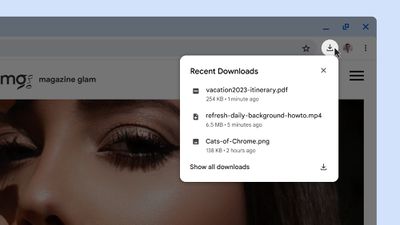
Google today announced a new Chrome downloads experience for its desktop browser, with the update aimed at making it easier to interact with recently downloaded files.
chrome search interface
Chrome's updated download tray is located to the right of the address bar, and it replaces the interface at the bottom of the display. The new look is closer to the Safari download window, which is also at the top of the browser.

When a download is in progress, an animated ring will provide a quick way to monitor the download at a glance, and when the download has finished, the tray will open up briefly before dismissing itself for uninterrupted browsing. The download tray houses Chrome downloads from the past 24 hours, and it includes in-line options for opening the folder that a download went to. Downloads can be canceled, retried, paused, and resumed from the download tray.

Potentially malicious downloads will continue to trigger an alert, with the new interface providing additional context if malware or a virus is detected in a download. Google says that a more advanced deep scan function will be coming in the near future.

Google today also highlighted several new features that have been added to Chrome for iOS. When tapping on the address bar of an eligible site, Chrome will bring up relevant search suggestions. As an example, if you're reading an article about Japan, Chrome will show related searches for restaurants and tourist attractions in a new "Related to this page" interface.

chrome mobile
Chrome is also now offering more search suggestions. When starting a search, you'll see 10 suggestions for things you might want to search for, up from six. The most relevant suggestions in the list will show up first.

Later this year, Google plans to add a trending feature to iOS. Already available on Android devices, the trending feature shows you what's popular with Google searches directly from the Chrome address bar.

More information on the new features can be found on the Chrome blog.
Tags: Chrome, Google

Popular Stories

iOS 26

iOS 26.4 and iOS 27 Features Revealed in New Leak

Friday December 12, 2025 10:56 am PST by
Macworld's Filipe Espósito today revealed a handful of features that Apple is allegedly planning for iOS 26.4, iOS 27, and even iOS 28. The report said the features are referenced within the code for a leaked internal build of iOS 26 that is not meant to be seen by the public. However, it appears that Espósito and/or his sources managed to gain access to it, providing us with a sneak peek...
apple beta 26 lineup

Apple Leak Confirms Work on Foldable iPhone, AirTag 2, and Dozens More Devices

Monday December 15, 2025 2:05 pm PST by
Last week, details about unreleased Apple devices and future iOS features were shared by Macworld. This week, we learned where the information came from, plus we have more findings from the leak. As it turns out, an Apple prototype device running an early build of iOS 26 was sold, and the person who bought it shared the software. The OS has a version number of 23A5234w, and the first...
Apple Foldable Thumb

Leak Reveals Foldable iPhone Details

Monday December 15, 2025 9:09 am PST by
The first foldable iPhone will feature a series of design and hardware firsts for Apple, according to details shared by the Weibo leaker known as Digital Chat Station. According to a new post, via machine translation, Apple is developing what the leaker describes as a "wide foldable" device, a term used to refer to a horizontally oriented, book-style foldable with a large internal display....
Apple Logo Top Half

Early iOS 26 Software Leak Uncovers Dozens of Upcoming Apple Features

Monday December 15, 2025 3:05 pm PST by
Software from an iPhone prototype running an early build of iOS 26 leaked last week, giving us a glimpse at future Apple devices and iOS features. We recapped device codenames in our prior article, and now we have a list of some of the most notable feature flags that were found in the software code. In some cases, it's obvious what the feature flags are referring to, while some are more...
iOS 26

Apple Releases iOS 26.2 With Alarms for Reminders, Lock Screen Changes, Enhanced Safety Alerts and More

Friday December 12, 2025 10:10 am PST by
Apple today released iOS 26.2, the second major update to the iOS 26 operating system that came out in September, iOS 26.2 comes a little over a month after iOS 26.1 launched. ‌iOS 26‌.2 is compatible with the ‌iPhone‌ 11 series and later, as well as the second-generation ‌iPhone‌ SE. The new software can be downloaded on eligible iPhones over-the-air by going to Settings >...
iOS 26

iOS 26.2 Coming Soon With These 8 New Features on Your iPhone

Thursday December 11, 2025 8:49 am PST by
Apple seeded the second iOS 26.2 Release Candidate to developers earlier this week, meaning the update will be released to the general public very soon. Apple confirmed iOS 26.2 would be released in December, but it did not provide a specific date. We expect the update to be released by early next week. iOS 26.2 includes a handful of new features and changes on the iPhone, such as a new...
macOS Tahoe 26 Thumb

Apple Releases macOS Tahoe 26.2 With Edge Light

Friday December 12, 2025 10:08 am PST by
Apple today released macOS Tahoe 26.2, the second major update to the macOS Tahoe operating system that came out in September. macOS Tahoe 26.2 comes five weeks after Apple released macOS Tahoe 26.1. Mac users can download the macOS Tahoe update by using the Software Update section of System Settings. macOS Tahoe 26.2 includes Edge Light, a feature that illuminates your face with soft...
AirPods Pro Firmware Feature

Apple Releases New Firmware for AirPods Pro 2 and AirPods Pro 3

Thursday December 11, 2025 11:28 am PST by
Apple today released new firmware designed for the AirPods Pro 3 and the prior-generation AirPods Pro 2. The AirPods Pro 3 firmware is 8B30, up from 8B25, while the AirPods Pro 2 firmware is 8B28, up from 8B21. There's no word on what's include in the updated firmware, but the AirPods Pro 2 and AirPods Pro 3 are getting expanded support for Live Translation in the European Union in iOS...

Top Rated Comments

Jmausmuc Avatar
31 months ago
“Download experience” ?
Score: 15 Votes (Like | Disagree)
mzeb Avatar
31 months ago
Lipstick on a pig. Chrome has fallen to the fate of IE and Firefox before it. It is bloatware and spyware now. All three started out with the intent to be lean and fast and grew into these behemoths. Google tries to entice users with little things like this but newer, cleaner competitors like Edge and Brave outpace it. Safari hasn’t fallen the same way and I’m not sure why. It’s a bit of an interesting anomaly in this regard. On topic though, face lifts won’t bring me back.
Score: 13 Votes (Like | Disagree)
TheYayAreaLiving ?️ Avatar
31 months ago
Is this really a new feature?
I feel like I've seen it on different browsers. Definitely reminds me of Microsoft Edge.
Score: 6 Votes (Like | Disagree)
Mrkevinfinnerty Avatar
31 months ago
I downloaded a PDF on my laptop earlier, I gathered the family so they could experience it with me. Incredible.
Score: 5 Votes (Like | Disagree)
asdfjkl; Avatar
31 months ago
It's still bloated spyware.
Score: 5 Votes (Like | Disagree)
Carlson-online Avatar
31 months ago
It's been like this for absolutely ages!

And the tray was so much better.
Score: 4 Votes (Like | Disagree)