

Apple today changed the subscription management interface on the iPhone and iPad, introducing a refreshed look that adds spacing between each subscription and it makes it clearer which subscriptions are active and inactive.
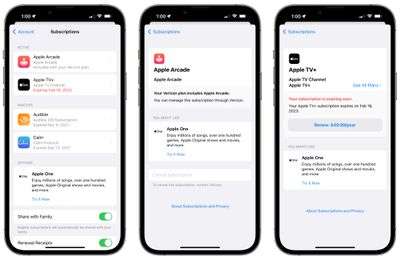
Tapping into a subscription provides details on the price of the subscription and when it is set to renew, plus the interface provides options to resubscribe to an expired subscription. Renewal buttons are more prominent than before, as are cancel buttons and options to change subscription plans for services like Apple One, Apple TV, and Apple Music.
The new subscription interface can be seen on devices running iOS 15.5 and later, including those with the iOS 16 beta. It does not appear to be available on iOS 15.4, so it may be limited to those with newer updates. No software update is required to see the refreshed interface because it loads a webview that Apple revamped.
The updated subscription interface is more in line with the rest of the Settings app changes that Apple made with iOS 15 and earlier updates, providing a simpler, more streamlined management system.
You can access the Subscriptions interface by opening up the Settings app, tapping on your profile picture, and then selecting "Subscriptions."


















































