Satechi Debuts Pro Hub Mini for New MacBook Pro Models
Satechi today announced the launch of the Pro Hub Mini, a new USB-C hub that's designed for Apple's 2021 MacBook Pro models. The hub is meant to add ports that are unavailable on the new MacBook Pro models, including USB-A ports and an Ethernet port.
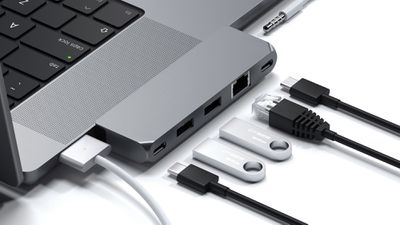
Available in either silver or space gray to match the finish of the MacBook Pros, the Pro Hub Mini has one USB-4 port that supports up to 96W charging, data transfer speeds up to 40Gb/s, or a 6K 60Hz display, one USB-C data port that supports transfer speeds up to 5Gb/s, two USB-A 3.0 data ports that support transfer speeds up to 5Gb/s, one Gigabit Ethernet port, and one audio jack port.
The hub is designed to attach to the left side of a 14 or 16-inch MacBook Pro model, and it takes up two USB-C ports and covers the headphone jack, hence the addition of a secondary headphone jack.
Pre-orders for the Pro Hub Mini are available from the Satechi website starting today, and it is set to ship in January. The Pro Hub Mini is priced at $70, but customers who use the promo code PROHUB to pre-order can get a 25 percent discount.
Popular Stories
Apple is releasing five new products this Friday, November 6, following pre-orders that opened last week, including its first touchscreen MacBook Pro models.
The following new products will be available from Friday:
iPad mini with OLED display and A20 Pro chip
iMac with M6 chip
14-inch MacBook Pro with M6 chip
14-inch MacBook Pro with OLED touchscreen
16-inch MacBook Pro with OLED...
Apple's busiest season isn't over yet. Far from it. With two hardware launch dates still to come in November, plus software updates and new smart home accessories running into December, there's more on the way from Apple before the end of 2026, so be sure to stick around.
Below, we've rounded up what's still coming, along with one date in particular that's worth watching if you're a holiday...
Apple today announced that its Festival Place store in Basingstoke, England will be permanently closing on Saturday, November 21.
Apple Festival Place
Apple had already announced that the store would be closing in November, but it had not provided the public with a specific date until now.
Apple's store inside the Festival Place shopping center opened in 2011, so it had a 15-year run....



















































