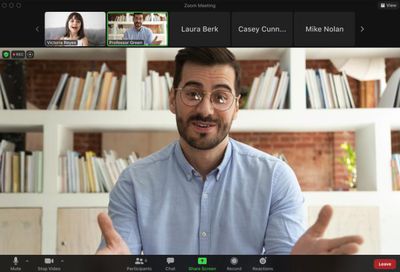
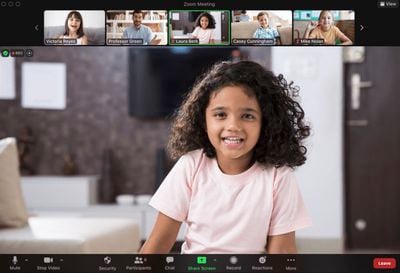
Zoom has introduced a new feature called Focus Mode that's designed to prevent students from distracting each other during virtual classrooms.
When enabled, Focus Mode allows the teacher or lecturer taking the class to see all the students, while each student can only see the teacher.
The setting can be activated at any time by the teleconferencing host, so for example it could be turned on for lecture periods to reduce distractions from students' video feeds and then turned off for group discussion.
Focus Mode is available on the free desktop Zoom client, therefore lending itself to other uses, like business meetings, family gatherings and so on.
Zoom announced the new feature in a blog post offering other back-to-school tips to get children prepared for virtual or hybrid learning. Version 5.7.5 of Zoom for Mac is available to download from the Zoom website.
Wednesday January 14, 2026 10:18 am PST by Joe Rossignol
Verizon is experiencing a major outage across the U.S. today, with hundreds of thousands of customers reporting issues with the network on the website Downdetector. There are also complaints across Reddit and other social media platforms.
iPhone users and others with Verizon service are generally unable to make phone calls, send text messages, or use data over 5G or LTE due to the outage....
Wednesday January 14, 2026 7:09 am PST by Joe Rossignol
While the iPhone 18 Pro models are still around eight months away, a leaker has shared some alleged details about the devices.
In a post on Chinese social media platform Weibo this week, the account Digital Chat Station said the iPhone 18 Pro and iPhone 18 Pro Max will have the same 6.3-inch and 6.9-inch display sizes as the iPhone 17 Pro and iPhone 17 Pro Max.
Consistent with previous...
Thursday January 15, 2026 10:56 am PST by Joe Rossignol
While the iPhone 18 Pro and iPhone 18 Pro Max are not expected to launch for another eight months, there are already plenty of rumors about the devices.
Below, we have recapped 12 features rumored for the iPhone 18 Pro models, as of January 2026:
The same overall design is expected, with 6.3-inch and 6.9-inch display sizes, and a "plateau" housing three rear cameras
Under-screen Face ID...
Thursday January 15, 2026 11:19 am PST by Joe Rossignol
Apple today updated its trade-in values for select iPhone, iPad, Mac, and Apple Watch models. Trade-ins can be completed on Apple's website, or at an Apple Store.
The charts below provide an overview of Apple's current and previous trade-in values in the United States, according to the company's website. Most of the values declined slightly, but some of the Mac values increased.
iPhone
...
Tuesday January 13, 2026 7:52 pm PST by Joe Rossignol
Apple and Google this week announced that Gemini will help power a more personalized Siri, and The Information has provided more details.
Subscribe to the MacRumors YouTube channel for more videos.
As soon as this spring, the report said the revamped version of Siri will be able to…
Answer more factual/world knowledge questions in a conversational manner
Tell more stories
Provide...
I've been teaching a lot over Zoom during a few periods of lockdown, and it has been less than ideal.
However, this seems like a nice way to get the students to actually enable camera (privacy concern and distractions are two main reasons why I normally teach to a bunch of "icons on black background").
That way it would be possible to actually get the "feel of the room", although just fraction of what you can get in a physical classroom.
There are other issues to zoom lectures (not least for practical subjects), but every little bit helps.
Now, I don't trust Zoom anywhere near enough to install the client on my personal Mac, I still consider the app as Malware, but on my company issued work Mac this will be a welcome upgrade.
I've been teaching a lot over Zoom during a few periods of lockdown, and it has been less than ideal.
However, this seems like a nice way to get the students to actually enable camera (privacy concern and distractions are two main reasons why I normally teach to a bunch of "icons on black background").
That way it would be possible to actually get the "feel of the room", although just fraction of what you can get in a physical classroom.
There are other issues to zoom lectures (not least for practical subjects), but every little bit helps.
Now, I don't trust Zoom anywhere near enough to install the client on my personal Mac, I still consider the app as Malware, but on my company issued work Mac this will be a welcome upgrade.
Honestly, as a student, I feel like this is the worst of both worlds from a student perspective. I absolutely hate zoom calls for a number of reasons:
- It’s distracting/hard to focus - primarily because of your OWN preview (you also don’t do other things in front of a mirror) - Other students can be distracting - (Most) teachers themselves can be distracting, for instance by being poorly prepared, having technical issues (bad WiFi - stutter, bad microphone or bad camera) or another common one is teachers taking +25% longer than a physical lecture because ‘they can’ which generally results in lectures that either drag and are too slow paced or on the other end of the spectrum, are overfilled and fatiguing
The upsides being:
- seeing your fellow students - seeing the teacher
With this new feature, it basically remains a ****** experience for students while also removing any social elements.
at this point might as well just stream a live recorded video and have a live q&a chatbox imo.
This reminds me of 19th century prison chapels where each prisoner sat in a partitioned cubicle so they could only see the priest and not each other as part of a prison-wide regime of total isolation from other prisoners. Can you imagine the response if anyone suggested doing the same in a normal school environment? So why do people think it's a good idea for online teaching?
Because it is not a normal school environment. you wouldn’t want it on all the time, but it would be good during an online assessment, plus there are special needs students who don’t have their camera on during lessons but would be more comfortable if they know the whole class isn’t looking at them. Our head of learning support is very happy they added this feature.
PS: The model for a whole gaol like you describe was called a panopticon ('https://en.wikipedia.org/wiki/Panopticon')
Have you never attended an assembly or lecture? This is intended to be used for short bursts of focus where you don't need to see everyone else's face for any dubious social reasons, but the presenter would. I have seen meetings go off the rails because someone's child or pet came on camera and someone called attention to it, or I get really self-conscious about my fidgeting/stimming and kill my video feed.
So instead of learning focus let’s mask it completely so these kids are more socially awkward and unprepared for the real world.
Guess what? When you grow up that big business meeting isn’t going to cater to your issues.