Some New Apple TV 4K Users Report 4K Content Incorrectly Labeled as HD - MacRumors
Skip to Content

Some New Apple TV 4K Users Report 4K Content Incorrectly Labeled as HD

A number of new Apple TV 4K owners are reporting that TV shows and movies in several apps are listed as HD rather than the expected 4K resolution.
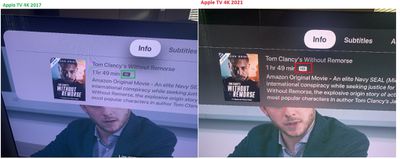
apple tv 4k content listings issue

‌Apple TV‌ 4K 2021 shown on right (Image credit: sundeepch)

Based on comments from MacRumors forum members, Apple Support Communities members, and Reddit users, the issue can be found on native Apple content accessed through the iTunes Movies and TV Shows apps, but not the main TV app, while video on third-party services like HBO Max and Netflix is also affected.

The possibility that HDMI cables could have something to do with it has already been ruled out, as some users simply replaced their previous-generation ‌Apple TV‌ 4K with the new set-top box using the same cables, and the older model doesn't exhibit the same problem.

There's some debate among users over whether the videos listed as HD are actually playing back in 4K. If so, it would suggest a labeling bug. However, knowing for certain is being made more difficult by the fact that the ‌Apple TV‌ 4K consistently outputs a 4K signal to the connected television and upscales the content if necessary, regardless of its native resolution.

The problem has been replicated on both tvOS 14.6 and in the latest tvOS 14.7 beta. Several users report they've been in contact with Apple regarding the issue, but the usual hardware reset/cable change suggestions aren't helping and it's still unknown if a software-based solution is in the works.


Related Roundup: Apple TV
Buyer's Guide: Apple TV (Don't Buy)

Popular Stories

iOS 26

iOS 26.4 Adds Two New Features to CarPlay

Tuesday March 24, 2026 1:55 pm PDT by
iOS 26.4 was released today, and it includes a couple of new features for CarPlay: an Ambient Music widget and support for voice-based chatbot apps. To update your iPhone 11 or newer to iOS 26.4, open the Settings app and tap on General → Software Update. CarPlay will automatically offer the new features so long as the iPhone connected to your vehicle is running iOS 26.4 or later....


Apple Business hero

Apple Unveils 'Apple Business' All-in-One Platform

Tuesday March 24, 2026 8:53 am PDT by
Apple today announced Apple Business, a new all-in-one platform that unifies device management, productivity tools, and customer outreach features. The service is designed to be a consolidated replacement for several of Apple's existing business-focused offerings, including Apple Business Essentials, Apple Business Manager, and Apple Business Connect. It provides organizations with a single...
AirPods Pro Firmware Feature

Apple Releases New Firmware for AirPods Pro 3, AirPods Pro 2 and AirPods 4

Tuesday March 24, 2026 12:31 pm PDT by
Apple today released new firmware for the AirPods Pro 2, AirPods Pro 3, and the AirPods 4. The firmware has a version number of 8B39, up from 8B34 on the AirPods Pro 3, 8B28 on the AirPods Pro 2, and 8B21 on the AirPods 4. There is no word on what's included in the firmware, but Apple has a support document with limited notes. Most updates are limited to bug fixes and performance...

Top Rated Comments

AppleTO Avatar
63 months ago

However, knowing for certain is being made more difficult by the fact that the Apple TV 4K consistently outputs a 4K signal to the connected television and upscales the content if necessary, regardless of its native resolution.
Uh, so no one can tell the difference between HD and 4K regardless? That’s kind of ironic.
Score: 16 Votes (Like | Disagree)
63 months ago
It’s pretty easy to test it on Netflix:

https://www.netflix.com/title/80018499

These are the internal Netflix test patterns, choose the one with 3840x2160 and 24 FPS. When it reaches 12-16 mbps and you can see the round targets on the corners without any smudging, it’s full 4K.
Score: 6 Votes (Like | Disagree)
63 months ago

I guess, in all fairness, 4K from steaming services are majorly compressed (as is HD of any sort), but still. I just find it kind of funny.
4K isn’t some magical button. You need to shoot, edit, distribute/stream all in 4K. You then need to have a TV large enough to see the pixels at your viewing distance. Let’s say you sit 15’ from the TV, you need at least a 120” screen to even start to see improvements.
Or your typical 50” screen you’d have to sit 5 feet from.

https://www.rgb.com/display-size-resolution-and-ideal-viewing-distance
Score: 3 Votes (Like | Disagree)
NLLV Avatar
63 months ago
It would not matter what resolution you watch "Without Remorse" in, the movie is still terrible.
Score: 3 Votes (Like | Disagree)
63 months ago
Apple TV 4K doesn’t consistently output in 4K if you have match frequency and resolution enabled. but lame apps like youtube still force the default resolution.
Score: 3 Votes (Like | Disagree)
63 months ago
Signing out of all devices via the Netflix website helped in my case. Now Netflix works in UHD.
Score: 3 Votes (Like | Disagree)