Apple's User-Installable Mac Pro SSD Kits Now Available With Up to 8TB of Storage for $2,800
Following an announcement earlier today, Apple is now selling SSD storage upgrade kits for the latest Mac Pro, with 1TB, 2TB, 4TB, and 8TB options available. Prices range between $600 and $2,800 in the United States.
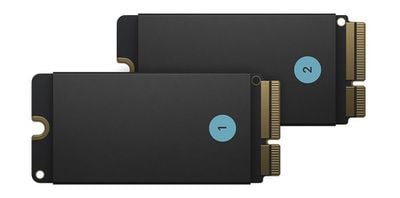
Each kit contains two SSD modules, enabling users to upgrade the internal storage capacity of a Mac Pro themselves. Until now, Apple advised customers who wanted to upgrade the built-in SSD modules to book an appointment with a Genius Bar or Apple Authorized Service Provider, as they are tied to Apple's T2 security chip.
As we demonstrated earlier this year, it is also possible to expand a Mac Pro's storage capacity by placing a third-party SSD in a PCIe slot. Another option is to install a third-party internal drive mount that connects via SATA.
Apple sells a
variety of other components and accessories for the Mac Pro and its companion Pro Display XDR, including graphics modules, RAM kits, expensive wheels, a VESA mount adapter, an AUX power cable kit, and more.
Popular Stories
Apple today updated its U.S. trade-in estimates, raising maximum values across the iPad lineup and for most Macs following today's announcement of the new iPad mini.
Every iPad category has gained value, although the increases are relatively modest. The iPad mini and standard iPad both rise by $20, while the iPad Air gains $15 and the iPad Pro increases by $10. The revised maximum estimates...
Owners of Apple's 2019 Mac Pro could repurpose its enclosure for a custom PC using a conversion kit being crowdfunded by Practical Prototyping (via Hackster).
The project comes after Apple discontinued the Mac Pro in March, confirming that it has no plans for future models. For owners of the 2019 Intel-based tower, the conversion offers a potential way to keep using its distinctive...
Apple is releasing five new products this Friday, November 6, following pre-orders that opened last week, including its first touchscreen MacBook Pro models.
The following new products will be available from Friday:
iPad mini with OLED display and A20 Pro chip
iMac with M6 chip
14-inch MacBook Pro with M6 chip
14-inch MacBook Pro with OLED touchscreen
16-inch MacBook Pro with OLED...







/https://forums.macrumors.com/attachments/924364/)


/https://forums.macrumors.com/attachments/924369/)











































