For this week's giveaway, we've once again teamed up with Astro to give MacRumors readers a chance to win a Luna Display adapter that's able to transform an iPad or an extra Mac into a secondary display for a main machine.
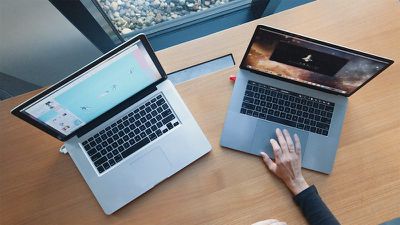
luna display mac to mac mode
The tiny Luna Display adapter plugs into your Mac through a USB-C port (newer Macs) or a Mini DisplayPort (older Macs) and then when paired with the Luna Display software, it connects an ‌iPad‌ or another Mac to your primary Mac using WiFi, giving new life to old iPads and Macs.
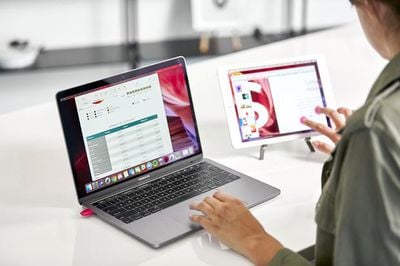
luna display macbook
When connected, the Luna Display extends the Mac's display to the secondary Mac or the ‌iPad‌ so the device can be used as a second screen, something that's especially useful these days with many people working from home with makeshift office setups.
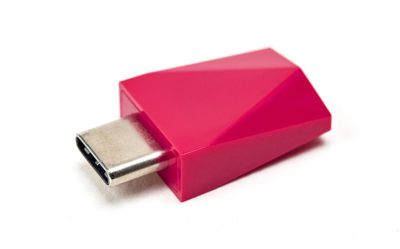
lunadisplay2
Priced at $80, the Luna Display sets itself apart from Apple's built-in Sidecar functionality with Mac-to-Mac support, something ‌Sidecar‌ doesn't do. Luna Display also works with older iPads, making it a more versatile option.

With Mac-to-Mac mode, the primary Mac needs macOS El Capitan or later, while the secondary Mac needs to be running macOS Mountain Lion or later, so this feature works with some machines that are quite a bit older.
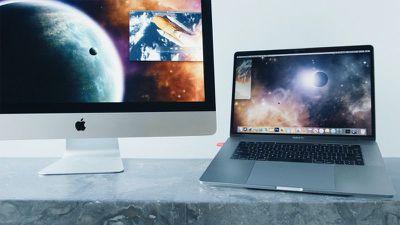
lunadisplaymactomac
For the best performance, the main Mac should be a 2012 MacBook Air or later, a 2012 MacBook Pro or later, a 2012 Mac mini or later, a 2012 iMac or later, or a 2013 Mac Pro or later.
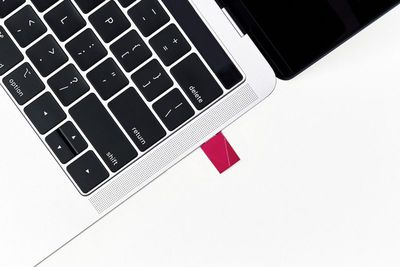
lunadisplay4
In Mac-to-Mac mode, Luna Display provides full keyboard, trackpad, and mouse support on both of the Macs, with more info available from the Luna Display website.

Luna Display also works with almost all modern iPads, with expanded support over what's available using Apple's ‌Sidecar‌. Luna Display is compatible with the ‌iPad‌ 2 or later, all iPad mini models, all iPad Pro models, and all iPad Air models, with iOS 9.1 or later as the only requirement. Performance is faster on newer iPads, but older models work well too.
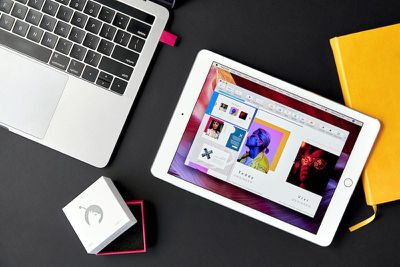
lunadisplay3

The Luna Display can be purchased from the Luna Display website, and we have five of them to give away to MacRumors readers. To enter to win our giveaway, use the Gleam.io widget below and enter an email address. Email addresses will be used solely for contact purposes to reach the winners and send the prizes. You can earn additional entries by subscribing to our weekly newsletter, subscribing to our YouTube channel, following us on Twitter, following us on Instagram, or visiting the MacRumors Facebook page.

Due to the complexities of international laws regarding giveaways, only U.S. residents who are 18 years or older and Canadian residents (excluding Quebec) who have reached the age of majority in their province or territory are eligible to enter. To offer feedback or get more information on the giveaway restrictions, please refer to our Site Feedback section, as that is where discussion of the rules will be redirected.

The contest will run from today (April 3) at 11:00 a.m. Pacific Time through 11:00 a.m. Pacific Time on April 10. The winners will be chosen randomly on April 10 and will be contacted by email. The winners will have 48 hours to respond and provide a shipping address before new winners are chosen.

Top Rated Comments

Rychiar Avatar
74 months ago
they probably can't give these away fast enough since sidecar came out
Score: 4 Votes (Like | Disagree)
JayMysterio Avatar
74 months ago

they probably can't give these away fast enough since sidecar came out
For those of us still using the rock solid 2015 Macbook Pro 15 inch, sidecar isn't an option.

Luna Display has an option for two different connectors, so you can still use it on the 2015, or USB C for the newer Mac products.
Score: 4 Votes (Like | Disagree)
kironin Avatar
74 months ago
Funny that this article claims the price is $80 when Luna website is selling it for $50 with an offer for 10% discount if you sign up to receive email. Almost like trying to make this prize seem of more value than it is.
Score: 1 Votes (Like | Disagree)
switz Avatar
74 months ago
Have a 2018 iPad Pro 11" with 1TB of storage and cellar and a 16" MacBook Pro with max memory, SSD, processor and graphics. I have used both the versions of the Luna adapters with the iPad and an older last of the 11" MacBook Air laptop with similar results. The data transfers are occasionally jerky and can momentarily freeze. They have updated both the firmware and software several times. Mapping the 16" screen to the 11" iPad makes the letters very small so that can be an issues with glasses.

But it is handy for the occasional use or when traveling. Not as user friendly as my 2013 MacPro driving two 27" Apple monitors.
Score: 1 Votes (Like | Disagree)
hardwickj Avatar
74 months ago
Since Sidecar is limited to a single iPad, is there anyone out there that has tried Sidecar + Luna Display on a 2nd iPad?

I'd try if I had a second iPad handy...


I would have thought the same thing. Not knowing what all it does, though, it is cheaper than an Apple Pencil, which you need to use Sidecar, right?
No, it doesn't need an Apple Pencil. What makes you think that?

Most people use Sidecar to turn their iPad into a 2nd display, not a virtual Wacom tablet.
Score: 1 Votes (Like | Disagree)
kazmac Avatar
74 months ago

Nah, Luna+ AstroPad work so, so much better for art creation purposes than Sidecar. And Luna’s getting windows support soon too.

https://astropad.com/astropad-vs-apples-sidecar/
I’d rather use Luna & Astropad for art too. Just waiting on the iMacs to be updated.
Score: 1 Votes (Like | Disagree)

Popular Stories

iOS 26

iOS 26.4 and iOS 27 Features Revealed in New Leak

Friday December 12, 2025 10:56 am PST by
Macworld's Filipe Espósito today revealed a handful of features that Apple is allegedly planning for iOS 26.4, iOS 27, and even iOS 28. The report said the features are referenced within the code for a leaked internal build of iOS 26 that is not meant to be seen by the public. However, it appears that Espósito and/or his sources managed to gain access to it, providing us with a sneak peek...
iOS 26

iOS 26.2 Coming Soon With These 8 New Features on Your iPhone

Thursday December 11, 2025 8:49 am PST by
Apple seeded the second iOS 26.2 Release Candidate to developers earlier this week, meaning the update will be released to the general public very soon. Apple confirmed iOS 26.2 would be released in December, but it did not provide a specific date. We expect the update to be released by early next week. iOS 26.2 includes a handful of new features and changes on the iPhone, such as a new...
iOS 26

Apple Releases iOS 26.2 With Alarms for Reminders, Lock Screen Changes, Enhanced Safety Alerts and More

Friday December 12, 2025 10:10 am PST by
Apple today released iOS 26.2, the second major update to the iOS 26 operating system that came out in September, iOS 26.2 comes a little over a month after iOS 26.1 launched. ‌iOS 26‌.2 is compatible with the ‌iPhone‌ 11 series and later, as well as the second-generation ‌iPhone‌ SE. The new software can be downloaded on eligible iPhones over-the-air by going to Settings >...
AirPods Pro Firmware Feature

Apple Releases New Firmware for AirPods Pro 2 and AirPods Pro 3

Thursday December 11, 2025 11:28 am PST by
Apple today released new firmware designed for the AirPods Pro 3 and the prior-generation AirPods Pro 2. The AirPods Pro 3 firmware is 8B30, up from 8B25, while the AirPods Pro 2 firmware is 8B28, up from 8B21. There's no word on what's include in the updated firmware, but the AirPods Pro 2 and AirPods Pro 3 are getting expanded support for Live Translation in the European Union in iOS...
macOS Tahoe 26 Thumb

Apple Releases macOS Tahoe 26.2 With Edge Light

Friday December 12, 2025 10:08 am PST by
Apple today released macOS Tahoe 26.2, the second major update to the macOS Tahoe operating system that came out in September. macOS Tahoe 26.2 comes five weeks after Apple released macOS Tahoe 26.1. Mac users can download the macOS Tahoe update by using the Software Update section of System Settings. macOS Tahoe 26.2 includes Edge Light, a feature that illuminates your face with soft...
AirTag 2 Mock Feature

Apple AirTag 2: Four New Features Found in iOS 26 Code

Thursday December 11, 2025 10:31 am PST by
The AirTag 2 will include a handful of new features that will improve tracking capabilities, according to a new report from Macworld. The site says that it was able to access an internal build of iOS 26, which includes references to multiple unreleased products. Here's what's supposedly coming: An improved pairing process, though no details were provided. AirTag pairing is already...
ipados 26 1 slide over

Apple Releases iPadOS 26.2 With Multitasking Improvements

Friday December 12, 2025 10:09 am PST by
Apple today released iPadOS 26.2, the second major update to the iPadOS 26 operating system released in September. iPadOS 26.2 comes a month after iPadOS 26.1. The new software can be downloaded on eligible iPads over-the-air by going to Settings > General > Software Update. iPadOS 26.2 continues with the multitasking improvements that were added with iPadOS 26.1. You can now drag and...
bug security vulnerability issue fix larry

Update Now: iOS 26.2 Fixes 20+ Security Vulnerabilities

Friday December 12, 2025 11:11 am PST by
Apple today released iOS 26.2, iPadOS 26.2, and macOS 26.2, all of which introduce new features, bug fixes, and security improvements. Apple says that the updates address over 20 vulnerabilities, including two bugs that are known to have been actively exploited. There are a pair of WebKit vulnerabilities that could allow maliciously crafted web content to execute code or cause memory...