For this week's giveaway, we've teamed up with Fuse to offer MacRumors readers a chance to win a set of cable organizers for Apple device cables from Fuse.

Fuse in November added to its Mac cable wrangling options with a whole set of cable organizers designed for Apple's entire iPhone, iPad, and Mac lineup.

fuseorganizedcables
From the Side Winder for keeping the MacBook Pro's USB-C cable organized to the Watch Side Winder for rolling up the Apple Watch cord, Fuse has something for everyone. Below is a quick overview of all that Fuse has to offer.

Snap Backs for iPhone, iPad, and MacBook

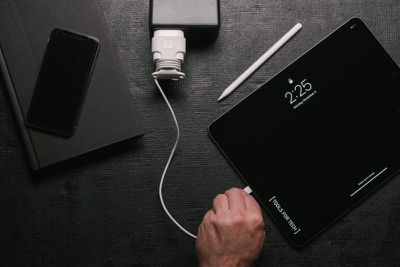
Priced at $13.99, the Snap Backs are available for the 12W ‌iPad‌ charger, the 18W iPad Pro/‌iPhone‌ charger, the 5W ‌iPhone‌ charger, and the 29/30W MacBook charger.
fusesnapback
Each Snap Back fits over one of Apple's chargers and then the reel at the bottom can be used to wind up the cord, so you can use as much cord as you need with no excess. It's also ideal for travel because you can roll up the entire cord to keep it organized.

Side Winders for Cables of All Sizes

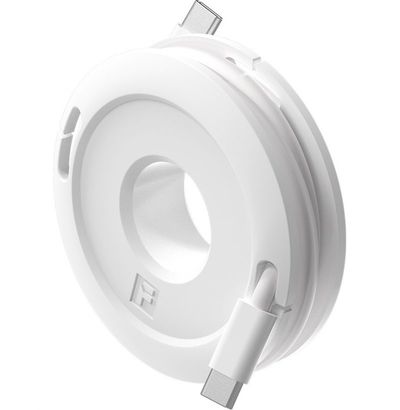
Priced starting at $9.99, Fuse makes little Side Winders for ‌iPhone‌ cables, headphone cables, ‌iPad‌ cables, and more. The Side Winder is donut shaped and lets you roll the cord around it before securing the end using the included groove.
sidewindermax
The Side Winder Mini ($9.99) is perfect for ‌iPhone‌ cables, micro-USB cables, corded headphones, and more. It can be used with cables one foot to five feet in length.

The Side Winder Max ($10.99) is identical to the Side Winder Mini but it's bigger in size so it works with USB-C cables and can wrap up cables between one foot and 10 feet in length.

sidewindermax 1
The Side Winder Watch ($12.99) is designed specifically for the Apple Watch. It wraps up the Apple Watch cable and has a cutout in the center for the watch so it can be used as a charging base for the Apple Watch.
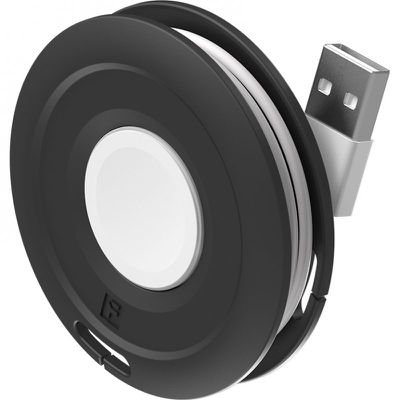
sidewinderwatch

The Side Kick

The Side Kick, priced at $19.99, is designed to work with Apple's MacBook, MacBook Air, and ‌MacBook Pro‌ chargers. It's a little socket that attaches to the side of a MacBook power adapter using adhesive.
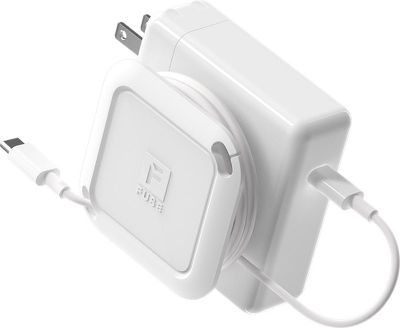
sidekick
When popped out, it can be used to wrap up a MacBook's cord neatly, allowing it to be transported with no cable mess. When you're using the cord, the Side Kick pops back in so it adds little bulk to a power adapter.

The Side Winder

Priced at $29.99, the Side Winder is designed for the ‌MacBook Air‌ and ‌MacBook Pro‌ models, and it's meant to wind up both the USB-C (or MagSafe) cable of a MacBook along with the extension cable.

sidewindertable
The MacBook's power adapter goes in the center and the two cables wrap up in the reel around it. You can pull out just the right amount of cable so you never have excess cable to deal with.

Make sure to check out our review of Fuse's product lineup for more info on all the cable organizing options that are available. 15 winners will be able to choose any three products from Fuse for the giveaway.

To enter to win our giveaway, use the Gleam.io widget below and enter an email address. Email addresses will be used solely for contact purposes to reach the winners and send the prizes. You can earn additional entries by subscribing to our weekly newsletter, subscribing to our YouTube channel, following us on Twitter, following us on Instagram, or visiting the MacRumors Facebook page.

Due to the complexities of international laws regarding giveaways, only U.S. residents who are 18 years or older and Canadian residents (excluding Quebec) who have reached the age of majority in their province or territory are eligible to enter. To offer feedback or get more information on the giveaway restrictions, please refer to our Site Feedback section, as that is where discussion of the rules will be redirected.

The contest will run from today (December 13) at 11:00 a.m. Pacific Time through 11:00 a.m. Pacific Time on December 20. The winners will be chosen randomly on December 20 and will be contacted by email. The winners will have 48 hours to respond and provide a shipping address before new winners are chosen.

Popular Stories

iOS 26

iOS 26.4 and iOS 27 Features Revealed in New Leak

Friday December 12, 2025 10:56 am PST by
Macworld's Filipe Espósito today revealed a handful of features that Apple is allegedly planning for iOS 26.4, iOS 27, and even iOS 28. The report said the features are referenced within the code for a leaked internal build of iOS 26 that is not meant to be seen by the public. However, it appears that Espósito and/or his sources managed to gain access to it, providing us with a sneak peek...
iOS 26

iOS 26.2 Coming Soon With These 8 New Features on Your iPhone

Thursday December 11, 2025 8:49 am PST by
Apple seeded the second iOS 26.2 Release Candidate to developers earlier this week, meaning the update will be released to the general public very soon. Apple confirmed iOS 26.2 would be released in December, but it did not provide a specific date. We expect the update to be released by early next week. iOS 26.2 includes a handful of new features and changes on the iPhone, such as a new...
iOS 26

Apple Releases iOS 26.2 With Alarms for Reminders, Lock Screen Changes, Enhanced Safety Alerts and More

Friday December 12, 2025 10:10 am PST by
Apple today released iOS 26.2, the second major update to the iOS 26 operating system that came out in September, iOS 26.2 comes a little over a month after iOS 26.1 launched. ‌iOS 26‌.2 is compatible with the ‌iPhone‌ 11 series and later, as well as the second-generation ‌iPhone‌ SE. The new software can be downloaded on eligible iPhones over-the-air by going to Settings >...
AirPods Pro Firmware Feature

Apple Releases New Firmware for AirPods Pro 2 and AirPods Pro 3

Thursday December 11, 2025 11:28 am PST by
Apple today released new firmware designed for the AirPods Pro 3 and the prior-generation AirPods Pro 2. The AirPods Pro 3 firmware is 8B30, up from 8B25, while the AirPods Pro 2 firmware is 8B28, up from 8B21. There's no word on what's include in the updated firmware, but the AirPods Pro 2 and AirPods Pro 3 are getting expanded support for Live Translation in the European Union in iOS...
macOS Tahoe 26 Thumb

Apple Releases macOS Tahoe 26.2 With Edge Light

Friday December 12, 2025 10:08 am PST by
Apple today released macOS Tahoe 26.2, the second major update to the macOS Tahoe operating system that came out in September. macOS Tahoe 26.2 comes five weeks after Apple released macOS Tahoe 26.1. Mac users can download the macOS Tahoe update by using the Software Update section of System Settings. macOS Tahoe 26.2 includes Edge Light, a feature that illuminates your face with soft...
AirTag 2 Mock Feature

Apple AirTag 2: Four New Features Found in iOS 26 Code

Thursday December 11, 2025 10:31 am PST by
The AirTag 2 will include a handful of new features that will improve tracking capabilities, according to a new report from Macworld. The site says that it was able to access an internal build of iOS 26, which includes references to multiple unreleased products. Here's what's supposedly coming: An improved pairing process, though no details were provided. AirTag pairing is already...
Apple Foldable Thumb

Leak Reveals Foldable iPhone Details

Monday December 15, 2025 9:09 am PST by
The first foldable iPhone will feature a series of design and hardware firsts for Apple, according to details shared by the Weibo leaker known as Digital Chat Station. According to a new post, via machine translation, Apple is developing what the leaker describes as a "wide foldable" device, a term used to refer to a horizontally oriented, book-style foldable with a large internal display....
ipados 26 1 slide over

Apple Releases iPadOS 26.2 With Multitasking Improvements

Friday December 12, 2025 10:09 am PST by
Apple today released iPadOS 26.2, the second major update to the iPadOS 26 operating system released in September. iPadOS 26.2 comes a month after iPadOS 26.1. The new software can be downloaded on eligible iPads over-the-air by going to Settings > General > Software Update. iPadOS 26.2 continues with the multitasking improvements that were added with iPadOS 26.1. You can now drag and...