Plex Releases Beta Version of Redesigned Apple TV App - MacRumors
Skip to Content

Plex Releases Beta Version of Redesigned Apple TV App

by

Plex today announced the launch of an updated Apple TV app that's available right now in a beta capacity.

The updated user interface has been designed for the larger screen of a TV with a side bar rather than a top menu bar, which is meant to be a better use of screen space.
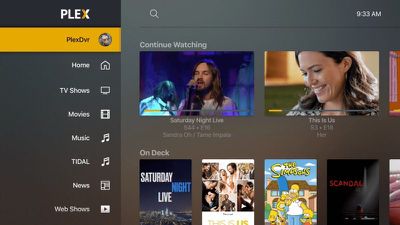
plexredesign1
The side bar is customizable so you can pin your favorite media sources, put them in the order that you want, and send the rest of the content to the "More" menu that's out of the way.
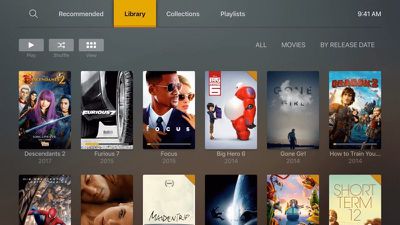
plexredesign2
Plex is aiming to make it easier to get to where you want to go, with more discoverable actions and sources and more intuitive navigation. Customizable navigation is also a key part of the new Plex experience for ‌Apple TV‌. More features are listed below:

- Customizable & always accessible sidebar navigation.
- Ability to pin your favorite libraries from all your servers to the sidebar.
- Reorder your libraries in the sidebar.
- Quick access to all the rest of your media through the "More" menu item.
- Redesigned tab views that remember your previous view within each library (can be controlled via setting).
- A customizable home screen including pinning content rows from any library to home.

The updated Plex interface is available for beta testers, and you can sign up to be a beta tester on the Plex website by filling out a registration form. Beta access can take up to one week as requests need to be processed by Plex.


Tag: Plex

Top Rated Comments

velocityg4 Avatar
91 months ago
I used to love Plex. When they updated it to require sign in when you are just operating on a local network with local content. I lost a lot of interest.

Score: 3 Votes (Like | Disagree)
91 months ago
Absolutely love Plex. I know this is mainly a UI update, but I hope it improves playback issues too.

You must be kidding. Plex is as most neutral.

- they are notorious for breaking things and then fixing them and call it progress
- their UI changes are awful, constant regress, they actually killed amazon fire tv in my household. I could not look at it their UI anymore
- on Samsung TV app, everyday is a lottery what would work what would not
- scrolling through content is pathetic, just compare it to Netflix
- they never got a handle on 4K playback
- iPhone offline sync shows items synced but cant play them back
Score: 3 Votes (Like | Disagree)
Grogfoot Avatar
91 months ago
Absolutely love Plex. I know this is mainly a UI update, but I hope it improves playback issues too.


Score: 3 Votes (Like | Disagree)
T'hain Esh Kelch Avatar
91 months ago
New UI looks great, but it is waaaay too late. Already jumped on the Infuse wagon.
Score: 2 Votes (Like | Disagree)
steve62388 Avatar
91 months ago
Much prefer infuse Pro.
I thought Plex removed their servers from ap tv or something to that effect.
They used to have cloud servers where you could store your media files. They closed these down (I’m guessing because of piracy issues). You can still stream your media remotely directly from your home server.

I’m trying to figure out why the side bar is necessarily better. In the screenshot it looks like you can’t see much of your media. Most other apps use a bar at the top. I’ll give it a go though.
Score: 2 Votes (Like | Disagree)
91 months ago
When connecting Infuse to Plex is the server still doing all the processing?
No. But again, even if you use Plex the server isn't necessarily doing all the processing either. Depends on your files and the device. The video file in most files people want to play is likely supported on the ATV4k and thus no transcoding of that file.

A video file is made up of a container, MKV, MP4, etc. And an audio and video file. Sometimes a sub file. If all are supported by the client then it direct plays.
If the audio and video are supported but not the container then it direct streams. This doesn't use much CPU.
If the audio isn't supported but the video is then it transcodes the audio but not the video. This doesn't use much CPU either.
Only if the video file isn't supported then it transcodes and this is what uses more CPU.

Most of my content are MKV with H265 video and the HD audio track. So mine direct stream, video is not transcoded as it's supported on the ATV4k and it transcodes the audio. Only a small amount of CPU is used.
Any shows I download are almost always supported on the ATV4k and thus no transcoding at all.
Score: 1 Votes (Like | Disagree)

Popular Stories

imac video apple feature

Apple Released Yet Another New Product Today

Friday March 20, 2026 2:39 pm PDT by
Apple has unveiled a whopping nine new products so far this March, including an iPhone 17e, iPad Air models with the M4 chip, MacBook Air models with the M5 chip, MacBook Pro models with M5 Pro and M5 Max chips, the all-new MacBook Neo, an updated Studio Display, a higher-end Studio Display XDR, AirPods Max 2, and now the Nike Powerbeats Pro 2. iPhone 17e features the same overall design as...
iPhone 18 Pro Deep Red Feature

iPhone 18 Pro Launching Later This Year With These 12 New Features

Wednesday March 18, 2026 7:39 am PDT by
While the iPhone 18 Pro and iPhone 18 Pro Max are not expected to launch for another six months or so, there are already plenty of rumors about the devices. It was initially reported that the iPhone 18 Pro models would have fully under-screen Face ID, with only a front camera visible in the top-left corner of the screen. However, the latest rumors indicate that only one Face ID component...
ios 26 4 pastel

iOS 26.4: Top 10 New Features Coming to Your iPhone

Friday March 20, 2026 2:44 pm PDT by
iOS 26.4 isn't the major update with new Siri features that we hoped for, but there are some useful quality of life improvements, and a little bit of fun with an AI playlist generator and new emoji characters. Playlist Playground - Apple Music has a Playlist Playground option that lets you generate playlists from text-based descriptions. You can include moods, feelings, activities, or...