Following in the footsteps of Google Assistant and Amazon Alexa, Pandora today launched its own voice assistant available within its iOS and Android apps. When the app is opened, users can turn on "voice mode" and say "Hey Pandora," asking the assistant to play their music, podcasts, radio stations and more connected to the streaming music service.
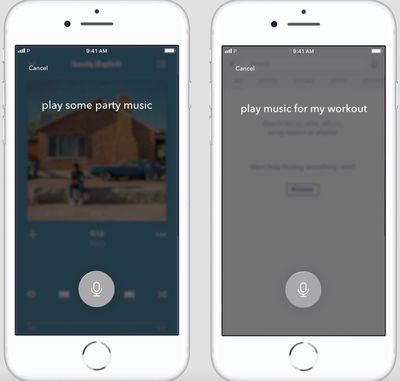
Similar to Siri, Pandora will also be able to respond to more vague commands to play music, like asking to "play something new," "play more like this," "play music I like," and more. According to Pandora chief product officer Chris Phillips, voice searches will be personalized for each user and informed by their listening habits on the service.
“Pandora is the leader in personalized audio entertainment, and millions of our listeners are already loving the experience we’ve created on smart speakers and other voice-enabled connected devices,” said Chris Phillips, Chief Product Officer, Pandora.
“With Voice Mode, we are introducing an even more natural and conversational way for listeners to discover new music and enhance their experience directly in the Pandora mobile app, like getting recommendations from a friend who really knows you.”
This means that when users ask to "play something new," each person will see different results, and the assistant will showcase these recommendations in various forms. Some listeners might see a playlist, while others will get an album, singular new song, or a radio station.
All voice mode features can be found in the Pandora app's search bar next to the magnifying glass.
Types of requests include:
Control requests to change stations, control volume, skip or pause music, and other basic navigation commands.
Thematic requests delivering personalized music based on each user’s unique tastes, moods, and favorite activities like “play something for my workout” or “play music for relaxing.”
Open-ended requests like “play something different,” “play something I like” or “play more like this.”
Basic requests for a specific artist, song, station, podcast or playlist like “play new music by…” or “play my happy jams playlist.”
Interactive requests like “what song is this?” or directional requests like “add this song to my party playlist” or “I like this” to give a thumbs-up.
Voice mode will be available for all Pandora users, both those on its free tier and those paying for Pandora Premium. The feature is launching today for some users on the Pandora iOS and Android apps, and it will continue to roll out for more users over the next few months.