Apple Officially Obsoletes iPhone 5, Ending Repair Support - MacRumors
Skip to Content

Apple Officially Obsoletes iPhone 5, Ending Repair Support

by

Apple has updated its vintage and obsolete products list to include the iPhone 5, six years after the smartphone's launch.

The iPhone 5 is now classified by the company as vintage in the United States and Turkey, and obsolete in the rest of the world. The addition was spotted by Japanese blog Mac Otakara.
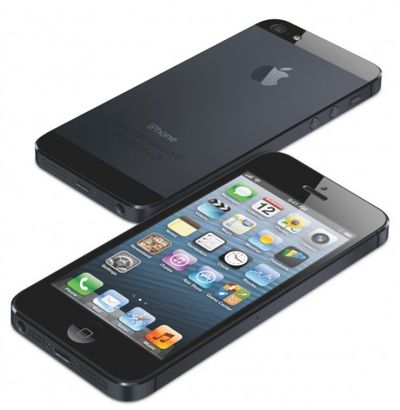
iphone5frontback
Apple defines vintage products as those that have not been manufactured for more than five but less than seven years. Macs and other products on the vintage and obsolete list are generally no longer eligible for hardware service.

The iPhone 5 introduced some major design changes to Apple's smartphone lineup when it was announced in September 2012.

New features included a lighter aluminum-based body, a taller screen with a nearly 16:9 aspect ratio, LTE support, and Apple's A6 system-on-chip.

The iPhone 5 was also the first Apple smartphone to include a Lightning port, replacing the 30-pin design used by previous iPhone models.
Related Forum: iPhone

Top Rated Comments

japanime Avatar
100 months ago
I will rue the day that the iPhone 5's younger sibling, the iPhone SE, is added to that list of "obsolete" devices. It will mark the end of an era of iPhones that can be operated one-handed in a comfortable, natural way.


Score: 22 Votes (Like | Disagree)
100 months ago
Deleted.
Score: 19 Votes (Like | Disagree)
quagmire Avatar
100 months ago
The 5's design still looks good today. It has really aged well.

So far IMHO the 3G/S, 6/S, 7/S, and 8 designs won't age well. The original, 4/S 5/S/SE, and X/S designs so far will be the classic designs that define what an iPhone looks like.
Score: 8 Votes (Like | Disagree)
MrGimper Avatar
100 months ago
I remember upgrading from a 4s to a 5 and thinking I’d been given a shop dummy device as the weight difference was insane. It honestly felt like they’d forgotten to install the insides.
Score: 8 Votes (Like | Disagree)
Moonjumper Avatar
100 months ago
It isn’t long since I upgraded from a 5 to an SE, a continuation of my favourite iPhone form factor. I don’t see anything I want to upgrade to, so I hope it is a long time before the SE is classified as obsolete.
Score: 8 Votes (Like | Disagree)
keysofanxiety Avatar
100 months ago
I remember how much people here hated this phone when it was introduced :)

In fairness, it wasn't that great. Had massive issues with flaking on the case and the battery failure rate was appalling. It was my least favourite iPhone I've ever used at just 6 months of ownership, but the 5S the following year was almost perfect.

Most people's criticism came from the lack of a 30 pin charger/adapter, though! Crazy how times change.
Score: 7 Votes (Like | Disagree)

Popular Stories

Apple TV Thumb 3

Everything Coming in the 2026 Apple TV 4K

Wednesday July 8, 2026 4:51 pm PDT by
The Apple TV 4K hasn't been updated since 2022, and it's due for a refresh. An update is planned for 2026, but Apple is likely going to wait to launch it after Siri AI launches in iOS 27. Design Apple TV design updates don't happen often, and that's not changing. The next Apple TV is going to have the same squircle shape as the current model, and it'll continue to be made from a black...
iphone 16 teal

'Siri AI' Lawsuit Update: Apple to Pay Owners of These iPhone Models

Thursday July 9, 2026 7:08 am PDT by
In May, Apple agreed to pay $250 million to settle a U.S. class action lawsuit over Siri AI's delayed launch, and eligible iPhone users could receive up to a $95 payout. This week, the California court overseeing the case held a hearing regarding preliminary approval of the settlement, but the judge has not yet issued a ruling. It will likely be at least a few more months before eligible...
apple wallet drivers license feature iPhone 15 pro

Apple Says iPhone Driver's Licenses Will Expand to These 6 U.S. States

Thursday July 9, 2026 7:29 am PDT by
In select U.S. states, residents can add their driver's license or state ID to the Apple Wallet app on the iPhone and Apple Watch, and then use it to display proof of identity or age at select airports and businesses, and in select apps. To set up the feature, open the Wallet app on the iPhone and tap on the plus sign in the top-right corner. Next, tap on Driver's License and ID Cards,...