Future Apple Watch to Adopt Solid State Buttons With Haptic Feedback - MacRumors
Skip to Content

Future Apple Watch to Adopt Solid State Buttons With Haptic Feedback

A future version of the Apple Watch will be updated with solid state buttons that don't physically click but instead use a Taptic Engine to provide haptic feedback to users, reports Fast Company.

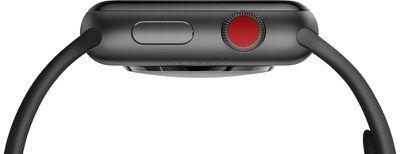
Apple will continue to use a two button configuration with a Digital Crown and a Side button, but neither button will be a traditional physical button.
applewatchseries3

Apple will stick with the Watch's current button configuration, with a button and a digital crown situated on one side of the device, but neither will physically click as before. Rather than reacting to the user's touch by physically moving back and forth, the new buttons will vibrate slightly under the fingertip, using the haptic effect Apple calls the Taptic Engine. (The digital crown will still physically rotate to navigate through content.)

What Fast Company is describing is the same solid state button design that Apple first introduced with the iPhone 7 and the iPhone 7 Plus Home button. These devices, and later iPhones with a Home button, use solid state buttons that provide haptic feedback from the built-in Taptic Engine to mimic a button press. Apple uses a similar method for its MacBook and MacBook Pro trackpads, which also lack physical buttons.

Solid state buttons will improve water resistance in the Apple Watch and also take up less space, leaving more room for a bigger battery or other components. Fast Company's source also alleges Apple is working on using the top of the buttons as sensors to gather health-related data like heart rhythms as some types of measurements require more than one point of contact with a user's skin.

According to Fast Company, the Apple Watch could adopt solid state buttons as early as 2018, but if the feature doesn't make it into the 2018 Apple Watch models, solid state buttons will be introduced in 2019. In the future, beyond 2019, Apple is also said to be working towards a watch that has no buttons at all, with the sides of the device designed to respond to touch and swipe-based gestures.

Previous 2018 Apple Watch rumors have made no mention of solid state buttons, but we have heard that the fourth-generation Apple Watch models could feature a display that's 15 percent larger, perhaps through a reduction in bezel size. New models are also said to feature a longer battery life and improved health monitoring capabilities.


Related Roundup: Apple Watch 11
Buyer's Guide: Apple Watch (Neutral)

Popular Stories

imac video apple feature

Apple Released Yet Another New Product Today

Friday March 20, 2026 2:39 pm PDT by
Apple has unveiled a whopping nine new products so far this March, including an iPhone 17e, iPad Air models with the M4 chip, MacBook Air models with the M5 chip, MacBook Pro models with M5 Pro and M5 Max chips, the all-new MacBook Neo, an updated Studio Display, a higher-end Studio Display XDR, AirPods Max 2, and now the Nike Powerbeats Pro 2. iPhone 17e features the same overall design as...
HomePod mini and Apple TV Sage

New Apple TV and HomePod Mini Remain 'Ready' to Launch

Sunday March 22, 2026 6:33 am PDT by
Apple has unveiled nine new products this month, but the wait continues for the next-generation Apple TV 4K and HomePod mini models. In his Power On newsletter today, Bloomberg's Mark Gurman said new versions of the Apple TV and HomePod mini have been "ready" since last year, but he reiterated that Apple has held off on releasing them until the more personalized version of Siri and other...
iOS 26

iOS 26.4 Adds Two New Features to CarPlay

Tuesday March 24, 2026 1:55 pm PDT by
iOS 26.4 was released today, and it includes a couple of new features for CarPlay: an Ambient Music widget and support for voice-based chatbot apps. To update your iPhone 11 or newer to iOS 26.4, open the Settings app and tap on General → Software Update. CarPlay will automatically offer the new features so long as the iPhone connected to your vehicle is running iOS 26.4 or later....

Top Rated Comments

garylapointe Avatar
102 months ago
So I can't push the button with standard gloves on?

Isn't that the button I need to push in emergencies?!?
Score: 45 Votes (Like | Disagree)
102 months ago
Please get rid of the Terminator red eye dot looking at us
Score: 31 Votes (Like | Disagree)
Wanted797 Avatar
102 months ago
I'm wondering how they'll do a solid state digital crown.
Score: 23 Votes (Like | Disagree)
Piggie Avatar
102 months ago
I always felt this was obvious.

Why have a physical wheel (crown) that actually spins?
You need a shaft and waterproofing.
And it's pointless.
With today's tech, you can have the exact same looking wheel, but its stationary, and as you move your finger tip across it as you do now, instead of it physically spinning, it's surface just detects your finger movement and passes on the movement to the watch.

Think of it exactly like the iPod circular control dial/disk.
You ran your finger around it, to do things just as you would have a moving wheel.
But your finger just slipped over the surface, and it stayed still

I knew this was going to happen as it's so obvious and the user experience will be 99/9% the same as it is now.
With e benefit of no moving parts.
Score: 18 Votes (Like | Disagree)
102 months ago
I’m not crazy about moves like this. There’s nothing that lets you know you’ve pushed a button on a device better than feeling the click but I get that the more they can seal up a device the better they can water proof it.
It literally feels like a click.
Score: 12 Votes (Like | Disagree)
826317 Avatar
102 months ago
Going down the force touch route for Apple Watch, I think it's a good idea. This will probably allow each individual user to set their feedback levels differently to suit their preferences.

Score: 10 Votes (Like | Disagree)