

Apple Approves 'Notch Remover' App for iPhone X - MacRumors
Skip to Content

Apple Approves 'Notch Remover' App for iPhone X

by

Apple appears to have made an exception to its rule that developers "embrace the notch" on the iPhone X, by approving an app called Notch Remover for the App Store.

Essentially, all the app does is add a black bar across the top of selected images that the user can then manually assign as a wallpaper in iOS Settings.
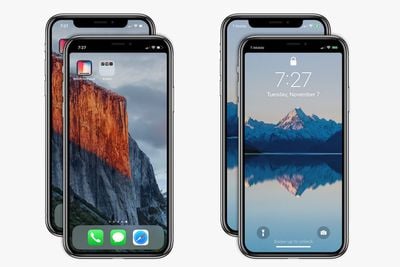
notch remover app 2 up
The result conceals the existence of the notch and the adjacent "ears" with what looks like a solid black status bar along the top of the lock screen and home screen.

The one-trick nature of the app is unlikely to have been overlooked by Apple and approved in error, suggesting that the company doesn't interpret its function as a violation of iPhone X developer guidelines.

Don't mask or call special attention to key display features. Don't attempt to hide the device's rounded corners, sensor housing, or indicator for accessing the Home screen by placing black bars at the top and bottom of the screen.

The notch houses Apple's TrueDepth camera and Face ID technology, but it eats into the viewing area of the OLED display. Its existence has divided Apple fans, but many iPhone X owners say that they don't really notice it after a few days or even just a few hours with the device, after which it ceases to be an issue for them.

Still, if the notch just isn't your thing, Notch Remover offers to mitigate the screen intrusion for just $0.99, while Notcho does something similar.


Related Forum: iPhone

Top Rated Comments

113 months ago
i like the notch and it looks full screen
Score: 48 Votes (Like | Disagree)
113 months ago
Wow...it actually looks so much better without the notch....who knew?

(thats right...everyone)
Score: 38 Votes (Like | Disagree)
T'hain Esh Kelch Avatar
113 months ago
I actually prefer the notch view.
Score: 33 Votes (Like | Disagree)
113 months ago
Wow...it actually looks so much better without the notch....who knew?

(thats right...everyone)
Looks like a giant bezel at top. How's this look good again? lol
Score: 29 Votes (Like | Disagree)
johnnyjibbs Avatar
113 months ago
Slow news day...

Personally I got really used to the notch really quickly and I find the iPhone X looks too old-fashioned when the notch is removed (as it looks like a 6/7/8, etc) and somehow restrictive

My wife has a new 8 Plus - amazing phone, but seems so last year...
Score: 27 Votes (Like | Disagree)
maflynn Avatar
113 months ago
I'm not a fan of the notch, but those screen shots seem to make it worse imo. Maybe I'm getting used to the notch
Score: 20 Votes (Like | Disagree)

Popular Stories

iphone 16 teal

'Siri AI' Lawsuit Update: Apple to Pay Owners of These iPhone Models

Thursday July 9, 2026 7:08 am PDT by
In May, Apple agreed to pay $250 million to settle a U.S. class action lawsuit over Siri AI's delayed launch, and eligible iPhone users could receive up to a $95 payout. This week, the California court overseeing the case held a hearing regarding preliminary approval of the settlement, but the judge has not yet issued a ruling. It will likely be at least a few more months before eligible...
Apple TV Thumb 3

Everything Coming in the 2026 Apple TV 4K

Wednesday July 8, 2026 4:51 pm PDT by
The Apple TV 4K hasn't been updated since 2022, and it's due for a refresh. An update is planned for 2026, but Apple is likely going to wait to launch it after Siri AI launches in iOS 27. Design Apple TV design updates don't happen often, and that's not changing. The next Apple TV is going to have the same squircle shape as the current model, and it'll continue to be made from a black...
apple wallet drivers license feature iPhone 15 pro

Apple Says iPhone Driver's Licenses Will Expand to These 6 U.S. States

Thursday July 9, 2026 7:29 am PDT by
In select U.S. states, residents can add their driver's license or state ID to the Apple Wallet app on the iPhone and Apple Watch, and then use it to display proof of identity or age at select airports and businesses, and in select apps. To set up the feature, open the Wallet app on the iPhone and tap on the plus sign in the top-right corner. Next, tap on Driver's License and ID Cards,...












































