EFF Says iOS 11's Wi-Fi and Bluetooth Toggles in Control Center Are Misleading and Compromise Security

Apple recently confirmed that Wi-Fi and Bluetooth are not fully disabled when toggled off in Control Center on iOS 11, and the change has generated some fresh criticism from a prominent non-profit digital rights group.

eff
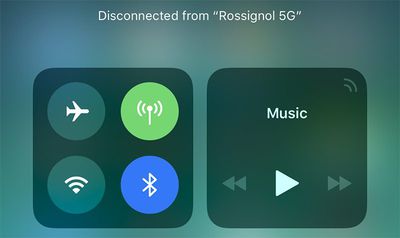
For background, when Wi-Fi and Bluetooth are toggled off, an iPhone or iPad on iOS 11 merely disconnects from a Wi-Fi network and Bluetooth accessories. The actual Wi-Fi and Bluetooth radios in the device remain activated.

Moreover, Wi-Fi and Bluetooth automatically reenable at 5:00 a.m. local time each day, or if the device is restarted.

iOS 11 works this way so that Wi-Fi and Bluetooth continue to be available for AirDrop, AirPlay, Apple Pencil, Apple Watch, Location Services, and Continuity features like Handoff and Instant Hotspot.
bluetooth wifi control center ios 11
As a result of the change, the Electronic Frontier Foundation believes that iOS 11 compromises users' security. In a critical article, the EFF said the toggles are "misleading" and "bad for user security."

When a phone is designed to behave in a way other than what the UI suggests, it results in both security and privacy problems. A user has no visual or textual clues to understand the device's behavior, which can result in a loss of trust in operating system designers to faithfully communicate what’s going on. Since users rely on the operating system as the bedrock for most security and privacy decisions, no matter what app or connected device they may be using, this trust is fundamental.

The EFF said the "loophole in connectivity" can potentially leave users open to new attacks, and it linked to a white paper that unveils apparent zero day vulnerabilities and security flaws in modern Bluetooth stacks.

The article added that, at a bare minimum, Apple should keep the Control Center toggles off until the user flips them back on, rather than overriding the user's choice at 5:00 a.m. local time the next morning.

Overall, the EFF's arguments are generally the same as those shared by iOS 11 users who are unhappy with the change. The toggles still behave the same in the iOS 11.1 beta, however, so there's no indication Apple will reverse course.

iOS 11 users can still completely disable Wi-Fi and Bluetooth for all networks and devices by toggling them off in the Settings app. A device can also be placed in Airplane Mode with Wi-Fi and Bluetooth disabled.

In a support document, Apple said users should try to keep Wi-Fi and Bluetooth turned on for the best experience on an iOS device.


Popular Stories

iOS 26

iOS 26.4 and iOS 27 Features Revealed in New Leak

Friday December 12, 2025 10:56 am PST by
Macworld's Filipe Espósito today revealed a handful of features that Apple is allegedly planning for iOS 26.4, iOS 27, and even iOS 28. The report said the features are referenced within the code for a leaked internal build of iOS 26 that is not meant to be seen by the public. However, it appears that Espósito and/or his sources managed to gain access to it, providing us with a sneak peek...
iOS 26

iOS 26.2 Coming Soon With These 8 New Features on Your iPhone

Thursday December 11, 2025 8:49 am PST by
Apple seeded the second iOS 26.2 Release Candidate to developers earlier this week, meaning the update will be released to the general public very soon. Apple confirmed iOS 26.2 would be released in December, but it did not provide a specific date. We expect the update to be released by early next week. iOS 26.2 includes a handful of new features and changes on the iPhone, such as a new...
iOS 26

Apple Releases iOS 26.2 With Alarms for Reminders, Lock Screen Changes, Enhanced Safety Alerts and More

Friday December 12, 2025 10:10 am PST by
Apple today released iOS 26.2, the second major update to the iOS 26 operating system that came out in September, iOS 26.2 comes a little over a month after iOS 26.1 launched. ‌iOS 26‌.2 is compatible with the ‌iPhone‌ 11 series and later, as well as the second-generation ‌iPhone‌ SE. The new software can be downloaded on eligible iPhones over-the-air by going to Settings >...
AirPods Pro Firmware Feature

Apple Releases New Firmware for AirPods Pro 2 and AirPods Pro 3

Thursday December 11, 2025 11:28 am PST by
Apple today released new firmware designed for the AirPods Pro 3 and the prior-generation AirPods Pro 2. The AirPods Pro 3 firmware is 8B30, up from 8B25, while the AirPods Pro 2 firmware is 8B28, up from 8B21. There's no word on what's include in the updated firmware, but the AirPods Pro 2 and AirPods Pro 3 are getting expanded support for Live Translation in the European Union in iOS...
macOS Tahoe 26 Thumb

Apple Releases macOS Tahoe 26.2 With Edge Light

Friday December 12, 2025 10:08 am PST by
Apple today released macOS Tahoe 26.2, the second major update to the macOS Tahoe operating system that came out in September. macOS Tahoe 26.2 comes five weeks after Apple released macOS Tahoe 26.1. Mac users can download the macOS Tahoe update by using the Software Update section of System Settings. macOS Tahoe 26.2 includes Edge Light, a feature that illuminates your face with soft...
AirTag 2 Mock Feature

Apple AirTag 2: Four New Features Found in iOS 26 Code

Thursday December 11, 2025 10:31 am PST by
The AirTag 2 will include a handful of new features that will improve tracking capabilities, according to a new report from Macworld. The site says that it was able to access an internal build of iOS 26, which includes references to multiple unreleased products. Here's what's supposedly coming: An improved pairing process, though no details were provided. AirTag pairing is already...
ipados 26 1 slide over

Apple Releases iPadOS 26.2 With Multitasking Improvements

Friday December 12, 2025 10:09 am PST by
Apple today released iPadOS 26.2, the second major update to the iPadOS 26 operating system released in September. iPadOS 26.2 comes a month after iPadOS 26.1. The new software can be downloaded on eligible iPads over-the-air by going to Settings > General > Software Update. iPadOS 26.2 continues with the multitasking improvements that were added with iPadOS 26.1. You can now drag and...
bug security vulnerability issue fix larry

Update Now: iOS 26.2 Fixes 20+ Security Vulnerabilities

Friday December 12, 2025 11:11 am PST by
Apple today released iOS 26.2, iPadOS 26.2, and macOS 26.2, all of which introduce new features, bug fixes, and security improvements. Apple says that the updates address over 20 vulnerabilities, including two bugs that are known to have been actively exploited. There are a pair of WebKit vulnerabilities that could allow maliciously crafted web content to execute code or cause memory...

Top Rated Comments

btrach144 Avatar
107 months ago
I couldn’t agree more.

I like another user who said, “the iPhone used to not require a user manual. Not anymore...”
Score: 106 Votes (Like | Disagree)
Rocko99991 Avatar
107 months ago
So turning off Wifi and Bluetooth via control center doesn't really turn them off. Turning them off in settings does? Oh that makes sense....
Score: 63 Votes (Like | Disagree)
thejadedmonkey Avatar
107 months ago
I agree, I think Apple really needs to fix it.
Score: 55 Votes (Like | Disagree)
BMcCoy Avatar
107 months ago
I do understand their and apples viewpoint. I think much of this could have been avoided with a better explanation from Apple on the release, and a notification when they are first toggled.
That is certainly true.

But I think I agree - if you toggle Wi-Fi and BT off.. they should be off. Until you, the user, decide to turn them on again.
That just makes sense to me.
Score: 48 Votes (Like | Disagree)
jsmith189 Avatar
107 months ago
They just need a 3D Touch toggle. Disabled and off. I prefer the way it works now.
Score: 41 Votes (Like | Disagree)
840quadra Avatar
107 months ago
I do understand their and apples viewpoint. I think much of this could have been avoided with a better explanation from Apple on the release, and a notification when they are first toggled.
Score: 38 Votes (Like | Disagree)