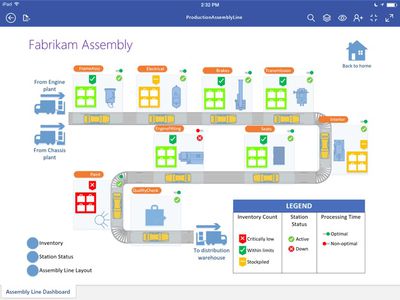
Microsoft yesterday released an iPad version of popular Office diagramming and graphic app Visio. The iOS incarnation is limited to viewing Visio documents, leaving the editing of files to the desktop application, and instead focuses on bringing a touch-based browsing experience with intuitive pan and zoom features to users on the go.
visio-for-ipad

Visio diagrams often comprise details that customers could miss on smaller screens. Built for iPad Retina display, Visio Viewer for iPad brings high-fidelity viewing of real-world processes and plans on the go. With the new exploration experience, plant managers can zoom in to production line issues from remote facilities, financial advisors can examine detailed workflows of a loan approval process while visiting clients around the world, retail district managers can conduct store management trainings with associates using detailed CAD-based store layouts and much more.

Visio Viewer for iPad can import documents from OneDrive, SharePoint, and email, with a search functionality built in to the interface for finding shape names, text, or data. Users are also granted the ability to adjust the visibility of different layers to reveal more structure in plans and diagrams.

Visio is a free download for iPad available on the App Store. [Direct Link]

Top Rated Comments

beanbaguk Avatar
118 months ago
I really need this on macOS....
Score: 5 Votes (Like | Disagree)
diggy33 Avatar
118 months ago
I really need this on macOS....
Have you tried OmniGraffle? We get MANY requests for Visio on Mac at my office, and people seem to think that OG Pro works the best as a 3rd party alternative. Hopefully this is a step in that direction for Microsoft, to put Visio and potentially Project on macOS
Score: 4 Votes (Like | Disagree)
threesixty360 Avatar
118 months ago
Well if writing emails and editing a 4 or 5 page document is pro, then I hope that makes you feel good. It is not uncommon for me to write documents with more than a 1000 pages. I would certainly not use Word for that (even though I was forced to try a couple of times and Word crapped all over itself). I have been required to work on spreadsheets that maxed out excels capabilities in both memory and row columns. So yes someone does this, but they are not pros. If you have never done anything that maxes out Office and shows what a poor program it is, then no you are not a pro. Sorry, don't mean to offend, but reality is reality. I have used Visio to produce 100 linear feet of 4 foot wide documents with minimal paper breaks. Try editing this on 13 inch Apple laptop. You will go crazy in spite of the retina display. And yes I have to both edit and present these documents in remote locations on my own hardware. And yes I ran Visio on my Apple laptop which had unacceptable performance and even with 17 inch display was unacceptable, but required.

Everyone wants to be a pro these days. In reality there are still people to that do Pro work that taxes all hardware today. It is simply a cop out for Apple to say, "hey we no longer need to make the best because the teenagers and college students that are in the in crowed don't need it." Then turn around and call that Pro. Pro used to mean near top of the line hardware. Under Cook it does not even come close.
[doublepost=1481298501][/doublepost]

Sorry did not mean to attack your self-esteem. You really are a good and valued person and I can tell because you are so sensitive about a computer with the word "Pro" in the name whether deserved or not.

BTW, the pro problem is not only about USB C ports.
How did you exist in the days of pentium pc's?
Or even 10 yrs ago?
Pro doesnt mean pushing machines to it's limits. It doesnt mean doing more than the software was designed to cope with either! Pro just means you make money with it. That's all.

I suggest you may need a different methodology to increase your ability to get you work done. How about splitting up your documents so you dont have this 1000 page memory hog? Or breaking down you diagrams into more manageable chunks? Because, that is actually what "pro's" end up doing. Managing expectations and not crying when they reach limits and just getting on with it in the most organized way possible.

I just find it laughable when people expect their edge case to be the norm for everybody.. really?
Score: 1 Votes (Like | Disagree)
nt5672 Avatar
118 months ago
Why do they have office (word, excel, PowerPoint, outlook, onenote), but not Visio or projects for iOS or macOS? What's the holdup?
Very simple. Visio is pro software, Apple does not make pro hardware anymore so why should Microsoft care. Neither Apple nor Microsoft want this.
Score: 1 Votes (Like | Disagree)
sracer Avatar
118 months ago
Why do they have office (word, excel, PowerPoint, outlook, onenote), but not Visio or projects for iOS or macOS? What's the holdup?
Resources. Microsoft probably doesn't have the manpower to develop those for other platforms.
Target audience. Visio and Project are more specialized so the percentage of people who need those is much smaller which leads back to resources... why expend significant resources on something that will be used by so few people?

Producing a Visio Viewer is a BIG step towards implementing full versions for iOS and macOS.

Microsoft has been dumb about a lot of things, but with regard to Office, they've been brilliant IMO. They rightfully understood that OneNote was the hook.
Score: 1 Votes (Like | Disagree)
superberg Avatar
118 months ago
Now, if only they could make Visio itself less of a dog to work with. I have to use it for work on a semi-regular basis and its UI is maddening.

Having to run it in a Windows VM doesn't help.
Score: 1 Votes (Like | Disagree)

Popular Stories

iOS 26

iOS 26.4 and iOS 27 Features Revealed in New Leak

Friday December 12, 2025 10:56 am PST by
Macworld's Filipe Espósito today revealed a handful of features that Apple is allegedly planning for iOS 26.4, iOS 27, and even iOS 28. The report said the features are referenced within the code for a leaked internal build of iOS 26 that is not meant to be seen by the public. However, it appears that Espósito and/or his sources managed to gain access to it, providing us with a sneak peek...
iOS 26

iOS 26.2 Coming Soon With These 8 New Features on Your iPhone

Thursday December 11, 2025 8:49 am PST by
Apple seeded the second iOS 26.2 Release Candidate to developers earlier this week, meaning the update will be released to the general public very soon. Apple confirmed iOS 26.2 would be released in December, but it did not provide a specific date. We expect the update to be released by early next week. iOS 26.2 includes a handful of new features and changes on the iPhone, such as a new...
iOS 26

Apple Releases iOS 26.2 With Alarms for Reminders, Lock Screen Changes, Enhanced Safety Alerts and More

Friday December 12, 2025 10:10 am PST by
Apple today released iOS 26.2, the second major update to the iOS 26 operating system that came out in September, iOS 26.2 comes a little over a month after iOS 26.1 launched. ‌iOS 26‌.2 is compatible with the ‌iPhone‌ 11 series and later, as well as the second-generation ‌iPhone‌ SE. The new software can be downloaded on eligible iPhones over-the-air by going to Settings >...
AirPods Pro Firmware Feature

Apple Releases New Firmware for AirPods Pro 2 and AirPods Pro 3

Thursday December 11, 2025 11:28 am PST by
Apple today released new firmware designed for the AirPods Pro 3 and the prior-generation AirPods Pro 2. The AirPods Pro 3 firmware is 8B30, up from 8B25, while the AirPods Pro 2 firmware is 8B28, up from 8B21. There's no word on what's include in the updated firmware, but the AirPods Pro 2 and AirPods Pro 3 are getting expanded support for Live Translation in the European Union in iOS...
macOS Tahoe 26 Thumb

Apple Releases macOS Tahoe 26.2 With Edge Light

Friday December 12, 2025 10:08 am PST by
Apple today released macOS Tahoe 26.2, the second major update to the macOS Tahoe operating system that came out in September. macOS Tahoe 26.2 comes five weeks after Apple released macOS Tahoe 26.1. Mac users can download the macOS Tahoe update by using the Software Update section of System Settings. macOS Tahoe 26.2 includes Edge Light, a feature that illuminates your face with soft...
AirTag 2 Mock Feature

Apple AirTag 2: Four New Features Found in iOS 26 Code

Thursday December 11, 2025 10:31 am PST by
The AirTag 2 will include a handful of new features that will improve tracking capabilities, according to a new report from Macworld. The site says that it was able to access an internal build of iOS 26, which includes references to multiple unreleased products. Here's what's supposedly coming: An improved pairing process, though no details were provided. AirTag pairing is already...
ipados 26 1 slide over

Apple Releases iPadOS 26.2 With Multitasking Improvements

Friday December 12, 2025 10:09 am PST by
Apple today released iPadOS 26.2, the second major update to the iPadOS 26 operating system released in September. iPadOS 26.2 comes a month after iPadOS 26.1. The new software can be downloaded on eligible iPads over-the-air by going to Settings > General > Software Update. iPadOS 26.2 continues with the multitasking improvements that were added with iPadOS 26.1. You can now drag and...
bug security vulnerability issue fix larry

Update Now: iOS 26.2 Fixes 20+ Security Vulnerabilities

Friday December 12, 2025 11:11 am PST by
Apple today released iOS 26.2, iPadOS 26.2, and macOS 26.2, all of which introduce new features, bug fixes, and security improvements. Apple says that the updates address over 20 vulnerabilities, including two bugs that are known to have been actively exploited. There are a pair of WebKit vulnerabilities that could allow maliciously crafted web content to execute code or cause memory...